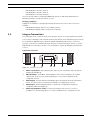
1
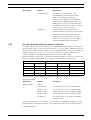
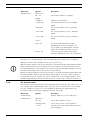
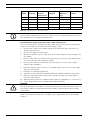
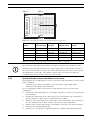
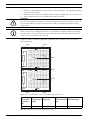
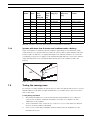
Integrus
Language Distribution System
en
Installation and Operation manual
Table of Contents | en
3
Table of Contents
1
Safety
6
2
About this manual
7
2.1
Purpose
7
2.2
Digital document
7
2.3
Intended audience
7
2.4
Related documentation
7
2.5
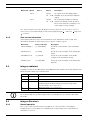
Alerts and notice signs
7
3
System Overview
8
3.1
System Overview
8
3.2
Integrus Transmitters
9
3.3
Audio interface modules
10
3.4
Integrus Radiators
11
3.4.1
Medium and High Power Radiators
11
3.4.2
Low Power Wide Beam Radiator
12
3.5
Integrus Receivers
14
3.6
Receiver Headphones
15
3.7
Integrus Charging Units
15
4
Planning
16
4.1
System technology
16
4.1.1
IR radiation
16
4.1.2
Signal Processing
16
4.1.3
Quality modes
17
4.1.4
Carriers and channels
17
4.2
Aspects of Infra-red distribution systems
18
4.2.1
Directional sensitivity of the receiver
18
4.2.2
The footprint of the radiator
18
4.2.3
Ambient lighting
20
4.2.4
Objects, surfaces and reflections
20
4.2.5
Positioning the radiators
21
4.2.6
Overlapping footprints and multipath effects
23
4.3
Planning an Integrus infra-red radiation system
24
4.3.1
Rectangular footprints
24
4.3.2
Planning radiators
25
4.3.3
Cabling
26
5
Installation
28
5.1
Integrus Transmitters
28
5.2
Audio Interface modules
28
5.3
Upgrading transmitter LBB4502/xx to INT-TX/xx
29
5.3.1
Removing the main PCB and the rear panel
29
5.3.2
Installation of the INTK
31
5.4
Medium and High Power Radiators
33
| |
4
en | Table of Contents
5.4.1
Attaching the suspension bracket
33
5.4.2
Mounting on a floor stand
34
5.4.3
Wall mounting
35
5.4.4
Ceiling mounting
36
5.4.5
Mounting on horizontal surfaces
37
5.5
Low Power Wide Beam Radiator
37
5.6
Integrus Charging Units
37
6
Connection
39
6.1
Integrus Transmitters
39
6.1.1
Connecting the DCN Next Generation
39
6.1.2
Connecting the DCN system
39
6.1.3
Connecting other external audio sources
40
6.1.4
Connecting an emergency signal
40
6.1.5
Connecting to another transmitter
41
6.2
Integrus Radiators
41
7
Configuration
43
7.1
Using the transmitter menu
43
7.1.1
Overview
43
7.1.2
Navigate through the menu
44
7.1.3
Examples
45
7.2
Setup the transmitter
51
7.2.1
Main menu
51
7.2.2
Set transmission mode
51
7.2.3
Set network mode
52
7.2.4
Set number of channels
52
7.2.5
Set channel quality and assign inputs to channels
53
7.2.6
Set channel names
54
7.2.7
Disable or enable carriers
55
7.2.8
View carrier assignments
55
7.2.9
Configure auxiliary inputs
56
7.2.10
Set sensitivity of the inputs
56
7.2.11
Enable / disable IR-monitoring
57
7.2.12
Enable / disable headphone output
57
7.2.13
Choose transmitter name
57
7.2.14
Reset all options to factory default values
57
7.3
Integrus Radiators
58
7.3.1
Setting the output power selection switch
58
7.3.2
Setting the delay switches
58
7.4
Determining the radiator delay switch positions
58
7.4.1
System with one transmitter
59
7.4.2
System with two or more transmitters in one room
61
7.4.3
Systems with more than 4 carriers and a radiator under a balcony
63
7.5
Testing the coverage area
63
9
Operation
68
9.1
Integrus transmitter
68
9.1.1
Start-up
68
| |
Table of Contents | en
5
9.1.2
View transmitter status
68
9.1.3
View fault status
68
9.1.4
Set monitoring options
69
9.1.5
View version information
70
9.2
Integrus radiators
70
9.3
Integrus Receivers
70
9.3.1
Normal operation
70
9.3.2
Reception test mode
71
9.4
Integrus Charging Units
72
11
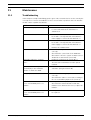
Maintenance
77
11.1
Troubleshooting
77
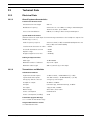
12
Technical Data
79
12.1
Electrical Data
79
12.1.1
Overall system characteristics
79
12.1.2
Transmitters and Modules
79
12.1.3
Radiators and Accessories
80
12.1.4
Receivers, Battery Packs and Charging Units
80
12.1.5
Cables and connectors
81
12.2
Mechanical Data
82
12.2.1
Transmitters and Modules
82
12.2.2
Radiators and Accessories
82
12.2.3
Receivers, Battery Packs and Charging Units
83
12.3
Ambient Conditions
83
12.3.1
Overall system conditions
83
12.4
Rules and Standards
84
12.4.1
Overall system conformance
84
12.5
Guaranteed rectangular footprints
85
Glossary
80
Index
87
| |
6
en | Safety
1
Integrus
Safety
Prior to installing or operating this product always read the Safety Instructions which are
available as a separate document.
IOM-INT | V1.1 | 2010.12
Installation and Operation manual
Bosch Security Systems B.V.
Integrus
About this manual | en
2
About this manual
2.1
Purpose
7
The purpose of this document is to provide information required for installing, configuring,
operating, maintaining and troubleshooting an Integrus Language Distribution System.
2.2
Digital document
This document is also available as a digital document in the Adobe Portable Document Format
(PDF).
2.3
Intended audience
This document is intended for installers and users of a Integrus Language Distribution System.
2.4
Related documentation
Not applicable.
2.5
Alerts and notice signs
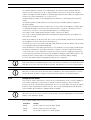
Three types of alerts are used in this manual. The alert type is closely related to the effect that
may be caused if it is not observed. These alerts- from least severe effect to most severe
effect - are:
CAUTION!
The equipment or the property can be damaged, or persons can be lightly injured if the alert is
not observed.
WARNING!
The equipment or the property can be seriously damaged, or persons can be severely injured
if the alert is not observed.
DANGER!
Not observing the alert will lead to death or sever injuries.
In this manual a ‘notice’ is used to provide tips, or to give some extra information:
NOTICE!
Alert containing additional information. Usually, not observing a ‘notice’ does not result in
damage to the equipment or personal injuries.
Bosch Security Systems B.V.
Installation and Operation manual
IOM-INT | V1.1 | 2010.12
8
en | System Overview
Integrus
3
System Overview
3.1
System Overview
Integrus is a system for wireless distribution of audio signals via infra-red radiation. It can be
used in a simultaneous interpretation system for international conferences where multiple
languages are used. To enable all participants to understand the proceedings, interpreters
simultaneously translate the speaker's language as required. These interpretations are
distributed throughout the conference venue, and delegates select the language of their
choice and listen to it through headphones. The Integrus system can also be used for music
distribution (mono as well as stereo).
Figure 3.1 Integrus system overview (with DCN-system as input)
The Integrus Language Distribution System comprises one or more of the following:
Infra-red transmitter
The transmitter is the core of the Integrus system. Four types are available:
–
INT-TX04 with inputs for 4 audio channels
–
INT-TX08 with inputs for 8 audio channels
–
INT-TX16 with inputs for 16 audio channels
–
INT-TX32 with inputs for 32 audio channels
The transmitter can be directly connected to the DCN Next Generation conference system
(see section 6 ).
Interface modules
One of two different interface modules can be mounted in the transmitter housing to connect
the transmitter to a wide range of conference systems:
–
LBB 3423/20 Integrus DCN interface module to connect to the Digital Congress Network
(DCN).
–
LBB 3222/04 Integrus audio input and interpreters module to connect to analogue
discussion and conference systems (such as CCS 800) or to LBB 3422/20 6-channel
interpreters desks.
Infra-red radiators
Three types of radiators are available:
–
LBB 3410/05 low power wide beam radiator for small conference venues
–
LBB 4511/00 medium-power radiator for small/ medium conference venues
–
LBB 4512/00 high-power radiator for medium/large conference venues
All three types can be switched between full and half power use. They can be mounted on
walls, ceilings or floor stands.
Infra-red receivers
Three multi-channel infra-red receivers are available:
IOM-INT | V1.1 | 2010.12
Installation and Operation manual
Bosch Security Systems B.V.
Integrus
System Overview | en
–
LBB 4540/04 for 4 audio channels
–
LBB 4550/08 for 8 audio channels
–
LBB 4540/32 for 32 audio channels
9
They can operate with a rechargeable NiMH battery pack or with disposable batteries.
Charging circuitry is incorporated in the receiver.
Charging equipment
Equipment is available for charging and storing 56 infra-red receivers. Two versions are
available:
3.2
–
LBB 4560/00 charging suitcase for portable systems
–
LBB 4560/50 charging cabinet for permanent systems
Integrus Transmitters
The transmitter is the central element of the Integrus system. It accepts asymmetrical audio
sources from a maximum of 32 external channels (dependent on the transmitter type) and can
be used with the Digital Congress Network (DCN) and DCN Next Generation conference
systems. It can also be used with analogue discussion and interpretation systems (e.g. CCS
800 with up to 12 interpreter desks), or as a stand-alone system distributing external audio
sources.
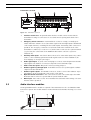
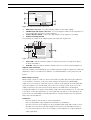
Transmitter front view
1
2
3
4
5
Figure 3.2 Transmitter, front view
1
Mains on/off switch - After switching the mains on, the transmitter starts up and the
2
display (3) will light-up.
Mini IR-radiator - Four IREDs, transmitting the same infra-red signal as the radiator
output. This can be used for monitoring purposes. They can be disabled via the
3
configuration menu.
Menu display - A 2x16 character LCD-display gives information about the transmitter
4
status. It is also used as a an interactive display for configuring the system.
Menu button - A turn-and-push button to operate the configuration software in
5
combination with the display (3)
Monitoring headphone output - A 3.5 mm (0.14 inch) jack socket to connect a
headphone for monitoring purposes. It can be disabled via the configuration menu
Bosch Security Systems B.V.
Installation and Operation manual
IOM-INT | V1.1 | 2010.12
10
en | System Overview
Integrus
Transmitter rear view
1
2
3
4
0
1
2
4
3
5
7
8
10
9
11
12
14
13
15
5
16
18
17
19
20
22
24
26
28
30
21
23
25
27
29
31
Network
1
2
3
6
4
5
1
6
7
2
8
9
Figure 3.3 Transmitter, rear view
1
Interface module slot - An optional audio interface module can be mounted in the
transmitter housing. Its connectors are accessible via an opening at the back of the
2
transmitter.
Emergency switch connector - A terminal block socket for a single, 'normally open'
switch. When the switch is closed, the audio signal on the Aux-right input is distributed
on all output channels, overriding all other audio inputs. A matching cable connector is
provided. The emergency contact does not function when the network mode of the
transmitter is enabled (see section 7.2.3 ) and it cannot connect to the optical network
(e.g. because the control unit of the DCN Next Generation conference system is
3
switched off).
Auxiliary audio inputs - Two female XLR connectors for extra audio inputs. They can be
used to connect auxiliary symmetrical audio signals such as a music installation, the
4
floor language or emergency messages.
Audio signal inputs - 4, 8, 16 or 32 cinch plugs to connect external asymmetrical audio
5
6
input signals. The number of connectors depends on the transmitter type.
Earth connection point - Only used for factory testing purposes.
Radiator signal loop-through input - A HF BNC connector to loop-through the radiator
7
output of another transmitter.
Radiator signal outputs - Six HF BNC connectors, used to connect the radiators. Up to
8
30 radiators can be loop-through connected to each output.
Optical network connections - Two connections used to connect directly to the DCN
9
Next Generation conference system with an optical network cable.
Mains input - Euro mains socket. The transmitter has automatic mains voltage selection.
A mains cable is provided
3.3
Audio interface modules
An Integrus DCN interface module is required if the transmitter is to be used with the DCN
Conference System. The module must be mounted inside the transmitter housing (see section
5.2 ).
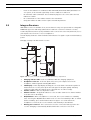
2
1
4
3
3
1
2
Figure 3.4 Integrus DCN interface module
IOM-INT | V1.1 | 2010.12
Installation and Operation manual
Bosch Security Systems B.V.
Integrus
System Overview | en
11
1
DCN output connector - A 6-pole trunk output female DIN connector for loop-through
2
interconnection with DCN units.
DCN input cable - A 2 m (6 ft 6 in) trunk input cable with 6-pole male DIN connector for
3
4
loop-through interconnect on with DCN units.
PCB connector
Mounting plate
3.4
Integrus Radiators
3.4.1
Medium and High Power Radiators
These units accept the carrier signals generated by the transmitter and emit infra-red
radiation carrying up to 32 audio distribution channels. They are connected to one or more of
the four HF BNC outputs of the IR transmitter. A maximum of 30 radiators can be connected
to each of these outputs by means of loop-through connections.
The LBB 4511/00 has an infra-red output of 16 Wpp, while the LBB 4512/00 has an infra-red
output of 32 Wpp. Both have an automatic mains power voltage selection and are switched on
automatically when the transmitter is switched on.
The attenuation of the signal by the cable is equalized automatically by the radiator. When the
radiator is supplied with power and the transmitter is switched on, the radiator initializes the
equalisation. The red LEDs flash for a brief period of time to indicate that the initialization is
in progress.
When not receiving carrier waves, the radiators switch to standby mode. There is also a
temperature protection mode which automatically switches the radiators from full to half
power or from half power to stand-by if the temperature of the IREDs becomes too high.
1
100-240 V
Loop - Through inputs
2
Do not
terminate
Output power
3
High
Low
Delay compensation
X10
4
X1
Figure 3.5 LBB 4511/00 and LBB4512/00 Radiators (Back view)
1
Mains input - Male Euro mains connector. The radiators have automatic mains voltage
2
selection.
IR signal input/loop-through - Two HF BNC connectors for connecting the radiator to
the transmitter and for loop-through connection to other radiators. Automatic cable
termination is achieved by a built-in switch in the BNC connectors.
Bosch Security Systems B.V.
Installation and Operation manual
IOM-INT | V1.1 | 2010.12
12
en | System Overview
Integrus
3
Output power selection switch - The radiators can be switched between full- and half-
4
power operation.
Delay compensation switches - Two 10-position switches to compensate for differences
in cable lengths to the radiators.
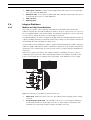
1
2
1
2
Figure 3.6 LBB 4512/00 High Power Radiator (Front view)
5
6
3.4.2
Amber indicator LEDs - Give an indication of the radiator status.
Red indicator LEDs - Give an indication of the radiator status.
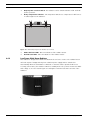
Low Power Wide Beam Radiator
This radiator is designed for small or medium-sized conference venues. The radiator has an
infra-red output of 3 Wpp and they have a built-in power supply and are switched on
automatically when the transmitter is switched on. A mains cable is provided. When not
receiving carrier waves, the radiators switch to standby mode. They can be mounted on walls
and ceilings or on a floor stand. Figure 3.7 and Figure 3.8 show front and rear views of the
radiators.
Figure 3.7 LBB 3410/05 Radiator (Front view)
IOM-INT | V1.1 | 2010.12
Installation and Operation manual
Bosch Security Systems B.V.
Integrus
System Overview | en
13
1
3
2
2
4
Figure 3.8 LBB 3410/05 Radiator (Rear view)
1
2
Male mains connector - for connecting the radiator to the mains supply.
HF BNC input and output connectors - for connecting the radiator to the transmitter or
3
4
for loop-through connection to other radiators.
Power reduction switch - reduces the output power of the radiator to 1.5 Wpp.
Radiator mounting bracket.
The following are found on the radiator printed circuit board: (Figure 3.9):
6
5
Figure 3.9 LBB 3410/05 Radiator (PCB)
5
Green LED - indicates that the radiator is switched on and is receiving carrier waves
6
from the transmitter.
Red LED - indicates that the radiator output is 70% or less of the normal output level.
Radiator status indication
When the radiator is transmitting, the green LED mounted internally on a printed circuit board
illuminates. If there is a failure in the radiator, a red LED illuminates on the printed circuit
board.
Mains voltage selection
Mains voltage selection of 115 V or 230 V is internally selectable. On delivery the radiator is
set for 230 Va.c. operation. To alter the mains voltage selection for the LBB 3410/05
radiators, it is necessary to solder two leads to contacts on the printed circuit board (PCB)
inside the radiator. To locate the PCB, remove the four securing screws at the rear of the
radiator and remove the unit from its housing. Remove the PCB from its mounting by
removing the PCB's six securing screws and the small connector X1 (Figure 3.9). To select 115
V operation, solder two small leads, one connecting X4 to X6 and one connecting X5 to X7.
Then remove the small SMD resistor R3. When this is completed replace fuse F1 (160 mA)
with a fuse rated at 350 mA.
Limitations
–
Not more than the first 4 carriers can be transmitted.
–
Not more than 100 m cable length from transmitter to last radiator.
–
Directly connection of the radiators to the transmitter with equal cable length. In loopthrough connection, the total cable length from the first to the last radiator may not
exceed 5 meters. Reason: there are no facilities on this radiator for compensating the
cable signal delay.
Bosch Security Systems B.V.
Installation and Operation manual
IOM-INT | V1.1 | 2010.12
14
en | System Overview
Integrus
–
Don't use this radiator in combination with LBB 4511/00 and LBB 4512/00 radiators in
one system, as the internal signal delay of these radiators are different.
–
No automatic cable termination: the termination plug has to be connected to the last
radiator in a trunk.
3.5
–
No communication of the radiator status to the transmitter.
–
Using this radiator at 105 to 125 V requires internal adjustments.
Integrus Receivers
LBB 4540 receivers are available for 4, 8 or 32 channels. They can operate with a rechargeable
NiMH battery pack or with disposable batteries and have controls for channel selection,
volume adjustment and an on/off push button. All receivers have a 3.5 mm (0.14 inch) stereo
jack output socket for mono or stereo headphones.
An LCD display shows the channel number and indicators for signal reception and low battery
power.
Charging circuitry is included in the receiver.
1
2
3
5
4
6
7
8
9
Figure 3.10
Receiver, front view and back view with open battery compartment
1
2
Charging indicator LED - Used in combination with the charging equipment.
Headphone connector - A 3.5 mm (0.14 inch) stereo jack output socket for the
3
headphone, with integrated Stand-by/Off-switch.
LCD Display - A two digit display showing the selected channel. An antenna symbol is
visible when the receiver picks up an infra red signal of adequate quality. A battery
4
5
symbol is visible when the battery pack or the batteries are almost empty.
Volume control - A slider to adjust the volume.
Channel selector - An up/down switch to select an audio channel. The channel number
6
is shown on the LCD display.
On/Off button - When a headphone is connected, the receiver switches to Stand-by
state. Pressing the On/Off button switches the receiver from Stand-by to On. To switch
back to Stand-by, press and hold the button for approx. 2 seconds. When the
7
headphone is removed, the receiver switches automatically to the Off-state.
Battery pack connector - This connection is used to connect the battery pack to the
receiver. Charging is automatically disabled when this connector is not used.
IOM-INT | V1.1 | 2010.12
Installation and Operation manual
Bosch Security Systems B.V.
Integrus
System Overview | en
15
8
Charging contacts - Used in combination with the charging equipment to recharge the
9
battery pack (if used)
Battery pack or disposable batteries - Either a rechargeable NiMH battery pack (LBB
4550/00) or two disposable AA-size 1.5 V batteries.
3.6
Receiver Headphones
The headphones connect with the receivers via a 3.5 mm (0.14 inch) stereo jack connector.
Suitable headphone types are:
3.7
–
LBB 3441/10 Under the chin stereo headphones
–
LBB 3442/00 Single earphone (mono)
–
LBB 3443/00 Stereo headphones (recommended)
–
Or any other compatible type (see chapter 7, Technical Data)
Integrus Charging Units
The charging units can recharge up to 56 receivers at once. The charging unit contains the
power supply with automatic mains voltage selection. The charging electronics and a charging
indicator LED are included in each receiver. The charging circuitry checks if a battery pack is
present and controls the charging process.
Two versions are available, which are functionally identical:
–
–
LBB 4560/00 Charging suitcase for portable systems.
LBB 4560/50 Charging cabinet for permanent systems. Suitable for either table-top or
wall-mounted use.
1
2
3
Figure 3.11
LBB 4560 Charging unit
1
Mains input - Male Euro mains socket. The charging unit has automatic mains voltage
2
3
selection. A mains cable is provided.
Mains on/off switch
Receiver positions - One charging unit can charge up to 56 receivers simultaneously.
Bosch Security Systems B.V.
Installation and Operation manual
IOM-INT | V1.1 | 2010.12
16
en | Planning
Integrus
4
Planning
4.1
System technology
4.1.1
IR radiation
The Integrus system is based on transmission by modulated infra-red radiation. Infra-red
radiation forms part of the electromagnetic spectrum, which is composed of visible light,
radio waves and other types of radiation. It has a wavelength just above that of visible light.
Like visible light, it is reflected from hard surfaces, yet passes through translucent materials
such as glass. The infra-red radiation spectrum in relation to other relevant spectra is shown
in Figure 4.1.
%
100
75
1
50
25
4
2
0
400
5
500
600
700
800
3
900
1000 nm
Figure 4.1 Infra-red radiation spectrum in relation to other spectra
4.1.2
1
Daylight spectrum
2
Sensitivity of the human eye
3
IR radiator
4
Sensitivity of IR sensor
5
Sensitivity of IR sensor with daylight filter
Signal Processing
The Integrus system uses high frequency carrier signals (typically 2-8 MHz) to prevent
interference problems with modern light sources (see section 4.2.2 ). The digital audio
processing guarantees a constant high audio quality.
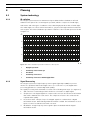
The signal processing in the transmitter consists of the following main steps (see Figure 4.2):
1.
2.
A/D conversion - Each analogue audio channel is converted to a digital signal.
Compression - The digital signals are compressed to increase the amount of information
that can be distributed on each carrier. The compression factor is also related to the
required audio quality.
3.
Protocol Creation - Groups of up to four digital signals are combined into a digital
information stream. Extra fault algorithm information is added. This information is used
by the receivers for fault detection and correction.
4.
Modulation - A high frequency carrier signal is phase-modulated with the digital
information stream.
IOM-INT | V1.1 | 2010.12
Installation and Operation manual
Bosch Security Systems B.V.
Integrus
Planning | en
5.
17
Radiation - Up to 8 modulated carrier signals are combined and sent to the IR radiators,
which convert the carrier signals to modulated infra-red light.
In the IR receivers a reverse processing is used to convert the modulated infra-red light to
separate analogue audio channels.
Audio
Channel
A/D Conversion
& Compression
4x
Protocol Creation
& Modulation
4x
Carrier (to IR Radiators)
A/D Conversion
& Compression
Audio
Channel
Figure 4.2 Overview of the signal processing (for one carrier)
4.1.3
Quality modes
The Integrus system can transmit audio in four different quality modes:
–
Mono, standard quality, maximum 32 channels
–
Mono, premium quality, maximum 16 channels
–
Stereo, standard quality, maximum 16 channels
–
Stereo, premium quality, maximum 8 channels
The standard quality mode uses less bandwidth and can be used for transmitting speech. For
music the premium quality mode gives near CD quality.
4.1.4
Carriers and channels
The Integrus system can transmit up to 8 different carrier signals (depending on the
transmitter type). Each carrier can contain up to 4 different audio channels. The maximum
number of channels per carrier is dependent on the selected quality modes. Stereo signals
use twice as much bandwidth as a mono signals, premium quality uses twice as much
bandwidth as standard quality.
Per carrier a mix of channels with different quality modes is possible, as long as the total
available bandwidth is not exceeded. The table below lists all possible channel combinations
per carrier:
Channel quality
Mono
Mono
Stereo
Stereo
Standard
Premium
Standard
Premium
Possible
4
number
2
of
2
4 x 10 kHz
1
2 x 10 kHz and 1 x 20 kHz
1
2 x 10 kHz and 1 x 10 kHz (left)
channels
per
carrier
Bandwidth
and 1 x 10 kHz (right)
1
1
1 x 20 kHz and 1 x 10 kHz (left)
and 1 x 10 kHz (right)
2
2 x 10 kHz (left) and 2 x 10 kHz
(right)
2
2 x 20 kHz
1
1 x 20 kHz (left) and 1 x 20 kHz
(right)
Bosch Security Systems B.V.
Installation and Operation manual
IOM-INT | V1.1 | 2010.12
18
en | Planning
4.2
Integrus
Aspects of Infra-red distribution systems
A good infra-red distribution system ensures that all delegates in a conference venue receive
the distributed signals without disturbance. This is achieved by using enough radiators,
placed at well planned positions, so that the conference venue is covered with uniform IRradiation of adequate strength. There are several aspects that influence the uniformity and
quality of the infra-red signal, which must be considered when planning an infra-red radiation
distribution system. These are discussed in the next sections.
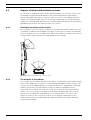
4.2.1
Directional sensitivity of the receiver
The sensitivity of a receiver is at its best when it is aimed directly towards a radiator. The axis
of maximum sensitivity is tilted upwards at an angle of 45 degrees (see Figure 4.3). Rotating
the receiver will decrease the sensitivity. For rotations of less than +/- 45 degrees this effect is
not large, but for larger rotations the sensitivity will decrease rapidly.
45
45
90
Figure 4.3 Directional characteristics of the receivers
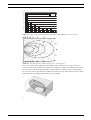
4.2.2
The footprint of the radiator
The coverage area of a radiator depends on the number of transmitted carriers and the output
power of the radiator. The coverage area of the LBB 4512/00 radiator is twice as large as the
coverage area of the LBB 4511/00. The coverage area can also be doubled by mounting two
radiators side by side. The total radiation energy of a radiator is distributed over the
transmitted carriers. When more carriers are used, the coverage area gets proportionally
smaller. The receiver requires a strength of the IR signal of 4 mW/m2 per carrier to work
without errors (resulting in a 80 dB S/N ratio for the audio channels). The effect of the
number of carriers on the coverage area can be seen in Figure 4.4 and Figure 4.5. The
radiation pattern is the area within which the radiation intensity is at least the minimum
required signal strength.
IOM-INT | V1.1 | 2010.12
Installation and Operation manual
Bosch Security Systems B.V.
Integrus
Planning | en
19
m2
2000
LBB 4512/00
1800
LBB 4511/00
1600
1400
1200
1000
800
600
400
200
0
1
2
3
4
5
6
7
8
Figure 4.4 Total coverage area of LBB 3410/05, LBB 4511/00 and LBB 4512/00 for 1 to 8 carriers
1
2
4
8
Figure 4.5 Polar diagram of the radiation pattern for 1, 2, 4 and 8 carriers
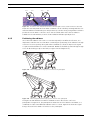
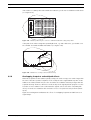
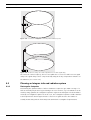
The cross section of the 3-dimensional radiation pattern with the floor of the conference
venue is known as the footprint (the white area in Figure 4.6, Figure 4.7 and Figure 4.8). This is
the floor area in which the direct signal is strong enough to ensure proper reception, when
the receiver is directed towards the radiator. As shown, the size and position of the footprint
depends on the mounting height and angle of the radiator.
Figure 4.6 The radiator mounted at 15° to the ceiling
Bosch Security Systems B.V.
Installation and Operation manual
IOM-INT | V1.1 | 2010.12
20
en | Planning
Integrus
Figure 4.7 The radiator mounted at 45° to the ceiling
Figure 4.8 The radiator mounted perpendicular (at 90°) to the ceiling
4.2.3
Ambient lighting
The Integrus system is practically immune for the effect of ambient lighting. Fluorescent
lamps (with or without electronic ballast or dimming facility), such as TL lamps or energy
saving lamps give no problems with the Integrus system. Also sunlight and artificial lighting
with incandescent or halogen lamps up to 1000 lux give no problems with the Integrus
system. When high levels of artificial lighting with incandescent or halogen lamps, such as
spotlights or stage lighting are applied, you should directly point a radiator at the receivers in
order to ensure reliable transmission. For venues containing large, unscreened windows, you
must plan on using additional radiators. For events taking place in the open air a site test will
be required in order to determine the required amount of radiators. With sufficient radiators
installed, the receivers will work without errors, even in bright sunlight.
4.2.4
Objects, surfaces and reflections
The presence of objects in a conference venue can influence the distribution of infra-red light.
The texture and color of the objects, walls and ceilings also plays an important role. Infra-red
radiation is reflected from almost all surfaces. As is the case with visible light, smooth, bright
or shiny surfaces reflect well. Dark or rough surfaces absorb large proportions of the infra-red
signal (see Figure 4.9). With few exceptions it cannot pass through materials that are opaque
to visible light.
IOM-INT | V1.1 | 2010.12
Installation and Operation manual
Bosch Security Systems B.V.
Integrus
Planning | en
100%
40%
100%
21
80%
Figure 4.9 The texture of the material determines how much light is reflected and how much is absorbed
Problems caused by shadows from walls or furniture can be solved by ensuring that there are
sufficient radiators and that they are well positioned, so that a strong enough infra-red field is
produced over the whole conference area. Care should be taken not to direct radiators
towards uncovered windows, as most of this radiation will subsequently be lost.
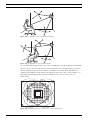
4.2.5
Positioning the radiators
Since infra-red radiation can reach a receiver directly and/or via diffused reflections, it is
important to take this into account when considering the positioning of the radiators. Though
it is best if receivers pick up direct path infra-red radiation, reflections improve the signal
reception and should therefore not be minimized. Radiators should be positioned high enough
not to be blocked by people in the hall (see Figure 4.10 and Figure 4.11).
Figure 4.10
Infra-red signal blocked by a person in front of the participant
Figure 4.11
Infra-red signal not blocked by a person in front of the participant
The figures below illustrate how infra-red radiation can be directed to conference
participants. In Figure 4.12, the participant is situated clear from obstacles and walls, so a
combination of direct and diffused radiation can be received. Figure 4.13 shows the signal
being reflected from a number of surfaces to the participant.
Bosch Security Systems B.V.
Installation and Operation manual
IOM-INT | V1.1 | 2010.12
22
en | Planning
Integrus
Figure 4.12
Combination of direct and reflected radiation
Figure 4.13
Combination of several reflected signals
For concentrically arranged conference rooms, centrally placed, angled radiators located high
up can cover the area very efficiently. In rooms with few or no reflecting surfaces, such as a
darkened film-projection room, the audience should be covered by direct path infra-red
radiation from radiators positioned in front. When the direction of the receiver changes, e.g.
with varying seat arrangements, mount the radiators in the corners of the room (see
Figure 4.14).
Figure 4.14
IOM-INT | V1.1 | 2010.12
Radiator position for covering seats in a square arrangement
Installation and Operation manual
Bosch Security Systems B.V.
Integrus
Planning | en
23
If the audience is always directed towards the radiators, you do not need radiators at the back
(see Figure 4.15).
Figure 4.15
Radiator positioning in a conference hall with auditorium seating and podium
If the path of the infra-red signals is partially blocked, e.g. under balconies, you should cover
the 'shaded' area with an additional radiator (see Figure 4.16).
Figure 4.16
4.2.6
Radiator for covering seats beneath a balcony
Overlapping footprints and multipath effects
When the footprints of two radiators partly overlap, the total coverage area can be larger than
the sum of the two separate footprints. In the overlap area the signal radiation power of two
radiators are added, which increases the area where the radiation intensity is larger than the
required intensity. However, differences in the delays of the signals picked up by the receiver
from two or more radiators can result in that the signals cancel each other out (multi path
effect). In worst-case situations this can lead to a loss of reception at such positions (black
spots).
Figure 4.17 and Figure 4.18 illustrate the effect of overlapping footprints and differences in
signal delays.
Bosch Security Systems B.V.
Installation and Operation manual
IOM-INT | V1.1 | 2010.12
24
en | Planning
Integrus
Figure 4.17
Increased coverage area caused by added radiation power
Figure 4.18
Reduced coverage area caused by differences in cable signal delay
The lower the carrier frequency, the less susceptible the receiver is for differences in signal
delays. The signal delays can be compensated by using the delay compensation switches on
the radiators (see section 7.4 ).
4.3
Planning an Integrus infra-red radiation system
4.3.1
Rectangular footprints
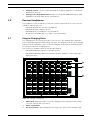
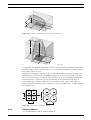
Determining the optimal number of infra-red radiators required to give 100% coverage of a
hall can normally only be done by performing a site test. However, a good estimation can be
made by using 'guaranteed rectangular footprints'. Figure 4.19 and Figure 4.20 show what is
meant by a rectangular footprint. As can be seen, the rectangular footprint is smaller than the
total footprint. Note that in Figure 4.20 the 'offset' X is negative because the radiator is
actually mounted beyond the horizontal point at which the rectangular footprint starts.
IOM-INT | V1.1 | 2010.12
Installation and Operation manual
Bosch Security Systems B.V.
Integrus
Planning | en
25
H
W
X
L
Figure 4.19
A typical rectangular footprint for a mounting angle of 15°
H
W
X
L
Figure 4.20
A typical rectangular footprint for a mounting angle of 90°
The guaranteed rectangular footprints for various number of carriers, mounting heights and
mounting angles can be found in section 12.5 . The height is the distance from the reception
plane and not from the floor.
Guaranteed rectangular footprints can also be calculated with the footprint calculation tool
(available on the documentation CD-ROM). The given values are for one radiator only, and
therefore do not take into consideration the beneficial effects of overlapping footprints. The
beneficial effects of reflections are also not included. As rule of thumb can be given for
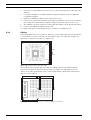
systems with up to 4 carriers, that if the receiver can pick up the signal of two adjacent
radiators the distance between these radiators can be increased by a factor 1.4 approximately
(see Figure 4.21).
R2
R3
R4
R1
R2
R3
R4
W
1.4 W
R1
L
1.4 L
Figure 4.21
4.3.2
The effect of overlapping footprints
Planning radiators
Use the following procedure to plan the radiators:
Bosch Security Systems B.V.
Installation and Operation manual
IOM-INT | V1.1 | 2010.12
26
en | Planning
Integrus
1.
Follow the recommendations in section 4.2 in order to determine the positioning of the
radiators.
2.
Look up (in the table) or calculate (with the footprint calculation tool) the applicable
rectangular footprints.
3.
Draw the rectangular footprints in the lay-out of the room.
4.
If the receiver can pick up the signal of two adjacent radiators in some areas, determine
the overlap effect and draw the footprint enlargement(s) in the lay-out of the room.
5.
Check whether you have sufficient coverage with the radiators at the intended positions.
6.
If not so, add additional radiators to the room.
See Figure 4.14, Figure 4.15 and Figure 4.16 for examples of a radiator lay out.
4.3.3
Cabling
Signal delay differences can occur due to differences in the cable length from the transmitter
to each radiator. In order to minimize the risk of black spots, use equal cable length from
transmitter to radiator if possible (see Figure 4.22).
50m
50m
50m
50m
Figure 4.22
Radiators with equal cable length
When radiators are loop-through connected, the cabling between each radiator and the
transmitter should be as symmetrical as possible (see Figure 4.23 and Figure 4.24). The
differences in cable signal delays can be compensated with the signal delay compensation
switches on the radiators.
Figure 4.23
IOM-INT | V1.1 | 2010.12
Asymmetrical arrangement of radiator cabling (to be avoided)
Installation and Operation manual
Bosch Security Systems B.V.
Integrus
Planning | en
Figure 4.24
Bosch Security Systems B.V.
27
Symmetrical arrangement of radiator cabling (recommended)
Installation and Operation manual
IOM-INT | V1.1 | 2010.12
28
en | Installation
Integrus
5
Installation
5.1
Integrus Transmitters
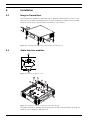
The transmitter is suitable for either table-top or 19-inch rack-mounted use. Four feet (for
table top use) and two mounting brackets (for rack mounting) are supplied. The mounting
brackets can also be used to mount the transmitter to a flat surface.
Figure 5.1 Transmitter with optional mounting brackets and table-top feet
5.2
Audio Interface modules
1
2
Figure 5.2 Interface module slot cover
2
5
3
4
7
6
Figure 5.3 Mounting an interface module in the transmitter housing
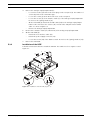
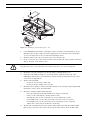
Follow the instructions below to mount an interface module in the transmitter housing. The
numbers refer to Figure 5.2 and Figure 5.3.
IOM-INT | V1.1 | 2010.12
Installation and Operation manual
Bosch Security Systems B.V.
Integrus
Installation | en
29
DANGER!
Before opening the transmitter housing, make sure that the mains power and all other
connections are disconnected!
WARNING!
ICs and many other electronic components are susceptible to electrostatic discharge (ESD).
Take preventive measures when handling the interface modules. Keep the PCBs as long as
possible in their protective packing. Wear an anti-ESD bracelet.
1.
2.
Remove the top cover of the transmitter housing.
Remove the interface module slot cover (1) at the back of the transmitter. Keep the
screws (2).
3.
Insert the module (3) (with the components faced down) into the transmitter housing
and push it firmly into the PCB connector (4).
4.
Fasten the slot cover (5) to the back of the transmitter housing. Use the screws (2) from
step 2.
5.
Fasten the module's PCB to the distance studs (6). Use the screws (7) provided with the
interface module.Close the transmitter housing.
WARNING!
To prevent damage to the PCB connectors (4), be sure that the connectors are aligned
properly before pushing the module in.
5.3
Upgrading transmitter LBB4502/xx to INT-TX/xx
To upgrade an LBB4502/xx to an INT-TX the following upgrade kits are available:
–
INT-TXK04: 4 channel transmitter upgrade kit
–
INT-TXK08: 8 channel transmitter upgrade kit
–
INT-TXK16: 16 channel transmitter upgrade kit
–
INT-TXK32: 32 channel transmitter upgrade kit
Each kit comprises the following items:
–
5.3.1
1 (type dependent) rear panel
–
1 (type dependent) main PCB
–
1 extra screw for the main PCB
–
1 glue stud
Removing the main PCB and the rear panel
Follow the instructions below to remove the main PCB and the rear panel. The numbers refer
to Figure 5.4 and Figure 5.5.
NOTICE!
The upgrade kits do not contain new fixing materials. Therefore make sure to keep all screws
and washers.
DANGER!
Before opening the transmitter housing, make sure that the mains power and all other
connections are disconnected!
Bosch Security Systems B.V.
Installation and Operation manual
IOM-INT | V1.1 | 2010.12
30
en | Installation
Integrus
WARNING!
ICs and many other electronic components are susceptible to electrostatic discharge (ESD).
Take preventive measures when handling the interface modules. Keep the PCBs as long as
possible in their protective packing. Wear an anti-ESD bracelet.
1
6
8
2
9
7A
7B
7C
10
10
5
3
7
7
4
11
10
Figure 5.4 Removing the main PCB and the rear panel (steps 1 - 5)
14
15
9
12
13
16 17
4
18
19
Figure 5.5 Removing the main PCB and the rear panel (steps 6 - 8)
1.
Remove the top cover of the transmitter housing.
2.
If the transmitter contains an interface module (1): Remove the interface module
proceeding in reverse order of mounting. The mounting instructions can be found in
section 5.2 . Note that the distance studs of the transmitter module can remain in place.
3.
If the transmitter does not contain an interface module: Remove the interface module
slot cover proceeding as described in section 5.2 .
IOM-INT | V1.1 | 2010.12
Installation and Operation manual
Bosch Security Systems B.V.
Integrus
Installation | en
4.
31
Remove the analogue input/output PCB (2):
–
Loosen the screws (3) between the cinch plugs on the rear panel (4). The number of
–
Loosen the screws (5) at the XLR connectors on the rear panel.
–
Loosen the screws (6) of the distance studs (7) of the analogue input/output PCB.
–
On the main PCB (9) detach the flexible cables(10) to the analogue input/output
screws depends on the transmitter type.
Do not lose the (spring) washers (8).
PCB. To this end release the catches (11) on both sides and pull out the flexible
cable. See inset in Figure 5.4.
–
Remove three distance studs (7A, 7B and 7C) of the analogue input/output PCB.
6.
On the main PCB (9):
7.
5.3.2
Remove the analogue input/output PCB.
5.
–
Detach the user interface cable (12).
–
Detach the power supply connector (13).
–
Loosen the screws (14) of the distance studs. Do not lose the (spring) washers (15).
Remove the main PCB.
Installation of the INTK
Follow the instructions below to install the INT-TXK. The numbers refer to Figure 5.6 and
Figure 5.7.
2
10
8
9
11
67
1
4
18
5C
3
1
5B
5A
Figure 5.6 Installation of the INT-TXK (steps 1 - 6)
Bosch Security Systems B.V.
Installation and Operation manual
IOM-INT | V1.1 | 2010.12
32
en | Installation
Integrus
20
14
15
13
2
12A
12B
12C
18
18
16
17
12
12
18
19
Figure 5.7 Installation of the INT-TXK (steps 7 - 12)
1.
If the LBB4502/xx transmitter is missing a stud to mount the new main PCB (2) of the
INT-TXK, paste the glue stud (1) from the upgrade kit to the bottom of the transmitter.
See inset in Figure 5.6 for the recommended pasting position.
2.
3.
Click the mains socket (3) in position in the new rear panel (4).
Fit the connectors (5) of the mains inlet wires (5A - brown, 5B - blue) and the earth wire
(5C) on the pins of the mains socket.
WARNING!
Pay attention to the correct position of the mains inlet wires. See inset in Figure 5.6.
4.
5.
Mount the rear panel using the screws (6) and the (spring) washers (7).
Install the main PCB (2) using the screws (8) and the (spring) washers (9). If the
LBB4502/xx transmitter is provided with a stud to mount the main PCB, use the extra
screw from the upgrade kit.
6.
7.
On the new main PCB:
–
Fasten the user interface cable (10).
–
Fasten the power supply connector (11).
Mount the three distance studs (12A, 12B and 12C) of the analogue input/output PCB
through the orifices in the new main PCB.
8.
Mount the analogue input/output PCB (13):
–
9.
Place the analogue input/output PCB on its distance studs (12).
–
Fit the screws (14) with the (spring) washers (15).
–
Carefully give the screws a few turns. Do not yet tighten the screws.
–
Fit and tighten the screws (16) at the XLR connectors on the rear panel.
–
Fit and tighten the screws (17) between the cinch plugs on the rear panel.
–
Tighten the screws (14) of the distance studs (12).
On the new main PCB (2) fasten the flexible cables(18) to the analogue input/output
PCB. To this end release the catches (19) on both sides and insert the flexible cable.
IOM-INT | V1.1 | 2010.12
Installation and Operation manual
Bosch Security Systems B.V.
Integrus
Installation | en
33
NOTICE!
Make sure that the flexible cables are entirely and correctly inserted into the connector as
incorrect mounting will lead to transmitter failure. See inset in Figure 5.7.
10. If the transmitter contained an interface module (20): Mount the interface module
proceeding as described in section 5.2 .
11. If the transmitter did not contain an interface module: Mount the interface module slot
cover on the new rear panel.
12. Mount the top cover of the transmitter housing.
5.4
Medium and High Power Radiators
Radiators in permanent installations can be either fixed to a wall, hung under a ceiling or
balcony or secured to any sturdy material, using the suspension bracket supplied with the
radiator. The mounting angle can be adjusted for optimal coverage. For wall mounting a
separate bracket (LBB 3414/00) is also required. In non-permanent installations, a floor stand
can be used.
WARNING!
When you install the radiator in a ceiling, you must leave at least 1 m3 of free space around
the back of the radiator. To prevent the radiator from becoming too hot, make sure that there
is a good airflow in this free space.
Always ensure that natural airflow is not obstructed by ceilings, walls etc. when determining
the position of the radiator. Leave plenty of space around the radiator to prevent it becoming
too hot.
NOTICE!
When in operation, the radiators may feel warm to the touch. This is quite normal, and does
not indicate a radiator fault or malfunction.
5.4.1
Attaching the suspension bracket
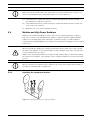
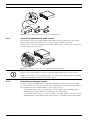
Figure 5.8 Attaching the plate to the suspension bracket
Bosch Security Systems B.V.
Installation and Operation manual
IOM-INT | V1.1 | 2010.12
34
en | Installation
Integrus
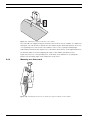
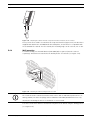
Figure 5.9 Attaching the suspension bracket to the radiator
First assemble the supplied suspension bracket and connect it to the radiator (see Figure 5.8
and Figure 5.9). This bracket is attached to the radiator by two bolts with washers. There are
corresponding holes on the back of the radiators. There is also a spring-loaded plunger
(indicated by a black arrow in Figure 5.9), located above the bolt hole on the right-hand arm of
the bracket, which is used for adjusting the angle of the radiator (shown in inset in
Figure 5.9). There are corresponding holes on the back of the radiator for accepting this
plunger. The mounting angle can be adjusted in steps of 15°.
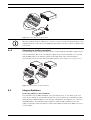
5.4.2
Mounting on a floor stand
Figure 5.10
IOM-INT | V1.1 | 2010.12
Attaching the stud of a floor stand to the suspension bracket of the radiator
Installation and Operation manual
Bosch Security Systems B.V.
Integrus
Installation | en
Figure 5.11
35
Attaching the radiator inclusive suspension bracket and stud to the floor stand
The top of the floor stand is screwed into the suspension bracket (Figure 5.10). The bracket is
supplied with both metric and Whitworth threaded plates, and is therefore compatible with
most standard floor stands. For floor stands, the mounting angle can be set at 0°, 15° or 30°.
5.4.3
Wall mounting
For wall mounting, an extra wall bracket (LBB 3414/00) is required (must be ordered
separately). This bracket is attached to the wall by means of four bolts (see Figure 5.12).
Figure 5.12
Attaching the wall mounting bracket to a wall
NOTICE!
The four bolts used to attach the bracket must each be able to withstand a pull-out force of
200 kg (440 lb). The bolts and plugs delivered with the LBB 3414/00 wall bracket are only
intended for mounting the unit on a solid brick or concrete wall.
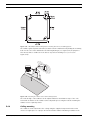
Four holes of 10 mm in diameter and 60 mm in depth must be drilled using the drilling pattern
(see Figure 5.13).
Bosch Security Systems B.V.
Installation and Operation manual
IOM-INT | V1.1 | 2010.12
36
en | Installation
Integrus
Figure 5.13
LBB 3414/00 wall mounting bracket showing dimensions and drilling pattern
The radiator (plus suspension bracket) is attached to the wall bracket by sliding the mounting
bolt over the slot on the wall bracket and then tightening it (see Figure 5.14). A split pin is
then inserted into a small hole in the bolt to stop it from working loose (see inset in
Figure 5.14).
Figure 5.14
Attaching the radiator to the wall mounting bracket
The vertical angle of the radiator can be adjusted between 0 and 90° in steps of 15°. The
horizontal orientation of the radiator can be adjusted by loosening the bolt then turning the
radiator to the required position.
5.4.4
Ceiling mounting
The radiators can be attached to the ceiling using the supplied suspension bracket. This
ensures enough space for a proper air flow around the radiator. Mounting a radiator in the
IOM-INT | V1.1 | 2010.12
Installation and Operation manual
Bosch Security Systems B.V.
Integrus
Installation | en
37
ceiling will in most cases require a forced air flow by means of a ventilator to prevent
overheating.
5.4.5
Mounting on horizontal surfaces
When the radiator has to be positioned a horizontal surface (e.g. on top of an interpreter
booth), the distance between the radiator and the surface must be at least 4 cm (1.5 inch) to
enable enough air flow around the radiator. This can be achieved by using the suspension
bracket as a support. If this is not possible, switch the radiator to half power. If the radiator is
used at full power on top of an interpreter booth, the ambient temperature must not exceed
35° C.
5.5
Low Power Wide Beam Radiator
Radiators in permanent installations can be fixed to a wall, hung under a ceiling or balcony or
secured to any sturdy material using the unit's built-in bracket and mounting adaptor supplied
with the radiator (Figure 5.15). In non-permanent installations, a floor stand can be used. The
mounting adaptor enables the radiator to be positioned for optimum performance.
Figure 5.15
5.6
LBB 3410/05 Radiator Mounting
Integrus Charging Units
Wall mounting the charging cabinet
LBB 4560/50 is suitable for either table-top or wall-mounted use.
It can be wall-mounted using 5 mm (0.19 inch) screws, with a head diameter of 9 mm (0.35
inch). The screws and plugs delivered with the LBB 4560/50 are designed to mount the unit
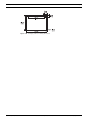
on a solid brick or concrete wall. Two holes, 8 mm in diameter and 55 mm in depth, must be
drilled 500 mm apart (see Figure 5.16).
WARNING!
To comply with UL and CSA regulations, the charging cabinets must be mounted in such a way
that they can be easily removed by hand in case of emergency.
Bosch Security Systems B.V.
Installation and Operation manual
IOM-INT | V1.1 | 2010.12
38
en | Installation
Integrus
Figure 5.16
IOM-INT | V1.1 | 2010.12
Charging cabinet mounting dimensions
Installation and Operation manual
Bosch Security Systems B.V.
Integrus
Connection | en
6
Connection
6.1
Integrus Transmitters
39
This chapter gives an overview of typical system connections using the INT-TX range
transmitter:
6.1.1
–
Connecting the DCN Next Generation system
–
Connecting the DCN system
–
Connecting other external audio sources
–
Connecting an emergency signal switch
–
Connecting to another transmitter
Connecting the DCN Next Generation
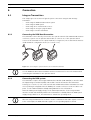
The transmitter can be directly connected to the optical network of the DCN Next Generation
conference system. Use an optical network cable to connect one of the optical network
sockets of the transmitter to the optical network (see Figure 6.1). The network mode must be
enabled with the configuration menu (see section 7.2.3 ).
Figure 6.1 Connecting the optical network to the modular IR transmitter
NOTICE!
See the DCN Next Generation Installation and User Instructions for more information about
connecting the transmitter in the optical network.
6.1.2
Connecting the DCN system
The transmitter requires the Integrus DCN Interface Module (LBB 3423/20) to interface with
the Digital Congress Network (DCN). This module must be mounted in the transmitter
housing (see section 5.2 ). The connections between DCN units and the transmitter are made
in a loop-through configuration via the DCN 6-pole circular connectors on the module's rear
panel. See the DCN Installation and Operating Manual for more information.
When the DCN system supply voltage on the trunk input switches off, the Integrus DCN
interface module automatically switches the transmitter to standby. When the DCN system
supply voltage switches on, the transmitter is switched to operating mode.
NOTICE!
When the Integrus DCN interface module is used in combination with audio signals connected
to the cinch inputs, the DCN and audio signals on corresponding inputs are mixed.
Bosch Security Systems B.V.
Installation and Operation manual
IOM-INT | V1.1 | 2010.12
40
en | Connection
Integrus
1
2
3
4
5
6
Netw
ork
1
2
Figure 6.2 Connecting the DCN systems to the Modular IR transmitter
6.1.3
Connecting other external audio sources
The transmitter has up to 32 audio inputs (depending on the transmitter type) to interface
with external asymmetrical audio sources, such as congress systems from other
manufacturers or for music distribution. The audio signals (stereo or mono) are connected to
the audio input cinch connectors.
1
2
3
4
5
6
Netw
ork
1
2
1
2
3
4
5
6
Figure 6.3 Connecting external audio sources to the Modular IR transmitter
NOTICE!
When the cinch audio inputs are used in combination with inputs via one of the interface
modules, the signals on corresponding channels are mixed. This situation should normally be
avoided by using higher-numbered cinch audio inputs.
6.1.4
Connecting an emergency signal
To use the emergency signal function, a switch (normally-open) must be connected to the
emergency switch connector. The reaction of the transmitter on a closed switch depends on
the configuration of the auxiliary inputs (see also section 7.2.9 ):
–
If the auxiliary input is 'Mono + Emergency', the audio signal on the Aux-Right input is
distributed to all output channels, overriding all other audio inputs.
–
If the auxiliary input is 'Stereo' or 'Stereo to Mono', the audio signals on the Aux-Left and
Aux-Right inputs are distributed to all output channels, overriding all other audio inputs.
IOM-INT | V1.1 | 2010.12
Installation and Operation manual
Bosch Security Systems B.V.
Integrus
Connection | en
41
1
2
3
4
5
Netw
6
ork
1
2
1
2
3
4
5
6
Figure 6.4 Connecting an emergency signal
NOTICE!
When the network mode is enabled (see section 7.2.3 ), the emergency signal function is not
available when the control unit of the DCN Next Generation conference system is switched off
or defective.
6.1.5
Connecting to another transmitter
The transmitter can be operated in slave mode to loop-through the IR radiator signals from a
master transmitter. One of the four radiator outputs of the master transmitter is connected
with an RG59 cable to the radiator signal loop-through input of the slave transmitter.
The Transmission mode of the slave transmitter must be set to ‘Slave’ (see section 7.2.2 ).
1
1
2
2
3
3
4
4
5
6
Netwo
5
6
rk
1
Netwo
rk
1
2
2
1
1
2
2
3
3
4
4
5
5
6
6
MASTER
SLAVE
Figure 6.5 Connecting to another transmitter
6.2
Integrus Radiators
Connecting radiators to the transmitters
The transmitter has six BNC HF Output connectors labelled 1, 2, 3, 4, 5 and 6 on the rear
panel. All six outputs are functionally identical. They can each drive up to 30 radiators (LBB
4511/00 and/or LBB 4512/00) in a loop-through configuration. The radiators are connected
with RG59 cables. The maximum cable length per output is 900 m (2970 ft) to the last
radiator. Automatic cable termination is achieved by a built-in switch in the BNC connectors
on the radiator.
Bosch Security Systems B.V.
Installation and Operation manual
IOM-INT | V1.1 | 2010.12
42
en | Connection
Integrus
Figure 6.6 Loop-through connection of radiators
NOTICE!
For the automatic cable termination to work, never leave an open-ended cable connected to
the last radiator in a loop-through chain.
When connecting infra-red radiators, do not split the cable, else the system will not function
correctly.
IOM-INT | V1.1 | 2010.12
Installation and Operation manual
Bosch Security Systems B.V.
Integrus
Configuration | en
7
Configuration
7.1
Using the transmitter menu
7.1.1
Overview
43
All configuration and operation options of the transmitter are set via an interactive menu,
using a 2x16 character LCD display and a 'turn-and-push' menu button. Figure 7.1 gives an
overview of the menu structure. A general description of how to use the menu is given in
section 7.1.2 . Some examples are given in section 7.1.3 . The detailed descriptions of all
menu items can be found in section 7.2 .
Transmitter
Status
0
4P Download Bitmaps
Fault Status
1
4O Defaults
4N Unit Name
4M Headphone on/off
3E Bitmaps
4L Mini Radiator on/off
4K Level Inputs
3D FW Version
Monitoring
4J Level Aux. Right
2
3C FPGA Version
4I Level Aux. Left
4H Aux. Input Mode
3B HW Version
4G Carrier Overview
3A Serial Number
Enquiry
4F Carrier Settings
4E Channel Names
3
4D Channel Quality
4C Number of Channels
4B
Network Mode
4A Transmission Mode
Setup
4
<
Back
Figure 7.1 Menu overview
Bosch Security Systems B.V.
Installation and Operation manual
IOM-INT | V1.1 | 2010.12
44
en | Configuration
7.1.2
Integrus
Navigate through the menu
main menu
item number
sub-menu
item character
4D Ch. Quality
Per Channel ...
menu item title
4D Channel 12
Stereo PQ In 03
three dots indicate
that the item has a
sub-menu
option values
Figure 7.2 Menu item screen elements
Operating the menu is always a sequence of alternating turns and pushes:
Turn the button to:
–
Cycle through the menu items within a menu (the menu item number and title on the first
–
Go to a settable option within a menu item (a blinking cursor moves through the menu
line is blinking).
screen).
–
Cycle through the available values for a settable option (the value is blinking).
Push the button to:
–
Confirm a chosen menu item (the menu item number and title stops blinking, a blinking
cursor appears).
–
–
Go to a sub-menu (the sub-menu item character starts blinking).
Confirm the selection of a settable option (the cursor disappears, the option value starts
blinking).
–
Confirm a selected value for a settable option (the value stops blinking, the cursor
appears again).
After 3 minutes of inactivity, the display automatically switches back to the first item of the
Main menu (Transmitter Status).
Each menu item is identified by a number (for the Main menu) or by a number plus a character
(for the sub-menus). The item identification can be found at the start of the first line and is
used to navigate to and from sub-menus.
Most menu items have one or more settable configuration options. The value of an option can
be changed by selecting a value from a list of available values.
To navigate through the main menu:
1.
Turn the button to move through the Main menu items. The item number and title starts
blinking. (The first item, Transmitter Status, doesn't blink.)
To jump to a sub-menu:
1.
2.
Navigate in the Main menu to an item with three dots (e.g. 'Setup...').
Push the button to go to the sub menu. The submenu item character and title starts
blinking
NOTICE!
To enter the Setup sub-menu, push and hold the button for at least 3 seconds.
To navigate through a sub-menu:
1.
Turn the button to move the cursor to the submenu item character.
2.
Push the button. The item character and title starts blinking.
3.
Turn to select another sub-menu item character.
4.
Push to confirm the selection.
To change the option values:
1.
IOM-INT | V1.1 | 2010.12
Navigate to the applicable menu item.
Installation and Operation manual
Bosch Security Systems B.V.
Integrus
Configuration | en
2.
Turn the button to move the cursor to the option value you want to change.
3.
Push the button to activate the option. The option value starts to blink.
4.
Turn the button to select a new option value.
5.
Push the button to confirm the new value. The option value stops blinking.
6.
45
Turn the button to move the cursor to another settable option (when available) and
repeat steps 3 to 5.
To jump back from a sub-menu to an item of the main menu:
1.
Turn the button to move the cursor to the Main menu item number.
2.
Push the button. The item number and title starts blinking.
3.
Turn to select another item number.
4.
Push to confirm the selection.
When you are turning counter-clockwise through submenu items, the display jumps
automatically to the Main menu after you have reached the first item (A) of the sub-menu.
Example:
To jump back from an item of the main menu to the Transmitter status:
7.1.3
1.
Turn the button to the < Back screen.
2.
Push the button to go to the Transmitter Status.
Examples
Each step in the examples below shows the text on the display and the action to go to the
next step. Bold text in italics (text) indicates that the text is blinking. An underscore ( _ )
indicates the position of the cursor. Each example starts at the Transmitter Status screen.
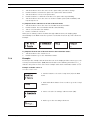
Example 1: Disable carrier 2.
See also section 7.2.7 .
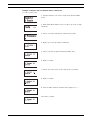
1. Turn the button to select the ‘Setup’ item (4) in the Main
menu.
2. Push and hold the button for 3 seconds to go to the ‘Setup’
submenu.
3. Turn to select the ‘C.Settings’ sub-menu item (4G).
4. Push to go to the 'C.Settings' sub-menu.
Bosch Security Systems B.V.
Installation and Operation manual
IOM-INT | V1.1 | 2010.12
46
en | Configuration
Integrus
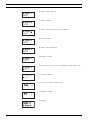
5. Turn to select carrier 2.
6. Push to confirm.
7. Turn to move the cursor to the second line.
8. Push to confirm.
9. Turn to select 'Disabled'.
10. Push to confirm.
11. Turn to move the cursor to the Main menu item number (4).
12. Push to confirm.
4G Carrier 2
Disabled
13. Turn to select the < Back screen.
14. Push to confirm.
15. Ready.
IOM-INT | V1.1 | 2010.12
Installation and Operation manual
Bosch Security Systems B.V.
Integrus
Configuration | en
47
Example 2: Assign a new user defined name to channel 12.
See also section 7.2.6 .
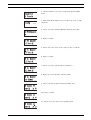
1. Turn the button to select the 'Setup' item (4) in the Main
menu.
2. Push and hold the button for 3 seconds to go to the 'Setup'
sub-menu.
3. Turn to select the 'Ch. Names' sub-menu item (4F).
4. Push to go to the 'Ch. Names' sub-menu.
5. Turn to select the required channel number (12).
6. Push to confirm.
7. Turn to move the cursor to the start of the second line.
8. Push to confirm.
9. Turn clockwise until the channel name changes to: o - - -
10. Push to confirm.
Bosch Security Systems B.V.
Installation and Operation manual
IOM-INT | V1.1 | 2010.12
48
en | Configuration
Integrus
11. Turn to move the cursor to the first dash.
12. Push to confirm.
13. Turn to select the first character (C).
14. Push to confirm this character.
15. Repeat steps 11 to 14 for the other characters.
16. Turn to move the cursor to the Main menu item number (4).
17. Push to confirm.
18. Turn to select the < Back screen.
19. Push to confirm
20. Ready
Example 3: Set channel 11 to transmit a Stereo signal in Premium Quality, using audio
inputs 14 (L) and 15 (R) as source.
See also section 7.2.5 .
IOM-INT | V1.1 | 2010.12
Installation and Operation manual
Bosch Security Systems B.V.
Integrus
Configuration | en
49
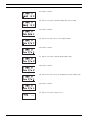
1. Turn the button to select the 'Setup' item (4) in the Main
menu.
2. Push and hold the button for 3 seconds to go to the 'Setup'
sub-menu.
3. Turn to select the 'Channel Quality' sub-menu item (4D).
4. Push to confirm.
5. Turn to move the cursor to the option on the second line.
6. Push to confirm.
7. Turn to select the option value 'Per Channel ...'.
8. Push to go to the 'Channel' sub-menu (4C).
9. Turn to select the required channel number (11).
10. Push to confirm.
11. Turn to move the cursor to the quality option.
Bosch Security Systems B.V.
Installation and Operation manual
IOM-INT | V1.1 | 2010.12
50
en | Configuration
Integrus
12. Push to confirm.
13. Turn to select the required quality value (Stereo PQ).
14. Push to confirm. *
15. Turn to move the cursor to the input number.
16. Push to confirm.
17. Turn to select the required input number (14).
18. Push to confirm.
19. Turn to move the cursor to the Main menu item number (4).
20. Push to confirm.
21. Turn to select the < Back screen.
IOM-INT | V1.1 | 2010.12
Installation and Operation manual
Bosch Security Systems B.V.
Integrus
Configuration | en
51
22. Push to confirm.
23. Ready.
* Note that after selecting ‘Stereo’ as input mode (step 14) the input number changes
automatically to the next even number (12), which is the input number of the left signal.
7.2
Setup the transmitter
The next sections give descriptions of the possible setup options. Each description is
followed by the relevant menu items with detailed information per menu option. The default
values (see section 7.2.14 ) are indicated by an asterisk (*) when applicable.
7.2.1
Main menu
The main menu contains the screens to the operational menus (see section 9.1 ) and to the
Setup sub-menu (see sections 7.2.2 and higher).
7.2.2
Menu Item
Description
Transmitter Status
Shows the transmitter status (see section 9.1.2 )
1 Fault Status
Shows the radiator fault status (see section 9.1.3 )
2 Monitoring . . .
Go to the ‘Monitoring’ sub-menu (see section 9.1.4 )
3 Enquiry . . .
Go to the ‘Enquiry’ sub-menu (see section 9.1.5 )
4 Setup . . .
Go to the ‘Setup’ sub-menu (see sections 7.2.2 and higher)
Set transmission mode
The Transmission Mode menu item (4A) is used to select which signals will be distributed
over the channels. It is also possible to switch all channels off (Standby). When using an
Integrus system with a DCN Next Generation system (see section 7.2.3 ), the transmitter is
automatically switched to 'Standby' when the connected DCN Next Generation system is
switched off. When the DCN Next Generation system is switched on, the transmitter is
automatically switched to 'On'. When using an Integrus DCN interface module of version 01.05
or higher, the transmitter is automatically switched to 'Standby' when the connected DCN
system is switched off. When the DCN system is switched on, the transmitter is automatically
switched to 'On'.
Menu Item
Options
4A Transmission
Mode:
- Standby
Description
All channels are switched off, no signals are
distributed.
* - On
Normal transmission. Input signals are
distributed on the channels as set in the
Channel Quality sub-menu (4D).
Bosch Security Systems B.V.
Installation and Operation manual
IOM-INT | V1.1 | 2010.12
52
en | Configuration
Integrus
Menu Item
Options
- Aux to All
Description
The signals on the Auxiliary inputs are
distributed on one carrier to all channels.
- Test A
A different test tone is distributed on each
channel. The frequency increases with
increasing channel number. For stereo
channels the tone for left and right will also be
different.
- Slave
The radiator signal on the slave input is
looped-through to all radiators.
7.2.3
Set network mode
The network mode menu item (4B) is used to enable and disable the optical network
connections. When the transmitter is connected to a DCN Next Generation conference
system, the optical network connections must be enabled.
Menu Item
Options
4B Network Mode
Mode:
- Disabled
Description
Optical network connections disabled. Use
this mode when the transmitter is not used in
combination with DCN Next Generation.
- Enabled
Optical network connections enabled. Use
this mode when the transmitter is used in
combination with DCN Next Generation.
7.2.4
Set number of channels
Via sub-menu item 4C the number of channels that will be used can be set. Note that the
maximum number of channels depends on the transmitter type (4, 8, 16 or 32 channels) and
the chosen quality modes. When a DCN Next Generation or a DCN system is connected to the
transmitter, the number of channels can be automatically set by the connected system.
IOM-INT | V1.1 | 2010.12
Menu Item
Options
4C Nr. of Ch.
Nr. of channels
Description
Installation and Operation manual
Bosch Security Systems B.V.
Integrus
Configuration | en
Menu Item
Options
Description
* - Automatic: nn
The number of used channels is set
53
automatically to the maximum possible
number of channels (depending on
transmitter type and the selected quality
modes). When a DCN Next Generation or a
DCN system is connected to the transmitter,
the number of channels is determined by the
settings of the connected system.
- Manual: nn
Set the number of used channels (the
maximum number depends on the transmitter
type and the selected quality modes). An
asterisk (*) is shown when the selected
number is not possible because it is higher
than the maximum number of channels.
7.2.5
Set channel quality and assign inputs to channels
The audio quality of the channels (mono/stereo, standard/premium) can be set in sub-menu
4D. The quality can be set the same for all channels or for each channel separately. Note that
choosing stereo and/or premium quality uses more bandwidth and decreases the number of
available channels (see section 4.1.4 ). In stereo mode, the left signal is always an even
numbered input. The next higher input number is used for the right signal.
When the quality is set the same for all channels with the 'All Mono' or 'All Stereo' options, the
inputs are assigned automatically to the channels as indicated in the table below:
All Mono
All Stereo
Channel
Input
Channel
input L
Input R
00
00
00
00
01
01
01
01
02
03
...
...
...
...
...
31
31
15
30
31
With menu option 4D (Per Channel Settings), the assignment can also be done for each
channel separately.
Menu Item
Options
4D Ch. Quality
Quality:
Description
* All Mono SQ
Set all channels to mono, standard quality.
All Mono PQ
Set all channels to mono, premium quality.
All Stereo SQ
Set all channels to stereo, standard quality
All Stereo PQ
Set all channels to stereo, premium quality.
Per Channel . . .
Select this option to go to the ‘Per Channel
Settings’ menu.
If, in the network mode, stereo quality is selected, the floor language is assigned to the left
channel and the translation is assigned to the right channel. This can be used for language
learning applications.
Bosch Security Systems B.V.
Installation and Operation manual
IOM-INT | V1.1 | 2010.12
54
en | Configuration
Integrus
Menu Item
Options
4D Channel nn
Channel nr.:
00 ... 31
Description
Select which channel to configure.
Quality:
- Disabled
Disable selected channel.
* - Mono SQ
Set selected channel to mono, standard
quality.
- Mono PQ
Set selected channel to mono, premium
quality.
- Stereo SQ
Set selected channel to stereo, standard
quality.
- Stereo PQ
Set selected channel to stereo, premium
quality.
Source:
In 00 .. 31
Select the audio input that should be
distributed on the selected channel. For
stereo signals, the input number of the left
signal (even number) should be selected.
On 00 .. 31
Select the optical network channel that
should be distributed on the selected channel.
NOTICE!
An asterisk (*) is shown behind the channel number when the channel in the configured
quality does not fit on the available carriers (see section 4.1.4 ).
With an optical network connected, an asterisk (*) is shown behind the input number and the
channel number when the selected input can not be routed to the selected channel, due to
the routing limitations of the hardware. The user has to browse through the inputs in order to
determine which input can be routed to the selected channel.
Without an optical network connected, an asterisk (*) is shown behind the input number and
the channel number when an optical network channel (On) is selected, or when an input is
selected that can not be routed to the selected channel due to the routing limitations of the
hardware (typically inputs 28, 29, 30 & 31 can not be routed to other carriers than carrier 7).
7.2.6
Set channel names
Each channel can be assigned a name via the Channel Names menu (4F). This can be 'Floor' or
one of 30 pre-defined ISO language names. Also up to 32 user defined names can be added.
See also example 2 in section 7.1.3 . The language in which the pre-defined names are
presented can be chosen via the Language List menu option (4E).
Menu Item
Options
4F Ch. Names ...
4F Channel nn
Description
Push the button to go to the sub-menu.
Channel nr.:
00 ... 31
Select which channel to name.
Language name:
Set the name for the selected channel.
* - ‘Floor’
Use this name for the channel that carries the
‘Floor’ language.
IOM-INT | V1.1 | 2010.12
Installation and Operation manual
Bosch Security Systems B.V.
Integrus
Configuration | en
Menu Item
Options
Description
- ISO language names
Choose from pre-programmed ISO language
55
names.
- User defined names
Up to 32 user defined names (max. 12
characters) can be added and chosen.
Menu Item
Options
4E Language List
Language:
Description
* English
Present language list in English.
French
Present language list in French.
Original
Present each language name in it’s original
language (e.g. English, Français, Deutsch,
etc.).
7.2.7
Disable or enable carriers
Normally the channels are automatically assigned to the available carriers. However, when the
reception quality of a specific carrier is not good, that carrier can be disabled manually. The
channels are then automatically re-assigned to the next available carriers. Each of the 8
carriers (0 to 7) can be disabled or enabled in the Carrier Settings menu (4G).
Menu Item
Options
4G C.Settings ...
Description
Push the button to go to the sub-menu.
4G Carrier n
Carrier nr.:
0 ... 7
Select which carrier to configure.
Status:
7.2.8
- Disabled
The selected carrier is disabled (off).
* - Enabled
The selected carrier is enabled (on).
View carrier assignments
With menu option 4H the carrier assignment can be seen, i.e. which channels are transmitted
on each carrier. Note that the number of channels that can be distributed on one carrier
depends on the chosen quality mode. See examples below.
Channels 4, 5, 6, and 7
Channels 16 and 17 (both Mono
Channels 18 and 19 (both Mono
(all Mono MQ) are
MQ) are assigned to carrier 4.
PQ) are assigned to carrier 5.
assigned to carrier 1.
Room for more channels on same
carrier.
Menu Item
Options
4H C.Overview ...
4H Carrier n
Push the button to go to the sub-menu.
Carrier nr.:
0 ... 7
Bosch Security Systems B.V.
Description
Select which carrier to view.
Installation and Operation manual
IOM-INT | V1.1 | 2010.12
56
en | Configuration
Integrus
Menu Item
Options
Description
Channel numbers:
-00 ... 31 or --
Shows the channel numbers that are assigned
to the selected carrier. The symbol ‘- -’ is used
when less than 4 channels are assigned.
7.2.9
Configure auxiliary inputs
The way the signals on the auxiliary inputs (Aux-.L and Aux.-R) are handled can be set in the
Aux. Input Mode menu (4I).
When the option 'Stereo' is chosen, the signals on both Aux. inputs are distributed as a stereo
signal to all channels. This setting can for instance be used to transmit a music signal during
breaks in a conference. Note that the Transmission mode must be set to 'Aux to All' (menu
item 4A) to actually transmit this stereo signal.
The 'Stereo to Mono' and 'Mono+ Emergency' options can be selected when the transmitter is
used in combination with an interpretation system. The Aux. input(s) will be distributed to the
Symmetrical Audio Input and Interpreters Module. In this configuration the 'floor' signal
should be connected to the Aux. inputs.
Menu Item
Options
4I Aux. Input
Type:
Description
* - Stereo
The Aux. inputs will be distributed in stereo to
all channels when the transmission mode
(menu item 1) is set to ‘Aux to All’.
- Stereo to Mono
The Aux-L and Aux-R inputs are combined into
a mono signal and distributed to the
Symmetrical Audio Input and
InterpretersModule (when present).
- Mono + Emergency
The Aux-L input is distributed to the
Symmetrical Audio Input and Interpreters
Module (when present). The Aux-R input is
distributed as emergency signal to all
channels when the emergency switchis
closed.
7.2.10
Set sensitivity of the inputs
The sensitivity of the audio and Aux. inputs can be set in the Input Sensitivity menus (4J, 4K,
4L). The sensitivity can be set the same for all audio inputs (menu item 4L) or for each audio
input separately.
Menu Item
Options
4J Level.Aux.L
Value
Description
Level:
-6 ... +6 dB
Set the required sensitivity for the left
auxiliary input.
4K Level.Aux.R
Level:
-6 ... +6 dB
Set the required sensitivity for the right
auxiliary input.
4J Level.Inputs
IOM-INT | V1.1 | 2010.12
Mode:
Level:
Installation and Operation manual
Bosch Security Systems B.V.
Integrus
Configuration | en
Menu Item
Options
Value
- All
-6 ... +6 dB
57
Description
Set the sensitivity of all audio inputs to a user
defined level.
- Per Input ...
Select this option to go to the ‘Per Input
Sensitivity Settings’ menu.
The sensitivity screens also displays a level meter for a visual indication of the actual signal
strength:
7.2.11
= low level,
= high level,
= overflow.
Enable / disable IR-monitoring
The mini IR-radiator at the front of the transmitter can be used for monitoring the IR-signal.
When required (e.g. for security reasons) this option can be switched off (menu 4M).
Menu Item
Options
4M Mini Radiator
Enabled
Description
Enable the mini IR-radiator at the front of the
transmitter.
Disabled
Disable the mini IR-radiator at the front of the
transmitter.
NOTICE!
The mini IR-radiator and the headphone output can also be permanently disabled by removing
two resistors. Consult your regular service contact for more information.
7.2.12
Enable / disable headphone output
The headphone output at the front of the transmitter can be used for monitoring the inputand channel signals. When required (e.g. for security reasons) this option can be switched off
in menu item 4N.
Menu Item
Options
Description
4N Headphone
Enabled
Enable the headphone output at the front of
the transmitter.
Disabled
Disable the headphone output at the front of
the transmitter.
7.2.13
Choose transmitter name
The transmitter can be assigned a user-defined name. This name is used in the Transmitter
Status screen. The name can be edited in the Unit Name menu (4O).
Menu Item
Options
4O Unit Name
Name:
- Free text
Description
Assign a user defined name to the transmitter
(max. 16 characters). The default name is
‘Transmitter’.
7.2.14
Reset all options to factory default values
Use menu item 4P to reset all options to the factory defaults. The user defined transmitters
name, the user defined language names and the transmission mode are not reset. (The default
values are indicated by an asterisk (*) in the menu descriptions.)
Bosch Security Systems B.V.
Installation and Operation manual
IOM-INT | V1.1 | 2010.12
58
en | Configuration
Integrus
Menu Item
Options
4P Defaults ...
4P Defaults ...
Description
Push the button to go to the sub-menu.
Reset to defaults?
* - No
Cancel Reset.
- Yes
Reset all options to the factory default value.
The user defined transmitters name, the user
defined language names and the transmission
mode are not reset.
7.3
Integrus Radiators
7.3.1
Setting the output power selection switch
The radiators can be switched to half power. This can be used when full power is not
required, e.g. when a mobile system is used in a small conference venue.
Also switch a radiator to half power when an adequate air flow can not be guaranteed, e.g.
when the radiator is mounted on top of an interpreters booth.
Reducing the power when possible saves energy and increases the lifetime.
7.3.2
Setting the delay switches
CAUTION!
Turn the delay switches carefully to a new position until you feel that it clicks into position, to
prevent that a switch is positioned between two numbers, which would result in a wrong
delay setting.
7.4
Determining the radiator delay switch positions
As described in section 4.2.6 , differences in the delays of the signals picked up by the
receiver from two or more radiators can cause black spots as a result of the multi path effect.
The signals picked up by the receiver are delayed by:
–
the transmission from transmitter to radiator through the cable (cable signal delay)
–
the transmission from radiator to receiver through the air (radiation signal delay)
–
for systems with two or more transmitters: the transmission through the slave
transmitter(s)
To compensate the signal delay differences, the delay of each radiator can be increased.
These signal delays can be set with the delay switches at the back of the radiator.
The cable signal delays can be determined in the following two ways:
–
by measuring the cable lengths
–
by measuring the impulse response time with a delay measurement tool
In both cases the cable signal delays can be calculated manually and with the delay switch
calculation tool (available on the documentation CD-ROM).
It is not necessary to calculate the cable signal delay in case:
–
the radiators are directly connected to the transmitter with equal cable length;
–
radiators are loop-through connected, but with less than 5 m distance between the first
and last radiator in a trunk, and with equal cable length between the first radiator in each
trunk and the transmitter.
In these cases set the delay switches on all radiators to zero and determine whether to
compensate for radiation signal delay (see section 7.4.3 ).
The next sections describe how to calculate the delay switch positions manually for systems
with one transmitter, or two or more transmitters. See the delay switch calculation tool for
the procedures how to calculate the delay switch positions automatically.
IOM-INT | V1.1 | 2010.12
Installation and Operation manual
Bosch Security Systems B.V.
Integrus
Configuration | en
59
NOTICE!
The delay switch calculation tool eases the calculation of the delay switch positions.
7.4.1
System with one transmitter
There are two ways to determine the delay switch positions:
–
Measuring the cable lengths
–
Using a delay measuring tool
Both methods are described in the next sections.
NOTICE!
For systems with a cable length difference of more than 50 meters, it is recommended to use
a measurement tool to determine the delay differences in order to calculate the delay switch
positions.
Determining delay switch positions by measuring the cable lengths
Use the following procedure to determine the delay switch position based on cable lengths:
1.
Look up the cable signal delay per meter of the used cable. The manufacturer specifies
this factor.
2.
Measure the lengths of the cables between the transmitter and each radiator.
3.
Multiply the lengths of the cables between the transmitter and each radiator with the
cable signal delay per meter. These are the cable signal delays for each radiator.
4.
Determine the maximum signal delay.
5.
Calculate for each radiator the signal delay difference with the maximum signal delay.
6.
Divide the signal delay difference by 33. The rounded off figure is the signal delay switch
position for that radiator.
7.
Add delay switch positions for radiators under a balcony, if applicable (see section
7.4.3 ).
8.
Set the delay switches to the calculated switch positions.
Figure 7.3 and Table 7.1 illustrate the calculation of the cable signal delay.
20m
30m
R1
R2
20m
R3
30m
R5
R4
20m
Figure 7.3 System with five radiators and measured cable lengths
Bosch Security Systems B.V.
Installation and Operation manual
IOM-INT | V1.1 | 2010.12
60
en | Configuration
Integrus
Radiator Total cable
Cable signal
Cable signal
Signal delay
Delay switch
number
delay per
delay [ns]
difference
position
length [m]
meter [ns/m]
[ns]
1
30
5.6
30*5.6 = 168
280-168=112
112/33=3.39=3
2
30+20=50
5.6
50*5.6 = 168
280-208=0
0/33=0
3
20
5.6
20*5.6 = 168
280-112=168
168/33=50.9=5
4
30
5.6
30*5.6 = 168
280-168=112
112/33=3.39=3
5
30+20=50
5.6
50*5.6 = 168
280-280=0
0/33=0
Table 7.1
Calculation of the cable signal delays
NOTICE!
The used cable signal delay per meter is an example. Use the actual signal delay per meter in
this calculation as specified by the manufacturer.
Determining delay switch positions by using a delay measuring tool
The most accurate way to determine the cable signal delays is to measure the actual signal
delay for each radiator as described in the following procedure:
1.
Disconnect the cable from a radiator output of the transmitter and connect this to a
delay measurement tool.
2.
3.
Disconnect a radiator from this cable.
Measure the impulse response time (in ns) of the cable(s) between the transmitter and
the radiator.
4.
Reconnect the cable to the radiator and repeat steps 2 to 4 for the other radiators that
are connected to the same transmitter output.
5.
Reconnect the cable t the transmitter and repeat step 1 to 5 for the other radiator
outputs of the transmitter.
6.
Divide the impulse response times for each radiator by two. These are the cable signal
delays for each radiator.
7.
Determine the maximum signal delay.
8.
Calculate for each radiator the signal delay difference with the maximum signal delay.
9.
Divide the signal delay difference by 33. The rounded off figure is the delay switch
position for that radiator.
10. Add delay switch positions to radiators under a balcony, if applicable (see section 7.4.3 )
11. Set the delay switches to the calculated delay switch positions.
CAUTION!
Turn the delay switches carefully to a new position until you feel that it clicks into position, to
prevent that a switch is positioned between two numbers, which would result in a wrong
delay setting.
Figure 7.4 and Table 7.2 illustrate the calculation of the signal delays and the delay switch
positions.
IOM-INT | V1.1 | 2010.12
Installation and Operation manual
Bosch Security Systems B.V.
Integrus
Configuration | en
584 ns
350 ns
R2
R1
237 ns
61
R3
R5
R4
563 ns
339 ns
Figure 7.4 System with five radiators and measured impulse response times
Radiator
Impulse res-
Signal delay
Delay switch
number
ponse time [ns] delay [ns]
Cable signal
difference [ns]
position
1
350
350/2=175
292-175=117
117/33=3.64=4
2
584
584/2=292
292-292=0
0/33=0
3
237
237/2=118
292-118=174
174/33=5.27=5
4
339
339/2=169
292-169=123
123/33=3.73=4
5
563
573/2=281
292-281=11
11/33=0.33=0
Table 7.2 Calculation of the delay switch positions of a system with one transmitter
NOTICE!
The calculated delay switch positions based on impulse response time can differ from the
calculated delay switch positions based on cable lengths. This is caused by the accuracy of
the measurements and the accuracy of the cable signal delay factor per meter as specified by
the manufacturer of the cable. If the impulse response time is measured correctly, the
calculated delay switch positions will be the most accurate.
7.4.2
System with two or more transmitters in one room
When radiators in one multi purpose room are connected to two transmitters, an extra signal
delay is added by:
–
Transmission from master transmitter to slave transmitter (cable signal delay).
–
Transmission through the slave transmitter.
Use the following procedure to determine the delay switch positions in a master-slave
configuration:
1.
Calculate the cable signal delay for each radiator, using the procedures for a system with
one transmitter.
2.
Calculate the signal delay of the cable between the master and the slave transmitter in
the same way as for cables between a transmitter and a radiator.
3.
Add to the cable signal delay of the cable between the master and the slave, the delay of
the slave transmitter itself: 33 ns. This gives the master-to-slave signal delay.
4.
Add the master-to-slave signal delay to each radiator connected to the slave transmitter.
5.
Determine the maximum signal delay.
6.
Calculate for each radiator the signal delay difference with the maximum signal delay.
Bosch Security Systems B.V.
Installation and Operation manual
IOM-INT | V1.1 | 2010.12
62
en | Configuration
Integrus
7.
Divide the signal delay difference by 33. The rounded off figure is the signal delay switch
position for that radiator.
8.
Add delay switch positions to radiators under a balcony, if applicable (see section 7.4.3 )
9.
Set the delay switches to the calculated delay switch positions.
CAUTION!
Turn the delay switches carefully to a new position until you feel that it clicks into position, to
prevent that a switch is positioned between two numbers, which would result in a wrong
delay setting.
NOTICE!
When a master-slave configuration is used for rooms which are always separated, the delay
switch positions can be determined per system and the delay caused by transmission from
master to slave transmitter can be ignored.
Figure 7.5, Table 7.1, Table 7.3 and Table 7.4 illustrate the calculation of the extra masterslave signal delay.
30m
20m
R1
R2
20m
R3
Tx1
R5
20m
R4
30m
R7
20m
R6
30m
50m
Tx2
R8
20m
R9
R10
20m
30m
Figure 7.5 System with master and slave transmitter in multi purpose room
Cable length
Cable signal
master-slave
delay per meter delay [ns]
Cable signal
Signal delay
slave transmitter signal delay [ns]
Master-to-slave
transmitter
[ns/m]
[ns]
[m]
50
Table 7.3
IOM-INT | V1.1 | 2010.12
5.6
50x5.6=280
33
280+33=313
Calculation of the master-to-slave signal delays
Installation and Operation manual
Bosch Security Systems B.V.
Integrus
Configuration | en
Radiator Trans-
Master-to-
Cable
Total signal
Signal delay
Delay switch
number
slave
signal
delay [ns]
difference
position
signal
delay
delay [ns]
[ns]
0
168
mitter
63
[ns]
1
Master
0+168=168
593-168=425
425/33=12.88=13
2
Master
0
280
0+280=280
593-280=313
313/33=9.48=9
3
Master
0
112
0+112=112
593-112=481
481/33=14.58=15
4
Master
0
168
0+168=168
593-168=425
425/33=12.88=13
5
Master
0
280
0+280=280
593-280=313
313/33=9.48=9
6
Slave
313
168
313+168=481
593-481=112
112/33=3.39=3
7
Slave
313
280
313+280=593
593-593=0
0/33=0
8
Slave
313
112
313+112=425
593-425=168
168/33=5.09=5
9
Slave
313
168
313+168=481
593-481=112
112/33=3.39=3
10
Slave
313
280
313+280=593
593-593=0
0/33=0
Table 7.4 Calculation of the delay switch positions of a system with two transmitters
7.4.3
Systems with more than 4 carriers and a radiator under a balcony
Figure 7.6 illustrates a situation in which a radiation signal delay occurs and which can be
compensated for. For systems with more than four carriers, add one delay switch position per
10 meter (33 feet) difference in signal path length to the radiators which are closest to the
overlapping coverage area. In Figure 7.6 the signal path length difference is 12 meter. Add one
delay switch position to the calculated switch position(s) for the radiator(s) under the
balcony.
4m
16m
Figure 7.6 Radiation path length difference for two radiators
7.5
Testing the coverage area
An extensive reception quality test must be done to make sure that the whole area is covered
with IR radiation of adequate strength and that there are no black spots. Such a test can be
done in two ways:
Testing during installation
1.
Check that all radiators are connected and powered up and that no loose cables are
connected to a radiator. Switch the transmitter off and on to re-initialise the auto
equalisation of the radiators.
2.
Set the transmitter in the Test-mode (see section 7.2.2 ). For each channel, a different
test tone frequency will be transmitted.
3.
Set a receiver on the highest available channel and listen via the headphones to the
transmitted test tone.
Bosch Security Systems B.V.
Installation and Operation manual
IOM-INT | V1.1 | 2010.12
64
en | Configuration
Integrus
4.
Test all positions and directions (see next paragraph).
Testing during a meeting
1.
Set a receiver in the Test-mode and select the highest available carrier. The quality of the
received carrier signal is indicated on the display of the receiver (see section 9.3.2 ).
2.
Test all positions and directions (see next paragraph). The quality indication should be
between 00 and 39 (good reception).
Testing all positions and directions
With the transmitter and receiver in one of the two test modes, go around the conference hall
and test the reception quality at every position where the infra-red signals must be received.
When an area is detected where there is bad reception or even no reception at all, three main
causes must be considered:
Bad coverage
The receiver can not pick-up infra-red radiation of adequate strength. This can be because the
tested position is outside the footprint of the installed radiators or the radiation is blocked by
obstacles such as a column, an overhanging balcony or other large objects.
Check that you used the correct footprints for the system design, that radiators with enough
output power are installed and that a radiator is not accidentally switched to half power
operation. When the bad reception is caused by a blocked radiation path, try to remove the
blocking obstacle or add an extra radiator to cover the shaded area.
Black spots
The receiver picks-up IR signals from two radiators which cancel out each other. The
multipath effect can be identified by the observation that the bad reception only occurs along
a specific line and/or when good reception returns when the receiver is rotated to another
direction. This can be confirmed by keeping the receiver in the position and direction with the
bad reception and then either shading-off the radiation from one radiator with your hand or
switching off one radiator. If this improves the reception quality, then the multipath effect is
causing the problem. Note that IR radiation that is reflected from a surface with a high
reflectively can also cause multipath problems.
Black spots can occur in case a transmitter is located in the same room as the radiators. In
that case, disable the mini IR radiator of the transmitter with the configuration menu (see
section 7.2.11 ).
Check that the signal delay compensation switches on the radiators are set to the correct
value and that a switch is not accidentally positioned between two numbers. Re-check your
system design. When necessary, reduce the distance between the two radiators that cause
the problem and/or add an extra radiator.
Note that due to the physical characteristics of the signal distribution, it is not always
possible to completely avoid multi path effects.
Interference from IR systems
IR assisted hearing systems and IR microphones operating at frequencies above 2 MHz, can
disturb the reception at the lowest carriers. If such is the case, disable the lowest two carriers
(see section 7.2.7 ) and re-check the reception.
IOM-INT | V1.1 | 2010.12
Installation and Operation manual
Bosch Security Systems B.V.
Integrus
Testing | en
8
Testing
8.1
Integrus Transmitter
65
The Monitoring sub-menu (2) on the transmitter is used to set which signal is sent to the
monitoring headphone output. It can be one of the inputs, one of the channels or no signal,
see also section 7.2.2 .
Use the monitoring headphone of the transmitter to check the input audio signal in the
transmitter, before it is sent to the receivers.
When the sensitivity of one of the inputs is being changed in the Setup menu (4I, 4J or 4K), or
when assigning inputs to channels (menu 4D, Per Channel), the monitoring output
automatically switches temporarily to that source, even when the option 'None' has been
chosen. When the headphone output is disabled (see section 7.2.12 ), the output level can
not be changed and the level indicator is not visible.
Menu Item Option
Value 1
Value 2
Description
Input nr:
Volume:
The signal from audio input nn is
00 ... 31
-31 ... 0 dB available on the monitoring headphone
2A Source/ Source:
Volume
- In. nn
output.
- Ch. nn
Channel nr:
00 ...31
- Aux.L
Volume:
The signal on channel nn is available on
-31 ... 0 dB the monitoring headphone output.
Volume:
The signal on the Aux. Left input is
-31 ... 0 dB available on the monitoring headphone
output.
Aux.R
Volume:
The signal on the Aux. Right input is
-31 ... 0 dB available on the monitoring headphone
output.
- None
Volume:
The monitoring headphone output is
-31 ... 0 dB switched off during normal operation,
but is active when the sensitivity of one
of the inputs is being changed.
The 'Source/volume' screen also displays level meters (two for a stereo source, one for a
mono source) for a visual indication of the actual signal strength:
= low level,
= high level,
= overflow.
8.2
Integrus Receiver
The receivers can be switched to a test-mode to get an indication of the reception quality for
each carrier separately. To activate the test-mode: Push the channel selector to the Upposition, press the on/off button and hold both for ca. 2 seconds. When in test-mode, switch
between carriers by using the channel selector.
For each carrier the display shows a relative value of the signal strength, Figure of
Merit(FOM), and a graphical quality indication symbol.
The reception quality can be assessed as follows:
Bosch Security Systems B.V.
Installation and Operation manual
IOM-INT | V1.1 | 2010.12
66
en | Testing
Integrus
Indication
Quality
00-39
Good reception. Very good audio quality.
40-49
Weak reception. Ticks in the audio.
50-90
No or bad reception. Poor audio quality.
The test mode is deactivated when the receiver is switched off.
8.3
Test the coverage area
An extensive reception quality test must be done to make sure that the whole area is covered
with IR radiation of adequate strength and that there are no black spots. Such a test can be
done in two ways:
Testing during installation
1.
Check that all radiators are connected and powered up and that no loose cables are
connected to a radiator. Switch the transmitter off and on to re-initialise the auto
equalisation of the radiators.
2.
Set the transmitter in the Test-mode (see section 7.2.2 ). For each channel, a different
test tone frequency will be transmitted.
3.
Set a receiver on the highest available channel and listen via the headphones to the
transmitted test tone.
4.
Test all positions and directions (see next paragraph).
Testing during a meeting
1.
Set a receiver in the Test-mode and select the highest available carrier. The quality of the
received carrier signal is indicated on the display of the receiver (see section 8.2 ).
2.
Test all positions and directions (see next paragraph). The quality indication should be
between 00 and 39 (good reception).
Testing all positions and directions
With the transmitter and receiver in one of the two test modes, go around the conference hall
and test the reception quality at every position where the infrared signals must be received.
When an area is detected where there is bad reception or even no reception at all, three main
causes must be considered:
Bad coverage
The receiver can not pick-up infrared radiation of adequate strength. This can be because the
tested position is outside the footprint of the installed radiators or the radiation is blocked by
obstacles such as a column, an overhanging balcony or other large objects.
Check that you used the correct footprints for the system design, that radiators with enough
output power are installed and that a radiator is not accidentally switched to half power
operation. When the bad reception is caused by a blocked radiation path, try to remove the
blocking obstacle or add an extra radiator to cover the shaded area.
Black spots
The receiver picks-up IR signals from two radiators which cancel out each other.
The black spot can be identified by the observation that the bad reception only occurs along a
specific line and/or when good reception returns when the receiver is rotated to another
direction. This can be confirmed by keeping the receiver in the position and direction with the
bad reception and then either shading-off the radiation from one radiator with your hand or
switching off one radiator. If this improves the reception quality, then the black spot is
IOM-INT | V1.1 | 2010.12
Installation and Operation manual
Bosch Security Systems B.V.
Integrus
Testing | en
67
causing the problem. Note that IR radiation that is reflected from a surface with a high
reflectively can also cause black spots.
Black spots can occur in case a transmitter is located in the same room as the radiators.
–
In that case, disable the mini IR radiator of the transmitter with the configuration menu
(see section 7.2.11 ).
–
Check that the signal delay compensation switches on the radiators are set to the correct
value and that a switch is not accidentally positioned between two numbers.
–
Re-check your system design. When necessary, reduce the distance between the two
radiators that cause the problem and/or add an extra radiator.
Note that due to the physical characteristics of the signal distribution, it is not always
possible to completely avoid black spots.
Interference from IR systems
IR assisted hearing systems and IR microphones operating at frequencies above 2 MHz, can
disturb the reception at the lowest carriers. If such is the case, disable the lowest two carriers
(see section 7.2.7 ) and re-check the reception.
Bosch Security Systems B.V.
Installation and Operation manual
IOM-INT | V1.1 | 2010.12
68
en | Operation
Integrus
9
Operation
9.1
Integrus transmitter
9.1.1
Start-up
When the transmitter is switched on, the display shows the Transmitter Status screen, which
is the first item of the Main menu (see section 7.2.1 ). The display also goes to this screen
after 3 minutes of inactivity. In case the system detects a fault, the display shows a flashing
fault message (see section 9.1.3 ).
9.1.2
View transmitter status
The first screen of the Main menu gives information about the present status of the
transmitter. The screens shows the name of the transmitter (1st line) and the present
transmission mode (2nd line). See examples below. See section 7.2.2 to change the
transmission mode.
Transmitter is transmitting 10 Transmitter is transmitting the
Transmitter is in Standby
channels from DCN.
mode (not transmitting).
Aux inputs on all channels.
Menu Item
Option (read only)
Description
Transmitter Status
Name
The first line shows the user defined name of
the transmitter (see section 7.2.13 ).
Mode:
The second line shows the actual transmission
mode:
- nn Channels
Audio signals are distributed on nn channels.
- Aux to All
The signal on the Aux. inputs is distributed on
all channels.
- nn Ch. Test
The test signals are distributed on nn
channels.
- Slave
The transmitter operates in slave-mode: the
radiator signal on the slave input is loopedthrough to all radiator outputs.
- Standby
- Emergency Call
The transmitter is in stand by mode.
An emergency signal from the Aux. inputs is
distributed to all channels.
DCN
The text ‘DCN’ is shown at the right side of
the second line when a DCN or a DCN Next
Generation system is connected to the
transmitter.
9.1.3
View fault status
The fault status of the radiators can be seen in the second screen of the Main menu:
IOM-INT | V1.1 | 2010.12
Installation and Operation manual
Bosch Security Systems B.V.
Integrus
Operation | en
Menu Item
Value (read only)
1 Fault Status
Fault:
- No Faults
69
Description
The connected radiators function without
problems.
- Radiator Fault
One of the connected radiators is not
functioning properly.
- No Radiators
- No Network
No radiators are connected to the transmitter
When the Network Mode (see section 7.2.3 )
is Enabled, this fault is shown when there is a
fault in the optical network.
- Network Error
When the Network Mode (see section 7.2.3 )
is Disabled, this fault is shown when there is a
fault in the optical network. This message
usually occurs when the Network Mode (see
section 7.2.3 ) is disabled, and a DCN Next
Generation CCU is connected to the
transmitter.
When the system detects a failure for the first time, a flashing fault message pops-up on any
menu screen:
Push the menu button to remove the fault message from the screen and to go back to the
menu screen that was visible before the fault message popped-up. The flashing message will
also disappear when the fault has been resolved.
9.1.4
Set monitoring options
The Monitoring sub-menu (2) is used to set which signal is sent to the monitoring headphone
output. It can be one of the inputs, one of the channels or no signal. When the sensitivity of
one of the inputs is being changed in the Setup menu (4J, 4K or 4L), or when assigning inputs
to channels (menu 4D, Per Channel), the monitoring output automatically switches
temporarily to that source, even when the option 'None' has been chosen. When the
headphone output is disabled (see section 7.2.12 ), the output level can not be changed and
the level indicator is not visible.
Menu Item Option
Value 1
Value 2
Description
Input nr:
Volume:
The signal from audio input nn is
00 ... 31
-31 ... 0 dB available on the monitoring headphone
2A Source/ Source:
Volume
- In. nn
output.
- Ch. nn
- Aux.L
Channel nr:
Volume:
00 ...31
-31 ... 0 dB the monitoring headphone output.
Volume:
The signal on channel nn is available on
The signal on the Aux. Left input is
-31 ... 0 dB available on the monitoring headphone
output.
Bosch Security Systems B.V.
Installation and Operation manual
IOM-INT | V1.1 | 2010.12
70
en | Operation
Integrus
Menu Item Option
Value 1
Aux.R
Value 2
Description
Volume:
The signal on the Aux. Right input is
-31 ... 0 dB available on the monitoring headphone
output.
- None
Volume:
The monitoring headphone output is
-31 ... 0 dB switched off during normal operation,
but is active when the sensitivity of one
of the inputs is being changed.
The 'Source/volume' screen also displays level meters (two for a stereo source, one for a
mono source) for a visual indication of the actual signal strength:
= low level,
= high level,
= overflow.
9.1.5
View version information
In the Enquiry sub-menu (3), version information of the transmitter can be found. This
information should be mentioned in service requests or failure reports.
Menu Item
Value (read only)
Description
3A Serial Number
e.g. 19.0.00001
Shows the serial number of the transmitter
board.
3B HW Version
e.g. 01.00
Shows the version number of the transmitter
board.
3C FPGA Version
e.g. 2.00.00
Shows the version number of the FPGA
software of the transmitter board.
3D FW Version
e.g. 1.00.0001
Shows the version number of the transmitter
firmware.
9.2
Integrus radiators
A radiator consists of two IRED panels. Each IRED panel has an amber and a red indicator LED
which show the status of the radiator panel
Red LED
Amber LED
Status
on
off
Stand-by mode
off
on
Transmitting
flashing
on
At switch-on:
Initializing signal equalisationDuring operation:Temperature
protection mode. See section 11.1 .
on
on
IRED panel failure. See section 11.1 .
NOTICE!
The indicator LEDs are positioned behind the semi-transparent cover and are only visible
when ON.
9.3
Integrus Receivers
9.3.1
Normal operation
The receiver cannot operate when no headphone is connected. After connecting the
headphone the receiver switches to stand-by mode. Push shortly on the on/off button to
switch the receiver on.
IOM-INT | V1.1 | 2010.12
Installation and Operation manual
Bosch Security Systems B.V.
Integrus
Operation | en
71
The channel number is shown on the LCD display. The channel can be changed with the
channel selector. Push it to the up- or down-position to increase or decrease the channel
number. The highest channel number is automatically matched to the number of channels that
has been set on the transmitter (see section 7.2.4 ).
A battery symbol is visible on the display when the batteries or the battery pack is almost
empty.
An antenna symbol is visible when the receiver picks up a modulated infra-red signal of
adequate quality.
During short interruptions in the reception, the receiver mutes the headphones output. When
no adequate IR signal is detected for more than 1 minute (e.g. when a delegate leaves the
conference room), the receiver automatically switches to stand-by mode.
The volume can be changed by moving the volume control up or down.
The receiver can be manually switched to stand-by mode by pressing the on/off button for
more than 2 seconds.
When the headphone is disconnected, the receiver is automatically switched off. (A switch in
the headphone connector disconnects the batteries.)
The infra-red receivers can operate with disposable batteries (2x AA-size alkaline cells) or with
a rechargeable battery pack (LBB 4550/00).
Insert the batteries or the battery pack in the receiver with the correct polarity as indicated in
the battery compartment. The battery pack has a separate connection cable which must be
connected to the receiver. When this connection is not present, the charging circuitry in the
receiver will not work. This also prevents the unwanted charging of disposable batteries. The
battery pack has a temperature sensor which prevents overheating during charging.
For more information about charging the battery pack see chapter 5.
NOTICE!
Disposable batteries and battery packs at the end of their technical lives should be discarded
with due care for the environment. When possible, take batteries to a local recycling station.
NOTICE!
When the receiver is not used, disconnect the headphones. This ensures that the receiver is
totally switched off and no energy is consumed from the batteries or the battery pack.
9.3.2
Reception test mode
The receivers can be switched to a test-mode to get an indication of the reception quality for
each carrier separately. To activate the test-mode: Push the channel selector to the Upposition, press the on/off button and hold both for ca. 2 seconds. When in test-mode, switch
between carriers by using the channel selector. The receiver's display will shortly show the
carrier number (0-7) and then a quality indication (00-90).
NOTICE!
When the receiver does not receive the selected carrier, it keeps displaying the carrier number
and does not display its quality.
The reception quality can be assessed as follows:
Indication
Quality
00-39
Good reception. Very good audio quality.
40-49
Weak reception. Ticks in the audio.
50-90
No or bad reception. Poor audio quality.
Bosch Security Systems B.V.
Installation and Operation manual
IOM-INT | V1.1 | 2010.12
72
en | Operation
Integrus
The test mode is deactivated when the receiver is switched off.
9.4
Integrus Charging Units
Ensure that the charging unit is connected to the mains and that it is switched on. Place the
receivers firmly in the charging compartments. The charging indicator LEDs on all receivers
should illuminate. These LEDs indicate the charging status of each receiver:
LED color
Charging status
Green
Charging completed.
Red
Charging in progress.
Red blinking
Error status. See chapter 6, Trouble-shooting.
Off
Charger switched off or receiver not properly inserted.
NOTICE!
–
These charging units are only intended to charge LBB 4540 receivers with a LBB 4550/00
battery pack. You cannot charge other receiver types with the LBB 4560 charging units,
nor can you use other charging units to charge LBB 4540 receivers.
–
It is preferred to switch on the charging unit before inserting the receivers. Receivers can
be inserted or removed without damage while the charging unit is switched on.
–
Charge the battery pack to full capacity before using them for the first time.
–
The charger always applies fast charge during the first 10 minutes after inserting a
receiver. Inserting the receiver multiple times with a fully charged battery pack should
therefore be avoided, as this will damage the battery pack.
–
Continuously charging the receiver will not damage the receiver or battery pack.
–
When the rechargeable battery pack is used, it is advisable to check regularly after three
Receivers can therefore safely be left in their charging positions when they are not used.
years that the batteries are not leaking. If there is any sign of leakage or corrosion,
replace the battery pack. Ensure that only the battery pack LBB 4550/00 is used. The
battery pack has to be replaced at least every five years.
IOM-INT | V1.1 | 2010.12
Installation and Operation manual
Bosch Security Systems B.V.
Integrus
Troubleshooting | en
10
Troubleshooting
10.1
Fault messages
73
When the system detects a failure for the first time, a flashing fault message pops-up on any
menu screen:
The fault status of the radiators can be seen in the second screen of the transmitter main
menu:
Menu Item
Value (read only)
1 Fault Status
Fault:
- No Faults
Description
The connected radiators function without
problems.
- Radiator Fault
One of the connected radiators is not
functioning properly.
- No Radiators
No radiators are connected to the transmitter
- No Network
When the Network Mode (see section 7.2.3 )
is Enabled, this fault is shown when there is a
fault in the optical network.
- Network Error
When the Network Mode (see section 7.2.3 )
is Standalone, this fault is shown when there
is a fault in the optical network. This message
usually occurs when the Network Mode (see
section 7.2.3 ) is Standalone, and a DCN Next
Generation CCU is connected to the
transmitter.
Push the menu button to remove the fault message from the screen and to go back to the
menu screen that was visible before the fault message popped-up. The flashing message will
also disappear when the fault has been resolved. See next section how to resolve this
problem.
10.2
Fault-finding guide
In this section a simple fault-finding guide is given. This is intended to be used to remedy the
consequences of incorrect installation. If more serious faults or problems arise the installer
should contact a qualified technician.
Problem
Actions
Transmitter display does not light up: –
Check that the mains supply to the transmitter
is connected and that the transmitter is
switched on.
Transmitter indicates “no radiators”:
–
Ensure that connections to all radiators have
been made correctly and that each radiator’s
mains supply is connected and switched on.
Bosch Security Systems B.V.
Installation and Operation manual
IOM-INT | V1.1 | 2010.12
74
en | Troubleshooting
Integrus
Problem
Actions
Transmitter indicates “radiator fault”: –
Ensure that connections to all radiators have
been made correctly and that each radiator’s
mains supply is connected and switched on.
Transmitter indicates “no network”:
–
Examine the radiator LEDs.
–
Check that the optical network is connected
correctly.
–
Check that the control unit of the DCN Next
Generation conference system is switched on or
disable the network mode (menu 4B).
Transmitter indicates “network
–
error”:
Enable the network mode (menu 4B) or
disconnect the transmitter from the optical
network.
Transmitter does not synchronize
–
automatically to the maximum
Ensure that the number of channels is set to
automatic (using menu item 4B).
number of channels in DCN:
Emergency contact on the
–
transmitter does not work:
Check that the emergency contact is connected
correctly.
–
Check that the audio is connected according to
the selected auxiliary input mode (menu 4I).
–
Check, when the network mode of the
transmitter is enabled, that the transmitter can
connect to the optical network.
Red LED flashes and amber LED is on
–
IRED panel is in temperature protection mode.
of one or both IRED panels of a
Check that the natural airflow around that
radiator:
radiator is not obstructed. If not so, replace the
radiator.
Both red LED and amber LED are on
of one or both IRED panels of a
–
IRED panel malfunctions and the radiator should
be replaced.
radiator:
IOM-INT | V1.1 | 2010.12
Installation and Operation manual
Bosch Security Systems B.V.
Integrus
Troubleshooting | en
Problem
Actions
Infrared receiver fails to function
–
properly:
75
If disposable batteries are used, check whether
the batteries have sufficient capacity and
whether they are inserted with the correct
polarity.
–
If a battery pack is used, ensure that the battery
pack is fully charged.
–
Ensure that the headphone is connected
properly.
–
Switch the receiver on and check whether the
display indicates a channel.
–
Ensure that the receiver picks up sufficient IR
signal and check whether the antenna symbol
becomes visible.
–
Enable the mini radiator (menu 4L) and check
the receiver by holding it in front of the mini
radiator of the transmitter.
–
Ensure that the volume control is turned up.
–
Set the transmitter in test mode and check
whether the test tone is audible on the receiver.
–
If the test tone is not audible, do the same test
with other receivers. If all receivers do not work
properly at that spot, check the coverage of the
system (see section 7.5 ).
The charging indicator LED on the
–
receiver is blinking:
Check that the charging unit is used under the
specified working conditions (see technical
data).
–
Check that the receiver contains a battery pack
which is connected correctly.
–
Ensure that the receiver is at room temperature
and re-insert the receiver in the charging unit.
–
If the charging indicator starts blinking again,
replace the battery pack and check whether the
problem is resolved.
Receiver discharges very quickly:
–
Replace the battery pack and check whether the
problem is resolved.
Bad coverage:
10.3
–
Do the tests as described in section 7.5 .
Service requests
In case you cannot be solved the problem, submit a service request or failure report.
Include version information in service requests and failure reports. For the transmitter,
version information can be found in the Enquiry sub-menu (3).
Menu Item
Value (read only)
Description
3A Serial Number
e.g. 19.0.00001
Shows the serial number of the transmitter
board.
3B HW Version
e.g. 01.00
Shows the version number of the transmitter
board.
Bosch Security Systems B.V.
Installation and Operation manual
IOM-INT | V1.1 | 2010.12
76
en | Troubleshooting
Integrus
Menu Item
Value (read only)
3C FPGA Version
e.g. 2.00.00
Description
Shows the version number of the FPGA
software of the transmitter board.
3D FW Version
e.g. 1.00.0001
Shows the version number of the transmitter
firmware.
3E Bitmaps
e.g. 2.01.1234
Shows the version number of the bitmap list
in the transmitter.
not available
IOM-INT | V1.1 | 2010.12
No bitmaps available.
Installation and Operation manual
Bosch Security Systems B.V.
Integrus
Maintenance | en
11
Maintenance
11.1
Troubleshooting
77
In this chapter a simple fault-finding guide is given. This is intended to be used to remedy the
consequences of incorrect installation. If more serious faults or problems arise the installer
should contact a qualified technician.
Problem
Actions
Transmitter display does not light up: –
Check that the mains supply to the transmitter
is connected and that the transmitter is
switched on.
Transmitter indicates “no radiators”:
–
Ensure that connections to all radiators have
been made correctly and that each radiator’s
mains supply is connected and switched on.
Transmitter indicates “radiator fault”: –
Ensure that connections to all radiators have
been made correctly and that each radiator’s
mains supply is connected and switched on.
Transmitter indicates “no network”:
–
Examine the radiator LEDs.
–
Check that the optical network is connected
correctly.
–
Check that the control unit of the DCN Next
Generation conference system is switched on or
disable the network mode (menu 4B).
Transmitter indicates “network
–
error”:
Enable the network mode (menu 4B) or
disconnect the transmitter from the optical
network.
Transmitter does not synchronize
–
Ensure that the number of channels is set to
automatic (using menu item 4B).
automatically to the maximum
number of channels in DCN:
Emergency contact does not work:
–
Check that the emergency contact is connected
correctly.
–
Check that the audio is connected according to
the selected auxiliary input mode (menu 4I).
Red LED flashes and amber LED is on
–
IRED panel is in temperature protection mode.
of one or both IRED panels of a
Check that the natural airflow around that
radiator:
radiator is not obstructed. If not so, replace the
radiator.
Both red LED and amber LED are on
of one or both IRED panels of a
–
IRED panel malfunctions and the radiator should
be replaced.
radiator:
Bosch Security Systems B.V.
Installation and Operation manual
IOM-INT | V1.1 | 2010.12
78
en | Maintenance
Integrus
Problem
Actions
Infra-red receiver fails to function
–
properly:
If disposable batteries are used, check whether
the batteries have sufficient capacity and
whether they are inserted with the correct
polarity.
–
If a battery pack is used, ensure that the battery
–
Ensure that the headphone is connected
–
Switch the receiver on and check whether the
pack is fully charged.
properly.
display indicates a channel.
–
Ensure that the receiver picks up sufficient IR
signal and check whether the antenna symbol
becomes visible.
–
Enable the mini radiator (menu 4M) and check
the receiver by holding it in front of the mini
radiator of the transmitter.
–
Ensure that the volume control is turned up.
–
Set the transmitter in test mode and check
whether the test tone is audible on the receiver.
–
If the test tone is not audible, do the same test
with other receivers. If all receivers do not work
properly at that spot, check the coverage of the
system (see section 7.5 ).
The charging indicator LED on the
–
receiver is blinking:
Check that the charging unit is used under the
specified working conditions (see technical
data).
–
Check that the receiver contains a battery pack
which is connected correctly.
–
Ensure that the receiver is at room temperature
and re-insert the receiver in the charging unit.
–
If the charging indicator starts blinking again,
replace the battery pack and check whether the
problem is resolved.
Receiver discharges very quickly:
–
Replace the battery pack and check whether the
problem is resolved.
Bad coverage:
IOM-INT | V1.1 | 2010.12
–
Do the tests as described in section 7.5 .
Installation and Operation manual
Bosch Security Systems B.V.
Integrus
Technical Data | en
12
Technical Data
12.1
Electrical Data
12.1.1
Overall system characteristics
79
Transmission Characteristics
IR transmission wavelength
870 nm
Modulation frequency
Carriers 0 to 5: 2 to 6 MHz, according to IEC 61603 part
7Carriers 6 and 7: up to 8 MHz
Protocol and modulation
DQPSK, according to IEC technique 61603 part 7
System Audio Performance
(Measured from the audio input of an INT-TX range transmitter to the headphone output of an
INT-RX range receiver.)
Audio frequency response
20 Hz to 10 kHz (-3 dB) at Standard Quality20 Hz to 20
kHz (-3 dB) at Premium Quality
Total harmonic distortion at 1 kHz
< 0.05%
Crosstalk attenuation at 1 kHz
> 80 dB
Dynamic range
> 80 dB
Weighted signal-to-noise ratio
> 80 dB(A)
Cabling and System Limits
12.1.2
Cable type
75 Ohm RG59
Maximum number of radiators
30 per HF output
Maximum cable length
900 m (2,970 feet) per HF output.
Transmitters and Modules
Infra-Red Transmitters
Asymmetrical audio inputs
+3 dBV nominal, + 6 dBV Maximal (+/- 6 dB)
Symmetrical audio inputs
+15 dBV nominal, + 18 dBV Maximal (+/- 6 dB)
Emergency switch connector
emergency control input
Headphone output
32 Ohm to 2 kOhm
HF input
nominal 1 Vpp, minimum 10 mVpp, 75 Ohm
HF output
1 Vpp, 6 VDC, 75 Ohm
Mains voltage
90 to 260 V, 50 to 60 Hz
Power consumption
maximal 55 W
Power consumption (standby)
29 W
Transmitter Upgrade Kit range
See 7.2.1 INT-TX Transmitter range.
Integrus DCN interface module
See DCN data brochure.
Bosch Security Systems B.V.
Installation and Operation manual
IOM-INT | V1.1 | 2010.12
80
en | Technical Data
12.1.3
Integrus
Radiators and Accessories
Medium and High Power Radiators
Number of IREDs
260 (LBB 4511/00), 480 (LBB 4512/00)
Total IR output at 20 °C
8 Wrms 16 Wpp (LBB 4511/00)16 Wrms 32 Wpp (LBB
4512/00)
Total optical peak intensity
9 W/sr (LBB 4511/00), 18 W/sr (LBB 4512/00)
Angle of half intensity
+/- 22°
HF input
nominal 1Vpp, minimal 10 mVpp
Mains voltage
90 to 260 V, 50 to 60 Hz
Power consumption
100 W (LBB 4511/00), 180 W (LBB 4512/00)
Power consumption (standby)
8 W (LBB 4511/00), 10 W (LBB 4512/00)
Low Power Wide Beam Radiator
Number of IREDs
88
Total IR output
1.8 Wrms 3.0 Wpp
Total optical peak intensity
2.0 W/sr
Angle of half intensity
+/-24° vertical, +/-48° horizontal
Mains voltage
105 to 125 V or 220 to 240 V internally selectable, 50 to
60 Hz
12.1.4
Power consumption
25 VA
Power consumption (standby)
5 VA
Receivers, Battery Packs and Charging Units
Pocket Receivers
IR irradiance level
4 mW/m2 per carrier
Angle of half sensitivity
+/-50°
Headphone output level at 2.4V
450 mVrms (speech at maximum volume, 32 Ohm
headphone)
Headphone output freq. range
20 Hz to 20 kHz
Headphone output impedance
32 Ohm to 2 kOhm
Max. signal-to-noise ratio
> 80 dB(A)
Supply voltage
1.8 to 3.6 V, nominal 2.4 V (battery voltage)
Power consumption at 2.4 V
15 mA (speech at maximum volume, 32 Ohm
headphone)
Power consumption (standby)
< 1 mA
NiMH Battery Pack
Voltage
2.4 V
Capacity
1100 mAh
Charging Units
Mains voltage
IOM-INT | V1.1 | 2010.12
90 to 260 V, 50 to 60 Hz
Installation and Operation manual
Bosch Security Systems B.V.
Integrus
12.1.5
Technical Data | en
Power consumption
270 W (56 receivers charging)
Power consumption (standby)
7 W (no receivers in the charging unit)
81
Cables and connectors
Mains cables
Blue
Neutral
Brown
Live
Green/Yellow
Earth/Ground
Audio cables: 3-pole XLR connector (female)
Pin 1
Earth
Pin 2
Signal +
Pin 3
Signal -
Audio cables: Chinch connector (male)
Pin1
Signal +
Pin 2
Signal -
Earphones: 3.5 mm Jack plug
Tip (1)
Signal left
Ring (2)
Signal Right
Sleeve (3)
Electrical earth/screen
Emergency switch: Terminal block
Connect the emergency switch to pin 1 and 2.
Bosch Security Systems B.V.
Installation and Operation manual
IOM-INT | V1.1 | 2010.12
82
en | Technical Data
Integrus
12.2
Mechanical Data
12.2.1
Transmitters and Modules
Infra Red Transmitters
Mounting
Brackets for 19” rack mounting or fixing to a table
topDetachable feet for free-standing use on a table top
Dimensions (H x W x D)
92 x 440 x 410 mm (3.6 x 17.3 x 16.1 in) for table top
use, without brackets, with feet88 x 483 x 410 mm (3.5
x 19.0 x 16.1 in) for 19” rackuse, with brackets, without
feet40 mm (1.6 in) in front of brackets, 370 mm (14,5
in)behind brackets
Weight
6.8 kg (15.0 lbs)
Finish
Charcoal with silver
Transmitter Upgrade Kit range
Mounting
Transmitter rear plate andmounting stub included
Dimensions (H x W x D)
325 x 220 x 26 mm (13 x 9 x 1 in)
Weight
425 g (0.95 lb)
Integrus DCN interface module
12.2.2
Mounting
Mounting plate and two screws included
Dimensions (H x W x D)
100 x 54 x 231 mm (39 x 21 x 91 in)
Weight
324 g (0.73 lb)
Radiators and Accessories
Radiators and Accessories
Mounting
Suspension bracket for direct ceiling
mountingMounting plates for floor stands with M10 and
1/2” Whitworth thread LBB 3414/00
Wall Mounting Bracket can be used for fixing radiator to
wall surfaces
Dimensions (H x W x D)
LBB 4511/00 without bracket: 200 x 500 x 175mm (7.9
x 19.7 x 6.9 in)LBB 4512/00 without bracket:300 x 500
x 175mm (11.0 x 19.7 x 6.9 in)
Radiator angle
0, 15 and 30° for floor-stand mounting0, 15, 30, 45, 60,
75 and 90° for wall/ceiling mounting
Weight
LBB 4511/00 without bracket: 6.8 kg (15 lbs)LBB 4511/
00 with bracket: 7.6 kg (17 lbs)LBB 4512/00 without
bracket: 9.5 kg (21 lbs)LBB 4512/00 with bracket: 10.3
kg (23 lbs)
Finish
Bronze coloured
Wall Mounting Bracket
IOM-INT | V1.1 | 2010.12
Dimensions (H x W x D)
200 x 280 x 160 mm (7.9 x 11.0 x 6.3 in)
Weight
1.8 kg (4.0 lb)
Finish
Quartz grey
Installation and Operation manual
Bosch Security Systems B.V.
Integrus
Technical Data | en
83
Low Power Wide Beam Radiator
Mounting
Bracket for ceiling, wall and floor stand mounting with
3/8“ Witworth thread
12.2.3
Dimensions (H x W x D)
176 x 300 x 125 mm (7 x 12 x 5 in)
Radiator angle
0° to 90° (without steps)
Weight
1.5 kg (3.3 lb)
Finish
Black
Receivers, Battery Packs and Charging Units
Pocket Receivers
Dimensions (H x W x D)
155 x 45 x 30 mm (6.1 x 1.8 x 1.2 in)
Weight excl. batteries/battery
75 g (0.16 lb)
pack
Weight incl. battery pack
125 g (27 lb)
Finish
Charcoal with silver
NiMH Battery Pack
Dimensions (H x W x D)
14 x 28 x 49 mm (0.6 x 1.1 x 1.9 in)
Weight
50 g (0.11 lb)
Charging Units
Mounting
LBB 4560/50:
Dimensions (H x W x D)
LBB 4560/00: 230 x 690 x 530 mm (9 x 27 x 21 in)LBB
screws and plugs for wall mounting included
4560/50: 130 x 680 x 520 mm (5 x 27 x 20 in)
Weight excl. receivers
LBB 4560/00: 15.5 kg (34 lbs)LBB 4560/50: 11.2 kg (25
lbs)
Weight incl. 56 receivers
LBB 4560/00: 22.3 kg (49 lbs)LBB 4560/50: 18.0 kg (40
lbs)
Finish
Charcoal with grey
12.3
Ambient Conditions
12.3.1
Overall system conditions
Working conditions
Fixed/stationary/transportable
Temperature range:
- transport
-40 to +70 °C (-40 to 158 °F)
- operating
+5 to +45 °C (41 to 113 °F)+5 to +35 °C (41 to 122 °F)
for LBB 4560 range+5 to +55 °C (41 to 131 °F) for INTTX range
Maximum relative humidity
< 93%
Safety
According to EN 60065, CAN/CSA-E65 (Canada andUS)
and UL 6500According to EN 60065, CAN/CSA-E65
(Canada andUS) and UL 1419 for LBB 4511/00 and LBB
4512/00
Bosch Security Systems B.V.
Installation and Operation manual
IOM-INT | V1.1 | 2010.12
84
en | Technical Data
Integrus
EMC emission
According to harmonized standard EN 55103-1 and FCC
rules part 15, complying with the limits for a class A
digital devices
EMC immunity
According to harmonized standard EN 55103-2
EMC approvals
Affixed with the CE mark
ESD
According to harmonized standard EN 55103-2
Mains harmonics
According to harmonizedstandard EN 55103-1
Environmental requirements
Contains no banned substances as specified in UAT0480/100 (e.g. no cadmium or asbestos)
12.4
Rules and Standards
12.4.1
Overall system conformance
–
Conforms to IEC 60914, the international standard for conference systems
–
Conforms to IEC 61603 part 7, the international standard for digital infra-red
transmission of audio signals for conference and similar applications
IOM-INT | V1.1 | 2010.12
Installation and Operation manual
Bosch Security Systems B.V.
Integrus
Technical Data | en
12.5
85
Guaranteed rectangular footprints
LBB 3410/05 at full power
LBB 4511/00 at full power
LBB 4512/00 at full power
Numb mount mount area
length width offset area
length width offset area
length width offset
ing
er-
ing
of
height angle
[degre
s
1
es]
10
20
2
2.5
5
10
20
4
2.5
5
10
8
20
2.5
5
10
15
30
45
60
90
15
30
45
60
90
30
45
60
90
15
15
30
45
60
90
30
45
60
90
60
90
15
15
30
45
60
90
45
60
90
90
15
15
30
45
60
90
60
90
L
W
X
A
L
W
X
A
L
W
X
[m2
[m]
[m]
[m]
[m2
[m]
[m]
[m]
[m2
[m]
[m]
[m]
130
130
140
120
100
56
13
13
14
12
10
7
10
10
10
10
10
8
4
4
3
3
1
-4
72
90
108
80
9
9
12
8
8
10
9
10
7
4
0
-5
63
63
56
49
49
42
9
9
8
7
7
6
7
7
7
7
7
7
2
3
3
1
0
-3
30
42
5
6
6
7
2
-3
20
5
4
2
627
620
468
288
196
144
589
551
414
306
256
408
368
418
324
308
322
247
168
132
100
266
234
195
144
195
196
160
144
140
99
90
64
120
108
100
64
84
60
70
63
49
36
49
49
33
31
26
18
14
12
31
29
23
18
16
24
23
22
18
22
23
19
14
12
10
19
18
15
12
15
14
16
16
14
11
10
8
12
12
10
8
12
10
10
9
7
6
7
7
19
20
18
16
14
12
19
19
18
17
16
17
16
19
18
14
14
13
12
11
10
14
13
13
12
13
14
10
9
10
9
9
8
10
9
10
8
7
6
7
7
7
6
7
7
7
7
4
2
0
-6
9
5
2
-1
-8
13
7
1
-9
4
5
3
1
-1
-5
6
2
-1
-6
3
-7
3
4
3
1
-1
-4
3
0
-5
-4
2
4
3
1
0
-3
2
-3.5
1269
1196
816
480
324
196
1288
988
672
506
400
1080
945
754
676
576
620
468
288
196
144
551
414
306
256
418
324
308
322
247
168
132
100
234
195
144
196
160
144
140
99
90
64
108
100
47
46
34
24
18
14
46
38
28
23
20
40
35
29
26
32
31
26
18
14
12
29
23
18
16
22
18
22
23
19
14
12
10
18
15
12
14
16
16
14
11
10
8
12
10
27
26
24
20
18
14
28
26
24
22
20
27
27
26
26
18
20
18
16
14
12
19
18
17
16
19
18
14
14
13
12
11
10
13
13
12
14
10
9
10
9
9
8
9
10
10
8
6
2
0
-7
10
6
2
-1
-10
11
4
-1
-13
6
7
4
2
0
-6
5
2
-1
-8
1
-9
4
5
3
1
-1
-5
2
-1
-6
-7
3
4
3
1
-1
-4
0
-5
]
carrier [m]
2.5
5
A
]
]
(The mounting height is the distance from the reception plane and not from the floor).
Bosch Security Systems B.V.
Installation and Operation manual
IOM-INT | V1.1 | 2010.12
86
en | Technical Data
Integrus
LBB 3410/05 at full power
LBB 4511/00 at full power
LBB 4512/00 at full power
Numb mount mount area
length width offset area
length width offset area
length width offset
er
ing
of
height angle
A
ing
L
W
X
] [feet] [feet] [feet]
[feet2
A
L
WX
A
] [feet] [feet] [feet]
[feet2
L
W
X
] [feet] [feet] [feet]
[feet2
carrier [feet] [degre
s
1
es]
8
16
33
66
2
8
16
33
66
4
8
16
33
8
66
8
16
33
15
30
45
60
90
15
30
45
60
90
30
45
60
90
15
15
30
45
60
90
30
45
60
90
60
90
15
15
30
45
60
90
45
60
90
90
15
15
30
45
60
90
60
90
1419
1419
1518
1287
1089
598
43
43
46
39
33
23
33
33
33
33
33
26
13
13
10
10
3
-13
780
990
1170
858
30
30
39
26
26
33
30
33
23
13
690
690
598
529
529
460
30
30
26
23
23
20
23
23
23
23
23
23
7
10
10
3
320
460
16
20
20
23
7
-10
208
16
13
7
-16
-10
6696
6732
5015
3068
2116
1521
6324
5890
4425
3304
2704
4424
3900
4464
3481
3312
3450
2666
1794
1404
1089
2852
2537
2107
1521
2107
2116
1716
1560
1518
1080
990
676
1287
1170
1089
676
897
660
759
690
529
400
529
529
108
102
85
59
46
39
102
95
75
59
52
79
75
72
59
72
75
62
46
39
33
62
59
49
39
49
46
52
52
46
36
33
26
39
39
33
26
39
33
33
30
23
20
23
23
62
66
59
52
46
39
62
62
59
56
52
56
52
62
59
46
46
43
39
36
33
46
43
43
39
43
46
33
30
33
30
30
26
33
30
33
26
23
20
23
23
23
20
23
23
23
23
13
7
0
-20
30
16
7
-3
-26
43
23
3
-30
13
16
10
3
-3
-16
20
7
-3
-20
10
-23
10
13
10
3
-3
-13
10
-16
-13
7
13
10
3
-10
7
-11
13706
12835
8848
5214
3481
2116
13892
10625
7268
5400
4356
11659
10235
8075
7225
6195
6732
5015
3068
2116
1521
5890
4425
3304
2704
4464
3481
3312
3450
2666
1794
1404
1089
2537
2107
1521
2116
1716
1560
1518
1080
990
676
1170
1089
154
151
112
79
59
46
151
125
92
75
66
131
115
95
85
105
102
85
59
46
39
95
75
59
52
72
59
72
75
62
46
39
33
59
49
39
46
52
52
46
36
33
26
39
33
89
85
79
66
59
46
92
85
79
72
66
89
89
85
85
59
66
59
52
46
39
62
59
56
52
62
59
46
46
43
39
36
33
43
43
39
46
33
30
33
30
30
26
30
33
33
26
20
7
0
-23
33
20
7
-3
-33
36
13
-3
-43
20
23
13
7
0
-20
16
7
-3
-26
3
-30
13
16
10
3
-3
-16
7
-3
-20
-23
10
13
10
3
-3
-13
0
-16
(The mounting height is the distance from the reception plane and not from the floor).
IOM-INT | V1.1 | 2010.12
Installation and Operation manual
Bosch Security Systems B.V.
Integrus
Index | en
87
Index
Bosch Security Systems B.V.
Installation and Operation manual
IOM-INT_en | V0.1 | 2010.06
88
en | Index
IOM-INT_en | V0.1 | 2010.06
Integrus
Installation and Operation manual
Bosch Security Systems B.V.
Bosch Security Systems B.V.
Kapittelweg 10
4800 RA Breda
The Netherlands
www.boschsecurity.com
© Bosch Security Systems B.V., 2010