1
Switch Memory and Configuration
Overview
Overview
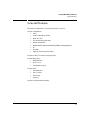
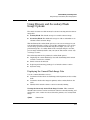
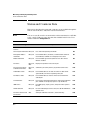
This chapter describes:
■
How switch memory manages configuration changes
■
How the CLI implements configuration changes
■
How the menu interface and web browser interface implement configuration changes
■
How the switch provides software options through primary/secondary
flash image options
■
How to use the switch’s primary and secondary flash options, including
displaying flash information, booting or restarting the switch, and other
topics
Overview of Configuration File
Management
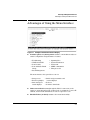
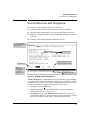
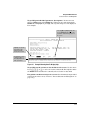
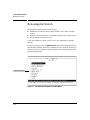
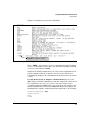
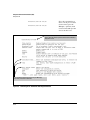
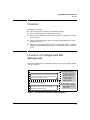
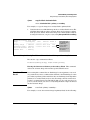
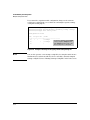
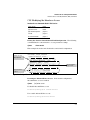
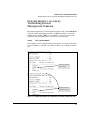
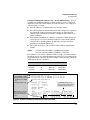
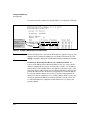
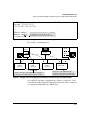
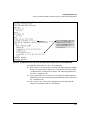
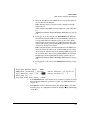
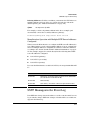
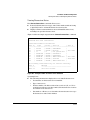
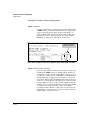
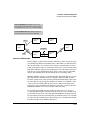
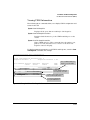
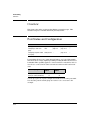
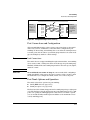
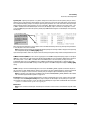
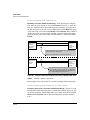
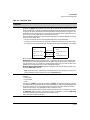
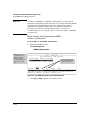
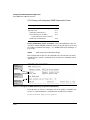
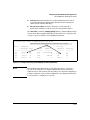
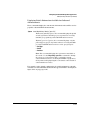
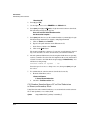
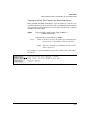
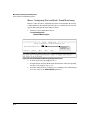
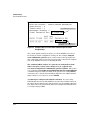
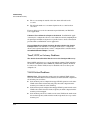
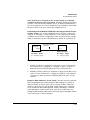
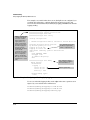
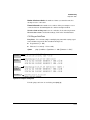
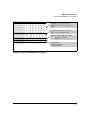
The switch maintains two configuration files, the running-config file and the
startup-config file.
Volatile Memory
Running-Config File
(Controls switch operation. When the switch reboots,
the contents of this file are erased and replaced by the
contents of the startup-config file.)
Flash (Non-Volatile) Memory
Startup-Config File
(Preserves the most recently saved configuration
through any subsequent reboot.)
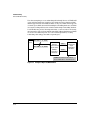
CLI configuration
changes are written to
this file. To use the CLI to
save the latest version of
this file to the startupconfig file, you must
execute the write
memory command.
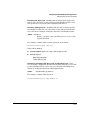
Menu interface configuration changes are simultaneously written to both
of these files.
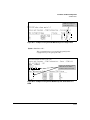
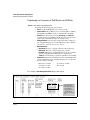
Figure 6-1. Conceptual Illustration of Switch Memory Operation
6-3