1
Printer error recovery
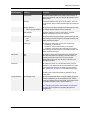
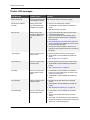
LCD Message
Possible Cause
Solution
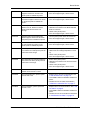
Media Broken
The retransfer film is
broken.
1 Repair the retransfer film as described in
“Mending broken ink ribbon or retransfer film”
on page 55.
2 Press RESET, and then ENTER to initialize the
printer one ribbon panel.
Media Search
The printer is searching for
the retransfer film.
1 Press RESET, and then ENTER to reset the
retransfer film.
2 Call for service if the problem persists.
Media Run Out
The retransfer film has run
out.
1 Replace with new roll of retransfer film.
2 Press RESET, and then ENTER to initialize the
printer.
3 Initialize the new roll of film as described in
“Initialize the retransfer film” on page 17.
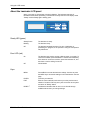
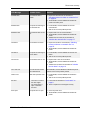
Ink Broken
The ink ribbon is broken.
1 Repair the ink ribbon as described in “Mending
broken ink ribbon or retransfer film” on
page 55.
2 Press RESET, and then ENTER to initialize the
printer.
Ink Search
The printer is searching for
the ink ribbon.
1 Press RESET, and then ENTER to reset the ink
ribbon.
2 Call for service if the problem persists.
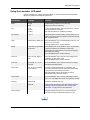
Ink Run Out
The ink ribbon has run out.
1 Replace with a new roll of ink ribbon.
2 Press RESET, and then ENTER to initialize the
printer.
3 Initialize the new ribbon as described in “Initialize
the ink ribbon” on page 16.
Turn Over Unit
The card turnover device
has malfunctioned.
Press RESET, and then ENTER to initialize the printer.
Call for service if the problem persists.
Heater Cam
Heat roller operation error.
1 Press RESET, and then ENTER to initialize the
printer.
2 Call for service if the problem persists.
No Card
1 There are no cards in
the card hopper.
2 The card hopper is
open or has been
removed.
1 Load cards as described in “Load cards” on
page 8.
2 Close or replace the card hopper securely.
Door Open
The printer door is open.
1 Close the printer door.
2 Press RESET, and then ENTER to initialize the
printer.
RP90 Plus E and RL90 User Guide
59