1
About the Printer
About the Printer
The Datacard® RP90 Plus E card printer uses retransfer printing technology to produce
high-quality, edge-to-edge printing on one or both sides of a variety of PVC and non-PVC
card surfaces, including contact and contactless smart cards. The retransfer printing
process uses two ribbon types –a color ink ribbon and a retransfer film. The ink ribbon is
available in YMCK (Yellow, Magenta, Cyan, and Black) or YMCKK format. The printer uses
these colors to print images on the retransfer film, and a heat roller to transfer the image
onto a card. The printer can be equipped with optional magnetic stripe and smart card
capabilities.
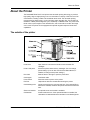
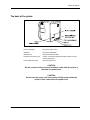
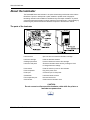
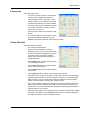
The outside of the printer
2
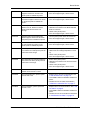
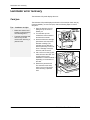
Printer door
Open the door to access the ink ribbon and retransfer film
cartridges.
Printer LCD panel
Shows the printer status and any messages. Use it to change
printer settings. (You can also use the driver Status Monitor, if
installed, to change some printer settings.)
Door latch
Slide the latch to the right to open the printer door.
Card hopper
Load blank cards.
Power switch
Press the switch to power on the printer.
Fan filter
Helps reduce airborne contaminates entering the printer.
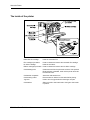
Card discharge slot
Cards removed from the print area exit here. If the optional RL90
laminator is installed, cards exit the printer and enter the laminator
here.
Smart card module
An optional smart card module is available.
Card stacker
Printed cards exit here. If the optional laminator is installed, the
card stacker is attached below the laminator’s card discharge slot.
RP90 Plus E and RL90 User Guide