1
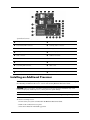
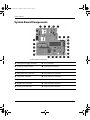
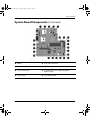
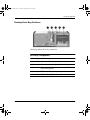
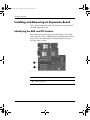
System board connectors (continued)
5 CPU power connector
t
CD-ROM audio connector
6 Power button/LED connector
y
Auxiliary audio connector
7 Diskette drive connector
u
Battery
8 Primary ATA connector
i
Password jumper
9 SCSI connector
o
CMOS reset switch
- Hood sensor connector
p
PCI sockets
q Front USB connector
a
Front audio connector
w Secondary ATA connector
s
AGP socket
e Front chassis fan connector
d
DIMM sockets
r Internal speaker connector
f
24-Position power connector
Installing an Additional Processor
IMPORTANT: If the system board part number in your workstation is 339100-xxx, this section replaces
the “Installing an Additional Processor” section of the existing Hardware Reference Guide.
CAUTION: Failure to follow the workstation preparation instructions and these installation steps could
result in an improperly installed processor, causing extensive system damage.
NOTE: The second processor must be of the same speed, cache, size, and type as the primary processor.
To install a second processor:
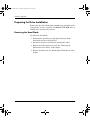
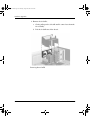
1. Power down your system as instructed in the Hardware Reference Guide.
2. Remove the workstation access panel.
3. Place the workstation in the desktop position.
2