1
Maintenance
Maintenance
Charge the Battery
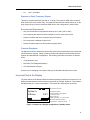
When the battery icon in the display is empty (
), the battery requires charging.
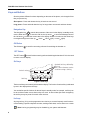
Place the handset in the charger. A beep indicates connection with the charger. Charging status
is displayed by the battery icon in the handset display. After approximately two hours for Desktop
Chargers or four hours for Charging Racks, the handset is fully charged, indicated by a filled
battery icon (
).
If the handset gets switched off automatically due to low battery, and is then placed in a charger,
it remains switched off when fully charged. To start the handset press and hold the ON button.
If the handset is active when placed in the charger, it remains active when fully charged.
Note: Charging below 0oC (32°F) will harm the battery and shorten the lifetime.
Charging Spare Batteries
Spare batteries can be charged in the wall-mounted Charging Rack equipped with the battery
pack adapter.
Figure 3.
022
LED
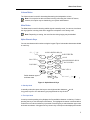
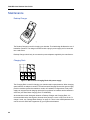
Figure 5: Inserting a battery in the Charging Rack equipped with an adapter.
Place the battery in the charging slot as shown above. The green LED on the adapter flashes
slowly (every two seconds) while charging and glows steady when the battery is fully charged.
39