1
Troubleshooting
Troubleshooting
Problem
Solution
The handset does
not start
Check that the correct battery type is used. "Only to be used in
RAID2-XXXXX" should be printed on the label on the battery,
see page 2. If the battery is correct ensure it is fully charged.
The handset beeps once a minute (during max
30 minutes) with a low tone followed by a high
tone (if enabled, the vibrator also follows the
beeps)."No System" appears in the display.
The handset is out of coverage: Stop the beep with the mute
button and move into range.
Note: When re-entering the coverage area it can take a couple
of minutes before the handset automatically registers into the
system.
(It is possible to adjust the beep volume via the
ring signal volume setting.)
or
It is a no system warning: Remove and then insert the battery
again to make the handset connect to the system
automatically.
Poor voice quality
For best voice quality, avoid positioning near computer, radio or
similar electronic device.
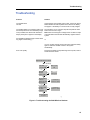
My handset does not work
Working?
Yes
Try with
another SIM
Order a new
SIM
No
Try with
Yes
another
battery pack
Order a new
battery pack
No
Send the handset
for repair
Consult the
installer for advice
Consult the
installer for advice
035
Try on another
location/
Yes
against another
base station
No
Are there more
handsets with Yes
the same
problem?
No
Figure4.
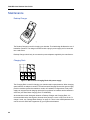
Figure 6: Trouble-shooting the 5606 Wireless Handset.
41