1
Dell_PERC6.2_UG.book Page 54 Wednesday, June 24, 2009 6:08 PM
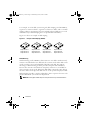
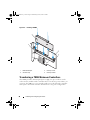
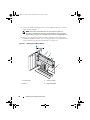
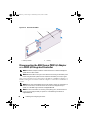
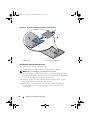
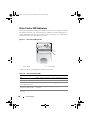
Figure 4-10.
Removing the TBBU
2
1
1 memory module
2
battery
Disconnecting the BBU from a PERC 6/i Adapter
or a PERC 6/i Integrated Controller
NOTE: A PERC 6/i adapter installed in a Dell workstation or a Dell PowerEdge SC
system does not have a BBU.
NOTE: Batteries with low charges can be detected and recharged. The battery must
first be charged and the system must be restarted for the battery to be active again.
This section describes how to disconnect the BBU on a PERC 6/i adapter or a
PERC 6/i Integrated controller while the adapter or controller is installed in a
system.
NOTE: The location of the PERC 6/i varies from system to system. For information on
PERC 6/i card location, see the Hardware Owner’s Manual shipped with your
system or on the Dell Support website at support.dell.com.
NOTE: For more information on removing and replacing parts, see the Hardware
Owner’s Manual shipped with your system or on the Dell Support website at
support.dell.com.
54
Installing and Configuring Hardware