1
Connecting the HD1000
Connection Methods
The HD1000 is designed to connect to your AV system in one of two
ways. In the first method, you connect the HD1000 like you would
a DVD player or any other normal audio-video source. An alternate
method allows you to connect your HD1000 “in-line” as the last
device between an AV source (such as an AV receiver) and your display
device. Both of these options are discussed in more detail below.
Separate AV Source
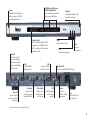
Connect the appropriate HD1000 audio and video outputs to the corresponding inputs on your TV or AV receiver. You will use the HD1000
like you would any other audio-video source by switching to the
appropriate audio-video source on your TV or AV receiver.
In-Line/Video Pass Through
When using the in-line mode, you connect both the Video/Audio
Ins and Outs on your HD1000. The video and audio will be passed
through (using high-quality analog switches) when the HD1000 is in
Standby mode. The HD1000 enters Standby mode when you press
the power button and the power light is off. When in this mode your
HD1000 monitors the incoming video signal and automatically generates a screen saver when appropriate, decreasing the chance of burnin. For more information on this connection method, see “Connecting
Your HD1000 to Use the Video Pass-Through Feature” below.
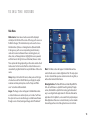
Mode
1
2
3
4
5
6
7
8
9
10
Connector
Component
S-Video
Composite
Component
Component
Component
VGA
VGA
VGA
VGA
Format
480i
480i
480i
480p
720p
1080i
480p
720p
1080i
1024x768
Picture Quality
Good
Good
Good
Better
Best
Best
Better
Best
Best
*
Preparing to Connect
How you connect the HD1000 also depends upon your type of display
and its available inputs. The HD1000 offers four options for connection to your display: Composite, S-Video, VGA and Component. Only
one type of connector may be connected at a time, or image quality
will be adversely affected. We highly recommend that you use either
Component or VGA for the best image quality. However, we have
provided S-Video and Composite for specialized applications.
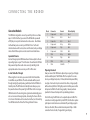
From the factory, the HD1000 is set to output Component 480i. This
connection is widely supported by most HDTVs, but the other options
yield superior results and are recommended if your display supports
them (see the chart). We recommend a Component 720p or 1080i
connection for best results, if supported by your display.
7