1
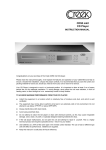
CD43 mk2 Compact Disc Player
CONNECTING THE COMPACT DISC
CAUTION
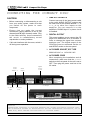
1. LINE OUT SOCKETS
Connect one end of the interconnect cable
to the unit's AUDIO OUTPUT sockets and
the other end to the sockets labelled CD or
A U X, or to other line inputs on the
amplifier. Do not connect it to the
amplifier's PHONO input if a phono circuit
is installed.
u Before connecting or disconnecting a unit
from your audio system, make sure that
you switch off the power to each
component.
u Ensure that you make the correct
connections, paying attention to the L (left
channel) and R (right channel) marks. Plug
in the cable securely. Loose connections
will result in unsatisfactory sound
reproduction or noise problems.
2. DIGITAL OUTPUT
This output enables you to connect the CD
player to a stand-alone D to A converter in
order to change the signal into a stereo
analogue one. The digital output of the
CD43 mk2 can be accessed via the coaxial SPDIF socket on the rear panel.
u If this unit interferes with the tuner, switch it
off during tuner operation.
3. AC POWER SOCKET, IEC TYPE
220V-240 V AC or 110V-120 V AC
4. AC POWER CORD
After completing the installation and all
connections, make sure that the P O W E R
switch on the front panel of the unit is set to
OFF. Then plug the power cord into a live
AC outlet.
Power
on/off
switch I / 0
Audio
Output
Digital
Output
Co-Ax
C D Player
A C Mains
Input
A C Mains
Fuse
Integrated stereo amplifier
WARNING
UNAUTHORISED RECORDING OF COPYRIGHT MATERIAL MAY VIOLATE APPLICABLE COPYRIGHT LAWS.
THE DISTRIBUTOR ASSUMES NO RESPONSIBILITY FOR THE UNAUTHORISED DUPLICATION, USE OR
OTHER ACTS, WHICH INFRINGE UPON THE RIGHTS OF COPYRIGHT OWNERS.
4