1
Connecting Audio Inputs
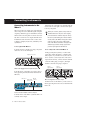
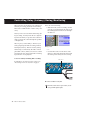
Each Input section has three analog input jacks:
Mbox 2 inputs (sources) support microphones,
guitars, keyboards, and other types of instruments. Mbox 2 has two audio input sections, labeled Input 1 and Input 2. For stereo inputs, use
Input 1 for the left input, and Input 2 for the
right input.
Mic For XLR microphone cables.
Input 2
Input 1
Line (TRS) For 1/4-inch Tip-Ring-Sleeve cables
from keyboards, mixers, microphones, and
other line sources.
DI For 1/4-inch Tip-Sleeve cables from guitar,
bass, microphones, or similar sources.
Mic
DI
Mic
DI
Inputs on back of Mbox 2
The two input sections are located so that the
hardware inputs line up directly behind their
corresponding input controls on the front
panel. This makes it easier to locate channel input connections from the front.
Line
(TRS)
Line
(TRS)
Analog input connectors
For information about connecting specific audio sources, see “Attaching a Microphone to the
Mbox 2” on page 4, and “Connecting Instruments to the Mbox 2” on page 6.
Getting Sound In and Out of Mbox 2
3