1
PX502 Tape Library Quick Start Guide
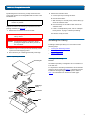
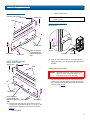
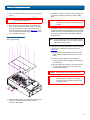
a Loosely attach the adjustable shelves (right and left)
with 4 M5 x 10 Allen screws and T-nuts.
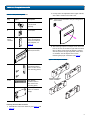
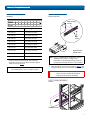
Table 3 Library Mounting Hardware
Qty
Figure
NOTE: T-Nuts must be oriented so they fit in the grooves
of the shelves.
Description
16
Allen head screws (M5
x 10) for shelf
assembly
8
T- nuts (M5)
4 metric
and 4
standard
Rail adapters (both
metric and standard
holes are included, 8
total adapters, see
figure 4)
2
Right and left support
shelves (left shown)
b Attach the appropriate rail adapter to the front and
back of the rack mount shelves (right and left) with 4
M5 x 10 Allen screws (each rail adapter is marked
with the specific hole type supported, either metric
or standard). The rail adapters have arrows
indicating the proper orientation (see figure 4).
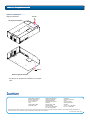
Figure 4 Rail Adapter Orientation
4 sets
Front and back rail
mounting hardware
(M5 x 12 allen screws
and mounting plates)
2 sets
Back bracket
hardware (M5 x 8
allen screws and
mounting plate)
2 sets
Back clamp hardware
(M5 x 10 and back
clamp)
Installing the Rack Mount Shelves
Keep the arrow up for
correct orientation
0
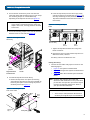
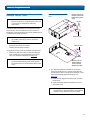
1 Assemble the rack mount shelves by (see figure 5 and
figure 6):
5