1
PX502 Tape Library Quick Start Guide
•
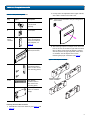
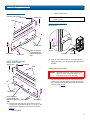
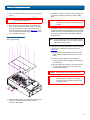
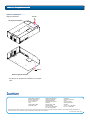
Figure 5 Assembling the LeftHand Rack Mount Shelf
Rail adapter
Allen screws
T-nuts
2 M4 x 12 Allen screw.
NOTE: The rack mount shelves must be installed on the
inside rack rails.
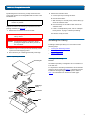
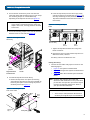
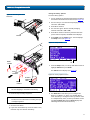
Figure 7 Installing the Rack
Mount Shelves
ft s
Le
lf
he
Allen screws
FlexLink™ opening
located towards the
front for the left-hand
shelf
Rail adapter
Allen screws
Mounting
plate
Allen
screws
Left shelf
Right shelf
3 Once the rack mount shelves are secured to the rack,
tighten the Allen screws securing the adjustable shelves
together.
Figure 6 Assembling the RightHand Rack Mount Shelf
Rail adapter
Allen screws
T-nuts
Installing the Library Chassis
0
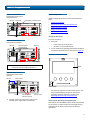
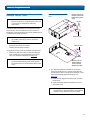
WARNING: The PX502 tape library weighs approximately
52 lbs (23.6 kg). At least two people are
required to lift and install the library.
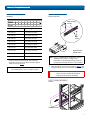
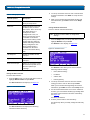
1 The back mounting brackets are lettered (A through I)
so the correct mounting position is easily determined.
The mounting positions differ depending on the depth
of the rack (see table 4).
Ri
gh
Allen screws
FlexLink opening
located towards the
back for the right-hand
shelf
ts
he
lf
Allen screws
Rail adapter
2 Install the left and right rack mount shelves into the
rack (the rack mount shelves adjust 27 in. to 36 in.) and
secure with the following parts in four locations (see
figure 7):
•
Mounting plate
6