1
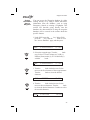
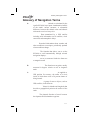
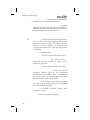
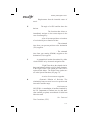
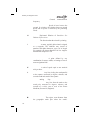
Troubleshooting
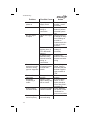
Problem
Unit does not
power on
Possible Cause
Open in power
supply circuit
Faulty electrical
wiring or
connection
110
No GPS signal
reception
Obstructed signal
path
Search for nearest
waypoints reveals
too few or wrong
types of waypoints
Incorrect seed
position, time, or
UTC differential
entered
If using a wrong
antenna: faulty
external antenna,
wiring, or
connections
Incorrect selection
of waypoint types
to show after
search
Position fix seems
inaccurate
Waypoints
sequencing is
erratic
Wrong seed
position
Direct-To entry
option setting may
not be correct
Wrong bearing
and track values
Incorrect magnetic
variation entered
Can’t change
active frequency
Comm Radio not
communicating
Action
Check circuit
breaker - reset if
necessary
Contact your
dealer to perform
electrical system
test
Move aircraft out
of hangar or away
from buildings to
provide an
unobstructed view
of the sky for the
antenna
Check these
settings, if
necessary
Contact your
dealer to check the
antenna and other
wiring
Check “Airspace
Setup” function
and verify that the
desired waypoint
type to search is
“ON”
Re-enter seed
position
If you are flying
Direct-To, the
option should be
set to “May Clear”,
see page 74
Check Magnetic
Var option - select
“Automatic” or
enter correct value
Contact dealer.