1
Operating the Agilent J-BERT
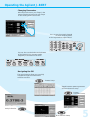
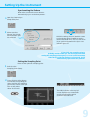
Changing Parameters
With the touchscreen, your finger is the
mouse. Tipping an item with your finger
is like clicking it with the mouse.
You can use the numeric keypad
to enter values by hand,
or the large knob to adjust values.
You can also use the knobs at the bottom
of the instrument to change certain
frequently used values in run-time.
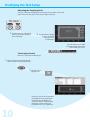
Navigating the GUI
The menu buttons allow you to quickly
navigate through the instrument's
software sections:
Pattern Setup
Toggle between pattern generator
and error detector setup
Pattern
Generator Setup
Analysis Results
Error Detector Setup
5