1
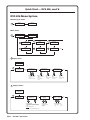
Quick Start — DVS 406, cont’d
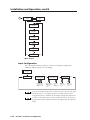
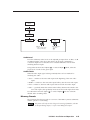
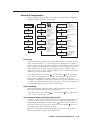
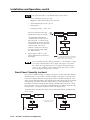
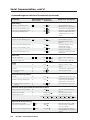
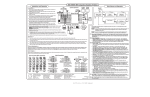
DVS 406 Menu System
Default Cycle menu
Extron
DVS 406 AD
Power
on
2 sec.
2 sec.
Input #2
RGB
Main menu
Extron
DVS 406
Power
on
2 sec.
2 sec.
Input #2
RGB
MENU
3
1
2
5
Input
Configuration
Audio
Configuration
Advanced
Configuration
MENU
MENU
MENU
Output
Configuration
4
Memory
Presets
Exit
Menu
6
NEXT
MENU
MENU
MENU
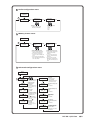
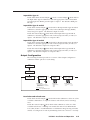
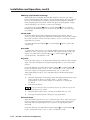
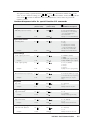
1 Input menu
Extron
DVS 406
MENU
1
Input
Configuration
Input Video Type
#1 RGB Pass Thru
NEXT
Input 1 video types
• RGB pass-through
(default)
• YUV pass-through
2
NEXT
Input Video Type
#2 YUVi #3 Vid
Input 2 video types
• RGB pass-through
• RGBcS
• YUVi (default)
• YUVp
NEXT
Input 3 video
types
• Video (default)
• S-video
Input Video Type
#4 Vid #5 Vid
Input 4 video
types
• Video (default)
• S-video
NEXT
Input 5 video
types
• Video (default)
• S-video
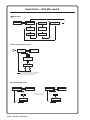
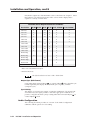
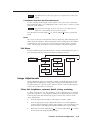
Output menu
Input
Configuration
MENU
2
Output
Configuration
Resol 640 x 480
Refresh @ 50
NEXT
NEXT
Scaler output rates
• See the table on page 2-12 for available
combinations of resolutions and refresh
rates.
Default: 640x480, 60 Hz
NOTE
QS-2
DVS 406 • Quick Start
Lock = Accu-RATE Frame Lock™
Output Sync
RGBHV
Sync formats
• RGBHV (default)
• RGsB
• RGBS
NEXT
Sync Polarity
H Neg
V Neg
Polarity combinations
• H-/V- (default) • H+/V• H+/V+
• H-/V+
NEXT