1
appendix f
TDM Mixing and DSP Usage
Benefits of TDM II
Digidesign’s TDM (or time division multiplexing)
technology is based on the concept of a single,
high-speed data highway, or bus that transmits
data between your Pro Tools CPU, Pro Tools
cards, and the DSP chips on the cards.
Pro Tools|HD cards feature Digidesign’s enhanced TDM II architecture. The TDM II architecture provides many advantages over the original TDM (or TDM I) architecture in terms of its
mixing capacity and flexibility.
In TDM systems, individual channels from
sources such as audio tracks, sends, or busses are
sent out from Pro Tools audio cards, and combined together or multiplexed onto the TDM bus
so that all signals can travel simultaneously and
can be accessed within a single sample period.
At the receiving end, the audio cards can listen
to any connection on the bus, and take whatever data they need.
The TDM bus runs fast enough to accommodate
many audio signals at the same time. Each separate audio signal or stream, takes up a single time
slot on this multiplexed bus.
One of most powerful features of the TDM architecture is that a single time slot can be used to
“broadcast” data to many destinations simultaneously.
With TDM II, not only can it send data to many
destinations simultaneously, but it can also
send signals both bi-directionally and “privately” between DSP chips, which effectively
provides a much greater number of available
time slots. This provides a greater potential
number of connections for routing, processing
and mixing audio signals within Pro Tools.
TDM II
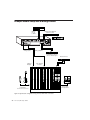
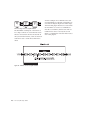
With TDM II, there is a separate TDM I/O bus between each DSP chip on the Pro Tools cards,
each with up to 512 bi-directional time slots at a
session sample rate of 44.1 or 48 kHz (both between DSPs on each card, and between the DSPs
that communicate between cards). The DSP
chips are arranged serially, with a TDM I/O bus
connecting one chip to the next. This means
that every TDM II connection need only use
time slots between the two DSPs that are being
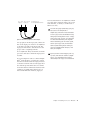
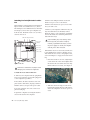
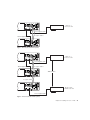
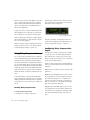
connected. See Figure 11 on page 100.
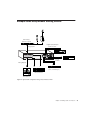
So, using the same example as above, if an audio
track has a Reverb One plug-in insert, a time slot
is used between the Engine DSP (sending out the
audio track) and the DSP with the Reverb One
instance. If the Reverb One insert is handled by
a DSP that is physically next to the DSP handling mixing tasks, as shown in the illustration
below, this leaves time slot 2 available for use
between DSP 3 through DSP 9, and subsequent
Pro Tools|HD cards.
Appendix F: TDM Mixing and DSP Usage
99