1
SERVSWITCH™ WIZARD
5.3 The Status Display
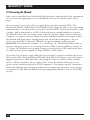
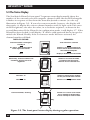
The ServSwitch Wizard’s front-panel 7-segment status display usually shows the
number of the currently selected computer channel, while the dot LED alongside
it flashes in response to data from the shared keyboard or mouse (see the top
illustration in Figure 5-2). If you select autoscan mode, however, the display will
alternately (a) display the current channel number and (b) light each of its outer
six LED segments, one after the other, in a clockwise sequence, as shown in the
second illustration. If the Wizard is in configuration mode, it will display “C”. If the
Wizard has been locked, it will display “P” until a valid password has been typed to
unlock the Wizard. Finally, if the screen-saver mode has been activated, the
channel number will flash.
DISPLAY SHOWS:
MEANING:
Channel number 1 through 8,
steadily lit
That channel is selected
As above, with flashing dot in
lower right-hand corner
Switch is receiving keyboard or
mouse data to be transmitted to
the selected computer
Zero
Display is disabled, but not controls
Alternately, channel number and
clockwise progression of lit
segments
Switch is in autoscan mode,
scanning from channel to
channel at user-selected rate
The letter “P”
Switch is locked and is waiting
for the password to be entered
The letter “C”
Switch is in configuration mode
Channel number, flashing
Switch is in screen-saver mode
and is waiting for keyboard or
mouse activity to restore video
Figure 5-2. The front-panel status display during regular operation.
38