1
SERVSELECTTM IP SOFTWARE INSTALLER/USER GUIDE
Managing SNMP traps
An SNMP trap is a notification sent by the appliance to a management station,
indicating that an event has occurred in the appliance that may require further
attention. You may specify which individual SNMP traps are sent to the
management stations by simply enabling the appropriate checkboxes, or you may
enable/disable all traps. The SCPS has enterprise traps.
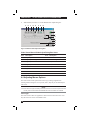
To configure general SNMP settings:
1.
Click the Settings tab in the SCPS AMP.
2.
Select the SNMP category.
3.
Enable or disable the Enable SNMP checkbox.
4.
In the Name field, enter the system’s 0-255 character fully qualified domain
name. In the Contact field, enter 0-255 characters of contact information.
5.
In the Community Names area, enter the 1-64 character Read, Write and Trap
community names. These specify the community strings that must be used in
SNMP actions. The Read and Write strings only apply to SNMP over UDP port
161 and act as passwords that protect access to the appliance.
6.
In the Allowable Managers area, specify up to four SNMP management entities
to monitor this appliance, or leave this area blank to allow any station to
monitor the appliance.
To add an Allowable Manager:
a.
b.
c.
Click the Add button. The Allowable Manager dialog box appears.
Enter the IP address of the management station.
Click OK to add the management station.
To modify an Allowable Manager:
a.
b.
c.
Select an entry in the Allowable Managers list, then click the Modify
button. The Allowable Manager dialog box appears.
Modify the entry as needed.
Click OK to save the change.
To delete an Allowable Manager:
a.
b.
7.
Select an entry in the Allowable Mangers list, then click the Delete button.
You will be prompted to confirm the deletion.
Click Yes to confirm the deletion.
In the Trap Destinations area, specify up to four SNMP trap destinations to
which this appliance will send traps.
To add a trap destination:
a.
b.
98
Click the Add button. The Trap Destination dialog box appears.
Enter the IP address of the trap destination.