1
SERVSELECTTM IP SOFTWARE INSTALLER/USER GUIDE
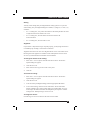
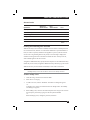
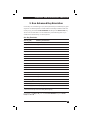
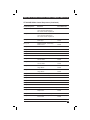
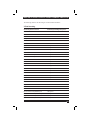
Unit List Keyboard and Mouse Operations
Operation
Description
Enter or Return
Launches the default action for the selected unit.
Up Arrow
Deselects current selection and moves selection up one row.
Down Arrow
Deselects current selection and moves selection down
one row.
Page Up
Deselects current selection and scrolls up one page, then
selects the first item on the page.
Page Down
Deselects current selection and scrolls down one page,
then selects the last item on the page.
Delete
Performs the Delete function. Works the same as the
Edit>Delete menu function.
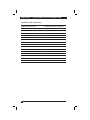
Ctrl + Home
Moves the focus and the selection to the first row in the table.
Ctrl + End
Moves the focus and the selection to the last row in the table.
Shift + Up Arrow
Extends selection up one row.
Shift + Down Arrow
Extends selection down one row.
Shift + Page Up
Extends selection up one page.
Shift + Page Down
Extends selection down one page.
Shift + Mouse-click
Deselects any existing selection and selects the range
of rows between the current focus point and the row the
mouse pointer is over when the mouse is clicked.
Ctrl + Mouse-click
Toggles the selection state of the row the mouse pointer is
over without affecting the selection state of any other row.
Mouse Double-click
Launches the default action for the selected unit.
106