1
3 User’s Guide Addendum
Creating a Soft Resize to Relink or Recapture Media of Different
Resolutions
For Extension 1 customers, a Soft Resize button has been added to the Relink and Recapture
menus in the Clip Library Tools menu. Enable this button to relink media to clips or recapture
media when the resolution of the media and the metadata in the clips differ.
For example, the default resolution of NTSC frames from our Editing and Effects applications
is 720x486, but DV encoded NTSC media originating from other applications is 720x480. To
relink 720x486 clips to 720x480 media, you must apply a soft resize.
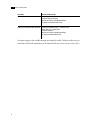
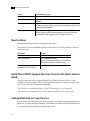
• Location of the Soft Resize button in the Relink menu
• Location of the Soft Resize button in the Recapture menu
For more information on unlinking and relinking and recapturing media, see your User’s Guide.
Enabling Audio On Linux Systems
On a Linux system with a DVS or AJA video I/O card, you must specify the Video keyword in
the software initialization configuration file, init.cfg, in order for the audio to be available. The
corresponding warning message appears if you fail to specify the Video keyword, and the audio
functionality becomes disabled.
FBX 2006.11 Support
This release now supports FBX® version 2006.11.
18