1
Before You Install
Obtaining and Entering Codewords
Obtaining and Entering Codewords
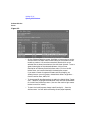
There are two types of software on the Product Media: protected and
unprotected. The core HP-UX software is not protected and has no
codeword. To access any protected software on a CD-ROM, you must
enter an authorized codeword in the SD interface. To access unprotected
software, no codeword is required (for example, the HP-UX 10.20
Runtime bundle does not require a codeword).
You will have access only to those items on the CD-ROM medium that
you have purchased, which are unprotected, or for which you have the
proper codeword. Your codeword appears on the document Codeword for
Installing Software that comes with your software; it is associated with
your customer ID. If you received a document Codeword for Installing
Software — Submittal Certificate, along with a Codeword Request Form,
you can obtain a codeword and Customer ID by returning the latter form
to the HP License Administration.
Product
Documentation
Examine all the packages that contain your products and the Software
Certificate(s). Keep the certificates handy. If your certificate does not
include a codeword (and you want to load optional, protected software)
you must obtain a codeword from Hewlett-Packard by following the
codeword instructions that come with your Software Certificate. If you
have problems with the codeword process, contact HP License
Administration.
Chapter 1
21