1
1394IG.fm Page 2 Thursday, November 9, 2000 8:55 AM
INSTALLING THE AFW-4300
STEP 1
Discharge any static electricity build-up before handling the
AFW-4300 by touching a grounded metal object (such as the
exposed metal parts on the back of your computer).
WARNING Turn OFF power to the computer and disconnect
the power cord.
STEP 2
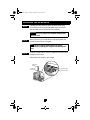
After you turn OFF your computer and unplug the power cord,
remove the cover from the computer.
NOTE See your computer system’s manual for specific
instructions on opening your computer and installing a PCI
card.
STEP 3
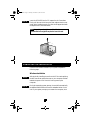
Locate an unused 32-bit or 64-bit PCI expansion slot and remove
the expansion slot cover.
Save the slot cover screw for use in Step 4.
Slot Cover
Screw
Expansion
Slot Cover
64-bit PCI Slot
32-bit PCI Slot
2