1
Hardware Counter Configuration
PowerPC G3/G4/G4+ CPU Performance Counter Configuration
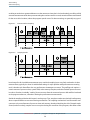
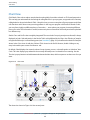
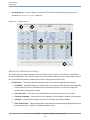
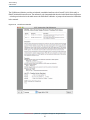
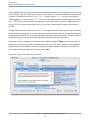
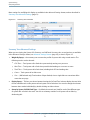
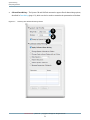
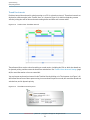
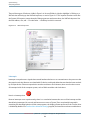
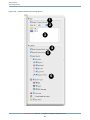
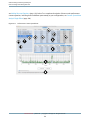
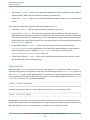
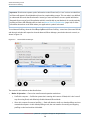
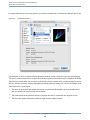
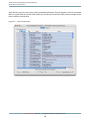
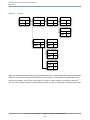
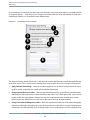
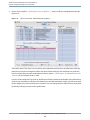
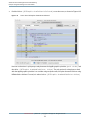
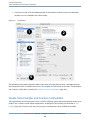
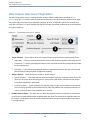
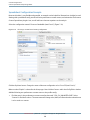
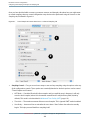
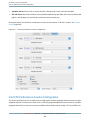
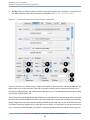
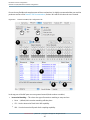
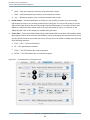
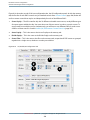
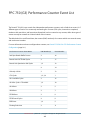
Figure 8-6 shows the single configuration tab for the G4+ processor (the one for the G3 and G4 is virtually
identical, but lacks PMCs 5–6). For the most part, it uses the standard controls from Counter Control (page 206).
Both user/supervisor event counting selection and “marked” threads and processes can be used, but all counters
must use the same settings at once.
Three relatively minor additional controls are provided with all of these cores, to adjust features specific to
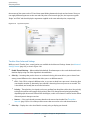
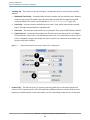
these processors. The three controls are numbered on Figure 8-6, and are:
1.
Threshold: This sets a lower limit on the number of processor cycles that a wide variety of stall events
must take before they are actually recorded, in case you want to filter out short stalls and thereby focus
in only on the most lengthy and problematic stalls.
2.
TB Select: This is the divider used for timebase events that cause processor exceptions, and selects from
four different division ratios.
3.
Branch Folding: PowerPC G3 and G4 CPUs have a feature that allows them to coalesce multiple branch
instructions into one instruction, instead of issuing multiple branch instructions. When this feature is
enabled (the default) performance events counting branch instructions and predictions can be inaccurate.
Hence, for best results when counting performance events dealing with branch instructions, you should
usually disable this feature. See your processor’s User Manual for more details.
Retired Document | 2012-07-23 | Copyright © 2012 Apple Inc. All Rights Reserved.
212