1
Developing Web
Applications with
ColdFusion Express
ColdFusion Express for Windows®
NT and Windows 95/98
Allaire Corporation
Copyright Notice
© Allaire Corporation. All rights reserved.
This manual, as well as the software described in it, is furnished under license and may
be used or copied only in accordance with the terms of such license. The content of
this manual is furnished for informational use only, is subject to change without
notice, and should not be construed as a commitment by Allaire Corporation. Allaire
Corporation assumes no responsibility or liability for any errors or inaccuracies that
may appear in this book.
Except as permitted by such license, no part of this publication may be reproduced,
stored in a retrieval system, or transmitted in any form or by any means, electronic,
mechanical, recording, or otherwise, without the prior written permission of Allaire
Corporation.
ColdFusion is a registered trademark and Allaire, HomeSite, the ColdFusion logo and
the Allaire logo are trademarks of Allaire Corporation in the USA and other countries.
Microsoft, Windows, Windows NT, Windows 95, Microsoft Access, and FoxPro are
registered trademarks of Microsoft Corporation. All other products or name brands
are the trademarks of their respective holders. Solaris is a trademark of Sun
Microsystems Inc. UNIX is a trademark of Novell Inc. PostScript is a trademark of
Adobe Systems Inc.
Contents
Preface: Welcome To ColdFusion Express .....................................................5
About ColdFusion Express Documentation .................................................................................. 6
Printing ColdFusion Express Documentation............................................................................... 6
Documentation Conventions ......................................................................................................... 6
Intended Audience........................................................................................................................... 7
Using This Guide.............................................................................................................................. 8
Developer Resources ....................................................................................................................... 8
Getting Answers ............................................................................................................................... 9
Contacting Allaire............................................................................................................................. 9
Chapter 1: Understanding ColdFusion .........................................................11
ColdFusion Web Applications ...................................................................................................... 11
CFML............................................................................................................................................... 13
ColdFusion Server.......................................................................................................................... 15
The ColdFusion Administrator ..................................................................................................... 16
Development Considerations ....................................................................................................... 17
Chapter 2: Verifying the Server Environment..............................................19
Windows System Requirements ................................................................................................... 20
Windows Configuration ................................................................................................................ 20
Verifying the Web Server ............................................................................................................... 20
Installing ColdFusion Express....................................................................................................... 21
Configuring the Apache Web Server............................................................................................. 22
Verifying ColdFusion Express ....................................................................................................... 22
Installation Considerations and Final Notes ............................................................................... 23
iv
Developing Web Applications with ColdFusion Express
Chapter 3: Understanding Development.....................................................25
ColdFusion Application Pages.......................................................................................................25
The Development Process .............................................................................................................26
Writing Code ...................................................................................................................................27
Saving Application Pages ...............................................................................................................28
Viewing Application Pages .............................................................................................................28
Adding CFML ..................................................................................................................................29
Development Considerations........................................................................................................30
Chapter 4: Creating and Manipulating Variables ........................................33
Variables ..........................................................................................................................................34
Variable Types .................................................................................................................................34
Variable Scope.................................................................................................................................35
Creating Variables...........................................................................................................................35
Local Variables ................................................................................................................................36
CFSET Syntax Example...................................................................................................................36
Creating Local Variables.................................................................................................................37
Referencing Variables.....................................................................................................................37
Outputting Variables ......................................................................................................................38
CFOUTPUT Syntax Example..........................................................................................................38
Variable Prefixing............................................................................................................................38
Variable Lookup Order ...................................................................................................................40
Outputting Local Variables ............................................................................................................40
Working with CGI Variables ...........................................................................................................41
Working with Cookie Variables......................................................................................................44
Development Considerations........................................................................................................45
Variable Table .................................................................................................................................46
Chapter 5: Building Pages that Retrieve Data .............................................49
Publishing Dynamic Data ..............................................................................................................50
Understanding Data Sources.........................................................................................................50
Adding Data Sources ......................................................................................................................51
Data Source Notes and Considerations ........................................................................................52
Retrieving Data................................................................................................................................53
Using the CFQUERY Tag ................................................................................................................53
Writing SQL .....................................................................................................................................55
Building Queries .............................................................................................................................55
Building Dynamic SQL Statements ...............................................................................................57
Query Notes and Considerations ..................................................................................................57
CFQUERY Variable Information....................................................................................................58
Debugging Application Pages ........................................................................................................59
Outputting Query Data...................................................................................................................60
Using CFOUTPUT to Output Query Data.....................................................................................61
Query Output Notes and Considerations .....................................................................................63
Development Considerations........................................................................................................63
Contents
Chapter 6: Formatting and Manipulating Data ...........................................65
Controlling Data .............................................................................................................................65
Formatting Data..............................................................................................................................66
Using Tables with CFML ................................................................................................................66
Table Syntax Usage Example .........................................................................................................66
Table Notes and Considerations ...................................................................................................68
Understanding ColdFusion Functions .........................................................................................68
Using Display and Formatting Functions.....................................................................................70
Using the DollarFormat Function .................................................................................................71
Using the DateFormat Function....................................................................................................72
Function Notes and Considerations .............................................................................................73
Development Considerations........................................................................................................73
Chapter 7: Using Forms and Action Pages ...................................................75
Using Forms ....................................................................................................................................75
Building Forms................................................................................................................................76
Form Notes and Considerations....................................................................................................79
Dynamically Populating Select Boxes ...........................................................................................80
Understanding Action Pages .........................................................................................................82
Working with Form Variables ........................................................................................................82
Creating Action Pages.....................................................................................................................82
Form Variable Notes and Considerations.....................................................................................83
Development Considerations........................................................................................................84
Chapter 8: Programming with ColdFusion ..................................................85
Using Programming Logic .............................................................................................................85
Using ColdFusion Conditional Logic ............................................................................................86
Coding Conditional Logic ..............................................................................................................87
Writing Conditional Logic Expressions.........................................................................................87
Using Decision Functions to Build Expressions ..........................................................................88
Using Operators to Build Expressions...........................................................................................90
Conditional Logic Notes and Considerations ..............................................................................95
Redirecting Users............................................................................................................................95
Reusing Code...................................................................................................................................97
Development Considerations........................................................................................................99
Chapter 9: Building Search Interfaces ........................................................101
Understanding Search Interfaces................................................................................................101
Dynamically Generating SQL Statements ..................................................................................102
Filtering Data.................................................................................................................................102
Performing Pattern Matching ......................................................................................................103
Filtering Data Based on Multiple Conditions.............................................................................104
Creating Table Joins......................................................................................................................104
Building Flexible Search Interfaces .............................................................................................105
Returning Results to the User ......................................................................................................107
Development Considerations......................................................................................................109
vi
Developing Web Applications with ColdFusion Express
Chapter 10: Building Web Front-Ends ........................................................111
Understanding Web Front-Ends .................................................................................................111
Adding Data...................................................................................................................................111
Validating Data..............................................................................................................................112
Inserting Data................................................................................................................................115
Updating Data...............................................................................................................................117
Passing URL Variables ..................................................................................................................117
Creating Update Action Page.......................................................................................................122
Development Considerations......................................................................................................124
Chapter 11: Where to Go From Here...........................................................125
ColdFusion Express Sample Application ....................................................................................126
Section 2 ........................................................................................................................................128
Chapter 12: Introducing ColdFusion Express Administrator ...................129
Overview of Administering ColdFusion Express ........................................................................129
Summary of Administrative Tasks...............................................................................................131
Starting and Stopping ColdFusion ..............................................................................................132
Chapter 13: Configuring ColdFusion Express Server ................................133
The ColdFusion Administrator ....................................................................................................133
Starting and Stopping ColdFusion ..............................................................................................134
The Settings Page ..........................................................................................................................135
Configuring Administrator Security ............................................................................................136
Mapping Directories.....................................................................................................................137
The ColdFusion Logging Page .....................................................................................................138
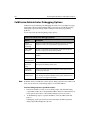
ColdFusion Administrator Debugging Options .........................................................................139
Monitoring ColdFusion Performance .........................................................................................141
Chapter 14: Managing Data Sources ..........................................................143
About ColdFusion Data Sources..................................................................................................143
Configuring ODBC Data Sources for ColdFusion ......................................................................144
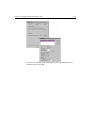
Configuring ODBC Data Sources for Windows ..........................................................................145
Verifying ColdFusion Data Sources.............................................................................................149
Using ColdFusion to Create a Data Source.................................................................................150
Chapter 15: Managing Client Variables......................................................153
About Client Variables..................................................................................................................153
Enabling External Client State Management..............................................................................155
Migrating Client Variable Data ....................................................................................................157
Chapter 16: Where to Go From Here...........................................................159
PREFACE
Welcome To ColdFusion Express
The ColdFusion Web application server provides the fastest way to integrate browser,
server, and database technologies into powerful Web applications and interactive
Web sites.
Up until now, the ColdFusion Web application server was available for purchase in
three editions that vary based on both platform and features:
• ColdFusion Server 4.0 Professional for Windows NT
• ColdFusion Server 4.0 Enterprise for Windows NT
• ColdFusion Server 4.0 Enterprise for Solaris
When you purchase ColdFusion Server Professional or Enterprise editions, you can
build everything from online stores to sophisticated business systems.
ColdFusion Express is a limited functionality version of ColdFusion Server that is
distributed electronically and available for free.
Read this manual to get started developing Web applications with ColdFusion
Express.
To learn about ColdFusion configurations, refer to the ColdFusion product pages
Contents
•
About ColdFusion Express Documentation .................................................... 8
•
Printing ColdFusion Express Documentation ................................................. 9
•
Intended AudienceUsing This Guide.............................................................. 10
•
Developer Resources........................................................................................ 11
•
Getting Answers ............................................................................................... 12
•
Contacting Allaire............................................................................................. 12
Developing Web Applications with ColdFusion Express
8
About ColdFusion Express Documentation
ColdFusion Express online documentation supports all components of the ColdFusion
Express Server. It is organized so that you can quickly locate the information you that
you need.
Online documentation
All ColdFusion Express documentation is available online in HTML and online at our
Web site in PDF format.
To view the HTML documentation, open the following URL:
http://127.0.0.1/cfdocs/dochome.htm
ColdFusion Express titles
The core ColdFusion Express documentation set consists of the following titles.
Developing Web Applications with ColdFusion
Section 1: Describes ColdFusion development system components, system
requirements, how to verify the ColdFusion Server and Web server, and ColdFusion
application development. Task-based in nature, this guide also details the procedures
for creating application pages, setting up ColdFusion data sources, and retrieving data
from desktop databases.
Section 2: Describes how to use the ColdFusion Express Administrator to configure the
server for performance , add and configure data sources, set up basic security,
configure logging, and work with client variables.
CFML Language Reference for ColdFusion Express.
Provides the complete syntax, with example code, of all CFML tags and functions.
Preface : Welcome To ColdFusion Express
9
Printing ColdFusion Express Documentation
If you would like printed documentation to read, locate the Acrobat files at our Web
site.
The Acrobat files offer excellent print output. You can print an entire manual or
individual chapters.
Documentation Conventions
When reading documentation, please be aware of these formatting cues:
• Code samples, filenames, and URLs are set in a monospaced font.
• URL addresses that begin with http://127.0.0.1 direct you to pages on your
Web server’s local machine or the localhost.
• Bulleted lists present options and features.
• Menu levels are separated by the greater than (>) sign.
• Text for you to type in is set in italics.
Developing Web Applications with ColdFusion Express
10
Intended Audience
Developing Web Applications with ColdFusion Express is meant for anyone who wants
to learn about:
• ColdFusion development platform components
• Verifying the server configuration
• ColdFusion development and processing
• Creating application pages
• Working with variables
• Building applications that retrieve data
• Formatting data for display
• Creating forms and action pages
• Controlling page flow
• Building search engines
• Building a Web frontend
• Where to go to learn more about ColdFusion
Using This Guide
Section 1 leads you through fundamental concepts and common procedures that you
need to know in order to develop Web applications with ColdFusion Express.
Within most chapters in Section 1, you will apply the concepts and procedures that
you learn in order to build a ColdFusion application that’s modelled after the Human
Resources Employee Manager - a simple example application that was installed with
the ColdFusion Express software. This application allows the Human Resources staff of
a large company to view important data about their employees.
The application is made up of ColdFusion application pages which you can view and
build as you progress through this guide. The Human Resources Employee Manager
relies on an Access database that was also installed with ColdFusion Express.
Section 2 details how to administer ColdFusion Server.
Preface : Welcome To ColdFusion Express
11
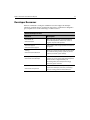
Developer Resources
Allaire is committed to setting the standard for customer support in developer
education, technical support, and professional services. Our Web site is designed to
give you quick access to the entire range of online resources.
Allaire Developer Services
Resource
Description
Allaire Web site
Our home page provides general information
about Allaire products and services as well as
regular corporate news updates.
www.allaire.com
Technical Support
www.allaire.com/support
Training
www.allaire.com/education
Developer Community
www.allaire.com/developer
Allaire Alliance
www.allaire.com/partners
Allaire offers a wide range of professional support
programs.
There are a variety of courses that you may attend
at an Allaire training center, at your site, on the
Internet, and even at your desktop.
The DevCenter provides the resources that you
need to stay on the cutting edge of development.
There are links to Support Forums, our
Knowledge Base, the Developer’s Exchange,
technical papers and more.
There is a network of solution providers,
application developers, releasers, and hosting
services creating solutions with ColdFusion.
Developing Web Applications with ColdFusion Express
12
Getting Answers
One of the best ways to solve particular programming problems is to tap into the vast
expertise of the ColdFusion developer community on the Allaire Support Forums.
Other ColdFusion developers on the forums can help you figure out how to do just
about anything with ColdFusion. The search facility can also help you search messages
going back 12 months, allowing you to learn how others have solved a problem you
may be facing. The Forums are a great resource for learning ColdFusion, and they’re
also a great place to see the ColdFusion developer community in action.
Contacting Allaire
Corporate headquarters
Allaire Corporation
One Alewife Center
Cambridge, MA 02140
Tel: 617.761.2000
Fax: 617.761.2001
http://www.allaire.com
Sales
Toll Free: 888.939.2545
Tel: 617.761.2100
Fax: 617.761.2101
Email: [email protected]
Web: http://www.allaire.com/store
Technical support
Telephone support is available Monday through Friday 8 A.M. to 8 P.M. Eastern time
(except holidays)
Toll Free: 888.939.2545 (U.S. and Canada)
Tel: 617.761.2100 (outside U.S. and Canada)
Postings to the ColdFusion Support Forum (http://forums.allaire.com) can be made
any time.
CHAPTER 1
Chapter 1
Understanding ColdFusion
This chapter describes ColdFusion application pages, ColdFusion components, and
how ColdFusion Server works with a Web server to deliver dynamic content to a
browser.
Contents
•
ColdFusion Web Applications......................................................................... 14
•
CFML................................................................................................................. 17
•
ColdFusion Server ............................................................................................ 19
•
The ColdFusion Administrator ....................................................................... 21
•
Development Considerations ......................................................................... 22
14
Developing Web Applications with ColdFusion Express
ColdFusion Web Applications
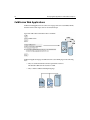
ColdFusion Web applications are collections of pages that can contain XML, HTML,
and other client technologies such as CSS and JavaScript.
ColdFusion application pages are different from static HTML pages in the following
ways:
• They are saved and referenced with a specific file extension.
The default ColdFusion file extension is CFM.
• They contain ColdFusion Markup Language.
Chapter 1: Understanding ColdFusion
15
ColdFusion Enterprise and Professional Editions applications
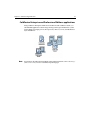
Using ColdFusion Enterprise and Professional editions and ColdFusion Studio, you
can build Web applications that leverage existing technologies and business systems
such as RDMS, messaging servers, file repositories, directory servers, and distributed
object middleware.
Note To learn about the full-featured ColdFusion development platform, refer to the http:/
/www.allaire.com/coldfusionColdFusion product pages.
16
Developing Web Applications with ColdFusion Express
ColdFusion Express applications
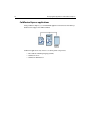
Using ColdFusion Express, you can build Web applications that interact with desktop
databases that support the ODBC standard.
ColdFusion applications rely on these core development components:
• The ColdFusion Markup Language (CFML)
• ColdFusion Server
• ColdFusion Administrator
Chapter 1: Understanding ColdFusion
17
CFML
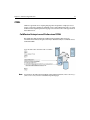
CFML is a tag-based server scripting language that encapsulates complex processes
such as connecting to databases and LDAP servers, and sending email. The core of the
ColdFusion development platform language is more than 70 server-side tags and more
than 140 functions.
ColdFusion Enterprise and Professional CFML
The CFML that’s delivered with the ColdFusion development platform is also
extensible and seamlessly integrates with major distributed objects standards such as
COM and CORBA.
Note To learn about the full-featured ColdFusion development platform, refer to the http:/
/www.allaire.com/coldfusionColdFusion product pages.
18
Developing Web Applications with ColdFusion Express
ColdFusion Express CFML
ColdFusion Express CFML is a pared down server scripting language. ColdFusion
Express CFML includes 10 server-side tags and a variety of functions that you can use
to build Web applications that interact with databases that adhere to ODBC standards.
Chapter 1: Understanding ColdFusion
19
ColdFusion Server
Because CFML is a server-side scripting language, ColdFusion Server must be installed
on a Web server to provide support for ColdFusion applications. The ColdFusion
development platform provides a dynamic application environment that is both
powerful and easy to use.
ColdFusion Enterprise and Professional Servers
ColdFusion Enterprise and Professional edition Servers:
• Deliver a high-performance and scalable architecture.
• Integrate with new and legacy technologies.
• Provide a foundation for building secure applications.
Note To learn about ColdFusion Enterprise and Professional editions, refer to the http://
www.allaire.com/coldfusionColdFusion product pages.
ColdFusion Express Server
The ColdFusion Express Server is a pared down version of ColdFusion Server. It
possesses the same engine as ColdFusion Server with fewer bells and whistles.
ColdFusion Express Server supports high performance and throughput through:
• Database connection pooling
• Just-in-time page compilation and caching
20
Developing Web Applications with ColdFusion Express
How ColdFusion Server works
Regardless of which ColdFusion Server you have installed, ColdFusion application
pages are processed on the server at run-time - each time they are requested by a
browser.
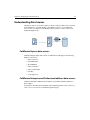
When any ColdFusion Server is installed on a Web server:
• The Web server passes files to ColdFusion Server if a page request contains a
ColdFusion file extension.
• ColdFusion Server scans the page and processes all CFML tags.
• ColdFusion Server then returns only HTML and other client-side technologies
to the Web server and, in turn, the browser.
Chapter 1: Understanding ColdFusion
The ColdFusion Administrator
The ColdFusion Administrator is the browser-based interface for ColdFusion Server.
The ColdFusion Enterprise and Professional Administrator
You use it to fine-tune and configure the following for Enterprise and Professional
edition ColdFusion Servers:
• ODBC and native data sources that applications will use to connect to
databases
• Settings and parameters for optimal server performance
• Debugging display options for development testing
• Security at the application level
• Clusters when working in a multi-server environment
• Scheduling for static page publishing
• Server mappings for directories
ColdFusion Express Administrator
The Administrator for ColdFusion Express Server is a pared down version of the
Administrator for ColdFusion Server. You will use it to fine-tune and configure the
following settings for the ColdFusion Express Server:
• ODBC data sources that applications will use to connect to databases
• Settings and parameters for optimal server performance
21
22
Developing Web Applications with ColdFusion Express
Development Considerations
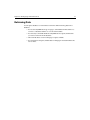
This chapter introduced you to:
• ColdFusion application pages
• CFML
• ColdFusion Server
• ColdFusion Administrator
Where to go from here
• Move on to the next chapter to verify your environment is set up for
development.
• Move on to Chapter 3, “Understanding Development,” on page 31 for more
details about how to develop ColdFusion applications and to see for yourself
how ColdFusion application pages are processed.
• To learn about ColdFusion development platform components, refer to the
http://www.allaire.com/coldfusionColdFusion product pages.
CHAPTER 2
Chapter 2
Verifying the Server
Environment
This chapter describes ColdFusion Server system requirements and configuration
procedures for common Web server environments.
Contents
•
Windows System Requirements...................................................................... 24
•
Windows Configuration................................................................................... 24
•
Verifying the Web Server.................................................................................. 24
•
Installing ColdFusion Express......................................................................... 26
•
Configuring the Apache Web Server ............................................................... 27
•
Verifying ColdFusion Express.......................................................................... 28
•
Installation Considerations and Final Notes ................................................. 29
24
Developing Web Applications with ColdFusion Express
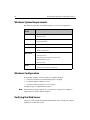
Windows System Requirements
The table below describes the ColdFusion Express Server system requirements.
System
Needs
ColdFusion Express
OS
• Windows NT 4.0 Server
• Windows 95/98
Processor
• Intel 486 or higher
• Pentium preferred
Disk Space
50MB
Memory
• 24MB minimum
• 32MB recommended
Web Server
Compatible with a wide range of Web servers including:
• Netscape servers
• Microsoft Internet Information servers (IIS)
• O’Reilly WebSite servers
• Apache servers
Notes
• A browser is needed to administer ColdFusion Server.
• Apache 1.3.4 and above is supported.
Windows Configuration
To install and configure your environment for ColdFusion Express:
1.
Verify that a Web server is installed and properly configured.
2.
Load and configure ColdFusion Server.
3.
Verify that ColdFusion Express Server is running.
Installation steps are explained in detail below.
Note When running an Apache Web server, you will need to configure it for ColdFusion
support after you install ColdFusion Express.
Verifying the Web Server
A Web server must already be installed and running in order to install and configure
ColdFusion on a Windows system.
Chapter 2: Verifying the Server Environment
25
To verify that a Web server is running:
1.
Open a browser on your local system and enter the following URL:
HTTP://127.0.0.1
If the Web server is running and properly configured, the default Web page
appears in your browser.
If a Web server is not properly configured, you will receive an error message.
2.
If you received an error, check Services in the Control Panel on a Windows NT
machine or the Web server’s utility on a Windows 95 or 98 machine to manage the
Web server.
Note If you are using a proxy server to access the Internet, you will need to configure your
localhost (127.0.0.1) to bypass it within your browser Internet options.
If errors persist, reinstall the Web server software and contact the Web server vendor
before installing ColdFusion Express.
26
Developing Web Applications with ColdFusion Express
Installing ColdFusion Express
If you are viewing this documentation, then you have installed ColdFusion Express
and this explanation is for information only.
Load and configure ColdFusion Express by launching the install program, setup.exe.
During ColdFusion Express setup, a wizard prompts for:
• The ColdFusion components to install
• The Web server you want to use with ColdFusion
• A folder in which to store ColdFusion program files
To get started quickly, accept default folders.
If your system has a previous version of ColdFusion, setup.exe replaces ColdFusion
program files but does not remove or change any existing application pages.
Caution Prior to running setup.exe, close all other applications and shutdown any database
servers running on the same machine. This ensures that the ODBC drivers install
properly.
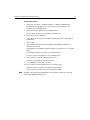
To install ColdFusion Express:
1.
Login to your system using an Administrator account.
2.
Run setup.exe from your hard drive.
3.
Read and accept the ColdFusion Express license agreement.
4.
Fill in the product registration form.
5.
Accept default folder names for ColdFusion files.
6.
Select the Web server for ColdFusion.
The setup wizard polls your computer and displays the Web root directory it finds.
7.
Accept default folder names for ColdFusion files.
ColdFusion examples and documentation are installed in the CFDOCS directory
which resides below the Web server’s root directory.
8.
Add ColdFusion Express to the Start menu.
9.
Start the installation by verifying the data on the next screen and then press Next.
After the installation is complete, perform the next series of tasks if you have an
Apache Web server. Otherwise, move ahead to verify that ColdFusion Express is
running.
Note Allaire recommends that you don’t install sample applications and documentation on
production servers or servers that are available on the internet unless you secure the
CFDOCS directory using standard Web security.
Chapter 2: Verifying the Server Environment
Configuring the Apache Web Server
In order to run ColdFusion Express on an Apache Web server on a Windows system,
configure the Web server to load the ColdFusion module.
To configure the Apache Web server:
1.
Copy the ColdFusion module:
c:\cfusion\bin\ApacheModuleColdFusion.dll
to your Apache modules directory.
2.
Edit the Apache\conf\httpd.conf configuration file to include this line:
LoadModule coldfusion_module modules/ApacheModuleColdFusion.dll
27
28
Developing Web Applications with ColdFusion Express
Verifying ColdFusion Express
After installation, test ColdFusion Express to ensure that it is configured correctly for a
Web server. ColdFusion is delivered with sample applications and databases. You may
test the configuration by accessing a sample application or by accessing the
ColdFusion Administrator, a tool that you can use to fine-tune the server settings.
To verify ColdFusion Express Server:
1.
Select Start > Programs > ColdFusion Express > Welcome to ColdFusion.
The ColdFusion Server Welcome page appears in your default browser.
2.
Select Test your ColdFusion Installation from the Here’s Where to Begin category
on the page.
The Verification Installation and Configuration page appears.
3.
Choose Biology from the department field and choose Verify Query to perform a
test query.
The test query, Courses Offered by the Biology Department, appears when
successful.
Note You can also verify the installation by entering http://127.0.0.1/CFIDE/
Administrator/index.cfm in a local browser URL window or selecting ColdFusion
Administrator from the Start menu ColdFusion Express program group to open the
ColdFusion Administrator.
If you are not successful, read the installation considerations and final notes before
contacting Allaire Corp.
Chapter 2: Verifying the Server Environment
29
Installation Considerations and Final Notes
• By default, ColdFusion Express installation creates and adds three Web server
mappings on your local machine:
/CFDOCS and /CFIDE reside under your Web root directory.
/CFUSION resides on your hard drive.
All three Web mappings are assigned read and execute permissions.
• If you don’t find any ODBC drivers on your system, you will need to install the
Microsoft Data Access Components (MDAC) so that you can connect to the
databases that CF Express supports.
Go to Start > Programs > ColdFusion Serve r> Install Microsoft Data Access
Components
or
Go to the Microsoft Web site to download the latest versions.
• Allaire recommends not to install sample applications and documentation on
production servers or servers that are available on the internet unless you
secure the CFDOCS directory using standard Web security.
• To uninstall ColdFusion Express, click the Uninstall ColdFusion Express icon in
your ColdFusion Express program group.
Where to go from here
• Move on to the next chapter for more details about how ColdFusion application
pages are processed.
• Refer to the Release Notes to learn more about supported configurations,
features, and enhancements.
• Contact Allaire Customer Service if ColdFusion Express does not install
properly.
30
Developing Web Applications with ColdFusion Express
CHAPTER 3
Chapter 3
Understanding Development
This chapter guides you through the ColdFusion development process as well as how
CFML tags are processed. During chapter practices, you will create a ColdFusion
application page, save it, and view it in a browser.
Contents
•
ColdFusion Application Pages ........................................................................ 32
•
The Development Process............................................................................... 33
•
Writing Code..................................................................................................... 35
•
Saving Application Pages................................................................................. 36
•
Viewing Application Pages .............................................................................. 37
•
Adding CFML.................................................................................................... 38
•
Development Considerations ......................................................................... 40
32
Developing Web Applications with ColdFusion Express
ColdFusion Application Pages
Create ColdFusion application pages to retrieve and output data for the Web. As
described in the previous chapter, application pages can include ColdFusion Markup
Language (CFML), HTML, JavaScript, and anything else that an HTML page can
contain.
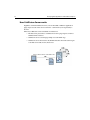
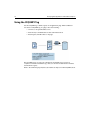
When clients request a ColdFusion application page:
1.
The Web server passes the requested page to ColdFusion Server.
2.
ColdFusion Server processes the page, generates output and returns this, HTML
and other client-side technologies to the Web server.
3.
The Web server passes the page to the client.
4.
The client renders the page in its browser.
Chapter 3: Understanding Development
The Development Process
Whether you are creating a static HTML page or a ColdFusion application page, you
follow the same iterative process:
• Write some code.
• Save the code to a document or page.
• View the page in a browser.
• Write some more code on the page.
• Save the page again.
• View it in a browser.
• and so on...
33
34
Developing Web Applications with ColdFusion Express
What we’ll do here
During this chapter, gain familiarity with CFML and how ColdFusion Server processes
CFML tags as you practice the development process.
During subsequent chapters, you will gain familiarity with the procedures that the tags
perform.
During this chapter, you will learn how to:
• Create a ColdFusion application page by writing some code in Allaire
HomeSite.
• Save your application page under the Web root directory.
• View your page in a browser.
• Add a CFML tag to your page.
• Save changes.
• View your page in a browser.
• Add another CFML tag to your page.
• Save changes.
• View your page in a browser.
Chapter 3: Understanding Development
35
Writing Code
You can code your application pages using NotePad or any HTML editor. The
instructions below guide you through developing your application pages using the
Allaire HomeSite because:
• It is our product.
• We believe it’s the best HTML editor on the market.
http://commerce.allaire.com/download/Click here/a to download an evaluation copy
of HomeSite from our Web site.
To create an application page:
1.
Open Allaire HomeSite.
2.
Select File > New to create a new document or page.
The New Document Template window appears.
3.
Select the Default Template for your new page.
Allaire HomeSite adds the standard HTML template code for you.
4.
Change the document title from Untitled to My First Page.
5.
Type ColdFusion directly under the begin BODY tag.
6.
Enclose ColdFusion in a STRONG block tag.
The page code should look like this:
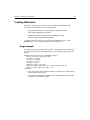
<HTML>
<HEAD>
<TITLE>My First Page</TITLE>
</HEAD>
<BODY>
<STRONG>ColdFusion</STRONG>
</BODY>
</HTML>
Move on to the next series of steps to save the page.
Allaire HomeSite features make it easy to code HTML, JavaScript, and CFML. To learn
about HomeSite, refer to the http://allaire.com/products/homesite/
index.cfmHomeSite product page/a.
36
Developing Web Applications with ColdFusion Express
Saving Application Pages
Instead of saving pages with a HTM file extension, you save ColdFusion application
pages with a CFM extension.
By default, the Web server knows to pass a page that contains a CFM extension to the
ColdFusion Server when it is requested by a browser.
Save ColdFusion application pages underneath the Web root or another Web server
mapping so that the Web server can publish these pages to the internet.
The CFDOCS directory is created and assigned appropriate permissions when you
install ColdFusion documentation. Save your practice pages here to ensure that you
have access to the files.
To save the page:
1.
Select File >Save.
The Save As window appears.
2.
Save your page as MyFirstPage.cfm in CFDOCS under the Web root directory.
For example, the directory path on your machine may be:
C:\INETPUB\WWWROOT\CFDOCS on Windows NT
Or C:\WEBSHARE\WWWROOT\CFDOCS on Windows 95
Move on to the next series of steps and view the page.
Chapter 3: Understanding Development
37
Viewing Application Pages
View the page on the Web server (local) as you go to ensure that the code is working as
expected. Presently, your page is very simple. But, as you add more code, you will want
to ensure that the page continues to work.
To view the page in a local browser:
1.
Open a Web browser on your local machine and enter the following URL to view
MyFirstPage.cfm:
http://127.0.0.1/CFDOCS/MyFirstPage.cfm
Where 127.0.0.1 refers to the localhost and is only valid when you are viewing
pages locally.
2.
View Source in the browser to examine the code that the browser uses for
rendering.
Only HTML and text is returned to the browser.
The code that was returned to the browser looks likes this:
<HTML>
<HEAD>
<TITLE>My First Page</TITLE>
</HEAD>
<BODY>
<STRONG>ColdFusion</STRONG>
</BODY>
</HTML>
Now that you have created the ColdFusion application page, move on to the next set of
steps and add some CFML.
38
Developing Web Applications with ColdFusion Express
Adding CFML
From a coding perspective, the major difference between a static HTML page and a
ColdFusion application page is that ColdFusion pages contain an additional language,
CFML.
CFML is a markup language that’s very similar in syntax to HTML so Web developers
find it intuitive.
Unlike HTML which defines how things are displayed and formatted on the client,
each CFML tag identifies a specific operation that is performed on ColdFusion Server.
During this chapter, you will mix CFML with HTML to see, firsthand, how CFML is
processed on the server. In subsequent chapters, you will learn how you to use CFML
to perform specific server-side processing.
To add CFML to your page:
1.
2.
Return to MyFirstPage.cfm in Allaire HomeSite.
Below the BODY tag, add the following code:
<CFSET ProductName="ColdFusion">
You use the CFSET tag to initialize variables with a value.
You will learn more about CFSET in the next chapter.
3.
Below the CFSET tag, add the following code:
<CFOUTPUT>
The product name is #ProductName#.
</CFOUTPUT>
You use the CFOUTPUT tag to output ColdFusion values to a page.
You will learn more about CFOUTPUT in the next chapter.
4.
Save the page.
Your code should look like this:
<HTML>
<HEAD>
<TITLE>My First Page</TITLE>
</HEAD>
<BODY>
<STRONG>ColdFusion</STRONG>
<CFSET ProductName="ColdFusion">
<CFOUTPUT>
The product name is #ProductName#.
</CFOUTPUT>
</BODY>
</HTML>
5.
Open a browser window.
6.
Enter this URL to view the page in the browser:
http://127.0.0.1/CFDOCS/MyFirstPage.cfm
Chapter 3: Understanding Development
39
"The product name is ColdFusion." appears below ColdFusion in the browser.
7.
View the source code in the browser.
ColdFusion Server processes the CFSET and CFOUTPUT tags and returns HTML
to the browser.
You have created a ColdFusion application page that includes HTML and CFML and
have followed the ColdFusion development process. Move on in this chapter to learn
about other development considerations.
40
Developing Web Applications with ColdFusion Express
Development Considerations
During this chapter you:
• Learned how to create, save, and view ColdFusion application pages
• Saw how CFML was processed and returned to a browser
As you can see, the same development rules that apply for any programming
environment apply to ColdFusion.
You should also follow the same programming conventions that you would with any
other language:
• Comment your code as you go.
HTML comments use this syntax: <!-- html comment -->
CFML comments add an extra dash: <!--- cfml comment --->
• Filenames should be all one word, begin with a letter and can contain only
letters, numbers and the underscore.
• Filenames should not contain special characters.
Where to go from here
• Move on to the next chapter to learn how you can use CFSET and CFOUTPUT
to create and manipulate ColdFusion variables.
• Valid ColdFusion extensions are stored as World Wide Web script map string
values in the Web server’s local registry. Refer to your Web server’s
documentation to learn how to change these values.
• You will learn more about the application development process as you go.
CHAPTER 4
Chapter 4
Creating and Manipulating
Variables
This chapter describes what variables are supported by ColdFusion Express and how
to create and reference ColdFusion variables. During chapter practices, you will use
two of the most frequently used CFML tags, CFSET and CFOUTPUT, to create and
output local variables. You will also learn how to reference CGI variables and set and
reference cookies in your ColdFusion applications.
Contents
•
Variables............................................................................................................ 42
•
Variable Types................................................................................................... 43
•
Variable Scope .................................................................................................. 44
•
Local Variables.................................................................................................. 46
•
CFSET Syntax Example .................................................................................... 47
•
Creating Local Variables .................................................................................. 48
•
Referencing Variables ...................................................................................... 49
•
Outputting Variables........................................................................................ 50
•
CFOUTPUT Syntax Example........................................................................... 51
•
Variable Prefixing ............................................................................................. 52
•
Variable Lookup Order..................................................................................... 54
•
Outputting Local Variables.............................................................................. 55
•
Working with CGI Variables............................................................................. 57
•
Working with Cookie Variables ....................................................................... 60
•
Development Considerations ......................................................................... 62
•
Variable Table ................................................................................................... 63
42
Developing Web Applications with ColdFusion Express
Variables
A Web application page is different from a static Web page because it can publish data
dynamically. This involves creating, manipulating, and outputting variables.
A variable stores data that can be used in applications. As with other programming
languages, you’ll set variables in ColdFusion to store data that you want to access later.
And you’ll reference a range of variables to perform different types of application
processing.
For example, you would store a user's preferences in a variable in order to use that data
to customize the page that’s returned to the browser.
Chapter 4: Creating and Manipulating Variables
Variable Types
There are a variety of variable types that you can create and reference in your
ColdFusion applications and many of them are available for you to use with
ColdFusion Express.
Also note that ColdFusion variables are typeless. This means that you don’t need to
define whether or not the variable value is numeric, text, or time-date.
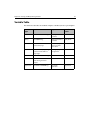
The table below describes the variables that you can use with ColdFusion Express.
Variable
Type
Description
Local
Manually initialize and manipulate values on an application page.
Query
Automatically store data that’s retrieved from a query on an
application page.
Form
Automatically store and pass form control data from a form to a form’s
action page.
URL
Manually set and pass values from one page to another (target page)
at the end of a URL.
HTTP Cookies
Manually set and automatically pass an identification value between
the client and the server.
CGI
Automatically pass environment details available on HTTP Web server
during browser requests.
Application
Manually initialize with values on an application.cfm page.
Manually reference values on other application-specific pages.
43
44
Developing Web Applications with ColdFusion Express
Variable Scope
The primary differences between variable types are where they exist, how long they
exist, and where their values are stored. These considerations are referred to as a
variable’s scope.
The table below describes the ColdFusion Express variables by their scope.
Variable
Type
Scope
Local
The page on which it is created.
Query
The page on which it is created.
Form
The action page that’s associated with a form.
URL
The target page for the hyperlink.
Cookie
All browser sessions.
CGI
All sessions.
Application
The specific application for which it is created.
You will learn more about scope on an as needed basis throughout this book.
Chapter 4: Creating and Manipulating Variables
45
Creating Variables
Variables are created in different ways depending on the variable type. The table below
describes how ColdFusion Express supported variables are created.
Variable
Type
Creation
Local
The CFSET or CFPARAM tag.
Query
The CFQUERY tag.
Form
Passes from the HTML form to the action page.
URL
Passes from the query string (?) at the end of a URL to a target page.
Cookie
The CFSET or CFCOOKIE tag.
CGI
Passes from the browser and server during a browser request.
Application
The CFSET or CFPARAM tag.
During this chapter, you will create and reference a local variable, learn how to
reference some CGI variables and, learn how to set cookie variables. You will create
other variables on an as needed basis throughout this book. For example, you will
create and reference query variables in Chapter 5, “Building Pages that Retrieve Data,”
on page 65 and form variables in Chapter 7, “Using Forms and Action Pages,” on page
103.
46
Developing Web Applications with ColdFusion Express
Local Variables
Create a local variable so that you can store and reference variable values on a page.
As shown in the variable scope table above, a local variable’s scope is local. This means
that a local variable is only valid for the application page on which it is created.
Use the CFSET tag to create a ColdFusion local variable and assign it a value. The
CFSET tag is one of the most frequently used CFML tags. You can use it to initialize a
variable with a text string, numeric value, another variable, or the results of an
expression. You can also use it to overwrite an existing variable’s value.
Chapter 4: Creating and Manipulating Variables
47
CFSET Syntax Example
The code below creates the local variable, ProductName, and assigns it the text string
value ColdFusion:
<CFSET ProductName="ColdFusion">
• On the left side of the equal sign (=) you assign the variable a name.
• On the right side of the equal sign you assign the variable its value.
• Always place double quotes (“) around your variable values.
Note The CFSET tag can also be used to create arrays and structures and other variable
types, refer to the CFExPress_Language_Reference/contents.htmCFML Language
Reference for more information.
48
Developing Web Applications with ColdFusion Express
Creating Local Variables
To create a local variable:
1.
Return to MyFirstPage.cfm in ColdFusion HomeSite.
2.
Below the begin BODY tag, create a local variable called ProductName and set its
value to ColdFusion:
<CFSET ProductName="ColdFusion">
If you performed the procedures presented in the last chapter, then you already
have this variable created.
3.
Save the file.
Ctrl S saves the file.
Your page should look like this:
<HTML>
<HEAD>
<TITLE>My First Page</TITLE>
</HEAD>
<BODY>
<STRONG>ColdFusion</STRONG>
<CFSET ProductName="ColdFusion">
</BODY>
</HTML>
4.
Return to the browser and refresh http://127.0.0.1/CFDOCS/MyFirstPage.cfm.
Ctrl R refreshes the page in the browser.
The variable is not output to the page; its value is just stored with the page.
You will learn how to output the variable value during the next procedure.
5.
View the page source in the browser.
The CFML tag was processed on the server.
Only HTML is returned to the browser.
Note The CFPARAM tag can also be used to set and initialize variables. Refer to the
CFExPress_Language_Reference/contents.htmCFML Language Reference for more
information.
You have created a local variable on your page. Move on in this chapter to learn how to
reference a variable on an application page.
Chapter 4: Creating and Manipulating Variables
49
Referencing Variables
Reference variables in ColdFusion applications so that you can manipulate them,
output them, and use them as a testing mechanism for conditional processing.
During this chapter, you will output variables to an application page.
In subsequent chapters, you will manipulate variables, and use them as a foundation
for conditional processing.
50
Developing Web Applications with ColdFusion Express
Outputting Variables
After you create a variable, you need a way to output it to the page for further
manipulation or just to display its value to users.
Use the CFOUTPUT block tag to tell ColdFusion Server to replace variable references
with variable values.
The CFOUTPUT tag is one of the most frequently used CFML tags. You can use it in
with many other CFML tags, HTML tags, and text to format the data that’s returned to
the user. ColdFusion processes the CFML on the server and returns the rest to the
browser.
You will learn more about formatting output and what to enclose in a CFOUTPUT tag
in the next several chapters.
Refer to the CFExPress_Language_Reference/contents.htmCFML Language Reference
to learn more about how you can use the CFOUTPUT tag.
Chapter 4: Creating and Manipulating Variables
51
CFOUTPUT Syntax Example
The code below outputs the current value of the ProductName local variable:
<CFOUTPUT>
#ProductName#
</CFOUTPUT>
• The CFOUTPUT tag is a block tag.
• Place CFML variables inside the CFOUTPUT block to output them to a page.
• Always place pound signs (#) around a variable name so that ColdFusion knows
to replace the variable reference with its current value.
• Because application pages are processed top-down, always place the
CFOUTPUT block after the CFSET block.
• You can include text, HTML,other CFML tags, and client-side technologies
inside a CFOUTPUT block.
52
Developing Web Applications with ColdFusion Express
Variable Prefixing
Because variables can differ in scope and can overlap, you need to be aware that
sometimes a variety of variables will be available to a ColdFusion application page and
some may variables may share the same name.
To ensure ColdFusion evaluates the appropriate variable, reference a variable by
prefixing a variable name with its type. The table below describes each variable by its
prefix.
Variable
Type
Prefix
Reference Syntax
Local
Variables.
Variables.VariableName
Query
*QueryName.
QueryName.VariableName
Form
Form.
Form.VariableName
URL
URL.
URL.VariableName
Cookie
Cookie.
Cookie.VariableName
CGI.
CGI.
CGI.VariableName
Application
Application.
Application.VariableName
* Where QueryName is the NAME attribute that you assigned in the CFQUERY tag. You
will learn more about querying a database in the next chapter.
Chapter 4: Creating and Manipulating Variables
53
Variable prefixing example
The code below outputs the current value of the ProductName local variable:
<CFOUTPUT>
#Variables.ProductName#
</CFOUTPUT>
• Prefix variables with the variable type. (This is optional for local variables.)
• Surround the variable reference with pound signs (#) so that ColdFusion knows
to replace the variable name with the variable value.
The code below outputs the current value of the ProductName form variable:
<CFOUTPUT>
#Form.ProductName#
</CFOUTPUT>
The code below outputs the current value of the ProductName query results:
<CFOUTPUT QUERY="ProductName" DATASOURCE="HRApp">
#ProductName.ProductName#
</CFOUTPUT>
Note Allaire recommends that you prefix any variables other than local when referencing
them.
54
Developing Web Applications with ColdFusion Express
Variable Lookup Order
When you don’t prefix variables, if more than one variable with the same name exists,
ColdFusion evaluates which variable type to use in this order:
1.
Query result variables
2.
Local variables
3.
CGI variables
4.
URL variables
5.
Form variables
6.
Cookie variables
Chapter 4: Creating and Manipulating Variables
Outputting Local Variables
To output the local variable that you created:
1.
Return to MyFirstPage.cfm in HomeSite.
2.
Add a CFOUTPUT block tag under the CFSET tag.
3.
Reference the ProductName local variable within the block:
<CFOUTPUT>
#Variables.ProductName#
</CFOUTPUT>
If you performed the procedures presented in the last chapter, then you have
already referenced the ProductName local variable. Prefix the variable now.
4.
Save your changes.
Your page should look like this now:
<HTML>
<HEAD>
<TITLE>My First Page</TITLE>
</HEAD>
<BODY>
<STRONG>ColdFusion</STRONG>
<CFSET ProductName="ColdFusion">
<CFOUTPUT>
#Variables.ProductName#
</CFOUTPUT>
</BODY>
</HTML>
5.
6.
Refresh your page in the browser.
View the page source in the browser.
The CFML tags were processed on the server.
The current variable value is returned as text to the browser.
7.
Return to HomeSite.
8.
Apply HTML formatting to make the ProductName value appear in bold:
<CFOUTPUT>
<STRONG>#Variables.ProductName#</STRONG>
</CFOUTPUT>
9.
Add some text surrounding the local variable reference:
<CFOUTPUT>
The product name is <STRONG>#Variables.ProductName#</STRONG>.
</CFOUTPUT>
10. Save your changes.
11. Refresh the page in the browser.
The HTML formatting and text is returned to the browser.
55
56
Developing Web Applications with ColdFusion Express
12. View the page source in the browser.
The CFML tags were processed on the server.
You have output the current value of a local variable. You will perform the same
procedure to output other types of variables. Move on in this chapter to learn about
how you work with and output CGI variables.
Chapter 4: Creating and Manipulating Variables
57
Working with CGI Variables
Each browser request creates a set of read-only variables that store data about the
actual browser and server transactions.
For example, these variables store relevant IP addresses and the browser type that’s
being used for the client request.
We refer to these variables as CGI environment variables even when the Web server
uses an API instead of CGI to communicate with ColdFusion Server.
You can reference CGI environment variables anywhere in a page, for example, to
perform conditional processing based on the type of browser that requested the page.
CGI variables
Different browsers and servers support different CGI variables. The table below
describes the most common CGI environment variables that are created on the server
or created on the client and passed to the server in the request (HTTP) header.
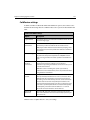
CGI Server Variables
Description
Server or
Client
CGI.SERVER_SOFTWARE
The information server software name and
version that answers the browser request.
Server
SERVER_NAME
The server’s hostname, DNS alias, or IP
address as it appears in self-referencing
URLs.
Server
GATEWAY_INTERFACE
The CGI specification revision to which the
server complies.
Server
SERVER_PROTOCOL
The information protocol name and revision
associated with the browser request.
Server
SERVER_PORT
The port number that received the request.
Server
The HTTP request method.
Server
REQUEST_METHOD
For example, Get or Post.
PATH_INFO
Extra path information that’s supplied by the
client.
Server
PATH_TRANSLATED
A translated version of PATH_INFO supplied
by the server.
Server
SCRIPT_NAME
The virtual path to the script being executed.
This is used for self-referencing URLs.
Server
58
Developing Web Applications with ColdFusion Express
CGI Server Variables
Description
Server or
Client
QUERY_STRING
The query information that follows the
question mark (?) in the URL that referenced
the script.
Server
REMOTE_HOST
The requesting machine’s hostname when
available.
Server
REMOTE_ADDR
The requesting machine’s IP address.
Server
AUTH_TYPE
The protocol-specific authentication method
used to validate users when supported on
the server and when the script is protected.
Server
REMOTE_USER
The username that the server authenticated
when supported on the server and when the
script is protected.
Server
The remote username that’s retrieved when
the HTTP server supports RFC 931
identification.
Server
AUTH_USER
REMOTE_IDENT
This variable can be used for logging only.
CONTENT_TYPE
The content type of attached query data.
Such as information attached via HTTP POST
and PUT,
Server
CONTENT_LENGTH
The length of the content as described by the
client and sent to the server.
Server
HTTP_REFERER
The referring document that linked or
submitted form data to this page.
Client
HTTP_USER_AGENT
Browser type and revision information for
the sending request.
Client
Note ColdFusion stores an empty string value for a CGI variable when detailed information
is not available for a particular session. For this reason, when performing conditional
processing based on a CGI variable, test for null (") rather than a variable’s existence.
You will learn about conditional processing in Chapter 8, “Programming with
ColdFusion,” on page 117.
Chapter 4: Creating and Manipulating Variables
59
Referencing CGI variables
Reference CGI environment variables anywhere on a page to use their values. As with
any variable that you reference:
• Prefix the variable name with its variable type.
• Surround the variable name with pound signs (#).
Referencing CGI variables example
The code below outputs the current value of the HTTP_USER_AGENT to display the
browser type and version:
<CFOUTPUT>
#CGI.HTTP_USER_AGENT#
</CFOUTPUT>
• Prefix the variable name with CGI.
• Reference CGI variables within a CFOUTPUT block to read their values on page.
• Always place pound signs (#) around a variable name so that ColdFusion knows
to replace the variable reference with its current value.
As you can see, you reference and output CGI variables using the same procedure that
you follow when outputting local variables. Move on in this chapter to learn about how
you work with and output cookie variables.
60
Developing Web Applications with ColdFusion Express
Working with Cookie Variables
Cookies are general variables used by application servers such as ColdFusion Server to
store data in and retrieve data from individual browsers.
As shown in the variable scope table above, a cookie is available from a specific
browser to a specific server across sessions. This means that the cookie variables that
you set in an individual browser can be referenced in different application pages.
For example, you may create a cookie and send it back to the browser during a user’s
login. That way, you can reference the cookie to pass specific data from page to page
and each time the browser returns to the application. This is extremely important to
site personalization strategies.
Cookies are characterized as:
• Persistent - they stay stored in the browser until they expire or are deleted.
• Widely-supported - almost all commercial browsers support them.
• Domain specific - they are set and retrieved for a specific server, such as
www.allaire.com or 127.0.0.1.
20 cookies can be set in a user’s browser for each domain. ColdFusion Server
reserves two of these cookies, for CFID and CFTOKEN.
Create cookies using either the CFCOOKIE tag or the CFSET tag on an application
page. When you create a cookie:
• It is set on the client after the entire page is processed.
• You can set it to expire.
• You can delete it later if you want to.
• It persists until the browser is closed unless you set it to expire.
Note Use Secure Sockets Layer (SSL), to exchange cookies securely.
Setting Cookies example
The code below creates the cookie variable, User_ID, assigns it a numeric value of
2344, and sets it to expire after 100 days:
<CFCOOKIE NAME="User_ID" VALUE="2344" EXPIRES="100">
• Use the NAME attribute to assign the variable a name.
• Use the VALUE attribute to assign the variable a value.
• Use the EXPIRES attribute to assign the number of days that the cookie should
live before it expires.
Optional when creating a cookie. Use a value of now to delete a cookie.
• Always surround attribute values with double quotes (“).
For more information on CFCOOKIE, see the ./CFML Language Reference for
ColdFusion Express.
Chapter 4: Creating and Manipulating Variables
61
Referencing Cookies
Once a server stores a cookie in a browser, that cookie is automatically sent back to the
server each time a page is requested by that browser. This means that you can
reference that cookie as needed throughout application pages on that server.
Reference cookie variables anywhere on a page to use their values. As with any variable
that you reference:
• Prefix the variable name with its variable type.
• Surround the variable name with pound signs (#).
Note Because cookies need to be set by the server before you can use them, always test
whether a cookie exists before you use it in an application page.
Always prefix the cookie variable when referencing it.
Referencing Cookies example
For example, you may output a cookie’s current value within another CFML tag so that
you can use its value to perform conditional processing. The code below outputs the
current value of the User_ID.
<CFOUTPUT>
#Cookie.User_ID#
</CFOUTPUT>
62
Developing Web Applications with ColdFusion Express
Development Considerations
During this chapter you learned:
• About the different variables that you can use to perform dynamic page
processing
• How to create a local variable and assign it a value using the CFSET tag
• How to reference a ColdFusion local variable for output to a page using the
CFOUTPUT tag
• How to reference CGI variables
• How to create and reference cookie variables
When creating and referencing variables in ColdFusion applications, keep these
guidelines in mind:
• Variable names should be all one word and begin with a letter.
• Variable names can contain only letters, numbers and the underscore.
• Variable names should not contain special characters.
• ColdFusion variables are not case-sensitive but use a consistent capitalization
scheme.
• Always use double quotes (") to surround a value when assigning a value to a
variable name.
• Always surround a variable name with pound signs (#) when referencing the
variable to use its current value.
• Prefix variable names with variable type to ensure that ColdFusion references
the correct variable during processing.
Where to go from here
• Move on to the next chapter to learn how to query a database and work with
query variables.
Chapter 4: Creating and Manipulating Variables
63
Variable Table
The table below describes the ColdFusion Express variables by their scope and prefix.
Variable
Type
Creation
Scope
Variable
Prefix
Local
The CFSET or CFPARAM tag.
The page on which it
is created.
Variables.
Query
The CFQUERY tag.
The page on which it
is created.
QueryName.
Form
Passes from the HTML form
to the action page.
The action page
that’s associated
with a form.
Form.
URL
Passes from the query string
(?) at the end of a URL to a
target page.
The target page for
the hyperlink.
URL.
Cookie
The CFSET or CFCOOKIE tag.
All browser sessions.
Cookie.
CGI
Passes from the browser and
server during a browser
request.
All sessions.
CGI.
Application
The CFSET or CFPARAM tag.
The specific
application
Application.
64
Developing Web Applications with ColdFusion Express
CHAPTER 5
Chapter 5
Building Pages that Retrieve
Data
This chapter describes how to retrieve data from a database, work with query data,
and enable debugging in ColdFusion applications. During chapter practices, you will
learn how to use the ColdFusion Administrator to set up a data source and enable
debugging, use the CFQUERY tag to query a data source, and use the CFOUTPUT tag
to output the query results to a Web page.
Contents
•
Publishing Dynamic Data................................................................................ 66
•
Understanding Data Sources .......................................................................... 67
•
Data Source Notes and Considerations.......................................................... 70
•
Retrieving Data................................................................................................. 71
•
Using the CFQUERY Tag .................................................................................. 72
•
Writing SQL....................................................................................................... 74
•
Building Queries............................................................................................... 75
•
Building Dynamic SQL Statements ................................................................ 76
•
Query Notes and Considerations.................................................................... 77
•
CFQUERY Variable Information ..................................................................... 78
•
Debugging Application Pages ......................................................................... 79
•
Outputting Query Data.................................................................................... 81
•
Using CFOUTPUT to Output Query Data ...................................................... 82
•
Query Output Notes and Considerations....................................................... 84
•
Development Considerations ......................................................................... 85
66
Developing Web Applications with ColdFusion Express
Publishing Dynamic Data
A Web application page is different from a static Web page because it can publish data
dynamically. This can involve querying databases, connecting to LDAP or mail servers,
and leveraging COM and DCOM objects to retrieve, update, insert, and delete data at
runtime − as your users interact with pages in their browsers.
ColdFusion Express
ColdFusion Express allows you to build queries that retrieve data from, insert data into,
or update data in any database that supports the Open DataBase Connectivity (ODBC)
specification.
To build a query, you will need to use:
• ColdFusion data sources
• The CFQUERY tag
• SQL commands
During this chapter, you will build a query to retrieve data from the HRExpress.mdb,
an Access database that was delivered with ColdFusion Express. In subsequent
chapters in this book, you will insert and update data in this database.
Chapter 5: Building Pages that Retrieve Data
67
Understanding Data Sources
A database is a file or server that contains a collection of data. A data source is a pointer
from ColdFusion to a specific database. You add data sources to your ColdFusion
server so that you can point to the databases that you want to connect to from your
ColdFusion applications.
ColdFusion Express data sources
ColdFusion Express ships with a variety of ODBC drivers and supports the following
database connectivity:
• Microsoft Access
• Borland Paradox
• Borland dBase
• Microsoft FoxPro
• Microsoft Excel files
• Text files
• Lotus Approach
ColdFusion Enterprise and Professional editions data sources
ColdFusion Enterprise and Professional editions offer additional ODBC and native
driver support.
To learn about the full-featured ColdFusion development platform, refer to the http:/
/www.allaire.com/coldfusionColdFusion product pages.
68
Developing Web Applications with ColdFusion Express
Adding Data Sources
Add data sources in the ColdFusion Administrator to define connection requirements
for database queries.
When you add a data source, you assign it a name so that you can reference it within
the CFQUERY tag on application pages to query databases. During a query, the data
source tells ColdFusion which database to connect to and what parameters to use for
the connection.
For example, you will add a data source that describes the ODBC requirements as well
as login information when it is needed to make a connection to a database.
For information about the ColdFusion Administrator, ODBC, and data sources, refer to
Chapter 13, “Configuring ColdFusion Express Server,” on page 175.
Chapter 5: Building Pages that Retrieve Data
69
To add a data source:
1.
Select Start > Programs > ColdFusion Express > ColdFusion Administrator.
The Administrator prompts you for a password if you assigned one to the
ColdFusion Server during install.
2.
Enter a password to gain access to the Administrator.
3.
Choose ODBC under the Server heading on the left menu.
4.
Name the data source HRExpress.
5.
Select Microsoft Access Driver (*.mdb) from the dropdown box to describe the
ODBC driver.
6.
Choose Add.
7.
In the Database File field, enter the full path of the HRExpress.mdb Access
database and click OK.
This database was installed in the CFusion directory under the root of your hard
drive.
For example, the directory path on your machine may be:
C:\CFusion\Database\HRExpress.mdb on Windows NT
8.
Choose Create to create the HRExpress data source.
The data source is added to the data source list.
9.
Locate HRExpress in the data source list.
10. Choose Verify to run the verification test on the data source.
If the data source was created, you should see this message:
The connection to the data source was verified successfully.
Note Example code references the HRApp data source and the code that you write will
reference the HRExpress data source.
70
Developing Web Applications with ColdFusion Express
Data Source Notes and Considerations
When adding data sources to ColdFusion Server, keep these guidelines in mind:
• Data source names should be all one word and begin with a letter.
• Data source names can contain only letters, numbers and the underscore.
• Data source names should not contain special characters.
• Data source names are not case-sensitive in a Windows enviroment, but you
should use a consistent capitalization scheme.
• A data source must exist in the ColdFusion Administrator before you use it on
an application page to retrieve data.
Chapter 5: Building Pages that Retrieve Data
71
Retrieving Data
You can query databases to retrieve data at run-time. When retrieving data from a
database:
• You use the CFQUERY block tag on a page to tell ColdFusion what and how to
connect to a database and how to store the retrieved data.
• You write SQL commands inside the CFQUERY block to specify the data that
you want to retrieve from the database.
• The retrieved data is stored on that page as a query variable.
• You can reference the query variable data on that page in a CFOUTPUT block to
use its values.
72
Developing Web Applications with ColdFusion Express
Using the CFQUERY Tag
Use the CFQUERY tag to define a query on an application page. When ColdFusion
encounters a CFQUERY tag on a page, it does the following:
• Connects to the specified data source.
• Performs SQL commands that are enclosed with the block.
• Returns query variable values to the page.
The CFQUERY tag is one of the most frequently used CFML tags. You use it in
conjunction with the CFOUTPUT tag so that you can retrieve and reference the data
returned from a query.
Refer to the CFML Language Reference for ColdFusion Express for full CFQUERY syntax.
Chapter 5: Building Pages that Retrieve Data
73
CFQUERY usage example
In this example, the query code tells ColdFusion to:
• Use the HRApp data source to connect to the HRExpress.mdb database.
• Store the retrieved data in the query variable EmpList
<CFQUERY NAME="EmpList" DATASOURCE="HRApp">
You’ll type SQL here
</CFQUERY>
• The CFQUERY tag is a block tag.
• Use the NAME attribute to name the query variable so that you can reference it
later on the page.
• Use the DATASOURCE attribute to name an existing data source that should be
used to connect to a specific database.
• Always surround attribute values with double quotes (").
• Place SQL commands inside the CFQUERY block to tell the database what to
process during the query.
Note The data source must exist in order to perform a successful query and that’s why all
examples reference HRApp; a data source delivered with the product.
74
Developing Web Applications with ColdFusion Express
Writing SQL
In between the begin and end CFQUERY tags, write the SQL that you want the
database to execute.
For example, to retrieve data from a database:
• Write a SELECT statement that lists the fields or columns that you want to
select for the query.
• Follow the SELECT statement with a FROM command that specifies the
database tables that contain the columns.
When the database processes the SQL, it creates a data set that is returned to
ColdFusion Server. ColdFusion places the data set in memory and assigns it the name
that you defined for the query in the begin CFQUERY tag.
You may reference that data set by name using the CFOUTPUT tag further down on the
page.
Note There is a lot more to SQL than what is covered here. Allaire recommends that you
purchase one or several SQL guides that you can refer to as you go.
SQL usage example
For example, you would write the code below to retrieve the FirstName, LastName,
StartDate, Salary, and Contract columns from the Employees table located in the
database C:\CFUSION\DATABASE\HRExpress.mdb:
<CFQUERY NAME="EmpList" DATASOURCE="HRApp">
SELECT FirstName, LastName, StartDate, Salary, Contract
FROM Employees
</CFQUERY>
• The SQL SELECT statement describes the column(s) to retrieve data from
during a query.
• The FROM statement describes the table(s) to work with during the query.
• Use commas (,) to separate multiple entries.
• Prefix column names with table names when working with more than one
table.
Note The data source, columns, and tables that you reference must exist in order to perform
a successful query. For this reason, all of the examples in this guide refer to the HRapp
data source; a data source that is delivered with the product.
Chapter 5: Building Pages that Retrieve Data
75
Building Queries
As discussed earlier in this chapter, you build queries using the CFQUERY tag and SQL.
To query the employees table:
1.
Return to HomeSite.
2.
Create a new application page.
3.
Select the Default Template for your page.
4.
Change the document title from Untitled to Employee List.
5.
Type Employee List directly under the begin BODY tag.
6.
Enclose Employee List in a H1 block tag.
7.
Add this code directly under the H1 tag to retrieve data from a database:
<CFQUERY NAME="EmpList" DATASOURCE="HRExpress">
SELECT FirstName,LastName, StartDate, Salary, Contract
FROM Employees
</CFQUERY>
The DATASOURCE attribute that you enter here refers to the data source that you
created.
8.
Save the page as EmpList.cfm in CFDOCS under the Web root directory.
For example, the directory path on your machine may be:
C:\INETPUB\WWWROOT\CFDOCS on Windows NT
Or C:\WEBSHARE\WWWROOT\CFDOCS on Windows 95
Your page should look like this:
<HTML>
<HEAD>
<TITLE>Employee List</TITLE>
</HEAD>
<BODY>
<H1>Employee List</H1>
<CFQUERY NAME="EmpList" DATASOURCE="HRExpress">
SELECT FirstName,LastName, StartDate, Salary, Contract
FROM Employees
</CFQUERY>
</BODY>
</HTML>
9.
Return to your browser and enter the following URL to view EmpList.cfm:
http://127.0.0.1/CFDOCS/EmpList.cfm
10. View source in the browser.
The ColdFusion EmpList data set is stored with the page but only HTML and text
is sent back to the browser.
76
Developing Web Applications with ColdFusion Express
Building Dynamic SQL Statements
You can reference ColdFusion variables in SQL statements to dynamically filter the
query result set at run-time. This is referred to as dynamic SQL statements.
For example, you may want to reference Form and URL variables in a SELECT
statement to return a result set that is associated with a value that a user entered on an
associated form page.
When writing dynamic SQL statements:
• Use the WHERE clause to reference the ColdFusion variable and its relationship
to a particular column.
• Surround the variable in pound signs (#) to tell ColdFusion to replace the
variablename with the its current value.
• Surround the entire variable reference with single quotes (’) to tell the database
that this value is a text value.
Dynamic SQL usage example
The action page code below retrieves database records whose LastName field match
the value that users entered in the LastName form field - a form variable that passed to
this action page when the user submitted a form:
SELECT FirstName, LastName, StartDate, Salary, Contract
FROM Employees
WHERE LastName= ’#Form.LastName#’
If the user entered Allaire in the LastName form field, the SQL statement sent to the
database at run-time would be:
SELECT FirstName, LastName, StartDate, Salary, Contract
FROM Employees
WHERE LastName= ’Allaire’
Note You will learn more about HTML forms and ColdFusion action pages in Chapter 7,
“Using Forms and Action Pages,” on page 103 and more about generating dynamic
SQL statements in Chapter 9, “Building Search Interfaces,” on page 135.
Chapter 5: Building Pages that Retrieve Data
77
Query Notes and Considerations
When creating queries to retrieve data, keep these guidelines in mind:
• Enter the query NAME and DATASOURCE attibutes in the begin CFQUERY tag.
• Surround attribute settings with double quotes(").
• Reference the query data by naming the query in the CFOUTPUT tag later on
the page.
• Make sure that a data source exists in the ColdFusion Administrator before you
reference in a CFQUERY tag.
• The SQL that you write is sent to the database and performs the actual data
retrieval.
• Columns and tables that you refer to in your SQL statement must exist
otherwise the query will fail.
Move on to the next heading to learn more about what other variable data is stored
with a query and how you may use it during debugging.
78
Developing Web Applications with ColdFusion Express
CFQUERY Variable Information
During the last procedure, the retrieved data does not display, but the data is available
to the current page. Each time you query a database with the CFQUERY tag, query
variables store:
• Query properties
• The data itself
Query properties variables
Query properties variables can help you format the data for display as well as debug an
application.
The following table describes the query properties.
Property
Description
RecordCount
The total number of records returned by the query.
ColumnList
Returns a comma-delimited list of the query columns.
CurrentRow
The current row of the query being processed by CFOUTPUT.
Referencing query properties syntax example
The code below displays the number of records returned from the EmpList query - a
query performed earlier on the same page:
<CFOUTPUT>
The query returned #EmpList.RecordCount# client addresses.<BR>
</CFOUTPUT>
• Prefix the variable with its type - in this case - prefix the variable with the name
of the query.
• Reference the query variable within a CFOUTPUT block so that ColdFusion will
output the query variable value to the page.
• Surround the query variable reference with double quotes (") so that
ColdFusion knows to replace the variable name with its current value.
Chapter 5: Building Pages that Retrieve Data
79
Debugging Application Pages
Good development practices also involve debugging applications as you develop
them.
During the last chapter, there was nothing on your application page to debug. But now,
there is a query that is not being output to the page.
When developing and debugging applications, you will want to enable debugging
options for ColdFusion Server so that you can view run-time information about:
• Queries
• CGI variables
• Forms and form variables
• URL variables
• Processing time
• Data sources
Enable debugging within the ColdFusion Express Administrator.
Note There are several debugging options that you can set for ColdFusion Server. Refer to
Chapter 13, “Configuring ColdFusion Express Server,” on page 175 for additional
detail.
80
Developing Web Applications with ColdFusion Express
To enable ColdFusion Server debugging:
1.
Select Start > Programs > ColdFusion Express > ColdFusion Administrator.
The Administrator prompts you for a password if you assigned one to ColdFusion
Server during install.
2.
Enter a password to gain access to the Administrator.
3.
Click DEBUGGING under the Administrator Server heading.
4.
Check the following debug settings:
SHOW
SHOW
SHOW
SHOW
5.
VARIABLES
PROCESSING TIME
SQL AND DATA SOURCE NAME
QUERY INFORMATION
Click APPLY to store these debug options.
Debugging is enabled.
6.
Close the ColdFusion Administrator.
Move on to view debugging information.
7.
Return to EmpList.cfm in your browser.
8.
Scroll down to the bottom of the page.
9.
View the debugging information.
You should see query properties, the SQL used, Data Source Name, and processing
time displayed.
Move on to the next heading to learn how to output query data to a page.
Chapter 5: Building Pages that Retrieve Data
Outputting Query Data
After you have defined a query on a page, you can reference the query using the
CFOUTPUT tag’s QUERY attribute to work with the query data.
81
82
Developing Web Applications with ColdFusion Express
Using CFOUTPUT to Output Query Data
Use the CFOUTPUT tag to define the query variable that you want to output to a page .
When you use the QUERY attribute:
• ColdFusion loops over all the code contained within the CFOUTPUT block,
once for each row returned from a database.
• Reference specific column names within the CFOUTPUT block to output the
data to the page.
• You can place text and HTML tags inside or surrounding the CFOUTPUT block
to format the data on the page.
The CFOUTPUT tag accepts a variety of optional attributes but, most frequently, you
will use the QUERY attribute to define the name of an existing query.
Refer to the CFML Language Reference for ColdFusion Express for full CFOUTPUT
syntax.
CFOUTPUT usage example
The code below outputs the data contained in the FirstName, LastName, StartDate,
and Contract columns of the EmpList query - a query performed earlier on the same
page:
<CFOUTPUT QUERY="EmpList">
#FirstName# #LastName# #StartDate# #Salary# #Contract#<BR>
</CFOUTPUT>
• As with other attributes, surround the QUERY value with double quotes (").
• As with any variables that you reference for output, surround column names
with pound signs (#) to tell ColdFusion to output the column’s current values.
• Add a <BR> tag to the end of the variable references so that ColdFusion will
start a new line for each row that is returned from the query.
Note You will learn how to use an HTML table to format the output Chapter 6, “Formatting
and Manipulating Data,” on page 87.
A query name must exist on the page in order to successfully output its data.
Chapter 5: Building Pages that Retrieve Data
83
To output query data on your page:
1.
Return to EmpList.cfm in HomeSite.
2.
Add this code below the CFQUERY block to define the QUERY to output:
<CFOUTPUT QUERY="EmpList">
</CFOUTPUT>
3.
Within the CFOUTPUT block, reference the columns that you want to output. Add
a <BR> tag to format the results.
#FirstName# #LastName# #StartDate# #Salary# #Contract#<BR>
4.
Save your changes.
Your page should look like this:
<HTML>
<HEAD>
<TITLE>Employee List</TITLE>
</HEAD>
<BODY>
<H1>Employee List</H1>
<CFQUERY NAME="EmpList" DATASOURCE="HRExpress">
SELECT FirstName,LastName, StartDate, Salary, Contract
FROM Employees
</CFQUERY>
<CFOUTPUT QUERY="EmpList">
#FirstName# #LastName# #StartDate# #Salary# #Contract#<BR>
</CFOUTPUT>
</BODY>
</HTML>
5.
View the page in a browser.
A client list displays in the browser.
Each line displays one row of data.
You have created a ColdFusion application page that retrieves and displays data from a
database. At present, the output is raw. You will learn how to format the data in the
next chapter.
84
Developing Web Applications with ColdFusion Express
Query Output Notes and Considerations
When outputting query results, keep these guidelines in mind:
• Run a CFQUERY before referencing its results using a CFOUTPUT with a
QUERY attribute.
• It’s a good idea to run all queries before all output blocks.
• The QUERY attribute must refer to an existing CFQUERY NAME attribute.
• Surround variable references with pound signs to output their current values to
a page.
• Prefix variables with their variable type - in the case of a query variable, it’s the
name of the query.
• When outputting the data itself, you define the variable name using the QUERY
attribute.
• When outputting query properties variables, don’t use the QUERY attribute;
instead, prefix the variable reference with the name of the query.
• Columns must exist and be retrieved to the application in order to output their
values.
Chapter 5: Building Pages that Retrieve Data
85
Development Considerations
During this chapter, you learned how to:
• Add a data source
• Build a query to retrieve data from a database
• Enable debugging for your ColdFusion Server
• Output query variables to a page
Now you are well on your way to harnessing the power of ColdFusion. Before you move
on to the next chapter, add some navigation to your page by performing the next
procedure.
To add navigation to your page:
1.
Return to EmpList.cfm in HomeSite.
2.
http://localhost/CFDOCS/exampleapp/TutorialSolutions/Chapter5/
Toolbar.txtClick here/a to open a file that contains navigation toolbar code.
3.
Copy the code from within the BODY tag of this open file to EmpList.cfm (Just
below the BODY tag.)
4.
Save the page.
5.
Open a browser window.
6.
Enter this URL to view the page in the browser:
http://127.0.0.1/CFDOCS/EmpList.cfm
The query data appears in the browser.
7.
View the source code in the browser.
Note The navigation links will not work at this time because you have not created the pages
that they reference yet.
Where to go from here
• Move on to the next chapter to learn how to format data in your ColdFusion
applications.
• Refer to Chapter 14, “Managing Data Sources,” on page 191 to learn more about
configuring data sources.
86
Developing Web Applications with ColdFusion Express
CHAPTER 6
Chapter 6
Formatting and Manipulating
Data
This chapter describes how to poplulate an HTML table with query results and how
to use ColdFusion functions to format and manipulate data. During chapter
practices, you will create an HTML table and apply date and currency functions for
the data that is retrieved from the Emplist query - the query that you built in the last
chapter.
Contents
•
Controlling Data............................................................................................... 88
•
Formatting Data ............................................................................................... 89
•
Using Tables with CFML .................................................................................. 90
•
Table Syntax Usage Example ........................................................................... 91
•
Table Notes and Considerations ..................................................................... 93
•
Understanding ColdFusion Functions ........................................................... 94
•
Using Display and Formatting Functions ...................................................... 96
•
Using the DollarFormat Function................................................................... 97
•
Using the DateFormat Function ..................................................................... 99
•
Function Notes and Considerations............................................................. 101
•
Development Considerations ....................................................................... 102
88
Developing Web Applications with ColdFusion Express
Controlling Data
Whether data is retrieved from databases, the system itself, LDAP servers or mail
servers, it possesses no inherent structure to help you control how it displays on a
page. Additionally, data types such as date and currency return raw values that are not
easy to work with or read.
By applying HTML tables and ColdFusion functions, you can format and manipulate
the data that’s returned to a page.
Chapter 6: Formatting and Manipulating Data
89
Formatting Data
One of the great things about building a Web application is that you can pull data for
your page at run-time. But what this means is that, though you might know the type of
data you want to return to a page, you will not always know the amount of data that’s
returned or its given length. To format data for display, you will incorporate HTML
tables and ColdFusion display functions within your application pages.
90
Developing Web Applications with ColdFusion Express
Using Tables with CFML
As you may remember from the previous chapter, the QUERY attribute tells
ColdFusion to process the contents of the CFOUTPUT block once for each row of
query data. By combining the CFOUTPUT tag with standard HTML table syntax, you
can create one table that displays one row of data for each record returned from a
query.
Chapter 6: Formatting and Manipulating Data
91
Table Syntax Usage Example
The code below formats Emplist query in a table. The query was defined previously on
that same page.
...
<TABLE >
<TR>
<TH>First Name</TH>
<TH>Last Name</TH>
<TH>Start Date</TH>
<TH>Salary</TH>
<TH>Contract?</TH>
</TR>
<CFOUTPUT QUERY="EmpList">
<TR>
<TD>#FirstName#</TD>
<TD>#LastName#</TD>
<TD>#StartDate#</TD>
<TD>#Salary#</TD>
<TD>#Contract#</TD>
</TR>
</CFOUTPUT>
</TABLE>
...
• Enclose a CFOUTPUT block in a table using the TABLE begin and end tags.
One table will be generated for the page display.
• To include table headers, add one table row for the table header tags within the
TABLE but before the CFOUTPUT block.
One row of table headers will be generated for the page display.
• Reference the name of the query that you want to display using the CFOUTPUT
tag’s QUERY attribute.
• Add one table row for the database column references within the CFOUTPUT
block.
Surround each column reference with a table data tag.
One table row will be generated for each row returned for the query.
To generate a table with query results:
1.
Open EmpList.cfm in HomeSite.
2.
Add a begin TABLE tag after the H1 block and before the CFOUTPUT block.
3.
Edit the tag to assign a table width of 95%.
4.
Add a TR tag after the begin TABLE tag and before the CFOUTPUT block.
5.
Add five TH ALIGN = "LEFT" blocks to that TR tag to create one table header for
each column of data that you’ll output to the page:
<TH ALIGN ="Left">First Name</TH>
92
Developing Web Applications with ColdFusion Express
<TH
<TH
<TH
<TH
ALIGN
ALIGN
ALIGN
ALIGN
="Left">Last Name</TH>
="Left">Start Date</TH>
="Left">Salary</TH>
="Left">Contract?</TH>
6.
Close the table row with the closing TR tag.
7.
Delete the BR tag within the CFOUTPUT block.
8.
Create a new table row by adding a TR tag after the begin CFOUTPUT tag.
9.
Add table data (TD) blocks to surround the five table column names referenced
for output:
<TD>#FirstName#</TD>
<TD>#LastName#</TD>
<TD> #StartDate#</TD>
<TD>#Salary#</TD>
<TD>#Contract#</TD>
10. Add an ending TR tag after the last closing TD tag and before the closing
CFOUTPUT tag to end the table row.
11. Add the closing TABLE tag after the closing CFOUTPUT tag to end the table.
Your table code should look like this:
<TABLE>
<TR>
<TH ALIGN ="Left">First Name</TH>
<TH ALIGN ="Left">Last Name</TH>
<TH ALIGN ="Left">Start Date</TH>
<TH ALIGN ="Left">Salary</TH>
<TH ALIGN ="Left">Contract?</TH>
</TR>
<CFOUTPUT QUERY="EmpList">
<TR>
<TD>#FirstName#</TD>
<TD>#LastName#</TD>
<TD>#StartDate#</TD>
<TD>#Salary#</TD>
<TD>#Contract#</TD>
</TR>
</CFOUTPUT>
</TABLE>
12. Save the file.
13. View the page in a browser.
The employee data appears in a table.
Note The navigation links will not work at this time.
Chapter 6: Formatting and Manipulating Data
Table Notes and Considerations
• The only table syntax inside the CFOUTPUT block should be the single table
row containing the query column references.
• If you wrap the entire HTML table syntax within the CFOUTPUT block,
multiple tables display each row of query data.
• You can mix other HTML and CFML inside or outside the CFOUTPUT block.
93
94
Developing Web Applications with ColdFusion Express
Understanding ColdFusion Functions
All programming languages possess their own set of functions that you use to
manipulate and format data.
For example, you use functions to:
• Display system data, such as the current date and time.
• Perform mathematical calculations, like rounding to the nearest whole
number.
• Find or parse characters in a string.
Function types
ColdFusion contains over 150 different functions. Because Allaire provides solid
reference guides, it’s not important to memorize these functions; you only need to
know what type of operation you want to perform on data.
The table below describes ColdFusion functions by the type of operation that you can
apply to data.
ColdFusion Function types
Usage example
Display and Formatting
• Control the display of dates, times, and numbers.
• For example, use the DollarFormat( ) function to
format a salary value retrieved from a database.
Date and Time
• Perform date-and-time actions.
• For example, retrieve and display the today’s date
from the system using the Now( ) function.
Mathematical
• Perform mathematical operations on values.
• For example, use the Round( ) function to round a
value to the nearest whole number.
String
• Parse text values and lists.
• For example, use Find( ) and Replace( ) to find and
replace characters in a string.
Decision
• Use these functions to test for arrays, queries, and
their simple values so that you can perform
conditional processing.
International
• Use this set of functions to perform date, time, and
currency formatting.
Array
• Use this set of functions to create, edit, and manage
ColdFusion arrays.
Chapter 6: Formatting and Manipulating Data
95
ColdFusion Function types
Usage example
Structure
• Use this set of functions to create, edit, and manage
ColdFusion structures.
System
• Perform actions on directories and paths.
• For example, use the GetTemplatePath function to
get the current page’s directory path so that you
may use all or a portion of its value on the page.
Other
• Perform miscellaneous actions on directories, paths
and files.
• For example, use the CreateUUID function to create
a unique string that you will use as a persistent
identifier in a distributed environment.
During this chapter, you will practice applying display and formatting functions so
that you can gain familiarity with general syntax. Refer to the CFML Language
Reference for ColdFusion Express for a list of functions and their syntax.
96
Developing Web Applications with ColdFusion Express
Using Display and Formatting Functions
During the last several procedures, you have retrieved and output data from a
database. The FirstName, LastName, and Contract fields look fine, but the Salary
contains no currency information and the StartDate column data is difficult to read.
ColdFusion provides a complete set of functions that you can use to control the display
and formatting of:
• Dates
• Times
• Currency
• Numbers
• HTML
• Paragraphs
During this chapter, you will learn how to use the:
• DollarFormat( ) function to format the data in the salary column
• DateFormat( ) function to format the data in the StartDate column
Refer to the CFML Language Reference for ColdFusion Express for a list of functions and
their syntax.
Chapter 6: Formatting and Manipulating Data
97
Using the DollarFormat Function
Use the DollarFormat( ) function to format values with a dollar sign, a thousand
separator, and 2 decimal places. Its syntax is:
DollarFormat(NumericValue)
• Place a NumericValue to format within the function’s parenthesis ( ).
• NumericValue may be a fixed or variable value.
• Reference the function anywhere on a ColdFusion page.
• When referencing the function within a CFOUTPUT block, surround the entire
function with pound signs (#).
This tells ColdFusion to return function results rather than the function name
to the browser.
DollarFormat function usage examples
The two code sets below display $23,333.44 in a browser:
<CFOUTPUT>
#DollarFormat(2333344)#
</CFOUTPUT>
• DollarFormat( ) formats a fixed value for display.
• Surround the entire function with pound signs (#) for immediate output.
<CFSET Salary=DollarFormat(2333344)>
<CFOUTPUT>
#Salary#
</CFOUTPUT>
• DollarFormat( ) formats a fixed value for the Salary variable.
• Surround the Salary variable with pound signs (#) for display.
The code below formats the Salary column data that was returned from a query
performed earlier on the same page:
<CFOUTPUT QUERY="EmpList">
#DollarFormat(Salary)#<BR>
</CFOUTPUT>
• DollarFormat( ) formats a variable for display.
• Surround the entire function with pound signs (#) for immediate output.
98
Developing Web Applications with ColdFusion Express
To format currency for display:
1.
Return to the page that you’re building.
2.
Format the Salary query data using the DollarFormat() function within the
existing TD block:
#DollarFormat(Salary)#
3.
4.
Save the file.
View the page in a browser.
The Salary is formatted for page display.
Note The navigation links will not work at this time.
Chapter 6: Formatting and Manipulating Data
99
Using the DateFormat Function
Use the DateFormat( ) function to display dates in a variety of ways. Its syntax is:
DateFormat(DateValue [, mask ])
• Place a DateValue to format within the function’s parenthesis ( ).
• DateValue may be a fixed or variable value.
When the DateValue is a fixed value, surround it with double quotes (" ) so that
ColdFusion does not interpret it as a numeric value.
• Define an optional mask to describe the date display order and filter.
For example, a mask may describe dd/mm/yy or mm/dd/yy.
Surround the mask value with double quotes (" ) so that ColdFusion interprets
it as a character string.
• Use a comma (,) to Separate the DateValue from the mask.
DateFormat function usage examples
The code below formats the current system date on a North American site:
<CFOUTPUT>
#DateFormat(Now(),"DD/MM/YY")#
</CFOUTPUT>
• The Now( ) function is the DateValue.
• The comma (,) separates the DateValue from the mask.
• The mask tells ColdFusion to format the current value of Now as day/month/
year.
• The double quotes (" ) tell ColdFusion that the mask value is not numeric.
The code below formats the StartDate column data that was returned from a query
performed earlier on the same page:
<CFOUTPUT QUERY=EmpList>
#DateFormat(StartDate)#<BR>
</CFOUTPUT>
• DateFormat( ) formats the query variable for display.
• Surround the entire function with pound signs (#) for immediate output.
100
Developing Web Applications with ColdFusion Express
To format dates for display:
1.
Return to the page that you’re building.
2.
Format the StartDate query data using the DateFormat() function within the
existing TD block:
#DateFormat(StartDate)#
3.
4.
Save the file.
View the page in a browser.
The StartDate is formatted for page display.
Note The navigation links will not work at this time.
Chapter 6: Formatting and Manipulating Data
101
Function Notes and Considerations
When using functions, keep these guidelines in mind:
• Function names are not case-sensitive but it’s good practice, to mix the case of
function names for readability.
• When using functions to format data for display, surround the entire function
with pound signs and include them within a CFOUTPUT block.
• Functions can be nested.
For example, you may display the system date value using the Now() function
and format the displayed system date using the DateFormat function.
102
Developing Web Applications with ColdFusion Express
Development Considerations
During this chapter, you learned how to control and manipulate data for a page using
HTML tables and ColdFusion functions. You will learn more about when and how to
apply ColdFusion functions as needed throughout the remainder of this guide.
Where to go from here
• Refer to the CFML Language Reference for ColdFusion Express for a list of
functions and their syntax.
• Move on to the next chapter to learn about how you can use forms to collect
data from end users.
CHAPTER 7
Chapter 7
Using Forms and Action Pages
This chapter describes how to build forms, the characteristics of form variables, and
how to work with form variables on action pages. During chapter practices, you will
create a form and action page so that you can see how they work together.
In subsequent chapters, you will learn how to incorporate the logic into forms and
actions pages so that you can create search engines and web front ends.
Contents
•
Using Forms.................................................................................................... 104
•
Building Forms ............................................................................................... 105
•
Form Notes and Considerations ................................................................... 109
•
Dynamically Populating Select Boxes .......................................................... 110
•
Understanding Action Pages ......................................................................... 112
•
Working with Form Variables ........................................................................ 113
•
Creating Action Pages .................................................................................... 114
•
Form Variable Notes and Considerations .................................................... 115
•
Development Considerations ....................................................................... 116
•
Development Considerations ....................................................................... 116
104
Developing Web Applications with ColdFusion Express
Using Forms
You can use forms in ColdFusion applications to:
• Gather user input.
For example, to gather user data for a login.
• Provide the front end for search engines.
For example, users could enter employee information and then send this data
to a database to selectively retrieve data.
• Allow your users to add and update database records.
For example, users could enter employee information and that data would be
used to populate a database.
When a form is submitted:
• Its data is stored in form variables.
• Forms can’t store or manipulate these form variables.
• You pass form variables to an associated page called an action page.
• The action page processes the data collected on the form.
For example, it is the action page that would process login information,
perform the search, and handle database updates.
Chapter 7: Using Forms and Action Pages
105
Building Forms
HTML forms begin with an opening FORM tag and end with a closing FORM tag. The
FORM tag accepts two major attributes that you will use to describe the form’s
associated action page and how to submit values to it.
Within the form block, you'll describe the form controls needed to gather and submit
user input.
Note Because forms are not ColdFusion-specific, the syntax and examples that follow
provide you with just enough detail to get going with ColdFusion Express.
FORM tag syntax
<FORM ACTION="ActionPage" METHOD="Post">
...
</FORM>
• Specify an action page to pass form variables using the ACTION attribute.
• Use the METHOD attribute to specify how the variables are submitted from the
browser to the action page on the server.
Submit ColdFusion forms with an attribute setting of METHOD="Post".
Note GET is the default METHOD. It will be used if you don’t specify a METHOD attribute in
the form tag.
Form control syntax
There are a variety of form controls types available. You choose form control input
types based on the type of input the user should provide. For example:
This code creates a text contol:
<INPUT TYPE="Text" NAME="ControlName" SIZE="Value" MAXLENGTH="Value">
This code creates a series of radio buttons:
<INPUT TYPE="RadioButton" NAME="ControlName" VALUE="Value1">DisplayName1
<INPUT TYPE="RadioButton" NAME="ControlName" VALUE="Value2">DisplayName2
<INPUT TYPE="RadioButton" NAME="ControlName" VALUE="Value3">DisplayName3
This code creates a drop down select box:
<SELECT NAME="ControlName">
<OPTION VALUE="Value1 ">DisplayName1
<OPTION VALUE="Value2">DisplayName2
<OPTION VALUE="Value3">DisplayName3
</SELECT>
This code creates a check box:
<INPUT TYPE="Checkbox" NAME="ControlName" VALUE="Yes|No">Yes
This code creates a reset button:
106
Developing Web Applications with ColdFusion Express
<INPUT TYPE="Reset" NAME="ControlName" VALUE="DisplayName">
This code creates a submit button:
<INPUT TYPE="Submit" NAME="ControlName" VALUE="DisplayName">
Form usage example
The code below creates a form for users to enter employee information. The
comments explain the code in this context.
<HTML>
<HEAD>
<TITLE>Input form</TITLE>
</HEAD>
<BODY>
<!--- define the action page in the form tag. The form variables will
pass to this page when the form is submitted --->
<FORM ACTION="ActionPage.cfm" METHOD="POST">
<!--- title the form--->
<H4>Employee Data Form</H4>
<!--- use P tags to format your form--->
<P>
<!--- text field label--->
Employee Last Name<BR>
<!--- text field allows users to enter an employee’s last name--->
<INPUT TYPE="Text" NAME="LastName" size="20" maxlength="50">
</P>
<P>
<!--- drop down select box allows users to select a department --->
<!--- label the form control--->
Department<BR>
<SELECT NAME="Department">
<OPTION VALUE="Training">Training</OPTION>
<OPTION VALUE="Marketing">Marketing</OPTION>
<OPTION VALUE="HR">HR</OPTION>
<OPTION VALUE="Sales">Sales</OPTION>
</SELECT>
</P>
<P>
<!--- checkbox allows users to identify contract employees --->
<!--- label the field--->
Contract Employee?<BR>
<INPUT TYPE="Checkbox" NAME="Contract" VALUE="Yes">Yes
</P>
<P>
<!--- the submit button passes data to the action page specified in
the opening form tag--->
<INPUT TYPE="Submit" NAME="SubmitButton" VALUE="Submit Form">
</P>
<P>
<!--- reset button resets the data on the form --->
<INPUT TYPE="Reset" NAME="Reset" VALUE="Reset Form Values">
Chapter 7: Using Forms and Action Pages
</P>
<!--- end form --->
</FORM>
</BODY>
</HTML>
To create a form to accept user input:
1.
Create a new application page in HomeSite.
2.
Save the page as FormPage.CFM within the CFDOCS directory.
Remember that CFDOCS resides under your web root directory.
3.
Title the page Chapter 7 Form Page.
4.
Add an opening FORM tag directly under the BODY tag:
<FORM ACTION="ActionPage.cfm" METHOD="POST">
5.
Add a heading for the form page:
<H4>Employee Data Form </H4>
6.
Add P tags to format the heading.
7.
Add a text input control so that users can enter a last name on the form:
<INPUT TYPE="Text" NAME ="LastName" SIZE="20" MAXLENGTH="50">
8.
Add a label above the form control to describe it on the form:
Last Name <BR>
9.
Add a select box so that users can select a department:
<SELECT NAME = "Department">
<OPTION VALUE="Training">Training</OPTION>
<OPTION VALUE="Marketing">Marketing</OPTION>
<OPTION VALUE="HR">HR</OPTION>
<OPTION VALUE="Sales">Sales</OPTION>
</SELECT>
10. Add a label above the select box to describe it on the form:
Department<BR>
11. Add a checkbox so that users can identify contract employees:
<INPUT TYPE="Checkbox" NAME="Contract" VALUE="Yes">Yes
12. Add a label above the checkbox to describe it on the form:
Contract employee?<BR>
13. Add a submit form control to pass the data to the action page:
<INPUT TYPE="Submit" NAME="SubmitButton" VALUE="Submit Form">
14. Add a reset form control so that users can reset the data on the form page:
<INPUT TYPE="Reset" NAME="ResetButton" VALUE="Reset Form Values">
15. Add a closing FORM tag before the closing BODY tag to end the form:
</FORM>
107
108
Developing Web Applications with ColdFusion Express
16. Add <P> tags throughout the code to format the page.
17. Save the page.
18. View the form in a browser.
The form appears in the browser.
Remember that you need an action page in order to submit values; you will create
one later in this chapter.
19. Modify as needed.
Note You will receive errors if you submit the form for processing at this time. You will learn
about action pages and the characteristics of form variables later on in this chapter.
Chapter 7: Using Forms and Action Pages
109
Form Notes and Considerations
• To make the coding process easy to follow, name form controls the same as
target database fields.
Refer to Chapter 5, “Building Pages that Retrieve Data,” on page 65 and Chapter
9, “Building Search Interfaces,” on page 135 to learn more about dynamically
generating SQL.
• Limit radio buttons to three-to-five mutually exclusive options.
If you need more than that many options, consider a dropdown select box.
• Use select boxes to allow the user to choose multiple items.
• All the data that you collect on a form is automatically passed as form variables
to the associated action page.
• Checkbox and radio button variables do not pass to action pages unless a user
selects them on a form. If you reference these variables on the action page, your
users will receive an error if they are not present.
• You can dynamically populate dropdown select boxes using query data.
Before creating an action page, move on to the next heading to learn how to
dynamically populate select boxes.
110
Developing Web Applications with ColdFusion Express
Dynamically Populating Select Boxes
During the last procedure, you hard-coded a form’s select box options.
Instead of manually entering department information on a form, you can dynamically
populate a select box with database column fields. When you code this way, changes
that you make to a database are automatically reflected on the form page.
To dynamically populate a select box:
• Use the CFQUERY tag to retrieve the column data from a database table.
• Use the CFOUTPUT tag with the QUERY attribute within the SELECT tag to
dynamically populate the OPTIONS of this form control.
Usage example
This code retrieves department data for a form page and stores it in the
GetDepartments query variable:
<CFQUERY NAME="GetDepartments" DATASOURCE="HRApp">
SELECT Department_Name
FROM Departments
</CFQUERY>
• GetDepartments is the query name.
• The query uses the HRApp data source to connect to the database.
• The data is retrieved from the Department_Name column in the Departments
table.
This code dynamically populates the Department_Name select box with the
GetDepartments query data:
<SELECT NAME="Department_Name">
<OPTION VALUE="All">All</OPTION>
<CFOUTPUT QUERY="GetDepartments">
<OPTION VALUE="#Department_Name#">
#Department_Name#
</OPTION>
</CFOUTPUT>
</SELECT>
• Hard-code an All option.
• The CFOUTPUT block generates one select box option for each column
returned from the query.
Chapter 7: Using Forms and Action Pages
111
To dynamically populate a select box:
1.
Open FormPage.cfm in HomeSite.
2.
Build a query to retrieve the Department_Name column from the HRExpress
Departments table by adding this code between the opening BODY tag and the
opening FORM tag:
<CFQUERY NAME="GetDepartments" DATASOURCE="HRExpress">
SELECT Department_Name
FROM Departments
</CFQUERY>
3.
Locate the select box on the form.
4.
Change the select box NAME attribute to DEPARTMENT_NAME:
<SELECT NAME="Department_Name">
5.
Delete all current select box OPTION blocks.
6.
Add an OPTION block within the SELECT block so that users can select ALL
departments.
<OPTION VALUE="All">All</OPTION>
7.
Add a second OPTION block within the SELECT block that dynamically populates
the select box with the GetDepartments query result set:
<CFOUTPUT QUERY="GetDepartments">
<OPTION VALUE="#Department_Name#">
#Department_Name#
</OPTION>
</CFOUTPUT>
8.
Save the page.
9.
View FormPage.cfm in a browser.
The changes that you just made appear in the form.
Remember that you need an action page to submit values.
Move on in this chapter to learn how to create action pages and work with form
variables.
Note The behind the scenes code refers to a different action page than the one that you are
building.
You will receive errors if you submit the form for processing at this time. You will learn
about action pages and the characteristics of form variables later on in this chapter.
112
Developing Web Applications with ColdFusion Express
Understanding Action Pages
A ColdFusion action page is just like any other application page except that you can
use the form variables that are passed to it from an associated form - a form variable is
passed for every form control that contains a value when the form is submitted.
Note If multiple controls have the same name, one form variable containing a comma
delimited list containing all occurences of that name passes to the action page.
Chapter 7: Using Forms and Action Pages
113
Working with Form Variables
A form variable’s name is the name that you assigned to the form control on the form
page.
Refer to form variable by name within tags, functions and other expressions on an
action page.
Because form variables extend beyond the local page - their scope is the action page,
prefix them with form. to explicitly tell ColdFusion that you are referring to a form
variable.
Note Checkboxes and radio buttons do not pass to action pages unless they are enabled on a
form. In fact, if you try to reference these variables on the action page, you will receive
an error if they are not present.
Usage example
For example this code references the LastName form variable for output on an action
page:
<CFOUTPUT>
#Form.LastName#
</CFOUTPUT>
114
Developing Web Applications with ColdFusion Express
Creating Action Pages
To create an action page for the form:
1.
Create a new application page in HomeSite.
2.
Save the page as ActionPage.cfm within the CFDOCS directory.
Remember that the form that you just created will pass values to a page called
ActionPage.cfm when the form is submitted.
3.
4.
Title the page Chapter 7 Action Page.
Add a heading for the action page output:
<H4>Employee Data Passed to the Action Page </H4>
5.
Add a CFOUTPUT block after the heading:
<CFOUTPUT>
</CFOUTPUT>
6.
Label and define form variables within the CFOUTPUT block to return them back
to the user:
Last Name: #Form.LastName#<BR>
Department: #Form.Department_Name#<BR>
Contract Employee? #Form.Contract#<BR>
7.
Save the page.
8.
View FormPage.cfm in your browser.
9.
Enter data for each form control and submit it.
ActionPage.cfm should return the values that you submitted.
If you receive errors, read the message and check for spelling mistakes.
10. Return to the form in your browser.
11. Reset the values.
12. Do not check the checkbox and submit the form again.
An error occurs when the checkbox does not pass to the action page.
During the next chapter, you will learn how to use conditional logic to handle this
form limitation.
Note Remember that, if you submit the form without checking the checkbox, you will
receive errors. You will learn how to apply conditional logic to your action page to
compensate for this HTML limitation in the next chapter.
Chapter 7: Using Forms and Action Pages
115
Form Variable Notes and Considerations
When using form variables, keep the following guidelines in mind:
• A form variable’s scope is the action page.
• Prefix variables when referencing them on the action page.
• Surround variable values with pound signs (#) for output.
• Text control form variables are always passed to the action page.
• Checkboxes and radio buttons are only passed to the action page if an option is
selected.
• Checkboxes and radio buttons form variables generate errors on action pages if
nothing is selected for the form controls.
116
Developing Web Applications with ColdFusion Express
Development Considerations
During this chapter, you learned about:
• Building forms
• Dynamically populating select boxes
• Creating action pages
• Working with form variables on an action page
Note The CFPARAM tag can be used to test for a variable’s existence and to set default
values. Refer to the CFExPress_Language_Reference/contents.htmCFML Language
Reference for more information.
Where to go from here
• Refer to Chapter 4, “Creating and Manipulating Variables,” on page 41 to learn
about working with variables.
• Move on to the next chapter to learn about how you can use programatic logic
to perform conditional procedures, reuse code, and redirect users.
CHAPTER 8
Chapter 8
Programming with ColdFusion
This chapter describes conditional logic and how to program for page control.
During chapter practices, you will add programming logic to your action pages to
perform conditional processing, program for code reuse, and redirect users
automatically within your applications.
Contents
•
Using Programming Logic............................................................................. 118
•
Coding Conditional Logic.............................................................................. 120
•
Writing Conditional Logic Expressions ........................................................ 121
•
Using Decision Functions to Build Expressions .......................................... 122
•
Using Operators to Build Expressions .......................................................... 124
•
Conditional Logic Notes and Considerations.............................................. 128
•
Redirecting Users ........................................................................................... 129
•
Reusing Code .................................................................................................. 131
•
Development Considerations ....................................................................... 133
118
Developing Web Applications with ColdFusion Express
Using Programming Logic
Even though ColdFusion is almost as easy to code as HTML, it has the same
programming features found in rich scripting languages.
For example, you can you can use CFML language constructs to:
• Perform conditional processing
• Maintain code in one location and use it in many locations
• Automatically redirect users within your application pages
Note ColdFusion also supports programatic looping. See the ./CFML Language Reference for
ColdFusion Express to learn about the CFLOOP tag.
Chapter 8: Programming with ColdFusion
119
Using ColdFusion Conditional Logic
ColdFusion provides simple branching structures that you use to code conditional
logic expressions. In its simplest form, you will use conditional logic to:
• Test for a condition.
• Define what procedure to perform if a condition is true.
• Define what procedure to perform if a condition is not true.
For example, you will use conditional logic on action pages to test for a form variable’s
existence so that your users will not get an error when they submit a form without a
checkbox enabled.
120
Developing Web Applications with ColdFusion Express
Coding Conditional Logic
There are two branching structures that you can use to code conditional logic:
• The CFIF and CFELSE tags
• The CFSWITCH and CFCASE block tags
Note During this guide, you will learn to code for conditional logic using the CFIF and
CFELSE block tags. See the ./CFML Language Reference for ColdFusion Express to learn
about CFSWITCH and CFCASE tags.
CFIF Syntax
<CFIF Expression>
True procedure
<CFELSE>
Not true procedure
</CFIF>
• Write an expression using ColdFusion functions and operators.
• Define the procedure that ColdFusion should perform if the condition is true
directly after the start CFIF tag.
• Define the procedure that ColdFusion should perform if the condition is false
within a CFELSE block within the CFIF block.
Chapter 8: Programming with ColdFusion
121
Writing Conditional Logic Expressions
Within the begin CFIF tag, write an expression to define the condition to test.
Expressions can include a variety of data types such as:
• Numeric
• Boolean
• Time-date
• Strings
The conditional logic expressions that you write will usually include a combination of:
• Variables - You learned about these in Chapter 4, “Creating and Manipulating
Variables,” on page 41.
• ColdFusion decision functions - You learned about functions in Chapter 6,
“Formatting and Manipulating Data,” on page 87 and you will use decision
functions here.
• ColdFusion operators - You’ll learn about these here.
122
Developing Web Applications with ColdFusion Express
Using Decision Functions to Build Expressions
Use decision functions to test for the presence of ColdFusion elements such as form
variables, queries, and their simple values so that you can perform conditional
processing.
When you use decision functions:
• The test will return a Boolean value.
• The actual Boolean value will be either true or false but, when used in a CFIF
expression, it is converted to either yes or no.
The table below describes the most frequently used decision functions.
Refer to the ./CFML Language Reference for ColdFusion Express
Function
Usage
IsDefined
Tests if a variable by a specific name exists.
IsDebugMode
Tests if debugging is enabled on the page.
IsDate
Tests if a variable value is time-date.
IsNumeric
Tests if a variable value is numeric.
IsQuery
Tests if a variable contains query data.
IsStruct
Tests if a variable contains structure data.
Usage example
Checkbox and radio button form variables only pass to action pages when an option is
enabled on the form.
The code below is added to a form’s action page to check for the existence of a
checkbox variable.
<CFIF IsDefined("Form.Contract") IS "YES">
Status: Contract Employee
<CFELSE>
Status: Permanent Employee
</CFIF>
• If Form.Contract is defined, the test returns yes and displays Status: Contract
Employee.
• If Form.Contract is not defined, the test returns no and displays Status:
Permanent Employee.
• After, peforming the conditional processing, ColdFusion continues processing
the page.
Chapter 8: Programming with ColdFusion
123
NoteDuring the next procedure, use this expression syntax on your action page to
check for the existence of a checkbox before trying to process it.
To test for a variable’s existence:
1.
Open ActionPage.cfm in HomeSite.
2.
Title the page Chapter 8 Action Page.
3.
Delete the line Contract Status: #Form.Contract#<BR> within the CFOUTPUT
block.
You will replace it with new code as you go.
4.
Add an opening CFIF tag immediately after the ending CFOUTPUT tag to test if
#Form.Contract# is defined:
<CFIF IsDefined("Form.Contract") IS "YES">
5.
Add a true procedure after the tag to output a label and a value:
Status: Contract Employee
6.
Add a CFELSE tag.
7.
Add a false procedure after this tag to output a label and a value:
Status: Permanent Employee
8.
Add an ending CFIF to end the conditional logic statement.
9.
Your output block should look like this:
<CFIF IsDefined("Form.Contract") IS "YES">
Status: Contract Employee
<CFELSE>
Status: Permanent Employee
</CFIF>
10. Save the page.
11. View FormPage.cfm in a browser.
12. Fill out each field and submit the form.
ActionPage.cfm should return all the values that you entered on the form.
The status field should appear as Contract Employee.
If you receive errors, read the error message and check for spelling mistakes on the
action page.
13. Return to the form in the browser.
14. Reset the form.
15. Do not check the checkbox and submit the form again.
The status field should appear as Pemanent Employee.
Move on in this chapter to learn how to use operators to perform conditional logic
testing.
124
Developing Web Applications with ColdFusion Express
Using Operators to Build Expressions
CFML provides a variety of operators that you can use to build expressions.
Operators fall into four category types:
• Arithmetic - perform operations on numeric values.
• String - perform operations on text values.
• Comparison - compare values and return true or false.
Frequently used when coding conditional logic.
• Compound Boolean - perform logical connective and negation operations and
return true or false.
Frequently used when coding conditional logic.
The table below describes operators by type and symbol.
Type
Symbol
Description
Arithmetic
+, -, *, /
Add, subtract, multiply, and divide.
In the case of division, the right operand cannot be
zero.
For example, 9/4 is 2.25
\
Divides two integer values and returns a whole
number.
For example, 9\4 is 2.
^
Returns the result of a number raised to a power
(exponent).
Use the ^ (caret) to separate the number from the
power.
The left operand cannot be zero.
For example, 2^3 is 8.
MOD
Returns the remainder (modulus) after a number is
divided.
The result has the same sign as the divisor.
The right operand cannot be zero.
For example, 11 MOD 4 is 3.
+ or -
Set a number to either positive or negative.
For example, +2 is 2 and -2 is (-1)*2.
String
&
Concatenates text strings including those returned
from variables and functions.
Chapter 8: Programming with ColdFusion
125
Type
Symbol
Description
Comparison
IS
Performs a case-insensitive comparison of two values.
Returns true or false.
For example, this code tests for equal values. The
condition is true only if the FirstName value is Jeremy.
<CFIF Form.FirstName IS "Jeremy">
IS NOT
Opposite behavior of IS.
For example, this code tests for inequal values. The
condition is true only if the FirstName value is not
Jeremy.
<CFIF Form.FirstName IS NOT "Jeremy">
CONTAINS
Checks to see if the value on the left is contained in the
value on the right.
Returns true or false.
For example this code tests for a value condition. The
condition is true only if the FirstName value contains
Jeremy.
<CFIF Form.FirstName CONTAINS "Jeremy">
DOES NOT
CONTAIN
Opposite behavior of CONTAINS.
GREATER
THAN
Checks to see if the value on the left is greater than the
value on the right.
Returns true or false.
LESS THAN
Opposite behavior of GREATER THAN.
GREATER
THAN OR
EQUAL TO
Checks to see if the value on the left is greater than or
equal to the value on the right.
LESS THAN
OR EQUAL
TO
Checks to see if the value on the left is less than or
equal to the value on the right.
Returns true or false.
Returns true or false.
126
Developing Web Applications with ColdFusion Express
Type
Symbol
Compound
Boolean
NOT
Description
Reverses the value of an argument.
For example, NOT TRUE is FALSE and vice versa.
AND
Returns true if both arguments are true; returns false
otherwise.
For example, TRUE AND TRUE is true, but TRUE AND
FALSE is false.
OR
Returns true if any argument is true; returns false
otherwise.
For example, TRUE OR FALSE is true, but FALSE OR
FALSE is false.
XOR
Returns true if either argument is exclusively true;
returns false otherwise.
For example, TRUE XOR TRUE is false, but TRUE XOR
FALSE is also true.
EQV
Returns true if both arguments are true or both are
false.
For example, TRUE EQV TRUE is true, but TRUE EQV
FALSE is false.
Note You can replace some conditional operators with shorthand notations. Refer to the ./
CFML Language Reference for ColdFusion Express for more information.
Usage example
Although form variables may pass to action pages, their values may not always be
usable - for example a value of null.
The code below would be added to a form’s action page to check for a value other than
null ("") in a LastName form variable.
<CFIF Form.LastName IS NOT "">
Last Name: <CFOUTPUT>#Form.LastName#<BR></CFOUTPUT>
<CFELSE>
Last Name Not Entered!<BR>
</CFIF>
• If Form.LastName is not null, the test returns yes, and displays its value to the
user.
• If Form.LastName is null, the test returns no. and displays a message back to
the user.
• After performing the conditional processing, ColdFusion continues processing
the page.
Chapter 8: Programming with ColdFusion
127
During the next procedure, use this expression syntax on your action page to check for
the value of a variable before trying to use it.
To test for a variable’s value:
1.
Open ActionPage.cfm in HomeSite.
2.
Delete Last Name: #Form.LastName#<BR> code from within the CFOUTPUT
block.
You will replace this code as you go.
3.
Add a CFIF tag directly above the existing CFOUTPUT block to test whether or not
the user entered information in the LastName text field:
<CFIF Form.LastName IS NOT "">
4.
Add a true procedure after the CFIF tag to output a label and the form variable.
Last Name: <CFOUTPUT>
#Form.LastName#<BR>
</CFOUTPUT>
5.
Add a CFELSE tag.
6.
Add a false procedure after this tag to output a message to the user.
Last Name Not Entered!<BR>
7.
Add an ending CFIF tag to end the conditional logic statement.
8.
Your conditional logic statement should look like this:
<CFIF Form.LastName IS NOT "">
Last Name:
<CFOUTPUT>
#Form.LastName#<BR>
</CFOUTPUT>
<CFELSE>
Last Name Not Entered!<BR>
</CFIF>
9.
Save the page.
10. View FormPage.cfm in a browser.
11. Fill out each field and submit the form.
ActionPage.cfm should return all the values that you entered on the form.
If you receive errors, read the error message and check for spelling mistakes on the
action page.
12. Return to the form in the browser.
13. Reset the form.
14. Do not enter a last name and submit the form again.
You should see the message that you coded.
Move on in this chapter to learn how to automatically redirect users from within your
applications.
128
Developing Web Applications with ColdFusion Express
Conditional Logic Notes and Considerations
• You can nest CFIF tags within conditional logic blocks, but, remember, that you
will need to track the logic and, also, complex nesting requires processing time.
• When nesting tags, indent the nested code to make it more readable.
• Only one CFELSE tag can be inside each CFIF block.
• You can have many CFELSEIF tags.
Refer to the CFML Language Reference for ColdFusion Express for more
information about this tag.
• When creating conditional logic blocks, always list the most likely to occur at
the top of the block and work downward to the least likely.
• ColdFusion exits the CFIF block once it evaluates a true expression.
Chapter 8: Programming with ColdFusion
129
Redirecting Users
When a user submits a form that adds or updates records, the action page should
automatically go to a page that lists records , including the new or updated records.
Use the CFLOCATION tag to automatically redirect users from the current page to a
different URL.
CFLOCATION Syntax
<CFLOCATION URL="file.cfm">
• The URL attribute describes the page to redirect users to from the current page.
• The URL attribute can include either a page’s relative path or an absolute path.
Use a relative path to describe the page to redirect users to relative to the
current page.
Use an absolute path to describe the page to redirect users to from the Web
root.
• When this tag is encountered, ColdFusion immediate redirects the user to
another URL and any code after it will not be processed.
Note When using absolute pathing, the pages that you redirect users to must be mapped for
ColdFusion use. Refer to Chapter 13, “Configuring ColdFusion Express Server to learn
about using mapping directories.
Usage example
In this example, the action page updates the CFExpress database and redirects the user
to the EmpList.cfm page.
<CFQUERY NAME="UpdateEmployee" DATASOURCE="HRApp">
UPDATE Employees
SET FirstName = ’#Form.FirstName#’,
LastName = ’#Form.LastName#’,
Department_ID = #Form.Department_ID#,
StartDate = #Form.StartDate#,
Salary = #Form.Salary#,
Contract= ’#Local.Contract#’
WHERE Employee_ID = #Form.Employee_ID#
</CFQUERY>
<CFLOCATION URL="EmpList.cfm">
• Update the Employees table columns using variables described in the SQL
UPDATE statement and the match criteria described in the SQL WHERE clause.
• Redirect the user to Emplist.cfm after the update is complete.
During the next procedure, use CFLOCATION on your action page to redirect users to
Emplist.cfm.
130
Developing Web Applications with ColdFusion Express
Note This guide covers just enough SQL to get you going with ColdFusion Express. Refer to
Chapter 9, “Building Search Interfaces,” on page 135 to learn about WHERE clause
basics and refer to Chapter 10, “Building Web Front-Ends,” on page 147 to learn about
the UPDATE statement.
To redirect users to another URL:
1.
Open ActionPage.cfm in HomeSite.
2.
Save this file as ActionPageRedirect.cfm.
Delete all of the current output that is displayed to the user.
During the next two chapters, you will learn how to use conditional logic and
redirection to return data from, insert data into, and update data in a database.
3.
Add this code to the page to redirect users to the EmpList.cfm page:
<CFLOCATION URL="EmpList.cfm">
The CFLOCATION tag will now immediately redirect users to another page.
4.
Save the page.
5.
Open FormPage.cfm in HomeSite.
6.
Save the page as FormPageRedirect.cfm.
7.
Modify the ACTION attribute of the opening FORM tag to reference
ActionPageRedirect.cfm.
8.
View FormPageRedirect.cfm in a browser.
9.
Submit the form.
You are redirected to EmpList.cfm.
If this was a form used to insert records into a database, you would have coded
your action page to insert data within a CFQUERY tag and redirected users to this
page.
Move on in this chapter to learn how to reuse the same code across your applications.
Note Remember that the form passes values to the action page that’s named in the opening
FORM tag.
If you don’t name the new action page in the ACTION attribute, it will not find
ActionPageRedirect.cfm.
Chapter 8: Programming with ColdFusion
131
Reusing Code
Often times, you’ll use some of the same elements in multiple pages; for example,
navigation, headers, and footer code.
Instead of copying and maintaining it from page to page, ColdFusion allows you to
reference the code stored in one file in many pages. This way you can modify one file
and recognize the changes throughout an entire application.
Use the CFINCLUDE tag to automatically include an existing file in the current page.
CFINCLUDE Syntax
<CFINCLUDE Template="File.cfm">
• The page that calls the template is also known as the calling page.
• The TEMPLATE attribute describes the file or template to include in the calling
page.
• The TEMPLATE attribute describes the template - including where it resides or
its path.
• Each time the calling page is requested, the template’s file contents are
included in that page for processing.
Note Refer to the ./CFML Language Reference for ColdFusion Express for CFINCLUDE
syntax.
Usage example
In this example, the navigation toolbar is included (not copied) at the top of the calling
page, EmpList.cfm:
<CFINCLUDE TEMPLATE="Toolbar.cfm">
• Each and every time the template page is requested, the contents of
Toolbar.cfm is included for processing.
• Toolbar.cfm resides in the same directory as Emplist.cfm.
• If Toolbar.cfm resided in the Templates directory underneath the calling
page's directory, the syntax would be:
<CFINCLUDE TEMPLATE="Templates/toolbar.cfm">
During the next procedure, use CFINCLUDE on your EmpList.cfm and
FormAction.cfm pages to reuse the application’s navigation code.
132
Developing Web Applications with ColdFusion Express
To reference code in a calling page:
1.
2.
Open EmpList.cfm in HomeSite.
Delete the existing toolbar code that begins with this:
<!--- begin application toolbar imported from toolbar.cfm--->
And ends with this:
<!--- end application toolbar --->
3.
Include Toolbar.cfm file in this page:
<CFINCLUDE TEMPLATE="ToolBar.cfm">
4.
Save the page.
5.
View EmpList.cfm in a browser.
6.
The toolbar should still appear at the top of the page.
7.
Return to HomeSite.
8.
Open FormPage.cfm.
9.
Save it as SearchForm.cfm.
You will modify this form during the next chapter’s procedures to create a search
form.
10. Add the CFINCLUDE tag directly below the opening BODY tag.
11. Save the page.
12. View EmpList.cfm in a browser and navigate to SearchForm.cfm by clicking
SEARCH.
The toolbar should now be included.
13. Click LIST to return to EmpList.cfm.
In the next chapter, you will code the form so that it really does search the database.
Move on in this chapter to review development considerations.
Chapter 8: Programming with ColdFusion
133
Development Considerations
During this chapter, you learned about:
• Using the CFIF and CFELSE tags to code conditional logic
• Working with ColdFusion operators and functions to build expressions for
conditonal logic constructs
• Redirecting users using the CFLOCATION tag
• Reusing code using the CFINCLUDE tag
Where to go from here
• Refer to Chapter 6, “Formatting and Manipulating Data,” on page 87 to learn
about working with functions.
• Move on to the next chapter and build a search interface with ColdFusion.
134
Developing Web Applications with ColdFusion Express
CHAPTER 9
Chapter 9
Building Search Interfaces
This chapter describes how to build form and action pages to search for and retrieve
information stored in databases. During chapter practices, you will create a search
interface that returns information based on search criteria.
Contents
•
Understanding Search Interfaces ................................................................. 136
•
Dynamically Generating SQL Statements.................................................... 137
•
Filtering Data.................................................................................................. 138
•
Performing Pattern Matching ....................................................................... 139
•
Filtering Data Based on Multiple Conditions .............................................. 140
•
Creating Table Joins ....................................................................................... 141
•
Building Flexible Search Interfaces .............................................................. 142
•
Returning Results to the User........................................................................ 144
•
Development Considerations ....................................................................... 146
136
Developing Web Applications with ColdFusion Express
Understanding Search Interfaces
Search interfaces allow you to use form input as search criteria on an action page to
limit what’s retrieved from a database and displayed to the user.
The form and action pages that you build for search interfaces usually include the
following code:
• Dynamically populated form controls so that users can select existing database
information as search criteria.
For example, the form that you’re building dynamically populates a dropdown
select box with data retreived from the Departments table.
Refer to Chapter 7, “Using Forms and Action Pages,” on page 103 to learn how
to dynamically populate form controls.
• Dynamically generated SQL statements so that user input on the form will be
used by the SELECT statement on the action page.
For example, the action page that you will build in this chapter will refer to user
input to filter what is returned to the page during the query.
Chapter 9: Building Search Interfaces
137
Dynamically Generating SQL Statements
As you learned in Chapter 5, “Building Pages that Retrieve Data,” on page 65, you can
retrieve a record for every employee in a database table by composing a query like this:
<CFQUERY NAME="GetEmployees" DATASOURCE="HRApp">
SELECT FirstName, LastName,
StartDate, Salary, Contract
FROM
Employees
</CFQUERY>
But when you want to return information about employees that match user search
criteria , you would add the following to an action page query:
• The SQL WHERE clause to filter what is returned from a database query
• The SQL LIKE operator with a wildcard string in a WHERE clause to perform
pattern matching
• The SQL AND clause to the WHERE clause to filter what is returned based on
whether both conditions are true
• A table join to filter data returned from multiple database tables
• Conditional logic around AND clauses to create a flexible search interface
138
Developing Web Applications with ColdFusion Express
Filtering Data
Use the SQL WHERE clause with a SQL SELECT statement to compare a value against a
character string field. When the WHERE clause is processed, it filters the query data
based on the results of the comparison.
Usage example
For example, to return employee data for only employees with the last name of Allaire,
you would build a query that looks like this:
<CFQUERY NAME="GetEmployees" DATASOURCE="HRApp">
SELECT FirstName, LastName,
StartDate, Salary, Contract
FROM
Employees
WHERE LastName = ’Allaire’
</CFQUERY>
• Add the WHERE clause after the FROM clause.
• Surround strings in SQL commands with single quotes (’) because SQL is type
sensitive.
• The equal sign (=) sets up the comparison between the value on the left with the
value on the right.
• You can use mulitple comparison operators in an expression.
Note The purpose of this guide is to get you up and running with ColdFusion Express. Allaire
suggests that you purchase a book on SQL to learn how to use it efficiently.
Chapter 9: Building Search Interfaces
139
Performing Pattern Matching
Use the SQL LIKE operator and SQL wildcard strings in a SQL WHERE clause when you
want to compare a value against a character string field so that the query returns
database information based on commonalities. This is known as pattern matching and
is a very common search scenario.
• Surround strings in SQL commands with single quotes (’).
140
Developing Web Applications with ColdFusion Express
Filtering Data Based on Multiple Conditions
Combine a SQL WHERE clause with a SQL AND clause in your queries when you only
want to retrieve data based on the results of more than one comparison.
Usage example
For example, to return data for contract employees who earn more than $50,000, you
would build a query that looks like this:
<CFQUERY NAME="GetEmployees" DATASOURCE="HRApp">
SELECT FirstName, LastName
StartDate, Salary, Contract
FROM
Employees
WHERE
Contract = ’Yes’
AND
Salary > 50000
</CFQUERY>
• Surround strings in SQL commands with single quotes (’).
• When comparing a value against a numeric field, don't surround the value with
single quotes (’).
Chapter 9: Building Search Interfaces
141
Creating Table Joins
Many times, the data that you want to retrieve is maintained in multiple tables.
For example, in the database that you’re working with:
• Department information is maintained in the Departments table.
This includes department ID numbers.
• Employee information is maintained in the Employees table.
This also includes department ID numbers.
To compare and retrieve data from more than one table during a query, use the
WHERE clause to join two tables through common information.
Usage example
For example, to return employee names, start dates, department names, and salaries
for employees that work for the HR department, you would build a query that looks
like this:
<CFQUERY NAME="GetEmployees" DATASOURCE="HRApp">
SELECT Departments.Department.Name,
Employees.FirstName,
Employees.LastName,
Employees.StartDate,
Employees.Salary
FROM Departments, Employees
WHERE Departments.Department_ID = Employees.Department_ID
AND Departments.Department_Name = ’HR’
</CFQUERY>
• Prefix each column in the SELECT statement to explicitly state which table the
data should be retrieved from.
• The Department_ID field is the primary key of the Deparments table and the
Foreign Key of the Employees table.
142
Developing Web Applications with ColdFusion Express
Building Flexible Search Interfaces
Frequently, you will want users to optionally enter multiple search criteria.
Wrap conditional logic around the SQL AND clause to build a flexible search interface.
Usage example
For example, to allow users to search for employees by last name, department, or both,
you would build a query that looks like this:
<CFQUERY NAME="GetEmployees" DATASOURCE="HRApp">
SELECT Departments.Department.Name,
Employees.FirstName,
Employees.LastName,
Employees.StartDate,
Employees.Salary
FROM Departments, Employees
WHERE Departments.Department_ID = Employees.Department_ID
<CFIF Form.Department_Name IS NOT "">
AND Departments.Department_Name = ’Form.Department_Name’
</CFIF>
</CFQUERY>
• The CFIF tag tests to see if the Form.Department_Name variable is not an
empty character string.
• If the test returns true, the SQL statement would include the AND clause.
• If the test returns not true, the AND clause is not included in the SQL statement.
• To test for multiple conditions, wrap additional CFIF tags around additional
AND clauses.
To build a flexible search interface:
1.
Open SearchForm.cfm.
2.
Rename the title to Chapter 9 Employee Search Form.
3.
Change the FORM tag’s ACTION attribute to SearchAction.cfm.
4.
Close and save the page.
5.
Create a new application page in HomeSite.
6.
Save the page as SearchAction.cfm within the CFDocs directory.
Naming is important because SearchForm.cfm passes variables to
SearchAction.cfm when the form is submitted.
7.
Title the page Chapter 9 Employee Search Results.
8.
Include Toolbar.cfm directly beneath the BODY tag:
<CFINCLUDE TEMPLATE="Toolbar.cfm">
Chapter 9: Building Search Interfaces
9.
143
Directly beneath the CFINCLUDE tag, create a query named GetEmployees to
retrieve data using the search criteria passed from the SearchForm.cfm page:
<CFQUERY NAME="GetEmployees" DATASOURCE="HRExpress">
</CFQUERY>
10. Add a SELECT statement within the query block to retrieve the FirstName,
LastName, StartDate, Salary, Contract, and Department_Name columns from the
Employees and Departments tables:
SELECT Employees.FirstName,
Employees.LastName, Employees.StartDate,
Employees.Salary, Employees.Contract,
Departments.Department_Name
FROM Employees, Departments
11. Directly beneath the FROM statement, join the tables together using the common
column Department_ID:
WHERE Departments.Department_ID = Employees.Department_ID
12. Add a nested CFIF block directly after the WHERE clause to test if Form.LastName
is defined and if it has a working value. If both are true, add an AND clause with
pattern matching to include Form.LastName as search criteria:
<CFIF IsDefined("Form.LastName") IS "YES">
<CFIF Form.LastName IS NOT "">
AND Employees.LastName LIKE ’%#Form.LastName#%’
</CFIF>
</CFIF>
13. Add a nested CFIF block to the query to test if Form.Department_Name is defined.
If it is, and if the user is searching on a single department rather than all
departments, add an AND clause to include Form.Department_Name as search
criteria:
<CFIF IsDefined("Form.Department_Name") IS "YES">
<CFIF Form.Department_Name IS NOT "ALL">
AND Departments.Department_Name=’#Form.Department_Name#’
</CFIF>
</CFIF>
14. Add another CFIF block to the query to test if Form.Contract exists, if so, add an
AND clause to include Form.Contract as search criteria:
<CFIF IsDefined("Form.Contract") IS "YES">
AND Employees.Contract=’#Form.Contract#’
</CFIF>
15. Save the page.
16. Test the search interface in your browser.
The returned records will not be displayed because you have not entered that code
yet, however, you will see the number of records returned if you have debugging
enabled.
Move on to the next procedure to display the search results to users.
144
Developing Web Applications with ColdFusion Express
Returning Results to the User
When you build search interfaces, keep in mind that there won’t always be a record
returned. If there is at least one record returned from a query, you will usually format
that data using an HTML table. But to make sure that a search has retrieved records,
you will need to test if any records have been returned using the recordcount variable
in a conditional logic expression in order to display search results appropriately to
users.
Usage example
For example, this code would be placed after the query to:
• Return a message to the user that no records were found if the number of
records returned for the GetEmployees query is 0.
• Display the data to the user if records are contains in the dataset.
<CFIF GetEmployees.RecordCount IS "0">
No records match your search criteria. <br>
Please click<b> Search </b>on the toolbar and try again.
<CFELSE>
<TABLE CELLSPACING="2" CELLPADDING="2" WIDTH="95%">
<TR>
<TH ALIGN="LEFT">First Name</TH>
<TH ALIGN="LEFT">Last Name</TH>
<TH ALIGN="LEFT">Department</TH>
<TH ALIGN="LEFT">Start Date</TH>
<TH ALIGN="LEFT">Salary</TH>
<TH ALIGN="LEFT">Status</TH>
</TR>
<CFOUTPUT QUERY="GetEmployees">
<TR>
<TD>#GetEmployees.FirstName#</TD>
<TD>#GetEmployees.LastName#</TD>
<TD>#GetEmployees.Department_Name#</TD>
<TD>#DateFormat(GetEmployees.StartDate)#</TD>
<TD>#DollarFormat(GetEmployees.Salary)#</TD>
<TD><CFIF Contract IS "Yes">Contract
<CFELSE>Permanent</CFIF></TD>
</TR>
</CFOUTPUT>
</TABLE>
• Prefix Recordcount with the queryname.
• Add a true procedure that displays a message to the user.
• Add a not true procedure after the CFELSE tag to format the returned data
using an HTML table.
Chapter 9: Building Search Interfaces
145
To return search results to users:
1.
Return to SearchAction.cfm in HomeSite.
2.
Directly under the closing CFQUERY tag, add a page heading:
<H4>Employee Search Results</H4>
3.
Begin a conditional logic expression to test whether no records are returned from
the query. If the test is true, return a message to the user:
<CFIF GetEmployees.RecordCount IS "0">
No records match your search criteria. <BR>
Please click searh button and try again.
4.
Add a false procedure to the conditional logic expression that outputs the query
results to the user, formatted in a table:
<TABLE CELLSPACING="2" CELLPADDING="2" WIDTH="95%">
<CFOUTPUT QUERY="GetEmployees">
<TR>
<TD>#GetEmployees.FirstName#</TD>
<TD>#GetEmployees.LastName#</TD>
<TD>#GetEmployees.Department_Name#</TD>
<TD>#DateFormat(GetEmployees.StartDate)#</TD>
<TD>#DollarFormat(GetEmployees.Salary)#</TD>
<TD><CFIF Contract IS "Yes">
Contract
<CFELSE>Permanent</CFIF></TD>
</TR>
</CFOUTPUT>
</TABLE>
5.
Add table headers directly above the begin CFOUTPUT tag:
<TR>
<TH
<TH
<TH
<TH
<TH
<TH
</TR>
6.
ALIGN="LEFT">First Name</TH>
ALIGN="LEFT">Last Name</TH>
ALIGN="LEFT">Department</TH>
ALIGN="LEFT">Start Date</TH>
ALIGN="LEFT">Salary</TH>
ALIGN="LEFT">Status</TH>
End the conditional logic expression after the end TABLE tag:
</CFIF>
7.
Save the page.
8.
View EmpList.cfm in a browser.
9.
Click on the SEARCH hyperlink in the toolbar.
10. Enter search criteria and SUBMIT the form.
The SELECT statement on SearchAction.cfm returns different results based on
the criteria that you submit.
Before beginning the next chapter, move on to the summary to review development
considerations.
146
Developing Web Applications with ColdFusion Express
Development Considerations
During this chapter, you learned about:
• Search inteface characteristics
• Dynamically generating SQL statements using the form variables passed to an
action page
• A variety of SQL clauses, operators, and wildcards that you can use to perform
pattern matching and table joins during data retrieval
• How to incorporate ColdFusion conditional logic into your SQL statements to
provide a truly flexible search interface
• How to incorporate ColdFusion conditional logic and the RecordCount variable
into your action page in order to display search results back to users
Where to go from here
• Refer to Chapter 6, “Formatting and Manipulating Data,” on page 87 to learn
about working with HTML tables.
• Move on to the next chapter to build a Web front-end.
• Purchase a primer to learn about SQL.
CHAPTER 10
Chapter 10
Building Web Front-Ends
This chapter describes how to build application pages that enable users to add and
update information stored in databases. During chapter practices, you will apply
what you learn as you create a Web front-end for a back-end database.
Contents
•
Understanding Web Front-Ends ................................................................... 148
•
Adding Data .................................................................................................... 149
•
Validating Data ............................................................................................... 150
•
Inserting Data ................................................................................................. 153
•
Updating Data ................................................................................................ 155
•
Passing URL Variables.................................................................................... 156
•
Creating Update Action Page ........................................................................ 161
•
Development Considerations ....................................................................... 164
148
Developing Web Applications with ColdFusion Express
Understanding Web Front-Ends
In addition to providing search interfaces, many Web applications also provide a frontend so that users can insert and update data in a database.
Web front-ends include forms that accepts user input and action pages that use that
input in a query to either add or update a record in a database table.
Chapter 10: Building Web Front-Ends
149
Adding Data
Building pages to add data is very much like building a search interface but there are
some additional considerations:
• Database tables usually store required information and your users will receive
errors if they don’t enter that information.
• Database fields may require specific data types and your users will receive
errors if they don’t enter data in the appropriate format.
• You insert rather than select data during the action page query.
To accommodate these considerations, a Web front-end must:
• Validate form field data so that the form variables will not pass to the action
page with inappropriate data.
• Use the SQL INSERT statement within the action page query so that INSERT
instructions are passed to the database.
150
Developing Web Applications with ColdFusion Express
Validating Data
Validate each form field by:
• Applying a validation rule that describes what data or data type to test for.
• Naming a procedure to perform if the validation fails.
You can validate input on either the client by adding JavaScript to the form page or the
server using HTML and CFML. When you validate on the client, form fields are
validated as you fill them in. When you validate on the server, form fields are validated
after the form is submitted.
During this chapter, you will perform ColdFusion server-side form field validation
using the hidden HTML input form control.
Hidden form control syntax
<INPUT TYPE="HIDDEN" NAME="FormFieldName_ColdFusionValidationRule"
VALUE="Message">
• Add one hidden form control for each form field rule that you want to validate.
• The NAME attribute defines the name of the form field to validate and the
validation rule that ColdFusion should apply.
• The VALUE attribute describes the message to send back to users when
validation fails.
ColdFusion validation rules
ColdFusion provides a variety of validation rules, for example:
• _Float validates a numeric type.
• _Date validates a date type .
• _Required validates that a value has been entered.
Note It’s good programming practices to group all hidden form controls at the top of the
page.
Validation usage examples
This code validates that a user entered data in the LastName form field:
<INPUT TYPE="HIDDEN" NAME="LastName_Required" VALUE="You must enter a
last name!">
This code validates that a user entered a numeric value in the Salary form field:
<INPUT TYPE="HIDDEN" NAME="Salary_Float" VALUE="Not a valid salary">
This code validates that a user entered a date value in the StartDate form field:
<INPUT TYPE="HIDDEN" NAME="StartDate_Date" VALUE="Not a valid date">
Chapter 10: Building Web Front-Ends
151
To validate form data:
1.
Open SearchForm.cfm in HomeSite.
2.
Save the page as InsertForm.cfm.
3.
Title the page Chapter 10- Add Employee Form.
4.
Edit the opening FORM tag’s ACTION attribute so that data will pass to
InsertAction.cfm.
You will create InsertAction.cfm later in this procedure.
5.
Modify the form page heading:
<H4>Employee Add Form</H4>
6.
Modify the GetDepartments query so that it also retrieves Department_ID fields:
<CFQUERY NAME="GetDepartments" DATASOURCE="HRExpress">
SELECT Department_Name, Department_ID
FROM Departments
</CFQUERY>
7.
Position your cursor directly after the opening FORM tag.
8.
Add a hidden form control that assigns required to the FirstName field and displays
a message to the user if no data was entered for that form control:
<INPUT TYPE="HIDDEN" NAME="FirstName_Required" VALUE="First Name is
Required!">
9.
Add a hidden form control that assigns required to the LastName field and
displays a message to the user if no data was entered for that form control:
<INPUT TYPE="HIDDEN" NAME="LastName_Required" VALUE="Last Name is
Required!">
10. Add a hidden form control that assigns required to the StartDate field and displays
a message to the user if no data was entered for that form control:
<INPUT TYPE="HIDDEN" NAME="StartDate_Required" VALUE="You must enter
a date in the proper format (mm/dd/yy).">
11. Add a hidden form control that validates a date format for the StartDate field and
displays a message to the user if they enter data in the wrong format:
<INPUT TYPE="HIDDEN" NAME="StartDate_Date" VALUE="You must enter a
date in the proper format (mm/dd/yy).">
12. Add a hidden form control that assigns required to the Salary field and displays a
message to the user if they don’t enter data:
<INPUT TYPE="HIDDEN" NAME="Salary_Required" VALUE="You must enter a
salary in the proper format (75000).">
13. Add a hidden form control that validates a float format for the Salary field and
displays a message to the user if they enter data in the wrong format:
<INPUT TYPE="HIDDEN" NAME="Salary_Float" VALUE="You must enter a
salary in the proper format (75000).">
14. Add a text control so that a user can enter an Employee’s FirstName:
152
Developing Web Applications with ColdFusion Express
<B>EMPLOYEE FIRST NAME</B><BR>
<INPUT TYPE="TEXT" NAME="FIRSTNAME" SIZE="20" MAXLENGTH="50">
15. Change the select box NAME attribute from Department_Name to
Department_ID:
<SELECT NAME="Department_ID">
16. Delete the opening and closing tags for the OPTION VALUE="ALL" block .
17. Modify the select box’s remaining OPTION tag to reference the Department_ID
column instead of Department_Name:
<OPTION VALUE="#Department_ID#">
#Department_Name#
</OPTION>
18. Add a text input control after the Department select box so that a user can enter an
Employee's start date:
<B>Employee Start Date(mm/dd/yy)</B><BR>
<INPUT TYPE="Text" NAME="StartDate" size="16" maxlength="16">
19. Add a text input control after the Employee Start Date field so that a user can enter
a new employee's salary:
<B>Employee Salary (75000)</B><BR>
<INPUT TYPE="Text" NAME="Salary" size="10" maxlength="10">
20. Edit the Submit control’s VALUE attribute:
<INPUT TYPE="Submit" NAME="SubmitButton" VALUE="Add Employee">
21. Save the page.
22. Create a new page.
23. Save it as InsertAction.cfm.
You will need to have this page created in order to test form validation.
You will add the code needed for inserting data in the next procedure.
24. View the InsertForm.cfm in a browser.
25. Test the validation by submitting the form leaving different fields empty.
Note Almost all links will work at this time. You will learn how to define a checkbox value for
the action page query during the next procedure.
Chapter 10: Building Web Front-Ends
153
Inserting Data
The action page that you build to insert data needs to include:
• Local variables that set values for all checkboxes and radio buttons when they
are to be inserted into required fields.
• A query to perform the actual data insertion.
• Some code to redirect users to a listing page so that they can confirm the
changes that they make to the database.
You’ll use the CFLOCATION tag to redirect users after the query insertion.
Building a query to insert data
The CFQUERY tag supports a number of SQL statements that you use to insert,
update, and delete records in a table.
For example, you’ll use the INSERT statement to insert data into a database.
SQL INSERT syntax
<CFQUERY NAME="QueryName" DataSource="DataSourceName">
INSERT INTO Table
(ColumnName, ColumnName,..)
VALUES
(’ValueToInsert’,’ValueToInsert’,..)
</CFQUERY>
• The INSERT statement describes the table and the columns to insert data into.
• The VALUES clause describes the values to insert.
• Separate multiple ValueToInsert entries with commas (,).
• Surround a ValueToInsert with single quotes(’) when it is a string value.
• Do not surround a ValueToInsert with single quotes when it is a numeric value.
Inserting data usage example
This code inserts an employee's last name and first name into the Employees table:
<CFQUERY NAME="AddEmployees" DATASOURCE="HRApp">
INSERT INTO Employees
(FirstName, LastName)
VALUES
(’#Form.FirstName#’,’#Form.LastName#’)
</CFQUERY>
• The values that are inserted are variables passed from a form page.
• There is a one-to-one correspondence between the columns and the values
named in the INSERT statement.
154
Developing Web Applications with ColdFusion Express
Note The purpose of this guide is to get you up and running with ColdFusion Express. Allaire
suggests that you purchase a book on SQL to learn how to use it efficiently.
To build an insert action page:
1.
Open InsertAction.cfm in HomeSite.
2.
Title the page Chapter 10- ADD EMPLOYEE ACTION PAGE.
3.
Set a local variable, ContractStatus, to a value of YES if the FORM.Contract
variable exists on the action page and set it to NO if the variable does not exist:
<CFIF IsDefined("Form.Contract") IS "Yes">
<CFSET ContractStatus="Yes">
<CFELSE>
<CFSET ContractStatus="No">
</CFIF>
This ensures that a contract value always passes to the database.
4.
Begin a query named InsertEmployee:
<CFQUERY NAME="InsertEmployee" DATASOURCE="HRExpress">
5.
Add a SQL INSERT statement to the query to insert the variables passed from the
INSERTFORM.CFM page and the local variable ContractStatus INTO the
EMPLOYEES table:
INSERT
INTO Employees
(FirstName, LastName, Department_ID, StartDate, Salary, Contract)
VALUES
(’#Form.FirstName#’,’#Form.LastName#’,
#Form.Department_ID#,#Form.StartDate#, #Form.Salary#,
’#ContractStatus#’)
6.
End the query:
</CFQUERY>
7.
After the query, redirect the user to EmpList.cfm.
<CFLOCATION URL="EmpList.cfm">
8.
Save the page.
9.
Test InsertAction.cfm by adding employees to the database.
Move on in this chapter to learn about updating data.
Note Almost all links will work at this time.
Chapter 10: Building Web Front-Ends
155
Updating Data
Updating data in a database requires that you build a Web front-end that:
• Provides the user with a way to choose which record to update.
Do this by building a list of hyperlink choices.
You should already know how to use the anchor tag.
• Passes the user’s selection value to a form page at the end of a URL.
Do this by defining a URL variable in each anchor tag on the listing page.
You’ll learn how to do this here.
• Uses that URL variable to retrieve existing database information that's
associated with a specific database record.
Do this by generating dynamic SQL.
You learned how to do this in Chapter 5.
• Prefills form fields with the record data and displays it back to the user.
You learned how to do this in Chapter 7.
• Allows the user to update record information on the form.
Like any form, your users should be able to input data.
• Passes the updated record information to the database.
Do this using an UPDATE statement in a query.
You’ll learn how to do this here.
• Confirms that changes are made.
Do this by redirecting the user to a page where they can confirm the changes.
You learned how to do this in Chapter 8.
156
Developing Web Applications with ColdFusion Express
Passing URL Variables
Pass the user’s selection to a new page within an HTML anchor tag. When you do this:
• The value of the user’s selection is added to the end of the URL.
• The selection value is referred to as a URL variable.
• You can reference URL variables on the action page as you would any other
variables.
When working with URL variables:
• Prefix URL variable’s with URL.
• A URL variable’s scope is the page that it passes to.
Passing URL syntax
<A HREF="URL?URLVariable">LinkName</A>
• Use a question mark to separate the URL variable from the URL address.
Passing URL variable examples
To create a hyperlink list that allows users to select an employee to update, you would
enter this code:
<A HREF="UpdateForm.cfm?Employee_id=18">Jeremy Allaire</A>
<A HREF="UpdateForm.cfm?Employee_id=19">John Allaire</A>
<A HREF="UpdateForm.cfm?Employee_id=20">Marcello Fabiano</A>
• The UpdateForm.cfm page appears in the browser when the user clicks on an
employee name.
• #URL.Employee_IDN# passes to that page.
• Once passed, you can reference the URL variable in SQL statements.
To generate a hyperlink list so that users can select an employee to update, you enter
this code on the listing page:
<CFQUERY NAME="GetEmployees" DATASOURCE="HRApp">
SELECT FirstName, LastName, Employee_ID
FROM Employees
</CFQUERY>
<CFOUTPUT QUERY="GetEmployees">
<A HREF="UpdateForm.cfm?Employee_ID=#GetEmployees.Employee_ID#">
#GetEmployees.FirstName# #GetEmployees.LastName#</A><BR>
</CFOUTPUT>
• The UpdateForm.cfm page appears in the browser when the user clicks on an
employee name.
• #URL.Employee_ID# passes to that page.
Chapter 10: Building Web Front-Ends
157
• Once passed, you can reference the URL variable to generate SQL.
Using URL variables examples
This update form’s query code retrieves database information by referencing the URL
variable passed from the hyperlink listing page:
<CFQUERY NAME="GetEmployeeDetails" DATASOURCE="HRApp">
SELECT FirstName, LastName,
Department_ID, StartDate,
Salary, Contract
FROM Employees
WHERE Employee_ID = #URL.Employee_ID#
</CFQUERY>
• Prefix URL variables when referencing them in a SQL statement.
• Once retrieved, you can use the data to populate the fields on the form.
• Each form control requires slightly different coding.
This code prefills the employee first name field using the VALUE attribute and dataset
values:
<INPUT TYPE="Text" NAME="FirstName" SIZE="20" MAXLENGTH="50"
VALUE="<CFOUTPUT>#GetEmployeeDetails.FirstName#</CFOUTPUT>">
• Surround the variable with pound signs within a CFOUTPUT block tag.
• Place the CFOUTPUT tag inside the input tag.
This code prefills the department select box using conditional logic statements inside
the OPTION tag:
Department<BR>
<SELECT NAME="Department_ID">
<CFOUTPUT QUERY="GetDepartments">
<OPTION VALUE="#Department_ID#"
<CFIF GetEmployeeDetails.Department_ID IS
GetDepartments.Department_ID>
SELECTED
</CFIF>>
#Department_Name#
</OPTION>
</CFOUTPUT>
</SELECT>
• When a field value matches the employee's department, that department
populates the selectbox.
This code prefills the contract checkbox using conditional logic inside the INPUT tag:
<INPUT TYPE="Checkbox" NAME="Contract" VALUE="Yes"
<CFIF GetEmployeeDetails.Contract IS "Yes">CHECKED
</CFIF>>Yes
• If contract is true, the checkbox is enabled.
158
Developing Web Applications with ColdFusion Express
To build the hyperlink list to pass URL parameters:
1.
Create a new application page in HomeSite.
2.
Save the page as UpdateList.cfm.
3.
Title the page Chapter 10 - Employee Update List.
4.
Create a page heading after the opening BODY tag:
<H4>Employee Update Listing</H4>
5.
Query the Employees table and retrieve FirstName, LastName, and Employee_ID:
<CFQUERY NAME="GetEmployees" DATASOURCE="HRExpress">
SELECT FirstName, LastName, Employee_ID
FROM Employees
</CFQUERY>
6.
Add another heading to instruct the user to select an employee:
<H4>Select an Employee to Update</H4>
7.
Create a CFOUTPUT block that references the GetEmployees query:
<CFOUTPUT QUERY="GetEmployees">
</CFOUTPUT>
8.
Insert an anchor tag within the CFOUTPUT block so that
GetEmployees.FirstName and GetEmployees.LastName will appear as a hyperlink
for each employee:
<CFOUTPUT QUERY="GetEmployees">
<A HREF=>#GetEmployees.FirstName# #GetEmployees.LastName#</A>
</CFOUTPUT>
9.
Assign an HREF attribute to the anchor tag so that when a user selects an
employee, the hyperlink passes the Employee_ID variable to the UpdateForm.cfm
page:
<A HREF="UpdateForm.cfm?Employee_ID=
#GetEmployees.Employee_ID#">
10. Format the hyperlink list by adding a BR tag after the anchor tag.
11. Save the page.
Move on to the next procedure and create the update form.
To create the update form:
1.
Open InsertForm.cfm in HomeSite.
2.
Save the form as UpdateForm.cfm.
3.
Title the page Chapter 10 - Update Employee Form.
4.
Change the page heading to Update Employee Form:
<H4>Update Employee Form</H4>
5.
After the opening BODY tag, create a query named GetEmployeeDetails to retrieve
data from the Employees table based on the URL parameter that will pass from the
UpdateList.cfm page:
Chapter 10: Building Web Front-Ends
159
<CFQUERY NAME="GetEmployeeDetails" DATASOURCE="HRExpress">
SELECT FirstName, LastName,
Department_ID, StartDate, Salary,Contract
FROM Employees
WHERE Employee_ID=#URL.Employee_ID#
</CFQUERY >
6.
Change the FORM tag ACTION attribute to UpdateAction.cfm:
<FORM ACTION="UPDATEACTION.CFM" METHOD="POST">
7.
Add a hidden form control to pass the URL.Employee_ID to UpdateForm.cfm:
<INPUT TYPE="HIDDEN" NAME="Employee_ID" VALUE="<CFOUTPUT>
#URL.Employee_ID# </CFOUTPUT>">
8.
Rename the submit button Update Employee:
<INPUT TYPE="Submit" NAME="SubmitButton" VALUE="Update Employee">
9.
Save the form.
Remain in the form and move on to the next procedure to prefill update form fields.
160
Developing Web Applications with ColdFusion Express
To prefill update form fields:
1.
Modify the FirstName and LastName fields to populate them with
GetEmployeesDetails query data:
<INPUT TYPE="Text" NAME="FirstName" SIZE="20" MAXLENGTH="50"
VALUE="<CFOUTPUT>#GetEmployeeDetails.FirstName# </CFOUTPUT>">
<INPUT TYPE="Text" NAME="LastName" SIZE="20" MAXLENGTH="50"
VALUE="<CFOUTPUT>#GetEmployeeDetails.LastName# </CFOUTPUT>">
2.
Modify the select box so that the selected Department_Name is based on the
GetEmployeeDetails query:
<SELECT NAME="Department_ID">
<CFOUTPUT QUERY="GetDepartments">
<OPTION VALUE="#Department_ID#"
<CFIF GetEmployeeDetails.Department_ID IS
GetDepartments.Department_ID>
SELECTED
</CFIF>>
#Department_Name#
</OPTION>
</CFOUTPUT>
</SELECT>
3.
Modify the StartDate and Salary fields to populate them with GetEmployeeDetails
query data:
<INPUT TYPE="Text" NAME="StartDate" SIZE="16" MAXLENGTH="16" VALUE="
<CFOUTPUT>#GetEmployeeDetails.StartDate#</CFOUTPUT>">
<INPUT TYPE="Text" NAME="Salary" SIZE="10" MAXLENGTH="10" VALUE="
<CFOUTPUT>#GetEmployeeDetails.Salary#</CFOUTPUT>">
4.
Enable the checkbox based on GetEmployeeDetails query data:
<INPUT TYPE="Checkbox" NAME="Contract" VALUE="Yes" <CFIF
GetEmployeeDetails.Contract IS "Yes">CHECKED
</CFIF>>
5.
Save the page.
Move on to the next procedure to create an update action page.
Chapter 10: Building Web Front-Ends
161
Creating Update Action Page
The action page that you build to update data is very similar to the action page that
you build to insert data. The update action page needs to include:
• Conditional logic to check for the existence of checkbox and radio button
values to ensure you have all the values that you need for the update later on
the page.
• A query to perform the actual data update.
• Some code to redirect users to a listing page so that they can confirm the
changes that they make to the database.
You’ll use the CFLOCATION tag to redirect users after the query insertion.
Building a query to update data
The CFQUERY tag supports a number of SQL statements that you use to insert,
update, and delete records in a table.
For example, you’ll use the UPDATE SQL statement, and SET and WHERE clauses to
describe:
• The table that you want to update
• Each table column by a variable that will set the update value
• The record to update
SQL UPDATE syntax
<CFQUERY NAME="QueryName" DATASOURCE="DataSourceName">
UPDATE Table
SET
ColumnName=’UpdateValue’,
ColumnName=’UpdateValue’,
...
WHERE PrimaryKey=UpdateValue
</CFQUERY>
• The UPDATE statement describes the table to update.
• The SET clause describes the values to update.
• Separate multiple UpdateValue entries with commas (,).
• Surround an UpdateValue with single quotes(’) when it is a string value.
• Do not surround an UpdateValue with single quotes when it is a numeric value.
• Use the WHERE clause so that the statement updates one record rather than all
records.
• There is a one-to-one correspondence among columns and UpdateValue(s).
162
Developing Web Applications with ColdFusion Express
Note The purpose of this guide is to get you up and running with ColdFusion Express. Allaire
suggests that you purchase a book on SQL to learn how to use it efficiently.
Updating data usage example
This code updates a particular employee in the Employees table:
<CFQUERY NAME="UpdateEmployee" DATASOURCE="HRApp">
UPDATE Employees
SET
FirstName=’#Form.FirstName#’,
LastName=’#Form.LastName#’,
Contract=’#Form.Contract#’
WHERE
Employee_ID=#Form.Employee_ID#
</CFQUERY>
• The update values are variables passed from a form page.
• There is a one-to-one correspondence between the columns and the values
named in the UPDATE statement.
Chapter 10: Building Web Front-Ends
163
To build an update action page:
1.
Create a new application page in HomeSite.
2.
Save the page as UpdateAction.cfm.
3.
Title the page Chapter 10 - Update Employee Action Page.
4.
Set a local variable to yes if the Form.Contract variable was passed from
UpdateForm.cfm and NO if it was not passed:
<CFIF IsDefined("Form.Contract") IS "Yes">
<CFSET ContractStatus="Yes">
<CFELSE>
<CFSET ContractStatus="No">
</CFIF>
5.
Create a query named UpdateEmployee to update data in the HRExpress
database:
<CFQUERY NAME="UpdateEmployee" DATASOURCE="HRExpress">
</CFQUERY>
6.
Within the CFQUERY block, create a SQL statement to update data in the
Employees table using the information passed from UpdateForm.cfm:
UPDATE Employees
SET FirstName = ’#Form.FirstName#’,LastName = ’#Form.LastName#’,
Department_ID = #Form.Department_ID#,
StartDate = #Form.StartDate#, Salary = #Form.Salary#,
Contract = ’#ContractStatus#’
WHERE
Employee_ID = #Form.Employee_ID#
7.
After the CFQUERY block, redirect users to EmpList.cfm.
<CFLOCATION URL="EmpList.cfm">
8.
Save the page.
9.
View UpdateList.cfm in a browser.
10. Select an employee to update.
11. Change information and submit the form.
UpdateAction.cfm updates the information in the database and redirects users to
EmpList.cfm so that they can confirm the changes.
You have completed the HR Manager Application. Move on to the chapter summary.
164
Developing Web Applications with ColdFusion Express
Development Considerations
During this chapter, you learned about:
• The characteristics of Web front-ends
• Building insert forms
• The characteristics of inserting data into databases
• Building update listing, forms, and action pages
• The characteristics of updating data in databases
Where to go from here
• Move on to the next chapter to learn about the sample application.
• Move on to the next section of this guide to learn about administering your
ColdFusion Server.
CHAPTER 11
Chapter 11
Where to Go From Here
During the last chapter’s practice, you finished the tutorial portion of this guide.
This chapter describes the ColdFusion Express sample application that you can use
to hone your development skills and what will be covered in subsequent chapters of
this guide.
Contents
•
ColdFusion Express Sample Application ..................................................... 166
•
Section 2.......................................................................................................... 168
166
Developing Web Applications with ColdFusion Express
ColdFusion Express Sample Application
During ColdFusion Express installation, a sample intranet site, Global Corp, was
installed in the CFDOCS directory under your Web root.
The site is made up of different sections that represent typical intranet application
needs. All can be accessed from the intranet home page:
http://localhost/CFDOCS/Exampleapp/cfexpress/index.cfm
You can learn a lot about programming with ColdFusion Express by running, viewing,
and copying existing application code.
To view the sample application code, open any page in HomeSite.
The table below describes site sections.
Page Name
Application
Purpose
Comments
Global Corp Home
Page (Index.cfm)
Intranet home
page
This application illustrates how to:
• Build a login page
• Build a home page
• Set variable default values
• Use application scope variables
• Use an application.cfm file to include the
same application logic in every page
• Reuse code using the CFINCLUDE tag
• Set and reuse common variables using
application.cfm.
Employee Directory
Employee
management
This application illustrates how to:
• Publish data to the Web from a database
• Build search interfaces that filter data
that’s retrieved
• Build Web front-ends so that data can be
inserted and updated in a database
Threaded Discussion
Discussion
group
This application illustrates how to:
• Build customizable online discussion
forums
Chapter 11: Where to Go From Here
167
Page Name
Application
Purpose
Product Catalog
Ecommerce
Comments
This application illustrates how to:
• Test for browser type to make good use
of JavaScript, CSS and DHTML
• Index with Verity
• Include a dynamic shopping cart
• Use CustomTags to abstract complexity
and reuse code across applications
Meeting Room
Scheduler
Calendaring
and Scheduling
This application illustrates how to:
• Build a calendar and scheduling form
using complex SQL filtering
• Generate custom confirmation messages
168
Developing Web Applications with ColdFusion Express
Section 2
Section 2 details how to administer ColdFusion Server. This includes:
• Enabling debugging
• Configuring ColdFusion Server for optimal performance
• Creating data sources
• Managing client variables
CHAPTER 12
Chapter 12
Introducing ColdFusion Express
Administrator
This chapter provides an overview of ColdFusion Express Administrator and
describes how to access the ColdFusion Administrator pages.
Contents
•
Overview of Administering ColdFusion Express ......................................... 170
•
Summary of Administrative Tasks ................................................................ 172
•
Starting and Stopping ColdFusion................................................................ 173
170
Developing Web Applications with ColdFusion Express
Overview of Administering ColdFusion Express
The ColdFusion Express Administrator is the administrative interface of ColdFusion
Express Server. ColdFusion Express Server is the component of the overall ColdFusion
Web application development system that processes ColdFusion application pages
and returns HTML pages to Web clients.
The Administrator provides a browser-based interface allowing you to manage server
performance, add and configure ColdFusion data sources, schedule pages, manage log
files, and so on. For any ColdFusion development project, some level of administration
is generally necessary to set up ColdFusion Server for your application.
Accessing the Administrator
All administrative operations are performed using the ColdFusion Express
Administrator.
The Administrator is a Web application you use to configure ColdFusion Express
Server, and to set various server options. The Administrator includes options for
managing a wide range of server settings.
You can launch the Administrator from the ColdFusion Express program group in
Windows by selecting the ColdFusion Express Administrator icon, or by opening the
Administrator URL in your browser. If ColdFusion Server is installed locally, you can
open the following URL:
http://127.0.0.1/CFIDE/Administrator/index.cfm
To access the Administrator remotely, you open the following URL:
http://hostname/CFIDE/Administrator/index.cfm
Where hostname is the name of the system on which ColdFusion Server is installed. If
you are using ColdFusion Administrator security, you will be prompted for a password.
If your Web server is providing security, access to the Administrator pages is governed
by the permissions defined in your Web server.
Once you have launched the Administrator, you have two menu choices: Home and
Server. The Home menu provides the following information.
ColdFusion Administrator Home Menu
Category
Description
Welcome
The Welcome page to ColdFusion Express Server.
Documentation
The main documentation page, which contains links to all of the
ColdFusion Express Server documentation.
License
Agreement
The ColdFusion Express Server license agreement.
Release Notes
ColdFusion Express Server release notes.
Chapter 12: Introducing ColdFusion Express Administrator
171
ColdFusion Administrator Home Menu (Continued)
Category
Description
Support
A page that lists the types of support available to ColdFusion Express
Server customers.
Upgrading
This page provides information about upgrading to ColdFusion
Server Enterprise and ColdFusion Server Professional.
Version Info
This page provides information about the version of ColdFusion
Express.
It is the Server menu that allows you to configure the ColdFusion Server, and set
various server options. See the next chapter for more information about the Server
menu and how to use the administrator to configure ColdFusion Express and change
settings.
Initial ColdFusion administration tasks
Immediately after installing ColdFusion Server, you’ll probably want to perform some
of the following configuration tasks:
Initial Administrative Tasks
Add, configure, and verify ColdFusion data sources
You use the Administrator to create ColdFusion data sources for your applications. You
can configure ODBC data sources to access your databases.
For more information about data sources, see Chapter 14, “Managing Data Sources,” on
page 191.
Configure ColdFusion log file options
ColdFusion produces a number of different log files you can use to monitor server errors
and activity.
For more information, see Chapter 13, “Configuring ColdFusion Express Server,” on page
175.
172
Developing Web Applications with ColdFusion Express
Summary of Administrative Tasks
The things you may need to do to set up and run the ColdFusion Server fall into several
categories:
• Installing and configuring ColdFusion
• Managing data sources
• Managing server performance and resources
• Managing security for users, applications, and server resources
You can learn more about each of these areas of ColdFusion administration by
referring to the information in the following table:
Information about ColdFusion Administration
Subject
Where to find it
Installing ColdFusion
Chapter 2, “Verifying the Server
Environment,” on page 23
Configuring ColdFusion data sources
Chapter 14, “Managing Data Sources,” on
page 191
Setting debugging options
Chapter 13, “Configuring ColdFusion Express
Server,” on page 175
Managing log files
Managing Client Variables
Chapter 15, “Managing Client Variables,” on
page 203
Chapter 12: Introducing ColdFusion Express Administrator
173
Starting and Stopping ColdFusion
Normally, ColdFusion services are started during ColdFusion setup and configured to
run whenever you start your system. However, if you need to start ColdFusion services,
you need to do so from the Services Control Panel on Windows NT or the system tray
on Windows 95 and Windows 98.
Windows NT
During setup, ColdFusion is installed as a system service in Windows NT. Ordinarily,
ColdFusion is launched at startup time. To manage how the service is run, use the
Services Control Panel in Windows NT.
To prevent ColdFusion from running at startup:
1.
Open the Services Control Panel.
2.
Select the Allaire ColdFusion Express Server service.
3.
Click Stop to halt the service immediately, click Startup to configure startup
options for ColdFusion.
Windows 95 and Windows 98
Since Windows 95 and Windows 98 do not have a services architecture, ColdFusion
must be run as an ordinary executable.
When ColdFusion is running in Windows 95 or 98, two icons appear in the system tray
found in the bottom left-hand corner of your screen: one represents the ColdFusion
Express Administrator and one the ColdFusion Express server. The former is called the
ColdFusion Express IDE icon.
To halt the ColdFusion service or to access the ColdFusion Administrator, right mouse
click the IDE service icon.
To run ColdFusion at startup, place a shortcut for the ColdFusion Express server icon
in the Startup program group.
Stopping ColdFusion
Stopping Allaire ColdFusion Express Server service may be necessary in the following
instances:
• To install a new ODBC driver package
• To replace or upgrade your Web server software
• To upgrade or reinstall your ColdFusion program files
• To update or replace database files
174
Developing Web Applications with ColdFusion Express
CHAPTER 13
Chapter 13
Configuring ColdFusion Express
Server
This section covers basic ColdFusion administration.
Contents
•
The ColdFusion Administrator ..................................................................... 176
•
Starting and Stopping ColdFusion................................................................ 178
•
The Settings Page ........................................................................................... 179
•
Configuring Administrator Security ............................................................. 181
•
Mapping Directories ...................................................................................... 183
•
The ColdFusion Logging Page....................................................................... 184
•
ColdFusion Administrator Debugging Options........................................... 186
•
Monitoring ColdFusion Performance .......................................................... 188
176
Developing Web Applications with ColdFusion Express
The ColdFusion Administrator
You use the Administrator to perform a variety of administrative tasks for the
ColdFusion Server, such as adding and configuring a data source and configuring
security settings. During the ColdFusion installation process, you specify an
Administrator password that is used to prevent unauthorized access to the
Administrator pages.
To open the ColdFusion Administrator:
1.
Select Start > Programs > ColdFusion Express >ColdFusion Express Administrator
or
2.
Open the administrator by loading the following URL:
http://hostname/CFIDE/administrator/index.cfm
Where hostname is the name of the server hosting ColdFusion.
Accessing the Administrator remotely
To access ColdFusion Administrator pages remotely, you load the following URL:
http://hostname/CFIDE/administrator/index.cfm
where hostname is the name of the system on which ColdFusion is installed. If you are
using ColdFusion Administrator security, you will be prompted to enter a password. If
your Web server is providing security, access to the Administrator pages is governed by
the permissions defined in your Web server.
Once the Administrator page loads, click one of the Administrator links to work with a
specific area of the Administrator.
ColdFusion Administrator Options
Category
Description
Settings
Includes options for tuning server performance.
ODBC Sources
Use to configure ColdFusion data sources, including:
• ODBC data sources
• Verifying a ColdFusion data source
See Chapter 14, “Managing Data Sources,” on page 191, for
information about ODBC Sources.
Basic Security
Configuring Administrator passwords and security options
Mapping
Mapping directories
Chapter 13: Configuring ColdFusion Express Server
ColdFusion Administrator Options (Continued)
Category
Description
Logging
You use the Logging pages to configure a ColdFusion Administrator
email address, and to:
• Specify a directory for ColdFusion log files
• View ColdFusion log files
Debugging
The debugging page allows you to enable and configure error
message output for ColdFusion pages.
Advanced
Features
This page provides information about upgrading to ColdFusion
Server Enterprise and ColdFusion Server Professional.
177
178
Developing Web Applications with ColdFusion Express
Starting and Stopping ColdFusion
Generally speaking, you should always stop and restart ColdFusion Server after
making any changes that affect a data source, connection parameter such as caching,
thread count, and so on. Specifically, you stop and restart ColdFusion services after
making any of the following changes in the Administrator:
• After changing any server settings on the Server Settings page.
• Enabling the performance monitoring options in the ColdFusion
Administrator. This feature allows you to use the native Windows NT
performance monitor to track ColdFusion performance-related data. For more
information, see “Monitoring ColdFusion Performance” on page 188.
• Changing the user account under which ColdFusion runs.
• Changing an existing data source setting, such as Page timeout, Buffer size, or
Maintaining database connections.
Using batch files to start and stop ColdFusion (Windows)
You can use batch files in Windows NT to stop and restart ColdFusion services. The
Windows NT NET START and NET STOP commands can be used in batch files to start
and stop ColdFusion services, as in the following excerpt:
NET STOP "Cold Fusion Application Server"
NET START "Cold Fusion Application Server"
Batch files, as well as other executables, can be scheduled in Windows NT. Refer to
your Windows NT documentation for more information about scheduling, and
stopping and starting NT services.
Note You must be logged in with Administrator rights to execute these batch commands.
Chapter 13: Configuring ColdFusion Express Server
179
The Settings Page
The Administrator Server Settings page contains several configuration options you can
set or enable to manage ColdFusion Server. Many of these options can significantly
affect server performance. Use the following table to find out about options on the
Server Settings Administrator page.
Server Settings Options
Option
Description
Limit
simultaneous
requests
Use this value to limit the number of simultaneous requests for
ColdFusion Server. Once ColdFusion reaches this limit, requests are
queued up and handled in the order received.
Timeout
requests
Set a value to limit the amount of time ColdFusion waits before
terminating a request.
Restart
unresponsive
server
This option allows you to restart the ColdFusion Server service
(daemon) in the event some ColdFusion component does not
respond within the specified amount of time.
Enforce strict
attribute
validation
Enables strict attribute validation rules. ColdFusion tag attributes that
are not relevant to the execution of a tag will not be allowed. When
disabled, irrelevant attributes may be passed to CFML tags without
effect. Strict attribute validation improves template execution time
and can help prevent many CFML coding errors.
Template cache
size
Use this option to specify how much memory you want to reserve for
caching ColdFusion pages. For best performance, assuming your
server has enough memory, you should set this value to the total
number of kilobytes of all your active ColdFusion pages.
Trusted cache
Allows ColdFusion to use cached application pages (templates)
without first checking to see if they’ve been changed.
Limit database
connection
inactive time
Use this option to limit the amount of time ColdFusion allows a
cached database connection to remain inactive. This option is
ignored if the option to maintain database connections has not been
enabled for an individual data source.
Limit maximum
number of
cached queries
Limits the maximum number of cached queries that the server will
maintain. Cached queries allow for retrieval of result sets from
memory rather than through a database transaction. The maximum
number of cached queries allowed at any given time is 100. When this
value is reached, the oldest query is dropped from the cache and
replaced with the specified query.
180
Developing Web Applications with ColdFusion Express
When changing values on this page, be sure to stop and restart ColdFusion for these
options to take affect.
Chapter 13: Configuring ColdFusion Express Server
181
Configuring Administrator Security
ColdFusion Express Server offers one level of security: Basic security. Basic security
allows you to secure the ColdFusion Administrator with a password.
To access Basic security settings in the ColdFusion Administrator, open the Server,
Basic Security page.
If you upgrade to ColdFusion Professional or Enterprise edition, ColdFusion also offers
Advanced security. Advanced security allows you to exercise a high degree of control
over a wide range of ColdFusion resources, including CFML tags (as well as individual
tag ACTION types), specific SQL operations, as well as other ColdFusion resources.
Installation defaults
The ColdFusion Administrator installs with secure access enabled. The password you
enter as part of the setup is saved as the default, so that when you open the
Administrator for the first time, you are prompted to enter the password. We
recommend that you continue to use Administrator security until you complete the
ColdFusion server configuration.
Disabling Administrator security
You can disable Basic security for the ColdFusion Administrator on the Server, Basic
Security page. Once you’ve disabled this option, anyone can open the Administrator
pages and make changes to ColdFusion Server settings.
Securing data sources
You can take the following measures to secure the data sources that you intend to use
with ColdFusion Express:
• Use a database system that supports security and create a user account that has
access to only selected tables and operations (such as, SELECT, INSERT). You
can then configure ColdFusion to use that account when interacting with the
data source.
• Select the ColdFusion Settings button from the ColdFusion ODBC page to allow
only certain SQL operations (such as SELECT and INSERT) in interactions with
the data source.
Basic Security limitations
ColdFusion Basic security hinges on the protection of a single password per server. As
long as the password is kept secret, unauthorized access to the Administrator and
databases on the server is impossible. It’s important to understand that this security
model has two liabilities:
• Password vulnerability. The password can be lost, stolen, or hacked.
182
Developing Web Applications with ColdFusion Express
• Access control is generalized, that is, remote developers have access either to all
data sources, or none. With Basic security, you can’t protect individual
directories and/or databases as you can with ColdFusion Enterprise and
ColdFusion Professional.
Chapter 13: Configuring ColdFusion Express Server
183
Mapping Directories
The Mappings page in the ColdFusion Administrator allows you to create logical
aliases for physical directories on your server. Mapping directories is only necessary if
you want to use ColdFusion with CGI or if you want to use absolute references to
ColdFusion pages with the CFINCLUDE tag.
The Web server APIs supported by ColdFusion (NSAPI, ISAPI, and Apache API)
perform document type mapping, which makes directory mapping in ColdFusion
unnecessary. When a browser loads a file with the .cfm extension, the Web server
recognizes that file type as a ColdFusion application page.
184
Developing Web Applications with ColdFusion Express
The ColdFusion Logging Page
ColdFusion generates log files you can use to help monitor ColdFusion server activity
as well as activity in your ColdFusion applications. ColdFusion generates several
different log files, most of which are written to \Cfusion\Log on Windows. All log files
are written in comma delimited format.
In addition to logging options, the Logging page contains a few other administrative
options.
Log directory
The default location for ColdFusion log files in Windows is cfusion\log. You can
specify a new location for ColdFusion log files by entering a new value in the Log
Directory list box.
Log slow pages
ColdFusion allows you to track pages in your applications that take longer than a
specified length of time to process. You can specify the amount of time ColdFusion
allows before writing an entry to the server.log file.
Log files created by ColdFusion
ColdFusion creates nine different log files.
ColdFusion Log Files
Log Filename
Description
exec.log
Logs problems with the ColdFusion Server service. If the
ColdFusion service hangs or if the service was unable to access
the system registry, that information is written to
cfexec.log.
rdseservice.log
Logs errors occurring in the ColdFusion RDS service, which
provides file, debugging, directory, and database browsing
services for ColdFusion Studio.
application.log
Logs every ColdFusion error reported back to a user. All
application page errors, including ColdFusion syntax errors,
ODBC errors, and SQL errors, are written to this log file. Every
error message that is displayed on a user’s browser is logged
here, along with the visitor’s IP address and browser
information, if possible.
webserver.log
Logs errors occurring in the Web server and the ColdFusion
stub.
Chapter 13: Configuring ColdFusion Express Server
ColdFusion Log Files (Continued)
Log Filename
Description
schedule.log
Logs scheduled events that have been submitted for
execution. Indicates whether the task submission was initiated
and if it succeeded. Provides the scheduled page URL, the date
and time executed, and a task ID.
server.log
Logs errors that occurred in the communication between
ColdFusion and your Web server. This file is meant primarily to
help Allaire Technical Support personnel.
customtag.log
Logs errors generated in custom tag processing.
remote.log
The Network Listener Module (NLM) writes various messages
to the remote.log file relating to a distributed ColdFusion
configuration.
errors.log
Logs errors generated in attempts to send mail from
ColdFusion applications. Stored in cfusion\mail\log
(Windows).
185
186
Developing Web Applications with ColdFusion Express
ColdFusion Administrator Debugging Options
ColdFusion can provide important debugging information for every application page
requested by a browser. When enabled, debug output is shown in a block following
normal page output. The debug output can help you track down programming
problems.
You can select from the following debug output options:
ColdFusion Administrator Debugging Options
Option
Description
Enable
performance
monitoring
Allows the standard NT Performance Monitor application to display
information about a running ColdFusion Application Server.
Enable CFML
stack trace
This option is provided so that production servers will not expend
resources creating a traceback stack by default.
Show variables
Displays the names and values of all CGI, URL, form, and cookie
variables.
Show
processing time
Shows the time, in milliseconds, to process the entire page.
Show SQL and
data source
name
Permits the display of the data source name and the SQL statement in
messages about database query errors.
Show query
information
Displays the record count, processing time, and the SQL statement
for each query executed.
Display the
template path
When enabled, this option allows ColdFusion to include in the default
error message the general identifier of the tag that suffered from an
error as well as the page’s file and path.
Note By default, when you enable any of these options, debug output becomes visible to all
users. You can, however, restrict debug output to a selected IP address.
To restrict debug output to a specific IP number:
1.
Enter the IP number you want to receive debug output, and click Add. Debug
output will be visible only to the specified IP address. Allaire recommends that you
always specify the localhost of the ColdFusion Express Server, IP 127.0.0.1.
2.
To disable debug output to a specific IP address, select the address and click
Remove.
If debugging output options have been selected and no IP address specified,
debug output will be displayed to all users.
Chapter 13: Configuring ColdFusion Express Server
3.
At the bottom of the dialog, the current registry size is reported. Specify a new
maximum registry size in MB.
187
188
Developing Web Applications with ColdFusion Express
Monitoring ColdFusion Performance
ColdFusion provides a set of counters for monitoring the performance of the
ColdFusion Express Server. This allows you to use the Windows NT Performance
Monitor administration utility to monitor ColdFusion performance. This
enhancement to NT Performance Monitor is installed automatically by the ColdFusion
Express setup.
A Windows NT Performance Monitor configuration file has been added to ColdFusion
for Windows systems that is pre-configured to monitor ColdFusion Server activity. The
Performance Monitor configuration file, ColdFusionServer.pmc is installed in
cfusion\bin.
To monitor ColdFusion Server activity, click on the ColdFusion Performance Monitor
icon in the ColdFusion Server Program group. You can also open the Performance
Monitor utility and then open the cfusion/bin/ColdFusionServer.pmc file.
ColdFusion counters available
ColdFusion supports 11 different counters you can enable in the Windows
Performance Monitor:
• Average database transaction time
• Average queue time
• Average request time
• Bytes incoming per second
• Bytes outgoing per second
• Database hits per second
• Page hits per second
• Cache pops per second
• Number of queued requests
• Number of running requests
• Number of timed out requests
To enable the Performance Monitor for ColdFusion:
1.
Open the ColdFusion Administrator to the Miscellaneous Debugging page.
2.
Click the Enable performance monitoring option. The default is off.
3.
Click Apply to save the new setting.
To configure the Performance Monitor:
1.
From the Windows Start menu, select Programs > Administrative Tools >
Performance Monitor.
Chapter 13: Configuring ColdFusion Express Server
2.
189
In the Performance Monitor, select Edit > Add to Chart or File > Open to open an
existing chart.
In the Add to Chart dialog, select ColdFusion Server from the Object drop-down
list. You can change any of the display options (Color, Scale, Width, Style) for a
counter before adding it.
3.
Click one or more selections in the Counters list, then click the Add button. The
counters are listed at the bottom of the Chart View.
4.
Click the Explain button to display embedded help for the selected counter.
190
Developing Web Applications with ColdFusion Express
CHAPTER 14
Chapter 14
Managing Data Sources
ColdFusion uses ODBC to communicate with a wide range of databases. Before you
can use a database in a ColdFusion application, you must register the data source in
the ColdFusion Express Administrator. This chapter is organized by database type
and connection type.
Contents
•
About ColdFusion Data Sources ................................................................... 192
•
Configuring ODBC Data Sources for ColdFusion........................................ 193
•
Configuring ODBC Data Sources for Windows............................................ 194
•
Verifying ColdFusion Data Sources .............................................................. 198
•
Using ColdFusion to Create a Data Source .................................................. 199
192
Developing Web Applications with ColdFusion Express
About ColdFusion Data Sources
Before a database can be used with a ColdFusion application, it must be configured as
a ColdFusion data source. You do this using the ColdFusion Administrator Data
Sources page. The specific databases you can configure for ColdFusion depend on the
platform on which ColdFusion Server is installed and on whether you’re running
ColdFusion Express, Professional, or Enterprise editions.
Databases supported by ColdFusion
ColdFusion Express uses ODBC to interact with data sources. The Databases
supported by ColdFusion Express are:
• Microsoft Access
• Microsoft Excel
• Borland dBase
• Text files
• Microsoft FoxPro
• Lotus Approach
Where to go from here
To use a data source in your ColdFusion applications, you need to register or create the
data source using the ColdFusion Administrator.
Refer to the following sections for details about configuring ColdFusion for your
database:
• “Configuring ODBC Data Sources for ColdFusion” on page 193 — Explains the
basics of creating an ODBC data source using the ColdFusion Administrator.
• “Configuring ODBC Data Sources for Windows” on page 194 — Describes
ODBC options for specific databases running on Windows.
• “Verifying ColdFusion Data Sources” on page 198 — Explains how to verify the
connection to your database.
• “Using ColdFusion to Create a Data Source” on page 199 — Explains how you
can use ColdFusion code to generate database tables dynamically.
Chapter 14: Managing Data Sources
193
Configuring ODBC Data Sources for ColdFusion
Although you can use any valid ODBC data source on your system as a ColdFusion
data source, creating or registering the data source in ColdFusion allows you to use the
extended options available through ColdFusion. Valid ODBC data sources already on
your system are available to your ColdFusion pages, but unless they are registered with
ColdFusion they cannot be configured with ColdFusion-specific options. For more
information see “ColdFusion settings” on page 197.
In general, the process for adding an ODBC data source to ColdFusion is the same,
regardless of platform.
To add an ODBC data source to ColdFusion on Windows:
1.
Open the ColdFusion Administrator by clicking on the ColdFusion Express
Administrator icon in the ColdFusion program group (Windows) or by opening
the Administrator URL:
http://hostname/CFIDE/administrator/index.cfm
The Administrator opens by default on the Home/Settings menu page.
2.
Click the ODBC link under the Settings menu. The ODBC Data Sources page
appears.
3.
Enter a name for the new data source and select an ODBC driver from the drop
down list. Click Add.
4.
At the Create ODBC Data Source page, enter information about the new data
source: a brief description and the full path of the database file. Use the Browse
button to help find the path.
5.
If you make edits to the data source settings, click the Update button to save those
changes.
6.
Click the CF Settings button to access a number of ColdFusion-related ODBC
options. For more information about these ColdFusion settings, see “ColdFusion
settings” on page 197.
7.
Click the Verify link on the ODBC Data Sources page to verify your data source. See
“Verifying ColdFusion Data Sources” on page 198.
Note When naming a ColdFusion data source, do not use the following names: Registry or
Cookie.
194
Developing Web Applications with ColdFusion Express
Configuring ODBC Data Sources for Windows
When creating or updating an ODBC data source, you use the Create ODBC Data
Source page in the Administrator. This page offers a number of options for configuring
your ODBC data source. The options visible on the ODBC Data Source page vary based
on the database driver being used.
For information about driver-specific options, refer to the following sources of
information:
• Your database documentation
• ODBC driver documentation, including help files you may have on your system
(check \winnt\system32\*.hlp)
Microsoft Access ODBC options
ColdFusion ODBC options for Microsoft Access data sources are described in the
following table.
Microsoft Access ODBC Options
Option
Description
Data Source Name
A name for your ODBC data source.
Description
Descriptive information about the data source.
Database File
Click the Browse button to select a database file for a file-based
ODBC data source.
System Database
Specify a database file to make it accessible to the system or any
user, rather than the local user. Note that Access data sources
created with ColdFusion and specified as a Database File are
automatically created as System Databases.
Driver Settings
Page Timeout — The length of time in milliseconds before a
request for a ColdFusion page times out.
Buffer Size — The total number of bytes ColdFusion uses to cache
application pages. To optimize ColdFusion performance, enter a
value.
Default Login
A username/password combination ColdFusion uses to access the
data source. If your ODBC data source requires a username or
password, enter them here. To verify your data source, you need to
enter login information here.
Chapter 14: Managing Data Sources
195
dBase ODBC Options
ColdFusion ODBC options for dBase data sources are described in the following table.
dBase ODBC Options
Option
Description
Data Source Name
A name for your ODBC data source.
Description
Descriptive information about the data source.
Database Directory
The path dBase database you want to use as an ODBC data
source.
Database Version
Enter the version number of the dBase database you want to
use. ColdFusion supports dBase versions III, IV, and 5.0.
Driver Settings
Collating Sequence — Select the collating sequence you want to
use. The collating sequence determines the sequence in which
the fields are sorted.
Page Timeout — Specifies the period of time, in tenths of a
second, that a page (if not used) remains in the buffer before
being removed.
Microsoft Excel ODBC options
ColdFusion ODBC options for Microsoft Excel data sources are described in the
following table.
Microsoft Excel ODBC Options
Option
Description
Data Source Name
A name for your ODBC data source.
Description
Descriptive information about the data source.
Workbook/Directory
The path and filename of the Excel workbook you want to use as
the ODBC data source.
196
Developing Web Applications with ColdFusion Express
Microsoft Excel ODBC Options
Option
Description
Version
Enter the version number of the Excel workbook you want to
use. ColdFusion supports Excel versions 3.4, 4.0, and 5.0.
Driver Settings
Rows to Scan — The number of rows to scan to determine the
data type of each column. The data type is determined given the
maximum number of kinds of data found. If data is encountered
that does not match the data type guessed for the column, the
data type will be returned as a NULL value.
Enter a number from 1 to 16 for the rows to scan. The value
defaults to 8; if it is set to 0, all rows are scanned. A number
outside the limit will return an error.
Microsoft Text ODBC options
ColdFusion ODBC options for Microsoft Text data sources are described in the
following table.
Microsoft Text ODBC Options
Option
Description
Data Source Name
A name for your ODBC data source.
Description
Descriptive information about the data source.
Database Directory
The directory where the text files are found.
Extensions List
Lists the file name extensions of the text files on the data source.
To use all files in the directory, enter *.*. To use only those files
with certain extensions, add each extension you want to use.
Chapter 14: Managing Data Sources
197
ColdFusion settings
To define a number of advanced ODBC and ColdFusion options, select a data source
and click the CF Settings button. ColdFusion data source options are described in this
table:
ColdFusion ODBC Settings
Option
Description
Login Timeout
The amount of time in seconds before ColdFusion times out the
connection login page.
Limit
Connections
Click to enable and then specify the number of simultaneous
connections you want to allow for the current data source.
Note: If you enable Limit Connections without specifying a limit
for simultaneous connections, ColdFusion defaults to unlimited
connections.
ColdFusion Login
Enter a username/password for accessing the ODBC data source.
Any username and password specified in a CFQUERY or other
data access tag overrides the values specified in the ColdFusion
login.
Maintain
database
connections
Ordinarily, a connection to a data source is established for every
operation that requires it. However, you can improve
performance by caching the database connection. To do so, click
to enable this checkbox.
Note: Use caution in enabling this option. If you enable it,
ColdFusion can lock database files, which can prevent them from
being deleted or overwritten.
Connection
timeout
Specify the maximum time after the database connection is
made (in minutes) for ColdFusion to cache a connection. This is
different from the Limit database connection inactive time as
this setting is server wide and only releases cached connections
that have been inactive for the specified period of time. The
Connection Timeout setting does not return a connection to the
cache after a specified period of time no matter how frequently
or infrequently it has been used. The default is "" or 0 which
means the connection timeout is never enforced.
Restrict SQL
Operations
Select the SQL operations you want to restrict for the current
data source. ColdFusion will not execute the SQL operations you
select in this list.
Click the Create or Update button to save your settings.
198
Developing Web Applications with ColdFusion Express
Verifying ColdFusion Data Sources
The ColdFusion Administrator includes a facility for verifying data sources configured
for ColdFusion. This is a useful way of making sure that a data source has been
correctly configured and is available to your ColdFusion application pages.
Note A username and password are required for data sources to be verified. To define a
username and password for a data source, edit the properties for the data source.
To verify a ColdFusion data source:
1.
Click the ODBC link under the Settings menu. The ODBC Data Sources page
appears.
2.
Select a data source from the drop down list and click Verify. If the specified data
source is not accessible, ColdFusion lets you know with an error message.
Note If a connection test fails, it is sometimes useful to run a CFQUERY against the failed
data source to get more helpful error messages.
Chapter 14: Managing Data Sources
199
Using ColdFusion to Create a Data Source
This example uses a coffee inventory model as a theme for the data.
Fields created in the Beans1 table
Field
Data type
Bean_ID
numeric
Name
char
Price
char
Date
date
Descript
char
<HTML>
<HEAD>
<TITLE>DBASE Table Setup</TITLE>
</HEAD>
<BODY>
<!---------------------------------------------------------------Before running this code, you need to create the
newtable data source in the ColdFusion Administrator,
specifying the Intersolv dBase/FoxPro ODBC driver.
------------------------------------------------------------------>
<!---------------------------------------------------------------Create a table Beans1 and specify its columns by using the CFQUERY
tag with the SQL CREATE TABLE command.
------------------------------------------------------------------>
<CFQUERY NAME=xs DATASOURCE="newtable">
CREATE TABLE Beans1 (
Bean_ID numeric(6),
Name char(50),
Price char(50),
Date date,</P>
Descript char(254))
</CFQUERY>
<!---------------------------------------------------------------Insert data into each column of the table Beans1 using the
CFQUERY tag with the SQL INSERT INTO command. This data constitutes
one record.
------------------------------------------------------------------>
<CFQUERY NAME=xs DATASOURCE="newtable">
INSERT INTO Beans1 VALUES (
1,</P>
200
Developing Web Applications with ColdFusion Express
’Kenya’,
’33’,
{ts ’1999-08-01 00:00:00.000000’},
’Round, rich roast’)
</CFQUERY>
<!---------------------------------------------------------------Create a second record and add it to the Beans1 table using the
CFQUERY tag with the SQL INSERT INTO command.
------------------------------------------------------------------>
<CFQUERY NAME=xs DATASOURCE="newtable">
INSERT INTO Beans1 VALUES (
2, ’Sumatra’,
’21’,
{ts ’1999-08-01 00:00:00.000000’},
’Complex flavor, medium-bodied’)
</CFQUERY>
<!---------------------------------------------------------------Create a third record and add it to the Beans1 table using the
CFQUERY tag with the SQL INSERT INTO command.
------------------------------------------------------------------>
<CFQUERY NAME=xs DATASOURCE="newtable">
INSERT INTO Beans1 VALUES (
3, ’Colombia’,
’89’,
{ts ’1999-08-01 00:00:00.000000’},
’Deep rich, high-altitude flavor’)
</CFQUERY>
<!---------------------------------------------------------------Create a fourth record and add it to the Beans1 table using the
CFQUERY tag with the SQL INSERT INTO command.
------------------------------------------------------------------>
<CFQUERY NAME=xs DATASOURCE="newtable">
INSERT INTO Beans1 VALUES (
4,</P>
’Guatamala’,
’15’,
{ts ’1999-08-01 00:00:00.000000’},
’Organically grown’)
</CFQUERY>
<!---------------------------------------------------------------Replace each manually inserted Bean_ID value with a new unique
index value.
------------------------------------------------------------------>
<CFQUERY NAME=xs DATASOURCE="newtable">
CREATE UNIQUE INDEX Bean_ID on Beans1 (Bean_ID)
</CFQUERY>
<!---------------------------------------------------------------Get all records from Beans1 and store them in the query object
QueryTest2 using the CFQUERY tag.
Chapter 14: Managing Data Sources
------------------------------------------------------------------>
<CFQUERY NAME=""QueryTest2"" DATASOURCE="newtable">
SELECT * FROM Beans1
</CFQUERY>
<!---------------------------------------------------------------Display the Bean_ID and Name for each record in the query object
QueryTest2.
------------------------------------------------------------------>
<CFOUTPUT QUERY=""QueryTest2"">
#Bean_ID# #Name#<br>
</CFOUTPUT>
</BODY>
</HTML>
201
202
Developing Web Applications with ColdFusion Express
CHAPTER 15
Chapter 15
Managing Client Variables
ColdFusion includes a number of options designed to give you a great deal of
flexibility in managing client variables. Client variables in ColdFusion give you the
ability to determine the identity of a client visiting your site. Identifying clients and
customizing page content for users requires the ability to manage client state.
Contents
•
About Client Variables ................................................................................... 204
•
Enabling External Client State Management............................................... 206
204
Developing Web Applications with ColdFusion Express
About Client Variables
ColdFusion allows the following ways of managing client variables:
• Using the system Registry to store client variables
• Using browser cookies
• Using an external data source of your choice
Planning client state management
The method you choose to store client variables will depend on a number of factors as
described in the following table:
Client Variable Storage
Storage Type
System registry
Advantages
• Simple implementation
• Good performance
• Registry can be exported
easily to other systems
Disadvantages
• Need to be aware of the
registry’s maximum size
limit as defined in the
System Control Panel
(Windows NT only)
• Server-side control
Browser cookies
• Simple implementation
• Good performance
• Can be set to
automatically expire
• Client-side control
• Users can configure
browsers to disallow
cookies
• ColdFusion limits
individual cookie data to
4 KB
• Netscape Navigator
allows only 20 cookies
from any one host;
ColdFusion uses three
cookies to store read-only
data, leaving only 17
additional cookies
available for use
External
repository
• Can use existing data
source
• Portability: Not tied to a
single server
• OS portability in a mixed
environment
• Requires database
transaction to read/write
variables
• Somewhat more involved
to implement
Chapter 15: Managing Client Variables
205
Increasing maximum registry size (Windows NT)
Windows NT notifies you if your registry data is approaching the limit defined for
registry size in the System Properties dialog. If you receive this message, you can open
the System Properties dialog and increase the minimum size of your system registry.
To increase maximum registry size:
1.
Open the System Control Panel and click the Performance tab.
2.
In the Virtual Memory group box, click the Change button to open the Virtual
Memory dialog.
3.
At the bottom of the dialog, the current registry size is reported. Specify a new
maximum registry size in MB.
206
Developing Web Applications with ColdFusion Express
Enabling External Client State Management
You enable client state management in the ColdFusion Server using the Administrator
to specify a data source repository where you want to store client variables.
Although you can select and use an existing data source to store client variables, Allaire
recommends creating a new data source specifically for the purpose of storing client
variables. By separating data sources, you can more easily define security options for
the data sources used in your ColdFusion environment.
When creating a new data source for client variables, you do not need to create any
tables in the data source. ColdFusion automatically creates the tables necessary to
store client variables.
To create a client variable data source:
1.
Open the ColdFusion Express Administrator to the Data Sources page.
2.
Enter a data source name in the text entry box and click Add.
3.
In the Create Data Source page, enter information about the new data source
location (path) as well as other options.
Excel and Text data sources do not appear as valid data sources for use in
configuring an external client data source repository. Neither data source type
supports the SQL required for the client variable repository.
4.
Click Create to create the new data source.
To enable your client variable data source:
1.
Open the ColdFusion Administrator to the Variables page, which is in the Server
group.
2.
Select the name of the data source you want to use for storing client variables in
the drop down list box, and click Add.
3.
On the Create Client Variable Storage page, select the options you want.
Client variable storage options
When you configure a data source for client variable storage, you have several options
for configuring the data source:
• Purging variables older than a specified number of days
• Configuring global client variable updates
• Automatically creating tables in the client variable data source
Purge client variables
Ordinarily, you don’t want to have client variables preserved indefinitely. ColdFusion
allows you to set a limit to the length of time a client variable remains active. You can
Chapter 15: Managing Client Variables
207
configure your client variable data source to expire client variables after some number
of days you specify.
As an example of how this can be useful, take the case of an online store. A user adds
items to his or her shopping basket, the details of which are stored as client variables in
a ColdFusion data source, but never completes the transaction, instead, choosing to
end the session. You want to be able to easily clear the contents of the shopping cart
after some number of days. Enabling ColdFusion to purge clients can help keep your
client variables data source from getting cluttered with data you don’t need.
Disable global client variable updates
By default ColdFusion updates client variables for every page request. Use this option
if you don’t want ColdFusion to perform these updates. When updates are disabled,
ColdFusion only updates global client variables when they are first created and when
they are updated. Since updating global client variables for every page request requires
a trip to the data source and back, disabling updates helps to improve the performance
of your application pages.
Create client variable data source tables
Use this option to allow ColdFusion to create the tables necessary for client variables
when you first configure the data source for this purpose. As you configure other
servers in your cluster to use this client variables data source, be sure to disable the
option for ColdFusion to create the necessary tables. If you inadvertently enable
automatic table generation, ColdFusion generates a SQL error because it tries to create
tables that already exist.
208
Developing Web Applications with ColdFusion Express
CHAPTER 16
Chapter 16
Where to Go From Here
This guide provides you with the information you need todevelop Web applications
and administer the ColdFusion Express Server.
From here, you can do any of the following to learn more about and do more with
ColdFusion:
• Check out the ColdFusion Express sample application at http://localhost/
cfdocs/exampleapp/globalcorp/index.cfm/.
• Attend a ColdFusion training class in your area.
• See www.allaire.com/developer/training.cfm.Upgrade to ColdFusion
Enterprise Server or ColdFusion Professional Server, and ColdFusion Studio.
More detailed information on upgrade opportunities can be found online at
www.allaire.com/coldfusion
210
Developing Web Applications with ColdFusion Express
Index
A
Access
ODBC options 194
Adding
data sources 192
Administering ColdFusion
initial tasks 171
overview 170
summary of tasks 172
Administrator
accessing remotely 170
URL 170
Administrator, Cold Fusion 21
Administrator, ColdFusion
about basic security 204
about security 181
accessing 170
debugging options 186
logging 184
mapping directories 183
ODBC data sources 191
opening 176
remote access 176
Server Settings page 179
Allaire 12
contacting 12
headquarters 12
sales 12
technical support 12
AND usage example 142
Apache servers 24
Apache Web Server 27
Application page
cookies 61
Application page connectivity 15
Application page contents 14
Application pages and HTML pages 14
application.log file 184
Arithmetic 125
arrays 47
AUTH_TYPE variable 58
Automatic table generation, about 207
B
Basic security 204
about 204
batch files 178
Boolean 125
boolean 122
Browser
cookies 60
C
CFCASE 120
CFELSE 120
CFELSEIF 130
cfexec.log file 184
CFIF 120
CFINCLUDE tag 183
CFLOCATION 131, 133
CFLOOP 118
CFQUERY tag
properties 78
CFSET tag 46
CFSWITCH 120
CGI (Common Gateway Interface)
environment variables 57
check box 105
Checkbox 109, 122
Client variables
creating a data source for 206
creating data source tables 207
disabling global updates 207
enabling data source for 206
migrating 208
planning state management 204
purging 206
storage options 206
ways of managing 204
Client variables storage
browser cookies 204
external repository 204
system registry 204
ColdFusion
developer resources 11
documentation, about 8
log file directories 184
processes on Solaris 173
starting 173
supported databases 192
ColdFusion Administrator 21, 68, 79
ColdFusion applications, keep these
guidelines 62
ColdFusion Components 14
ColdFusion counters
types of 188
ColdFusion performance
monitoring 188
ColdFusion processing order 131
ColdFusion services, Windows NT 173
ColumnList property. See CFQUERY tag
record numbers 78
COM 17, 66
Comparison 125
Conditional Logic with SQL usage
example 144
conditional processing and cookies 61
conditional processing based on a CGI
variable 58
CONTENT_LENGTH variable 58
CONTENT_TYPE variable 58
Cookie, HTTP
creating 60
CORBA 17
Currency 96
CurrentRow property. See CFQUERY
record numbers 78
customtag.log file 185
D
data source 67
Data sources
about 192
212
Developing Web Applications with ColdFusion
Enforce strict attribute validation 179
Error logging 184
errors.log file 185
Excel 195, 206
leverage 15
Limit Connections option 197
Limit database connection inactive
time 179
Limit maximum number of cached
queries 179
Limit simultaneous requests 179
Log files 184
application.log 184
cfexec.log 184
created by ColdFusion 184
customtag.log 185
directories for 184
error logging 184
errors.log 185
rdeservice.log 184
remote.log 185
schedule.log 185
server.log 185
specifying new location for 184
tracking slow pages with 184
webserver.log 184
Log files, ColdFusion Administrator 184
Logging, ColdFusion Administrator 184
Login Timeout option 197
Login Timeout, Administrator ODBC
option 197
F
M
fine-tuning and configuring 21
FORM tag 105
Functions
types 94
mail server 66
mail servers 88
Maintain database connections option
197
Mapping 183
Administrator 183
Microsoft Access 194
ODBC options 194
Microsoft Internet Information servers
(IIS) 24
multiple tables 143
verifying 199
database 67
Databases supported 192
Dates 96
dBase
ODBC options 195
DCOM 66
Debugging
Administrator 186
debug output options 186
output to an IP number 186
decision functions 122
Directory
mapping 183
Disabling global client variable updates
207
Documentation
conventions 9
Driver, ODBC 194
Dynamic parameters. See also Variables
41
E
G
GATEWAY_INTERFACE variable 57
H
HTML 96
HTTP cookie
creating 60
HTTP_REFERER variable 58
HTTP_USER_AGENT variable 58
I
IDE service icon 173
IP number, specifying for debug output
186
IsDate 122
IsDefined 122
L
LDAP 66
LDAP servers 88
N
Names
variables 57
nest CFIF tags 130
Netscape servers 24
Numbers 96
O
O’Reilly WebSite servers 24
ODBC 66, 67
ODBC data sources
Access options 194
Administrator 191
configuring (Windows) 193
dBase options 195
drivers for 194
Microsoft Excel 195
options 197
options (Windows) 194
text options 196
ODBC name 68
ODBC options 195
ODBC settings
advanced for ColdFusion 197
ColdFusion Login option 197
Opening, ColdFusion Administrator
176
Output, restricting 186
P
page navigation 85
Page proccessing order 32
Page processing order 20
Paragraphs 96
PATH_INFO variable 57
PATH_TRANSLATED variable 57
pattern matching 141
Performance monitor
configuring 188
enabling for ColdFusion (Windows
NT) 188
programatic looping 118
Purging
client variables 206
Q
Query, data
record number 78
QUERY_STRING variable 58
R
radio button 109, 122
radio buttons 105
rdseservice.log file 184
RecordCount property. See CFQUERY
record numbers 78
Recordcount usage example 147
redirect users to another URL 132
Registry, increasing maximum size 205
Registry, maximum size 205
Registry, using to store client variables
204
remote.log file 185
REMOTE_ADDR variable 58
REMOTE_HOST variable 58
REMOTE_IDENT variable 58
REMOTE_USER variable 58
Index
REQUEST_METHOD variable 57
reset button 105
Restart unresponsive server 179
Restrict SQL operations option 197
run-time information 79
S
schedule.log file 185
Scope
variables 57
SCRIPT_NAME variable 57
Search interface output usage example
147
Security
About Basic 204
select box 105, 109
Server
Limit connections option 197
Limit database connection time 179
Limit maximum number of cached
queries 179
Limit simultaneous requests 179
Server processing 38
Server variables
CGI 57
server.log file 185
SERVER_NAME variable 57
SERVER_PORT variable 57
SERVER_PROTOCOL variable 57
SERVER_SOFTWARE variable 57
213
Simultaneous requests
limiting 179
Slow pages
tracking 184
SQL AND clause 142
SQL LIKE operator 141
SQL WHERE 140
SQL wildcard strings 141
SSL (Secure Sockets Layer) 60
Starting ColdFusion 173
State management, external client 206
Stopping ColdFusion
reasons for 173
String 125
structures 47
submit button 106
System Needs 24
System registry
increasing maximum size 205
maximum size 205
system tray 173
T
Table joins usage example 143
Tables joins 143
Technical support, contacting 12
Template cache size 179
Text
ODBC options 196
text contol 105
Text data sources 206
Timeout requests 179
Times 96
true or false 125
Trusted cache 179
U
Usage 143
Usage example 147
V
variable naming conventions 62
variable scope and prefix table 63
Variables
CGI environment 57
CGI server 57
Verifying data sources 199
W
Web Server compatibility 24
Web site
Allaire 11
webserver.log file 184
When clients request a ColdFusion
application page
32
Windows 95
starting ColdFusion 173
Windows NT
starting ColdFusion 173