1
15
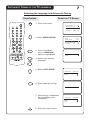
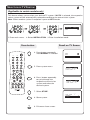
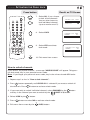
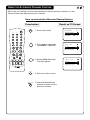
.......... ACTIVATING THE CHILD LOCK
Press button
2
AV
OSD
SLEEP
1
2
3
4
5
6
7
8
OR
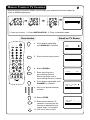
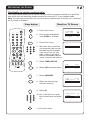
Result on TV Screen
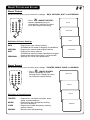
7. Select ALL if you choose
to lock all the channels.
You can also choose to
lock individual channel
(up to a maximum of 5).
XXXX
ALL
NO
É
CONFIRM CODE
CHANNEL
LOCK
CLEAR ALL
XXXX
ALL
NO
É
9
SMART
SMART
0
±
8. Select LOCK.
`
INC.
SURR.
MENU
A
CH
H
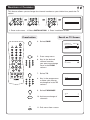
9. Select YES to activate
lock mode.
b
CONFIRM CODE
CHANNEL
LOCK
CLEAR ALL
h
SURF A/CH
4
f
e
CONFIRM CODE
CHANNEL
LOCK
CLEAR ALL
XXXX
ALL
YES
É
OSD
10. Exit menu from screen.
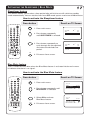
How to unlock channels
If you access any locked channel , a message “ACCESS CODE” will appear. To bypass
the lock mode, key in your personal access code.
Note : If you forget your personal access code, key in the universal code 0711 twice.
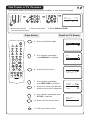
1. Repeat step 1 to 4 as in “How to lock channels”.
2. Press
button repeatedly until CLEAR ALL is selected if you want to unlock all
the channels. Press
button to activate unlock mode.
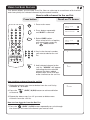
3. If you want only to unlock individual channel, select CHANNEL by the
button
and key in the channel you want to unlock by the
(DIGIT 0 -9) button.
1
2
3
4
5
6
7
8
9
0
4. Select LOCK by the
5. Press
button.
button to select NO to activate unlock mode.
OSD
6. Exit menu from screen by the
(OSD) button.