1
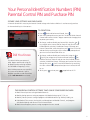
Your Personal Identification Numbers (PIN)
Parental Control PIN and Purchase PIN
Secure your settings and purchases.
A Parental Control PIN is necessary for Parental Control settings and a Purchase PIN that is used to securely purchase
On Demand and Pay Per View content.
To create PIN:
1.Press
and scroll to Parental Control. Press
.
2.You will be prompted to enter your PIN. The default PIN for Parental
Control and Purchase is 0000 – Rogers recommends changing these
to protect your security.
Did You Know
The default PIN for your account is
0000. Rogers recommends using this
for blocking and purchasing to reduce
the likelihood of forgetting it. After
three failed attempts to enter your PIN,
the system will be locked. If you’ve
forgotten your PIN or need to reactivate
it, call 1 866 368-8335 for assistance.
3.To change, enable or disable your Parental PIN, using the or
key navigate to the Parental PIN Tab. From this tab you can select
Enabled (default selection), Disabled or Change. To change your
Parental Control PIN, select change then press
. Enter a new PIN
and confirm by reentering the same number when prompted and
your new Parental Control PIN will be set.
4 To change, enable or disable your Purchase PIN, using the or
key keys to navigate to the Purchase PIN tab and press
on
Purchase PIN Setup. From this tab you can select Enabled (default
selection), Disabled or Change. To change your Purchase PIN, select
change then press
. Enter a new PIN and confirm by reentering
the same number when prompted and your new Purchase PIN will
be set.
5. To exit, press
twice or press
to go back to the TV.
The Parental Control settings that can be configured include:
1.Block Channels prevents tuning to blocked channels
2.Block by Ratings prevents tuning to programs with blocked ratings eg. NC-17, R, etc.
3.Block by Content prevents tuning to programs with blocked content eg. Violence, Nudity, etc.
4.Hide Blocked Titles prevents viewing titles and descriptions on Blocked Channels, and programs
with Blocked Ratings and Content in the Enhanced Guide
5.Block Unrated Programs prevents tuning to programs that are unrated
5