1
Customized Guide Views – Favourites,
Hide Channels
You can set up customized views of the guide to easily navigate favourite channels by setting Favourites or hiding
channels that you don’t use or want to see in the Enhanced Guide.
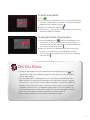
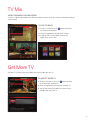
To set Favourites:
1.Press
from
, select Favourites and press
. You can also set Favorites
, select Channel Setup and press
.
2.Select a channel to add to your Favourites and press
icon will appear beside the channel.
. A heart
3.When you have completed setting channels to your Favourites,
press
or
to return to TV.
To access your Favourites:
1.Press
key or press
twice and your Enhanced Guide will
appear with only your Favourite channels.
2. Select a channel to watch and press
to tune to the channel.
To Hide Channels:
1.Press
, select Channel Setup and press
.
2.Select Hide Channels tab, select a channel from the list and
press
. An X will appear beside the channel.
3.Press
to access the Enhanced Guide. The channels you
have set to hide will no longer appear or be accessible through
direct tuning.
3