1
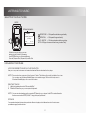
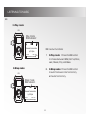
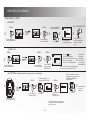
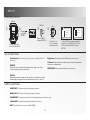
DELETING FILES ON THE PLAYER MAIN MENU: DELETE MENU VOL + MENU DELETE ¬ Press " " highlight to DELETE. VOL DELETE VOL ® MENU MAIN MENU Press "MENU" to select DELETE. Press "MENU" to enter MAIN MENU. MUSIC FILES VOICE FILES ¯ EXIT VOL Press "Vol + or Vol -" to highlight what type of file will be deleted. ° Press "MENU" to select the type of file to be deleted. ± DELETE FILES Press " VOL- or VOL+" to select the specific file to be deleted. 01/01/V001.WAV ² ? YES Press " or " to select YES or NO. Press "PLAY" to confirm. ABOUT MAIN MENU: ABOUT MENU MENU VOL Press " " to highlight ABOUT. ® MENU ¯ Version 1:01 Memory 491 MB Used/Free 91 / 400 MB EXT Memory Used/Free 55 / MB 4 ° MENU VOL MENU ¬ MAIN MENU MB ABOUT Press "MENU" to select ABOUT. Press "MENU" to enter MAIN MENU. 16 Version and memory information will be displayed. NO Press "MENU" to return to MAIN MENU.