1
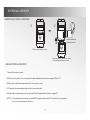
EXTERNAL MEMORY INSERTING EXTERNAL MEMORY ¬ Insert external memory card. Remove the battery cover. Insert the external memory card and replace the battery cover. USING EXTERNAL MEMORY 1. Insert the memory card. 2. Connect the player to the computer. Follow detailed instructions on pages10 and 11. 3. Open removable disk associated with the memory card. 4. Drag and drop selected songs into the removable disk. 5. Safely disconnect player from computer. Follow detailed instructions on page10. NOTE: To access external memory press EQ during the stop mode. This will switch your system from internal to external memory. 17