1
Installation and Quick Configuration Guide
Configuration
The MX4 can be configured by two methods:
•
On Screen Display (OSD) Configuration and Playback
Connect to VIDEO OUT on the MX4 front panel with an LCD monitor and use the trackball pointing device or the remote control to set
configuration settings. For more information, see the Explorer MX4 Basic and Plus Mobile Digital Video Recording System User Guide,
document part number 700-0075.
• Web Browser Configuration and Playback
Web Browser Configuration and Playback uses an Ethernet connection with a laptop. See page 14.
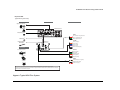
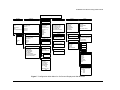
The MX4 Configuration Main Menu shown in Figure 7 applies to the on screen display configuration and to the Web browser
configuration.
12
700-0077 R002