1
Chapter 7
NPE-G1 and NPE-G2 Installation and Configuration Information
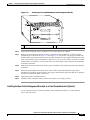
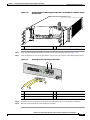
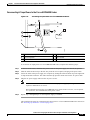
Installing the NPE-G1 or NPE-G2
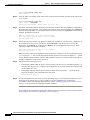
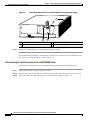
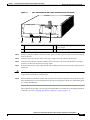
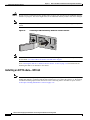
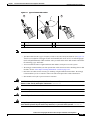
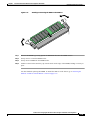
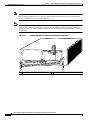
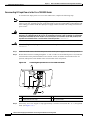
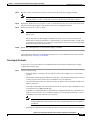
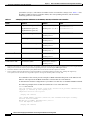
Figure 7-9
Types of SFP Module Latches
2
3
80755
1
Note
1
Sliding latch
3
2
Swing and slide latch
Swing latch
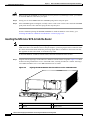
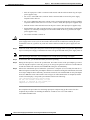
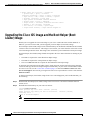
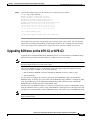
The SFP module must be installed before you connect the cables to it.
•
The SPF module has three types of latches, which are also the removal mechanism. See Figure 7-9.
There is no correlation of the type of latch to the model (such as SX or LH) or technology type
(such as Gigabit Ethernet) of SFP modules. Always read the label on the SFP module to determine
the technology type, and model.
•
You can install and remove Gigabit Ethernet SFP modules with power on to the system.
•
We strongly recommend that you clean optical fiber cable connectors before attaching them to SFP
modules. See the “Fiber Optic Cleaning Information” section on page 7-65.
•
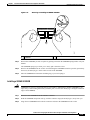
Disconnect all cables before removing or installing a Gigabit Ethernet SFP module. We strongly
recommend that you do not install or remove the SFP with optical fiber cables attached to it.
•
SFP modules are keyed to prevent incorrect insertion.
Warning
Invisible laser radiation may be emitted from disconnected fibers or connectors. Do not stare into
beams or view directly with optical instruments. Statement 1051
Warning
Class 1 laser product. Statement 1008
Warning
Class 1 LED product. Statement 1027
Warning
During this procedure, wear grounding wrist straps to avoid ESD damage to the card. Do not directly
touch the backplane with your hand or any metal tool, or you could shock yourself. Statement 94
Network Processing Engine and Network Services Engine Installation and Configuration
OL-4448-08
7-21