1
APPENDIX A. CHANGING PROM OR RAM CHIPS
The DSP4 has 5 sockets for memory chips. Two sockets hold 8 K Random Access Memory (RAM)
chips and two hold Programmable Read Only Memory (PROM) chips. There is one empty socket
between the two types of memory.
A.1 DISASSEMBLY OF THE DSP4
1. Turn power off, remove the four Phillips
head screws located near the edge of the
top and bottom of the DSP4. Place the
DSP4 face down. Carefully lift the outside
cover of the DSP4 up and away form the
inside circuit boards.
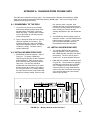
2. Figure 1 shows the CPU card; the memory
chips are opposite the connector. The
locations numbered 1 and 2 hold PROM
chips (with Campbell Scientific, Inc. labels).
Location 3 is empty. Locations 4 and 5
contain RAM chips.
A.2 INSTALLING NEW PROM CHIPS
1. PROMS are located at locations 1 and 2 in
Figure A-1. To replace a RAM chip,
carefully pry the old chip up with a small flat
blade screwdriver. Start at one end and
then loosen the other, alternating until the
chip is free. The new chip should be
installed with the notched end in the same
direction as the other chips, to the edge of
the card (see Figure A-1). Before pushing
the chips into the socket, make certain that
all pins are correctly seated. Start one side
first, then the other, if needed. After
installing the chip, check for pins that may
be bent or not firmly seated in the socket. If
there is a bent pin, remove the chip,
carefully straighten the pin, and reinstall the
chip.
2. The PROM chip with the lowest number is
inserted in socket 1, and the PROM with the
highest number in socket 2. In the event
you have special PROMS, check the
documentation that came with them.
A.3 INSTALLING NEW RAM CHIPS
1. The standard DSP4 has the maximum
memory allowable. In the unlikely event
that a RAM chip fails, the DSP4 can detect
the bad chip. The error code is given in
section 2.3.1, as to the problem detected.
2. RAM chips are installed in locations 4 and 5
in Figure A-1. The procedure for changing
an RMA chip is the same as for a PROM
chip - carefully pry out the old chip and
insert the new one, being certain that the
notch on the chip is toward the close edge
of the card and that all pins are correctly
seated in the sockets.
FIGURE A-1. Memory Sockets on the CPU Card
A-1