1
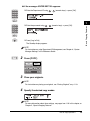
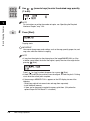
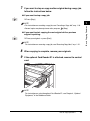
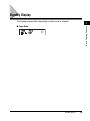
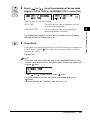
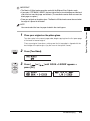
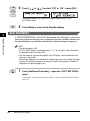
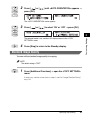
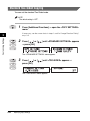
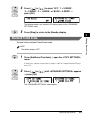
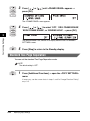
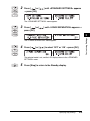
Copying Guide
Please read this guide before operating this equipment.
After you finish reading this guide, store it in a safe place for future reference.
ENG
imageRUNNER
2020/2016
Copying Guide
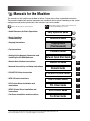
Manuals for the Machine
The manuals for this machine are divided as follows. Please refer to them for detailed information.
The manuals supplied with optional equipment are included in the list below. Depending on the system
configuration and product purchased, some manuals may not be needed.
Guides with this symbol are printed manuals.
• Quick Reference for Basic Operations
• Basic Operations
• Troubleshooting
• Copying Instructions
• Fax Instructions
• Setting Up the Network Connection and
Installing the CD-ROM Software
• Remote User Interface Instructions
• Network Connectivity and Setup Instructions
• PCL/UFR II Printer Instructions
• UFR II Printer Instructions
• PCL Printer Driver Installation and
Instructions
• UFR II Printer Driver Installation and
Instructions
• Fax Driver Installation and Instructions
CD-ROM
Guides with this symbol are PDF manuals included on the
accompanying CD-ROM. (See footnote.)
Easy Operation Guide
Reference Guide
Copying Guide
(This Document)
Facsimile Guide
Network Quick Start Guide
Remote UI Guide
CD-ROM
Network Guide
CD-ROM
PCL/UFR II Printer Guide
CD-ROM
UFR II Printer Guide
CD-ROM
PCL Driver Guide
CD-ROM
UFR II Driver Guide
CD-ROM
Fax Driver Guide
CD-ROM
• To view the manual in PDF format, Adobe Reader/Acrobat Reader/Acrobat is required. If Adobe Reader/Acrobat Reader/Acrobat is not installed on
your system, please download it from the Adobe Systems Incorporated website (http://www.adobe.com).
• The machine illustration on the cover may differ slightly from your machine.
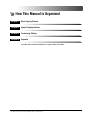
How This Manual Is Organized
Chapter 1
Basic Copying Features
Chapter 2
Special Copying Features
Chapter 3
Customizing Settings
Chapter 4
Appendix
Includes the available combination of copy modes and index.
Considerable effort has been made to ensure that this manual is free of inaccuracies and omissions. However, as we are constantly improving our
products, if you need an exact specification, please contact Canon.
Contents
Preface . . . . . . . . . . . . . . . . . . . . . . . . . . . . . . . . . . . . . . . . . . . . . . . . . . . . . . . . . vii
How to Use This Manual . . . . . . . . . . . . . . . . . . . . . . . . . . . . . . . . . . . . . . . . . . .
Symbols Used in This Manual . . . . . . . . . . . . . . . . . . . . . . . . . . . . . . . . . . . . .
Keys Used in This Manual . . . . . . . . . . . . . . . . . . . . . . . . . . . . . . . . . . . . . . . .
Illustrations Used in This Manual . . . . . . . . . . . . . . . . . . . . . . . . . . . . . . . . . . .
vii
vii
vii
viii
Legal Notices . . . . . . . . . . . . . . . . . . . . . . . . . . . . . . . . . . . . . . . . . . . . . . . . . . . . ix
Trademarks . . . . . . . . . . . . . . . . . . . . . . . . . . . . . . . . . . . . . . . . . . . . . . . . . . . . ix
Copyright . . . . . . . . . . . . . . . . . . . . . . . . . . . . . . . . . . . . . . . . . . . . . . . . . . . . . . ix
Disclaimers. . . . . . . . . . . . . . . . . . . . . . . . . . . . . . . . . . . . . . . . . . . . . . . . . . . . . ix
Chapter 1
Basic Copying Features
Overview of the imageRUNNER 2020/2016 . . . . . . . . . . . . . . . . . . . . . . . . . . . .1-2
Standard Features . . . . . . . . . . . . . . . . . . . . . . . . . . . . . . . . . . . . . . . . . . . . . .1-2
Optional Features. . . . . . . . . . . . . . . . . . . . . . . . . . . . . . . . . . . . . . . . . . . . . . .1-3
Flow of Copy Operations . . . . . . . . . . . . . . . . . . . . . . . . . . . . . . . . . . . . . . . . . .1-4
Standby Display . . . . . . . . . . . . . . . . . . . . . . . . . . . . . . . . . . . . . . . . . . . . . . . . . .1-9
Placing Originals . . . . . . . . . . . . . . . . . . . . . . . . . . . . . . . . . . . . . . . . . . . . . . . .1-10
Orientation . . . . . . . . . . . . . . . . . . . . . . . . . . . . . . . . . . . . . . . . . . . . . . . . . . .1-11
Platen Glass . . . . . . . . . . . . . . . . . . . . . . . . . . . . . . . . . . . . . . . . . . . . . . . . . .1-12
Feeder (DADF-P1) . . . . . . . . . . . . . . . . . . . . . . . . . . . . . . . . . . . . . . . . . . . . .1-15
Canceling a Copy Job . . . . . . . . . . . . . . . . . . . . . . . . . . . . . . . . . . . . . . . . . . . .1-18
Using the Stop Key. . . . . . . . . . . . . . . . . . . . . . . . . . . . . . . . . . . . . . . . . . . . .1-18
Using the System Monitor Screen . . . . . . . . . . . . . . . . . . . . . . . . . . . . . . . . .1-19
Reserved Copying . . . . . . . . . . . . . . . . . . . . . . . . . . . . . . . . . . . . . . . . . . . . . . .1-21
Reserving Copy Jobs . . . . . . . . . . . . . . . . . . . . . . . . . . . . . . . . . . . . . . . . . . .1-21
Copy Quantity . . . . . . . . . . . . . . . . . . . . . . . . . . . . . . . . . . . . . . . . . . . . . . . . . .1-23
Specifying the Required Number of Copies . . . . . . . . . . . . . . . . . . . . . . . . . .1-23
Changing the Copy Quantity . . . . . . . . . . . . . . . . . . . . . . . . . . . . . . . . . . . . .1-23
Paper Selection . . . . . . . . . . . . . . . . . . . . . . . . . . . . . . . . . . . . . . . . . . . . . . . . .1-24
Auto Paper Selection . . . . . . . . . . . . . . . . . . . . . . . . . . . . . . . . . . . . . . . . . . .1-24
Manual Paper Selection . . . . . . . . . . . . . . . . . . . . . . . . . . . . . . . . . . . . . . . . .1-26
Density and Image Quality Adjustments . . . . . . . . . . . . . . . . . . . . . . . . . . . . .1-28
Automatic Density Adjustment . . . . . . . . . . . . . . . . . . . . . . . . . . . . . . . . . . . .1-28
Manual Density Adjustment . . . . . . . . . . . . . . . . . . . . . . . . . . . . . . . . . . . . . .1-29
Original Type Selection . . . . . . . . . . . . . . . . . . . . . . . . . . . . . . . . . . . . . . . . .1-31
iv
Changing the Copy Ratio . . . . . . . . . . . . . . . . . . . . . . . . . . . . . . . . . . . . . . . . . 1-34
Preset Copy Ratio . . . . . . . . . . . . . . . . . . . . . . . . . . . . . . . . . . . . . . . . . . . . . 1-34
Zoom by Percentage . . . . . . . . . . . . . . . . . . . . . . . . . . . . . . . . . . . . . . . . . . . 1-36
Collating Copies . . . . . . . . . . . . . . . . . . . . . . . . . . . . . . . . . . . . . . . . . . . . . . . . 1-39
Page Order Collate . . . . . . . . . . . . . . . . . . . . . . . . . . . . . . . . . . . . . . . . . . . . 1-41
Page Order Staple . . . . . . . . . . . . . . . . . . . . . . . . . . . . . . . . . . . . . . . . . . . . . 1-43
Chapter 2
Special Copying Features
Two-Page Separation . . . . . . . . . . . . . . . . . . . . . . . . . . . . . . . . . . . . . . . . . . . . . 2-2
Frame Erase . . . . . . . . . . . . . . . . . . . . . . . . . . . . . . . . . . . . . . . . . . . . . . . . . . . . . 2-5
Original Frame Erase . . . . . . . . . . . . . . . . . . . . . . . . . . . . . . . . . . . . . . . . . . . . 2-7
Book Frame Erase . . . . . . . . . . . . . . . . . . . . . . . . . . . . . . . . . . . . . . . . . . . . . . 2-9
Binding Hole Erase . . . . . . . . . . . . . . . . . . . . . . . . . . . . . . . . . . . . . . . . . . . . 2-11
2 on 1 Combination . . . . . . . . . . . . . . . . . . . . . . . . . . . . . . . . . . . . . . . . . . . . . . 2-14
Different Size Originals . . . . . . . . . . . . . . . . . . . . . . . . . . . . . . . . . . . . . . . . . . . 2-17
Two-Sided Copying . . . . . . . . . . . . . . . . . . . . . . . . . . . . . . . . . . . . . . . . . . . . . . 2-20
1 to 2-Sided . . . . . . . . . . . . . . . . . . . . . . . . . . . . . . . . . . . . . . . . . . . . . . . . . . 2-20
2 to 2-Sided . . . . . . . . . . . . . . . . . . . . . . . . . . . . . . . . . . . . . . . . . . . . . . . . . . 2-23
2 to 1-Sided . . . . . . . . . . . . . . . . . . . . . . . . . . . . . . . . . . . . . . . . . . . . . . . . . . 2-26
Book to 2-Sided . . . . . . . . . . . . . . . . . . . . . . . . . . . . . . . . . . . . . . . . . . . . . . . 2-28
Chapter 3
Customizing Settings
Copy Settings Table . . . . . . . . . . . . . . . . . . . . . . . . . . . . . . . . . . . . . . . . . . . . . . 3-2
Specifying Copy Settings . . . . . . . . . . . . . . . . . . . . . . . . . . . . . . . . . . . . . . . . . . 3-4
Image Direction Priority . . . . . . . . . . . . . . . . . . . . . . . . . . . . . . . . . . . . . . . . . . 3-5
Auto Orientation . . . . . . . . . . . . . . . . . . . . . . . . . . . . . . . . . . . . . . . . . . . . . . . . 3-6
Standard Image Quality . . . . . . . . . . . . . . . . . . . . . . . . . . . . . . . . . . . . . . . . . . 3-7
Standard Density . . . . . . . . . . . . . . . . . . . . . . . . . . . . . . . . . . . . . . . . . . . . . . . 3-9
Standard Zoom Ratio. . . . . . . . . . . . . . . . . . . . . . . . . . . . . . . . . . . . . . . . . . . 3-11
Standard Copy Quantity. . . . . . . . . . . . . . . . . . . . . . . . . . . . . . . . . . . . . . . . . 3-13
Auto Collate . . . . . . . . . . . . . . . . . . . . . . . . . . . . . . . . . . . . . . . . . . . . . . . . . . 3-14
Standard Two-Sided Copying . . . . . . . . . . . . . . . . . . . . . . . . . . . . . . . . . . . . 3-16
Standard Frame Erase. . . . . . . . . . . . . . . . . . . . . . . . . . . . . . . . . . . . . . . . . . 3-17
Standard Two-Page Separation . . . . . . . . . . . . . . . . . . . . . . . . . . . . . . . . . . . 3-18
Paper Drawer Selection . . . . . . . . . . . . . . . . . . . . . . . . . . . . . . . . . . . . . . . . . 3-20
Sharpness . . . . . . . . . . . . . . . . . . . . . . . . . . . . . . . . . . . . . . . . . . . . . . . . . . . 3-21
Paper Size Group . . . . . . . . . . . . . . . . . . . . . . . . . . . . . . . . . . . . . . . . . . . . . 3-23
Frame Erase Width Unit of Measurement . . . . . . . . . . . . . . . . . . . . . . . . . . . 3-24
Restoring the Default Copy Settings . . . . . . . . . . . . . . . . . . . . . . . . . . . . . . . 3-25
v
Chapter 4
Appendix
Combination of Copy Modes Chart . . . . . . . . . . . . . . . . . . . . . . . . . . . . . . . . . .4-2
Index . . . . . . . . . . . . . . . . . . . . . . . . . . . . . . . . . . . . . . . . . . . . . . . . . . . . . . . . . . .4-3
vi
Preface
Thank you for purchasing the Canon imageRUNNER 2020/2016. Please read this manual
thoroughly before operating the machine to familiarize yourself with its capabilities, and to
make the most of its many functions. After reading this manual, store it in a safe place for
future reference.
How to Use This Manual
Symbols Used in This Manual
The following symbols are used in this manual to explain procedures, restrictions,
handling precautions, and instructions that should be observed for safety.
CAUTION
Indicates a caution concerning operations that may lead to injury to
persons, or damage to property if not performed correctly. To use the
machine safely, always pay attention to these cautions.
IMPORTANT Indicates operational requirements and restrictions. Be sure to read
these items carefully to operate the machine correctly, and avoid
damage to the machine.
NOTE
Indicates a clarification of an operation, or contains additional
explanations for a procedure. Reading these notes is highly
recommended.
Keys Used in This Manual
The following symbols and key names are a few examples of how keys to be
pressed are expressed in this manual. The control panel keys on the machine are
indicated within brackets.
Examples:
Start
Additional
Functions
Press [Start].
Press [Additional Functions].
vii
Illustrations Used in This Manual
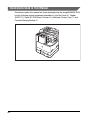
Illustrations used in this manual are those displayed when the imageRUNNER 2016
has the following optional equipment attached to it: the Fax Panel-A1, Feeder
(DADF-P1), Super G3 FAX Board, Finisher-U1, Additional Finisher Tray-C1, and
Cassette Feeding Module-J1.
viii
Legal Notices
Trademarks
Canon, the Canon logo, and imageRUNNER are registered trademarks of Canon
Inc. in the United States and may also be trademarks or registered trademarks in
other countries.
Adobe and Adobe Acrobat are trademarks of Adobe Systems Incorporated.
Other products and company names herein may be the trademarks of their
respective owners.
Copyright
Copyright 2005 by Canon Inc. All rights reserved.
No part of this publication may be reproduced or transmitted in any form or by any
means, electronic or mechanical, including photocopying and recording, or by any
information storage or retrieval system without the prior written permission of
Canon Inc.
Disclaimers
The information in this document is subject to change without notice.
CANON INC. MAKES NO WARRANTY OF ANY KIND WITH REGARD TO THIS
MATERIAL, EITHER EXPRESS OR IMPLIED, EXCEPT AS PROVIDED HEREIN,
INCLUDING WITHOUT LIMITATION, THEREOF, WARRANTIES AS TO
MARKETABILITY, MERCHANTABILITY, FITNESS FOR A PARTICULAR
PURPOSE OF USE OR NON-INFRINGEMENT. CANON INC. SHALL NOT BE
LIABLE FOR ANY DIRECT, INCIDENTAL, OR CONSEQUENTIAL DAMAGES OF
ANY NATURE, OR LOSSES OR EXPENSES RESULTING FROM THE USE OF
THIS MATERIAL.
ix
Basic Copying Features
1
CHAPTER
This chapter describes the basic copying features.
Overview of the imageRUNNER 2020/2016. . . . . . . . . . . . . . . . . . . . . . . . . . . . . . . . . . . 1-2
Standard Features . . . . . . . . . . . . . . . . . . . . . . . . . . . . . . . . . . . . . . . . . . . . . . . . . . . . . . . . . . . .1-2
Optional Features . . . . . . . . . . . . . . . . . . . . . . . . . . . . . . . . . . . . . . . . . . . . . . . . . . . . . . . . . . . . .1-3
Flow of Copy Operations . . . . . . . . . . . . . . . . . . . . . . . . . . . . . . . . . . . . . . . . . . . . . . . . . 1-4
Standby Display . . . . . . . . . . . . . . . . . . . . . . . . . . . . . . . . . . . . . . . . . . . . . . . . . . . . . . . . 1-9
Placing Originals. . . . . . . . . . . . . . . . . . . . . . . . . . . . . . . . . . . . . . . . . . . . . . . . . . . . . . . 1-10
Orientation . . . . . . . . . . . . . . . . . . . . . . . . . . . . . . . . . . . . . . . . . . . . . . . . . . . . . . . . . . . . . . . . .1-11
Platen Glass . . . . . . . . . . . . . . . . . . . . . . . . . . . . . . . . . . . . . . . . . . . . . . . . . . . . . . . . . . . . . . . .1-12
Feeder (DADF-P1) . . . . . . . . . . . . . . . . . . . . . . . . . . . . . . . . . . . . . . . . . . . . . . . . . . . . . . . . . . .1-15
Canceling a Copy Job. . . . . . . . . . . . . . . . . . . . . . . . . . . . . . . . . . . . . . . . . . . . . . . . . . . 1-18
Using the Stop Key. . . . . . . . . . . . . . . . . . . . . . . . . . . . . . . . . . . . . . . . . . . . . . . . . . . . . . . . . . .1-18
Using the System Monitor Screen . . . . . . . . . . . . . . . . . . . . . . . . . . . . . . . . . . . . . . . . . . . . . . .1-19
Reserved Copying . . . . . . . . . . . . . . . . . . . . . . . . . . . . . . . . . . . . . . . . . . . . . . . . . . . . . 1-21
Reserving Copy Jobs . . . . . . . . . . . . . . . . . . . . . . . . . . . . . . . . . . . . . . . . . . . . . . . . . . . . . . . . .1-21
Copy Quantity . . . . . . . . . . . . . . . . . . . . . . . . . . . . . . . . . . . . . . . . . . . . . . . . . . . . . . . . . 1-23
Specifying the Required Number of Copies . . . . . . . . . . . . . . . . . . . . . . . . . . . . . . . . . . . . . . .1-23
Changing the Copy Quantity . . . . . . . . . . . . . . . . . . . . . . . . . . . . . . . . . . . . . . . . . . . . . . . . . . .1-23
Paper Selection . . . . . . . . . . . . . . . . . . . . . . . . . . . . . . . . . . . . . . . . . . . . . . . . . . . . . . . 1-24
Auto Paper Selection . . . . . . . . . . . . . . . . . . . . . . . . . . . . . . . . . . . . . . . . . . . . . . . . . . . . . . . . .1-24
Manual Paper Selection . . . . . . . . . . . . . . . . . . . . . . . . . . . . . . . . . . . . . . . . . . . . . . . . . . . . . . .1-26
Density and Image Quality Adjustments. . . . . . . . . . . . . . . . . . . . . . . . . . . . . . . . . . . . . 1-28
Automatic Density Adjustment . . . . . . . . . . . . . . . . . . . . . . . . . . . . . . . . . . . . . . . . . . . . . . . . . .1-28
Manual Density Adjustment . . . . . . . . . . . . . . . . . . . . . . . . . . . . . . . . . . . . . . . . . . . . . . . . . . . .1-29
Original Type Selection . . . . . . . . . . . . . . . . . . . . . . . . . . . . . . . . . . . . . . . . . . . . . . . . . . . . . . .1-31
Changing the Copy Ratio . . . . . . . . . . . . . . . . . . . . . . . . . . . . . . . . . . . . . . . . . . . . . . . . 1-34
Preset Copy Ratio. . . . . . . . . . . . . . . . . . . . . . . . . . . . . . . . . . . . . . . . . . . . . . . . . . . . . . . . . . . .1-34
Zoom by Percentage . . . . . . . . . . . . . . . . . . . . . . . . . . . . . . . . . . . . . . . . . . . . . . . . . . . . . . . . .1-36
Collating Copies . . . . . . . . . . . . . . . . . . . . . . . . . . . . . . . . . . . . . . . . . . . . . . . . . . . . . . . 1-39
Page Order Collate. . . . . . . . . . . . . . . . . . . . . . . . . . . . . . . . . . . . . . . . . . . . . . . . . . . . . . . . . . .1-41
Page Order Staple . . . . . . . . . . . . . . . . . . . . . . . . . . . . . . . . . . . . . . . . . . . . . . . . . . . . . . . . . . .1-43
1-1
Overview of the imageRUNNER 2020/2016
Standard Features
Basic Copying Features
1
■ Copy Reduction/Enlargement
You can manually select a reduction/enlargement ratio from 50% to 200%. You can also
set the machine to automatically select an appropriate ratio to fit the paper size you are
copying onto.
■ Automatic and Manual Density/Image Quality Adjustment
The machine can automatically set the most suitable density for the document you are
copying. You can also manually adjust the density and image quality to get the best output
quality.
■ Frame Erase Modes
These modes enable you to erase shadows and lines that appear when copying various
types of originals. The modes available are Original Frame Erase, Book Frame Erase, and
Hole/Punch Erase.
■ Two-Page Separation
This mode enables you to copy facing pages in a book or bound original to fit onto
separate pages.
■ 2 on 1 Combination
This mode enables you to automatically reduce two originals to fit onto one side of a
selected paper size.
■ Sleep Mode
This machine incorporates an energy saver feature to conserve power called the Sleep
mode. The Sleep mode conserves energy by lowering the temperature of the fixing unit
when the machine is not used for a prolonged period of time. You can set the machine to
enter the Sleep mode manually by pressing the control panel power switch or specify the
amount of time that must be taken before the machine automatically enters the Sleep
mode.
■ Collating Copies
You can automatically collate copies into sets arranged in page order.
1-2
Overview of the imageRUNNER 2020/2016
Optional Features
■ Two-Sided Copying
The Two-Sided Copying mode enables you to make two-sided copies from one-sided or
two-sided originals, or make one-sided copies from two-sided copies. The Two-Sided
Copying mode can only be used if the optional Duplex Unit-A1 is attached.
The Offset Collate and Staple modes can only be used if the optional Finisher-U1 is
attached. If you select the Offset Collate mode, copies are automatically collated into sets
arranged in page order and shifted to the front and back alternately. If you select the
Staple mode, copies are automatically collated into sets arranged in page order, stapled,
and output into the tray.
■ Flexible Document Handling
To make a copy of an original, you can place your document into the Feeder (DADF-P1)
when attached, or place it directly onto the platen glass. You should use the feeder when
you want to copy several originals at the same time. You should use the platen glass when
copying bound originals (such as books and magazines), heavy or lightweight originals,
and transparencies.
■ Different Size Originals Mode
The Different Size Originals mode enables you to copy different size originals together as
one group.
Overview of the imageRUNNER 2020/2016
1-3
Basic Copying Features
1
■ Offset Collate and Staple Modes
Flow of Copy Operations
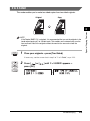
This section describes the flow of basic copy operations.
1
Basic Copying Features
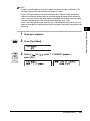
NOTE
• For the following items, see the Reference Guide:
- Main power and control panel power switch
- Routine maintenance
• The output quality may deteriorate if the platen glass is dirty. Always keep the platen
glass clean.
• Do not touch the feeder or platen cover while copying. Rocking the feeder or cover can
distort the image being copied.
1
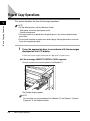
Press the appropriate keys in accordance with the messages
displayed on the LCD display.
If there are no messages displayed, this operation is unnecessary.
● If the message <INSERT CONTROL CARD> appears:
❑ Insert a control card into the optional Card Reader-E1.
The Standby display appears.
NOTE
For instructions on using the optional Card Reader-E1, see Chapter 4, “Optional
Equipment,” in the Reference Guide.
1-4
Flow of Copy Operations
● If the message <ENTER DEPT.ID> appears:
ABC
DEF
2
1
GHI
3
JKL
4
PQRS
MNO
TUV
0
❑ Enter the password using
9
-
9
(numeric keys) ➞ press [OK].
WXYZ
8
7
❑ Enter the Department ID using
6
5
9
SYMBOLS
Tone
#
0
OK
1
GHI
DEF
2
3
JKL
4
PQRS
MNO
7
-
(numeric keys) ➞ press [OK].
6
5
TUV
0
Basic Copying Features
ABC
1
WXYZ
8
9
SYMBOLS
Tone
0
#
OK
Log In/Out
❑ Press [Log In/Out].
ID
The Standby display appears.
NOTE
For instructions on using Department ID Management, see Chapter 6, “System
Manager Settings,” in the Reference Guide.
COPY
2
Press [COPY].
FAX
al
3
COPY
Address Book
Redial
Hook
Delayed TX
Direct TX
Stamp
Place your originals.
NOTE
For instructions on placing your originals, see “Placing Originals,” on p. 1-10.
4
Specify the desired copy modes.
NOTE
For more information about these settings, see pages from 1-23 in this chapter, or
Chapter 2, “Special Copying Features.”
Flow of Copy Operations
1-5
ABC
1
GHI
DEF
2
JKL
4
PQRS
TUV
7
3
MNO
5
5
6
Use 0 (1 to 99).
9
(numeric keys) to enter the desired copy quantity
WXYZ
8
9
SYMBOLS
Tone
0
#
NOTE
For instructions on setting the number of copies, see “Specifying the Required
Number of Copies,” on p. 1-23.
Basic Copying Features
1
Start
6
Press [Start].
Copying starts.
IMPORTANT
You cannot change copy mode settings, such as the copy quantity, paper size, and
copy ratio, while the machine is copying.
NOTE
• If you place the original on the platen glass of the imageRUNNER 2016, or if the
machine cannot detect the size of the original, specify the size of the original after
pressing
(Start).
(Start).
Press [
] or [
] to select the paper size ➞ press
• If there is a current job, the machine scans the original, and waits to print it. Printing
starts when the current job is complete.
• If the message <MEMORY FULL> appears on the LCD display, do one of the
following:
- Divide your originals into several sets and copy them separately.
- Install additional memory.
- If there are fax documents received in memory, print them. (Only when the
optional Super G3 FAX Board-T1 is installed.)
1-6
Flow of Copy Operations
7
If you want to stop or copy another original during a copy job,
follow the instructions below.
● If you want to stop a copy job:
Stop
❑ Press [Stop].
● If you want to start copying the next original while a previous
original is printing:
Start
❑ Place your originals ➞ press [Start].
NOTE
For instructions on reserving a copy job, see “Reserving Copy Jobs,” on p. 1-21.
8
9
When copying is complete, remove your originals.
If the optional Card Reader-E1 is attached, remove the control
card.
NOTE
For instructions on using the optional Card Reader-E1, see Chapter 4, “Optional
Equipment,” in the Reference Guide.
Flow of Copy Operations
1-7
1
Basic Copying Features
NOTE
• For instructions on canceling a copy job, see “Canceling a Copy Job,” on p. 1-18.
• Several copies may be output even after you press
(Stop).
Log In/Out
ID
10
If Department ID Management is set, press [Log In/Out].
NOTE
For Instructions on using Department ID Management, see Chapter 6, “System
Manager Settings,” in the Reference Guide.
Basic Copying Features
1
1-8
Flow of Copy Operations
Standby Display
The Standby display differs depending on which mode is selected.
1
Basic Copying Features
■ Copy Mode
Standby Display
1-9
Placing Originals
Place your originals on the platen glass or into the feeder, depending on the size
and type of the original, and the copy modes that you want to use.
Basic Copying Features
1
■ Platen Glass
Place the originals on the platen glass when copying bound originals (such as books and
magazines), heavy or lightweight originals, and transparencies.
■ Feeder (DADF-P1)
Place the originals into the feeder when you want to copy several originals at the same
time, and press
(Start). The machine automatically feeds the originals to the scanning
area and scans them. If you are copying in the Two-Sided mode, two-sided originals can
also be automatically turned over and scanned as two-sided documents.
1-10
Placing Originals
Orientation
You can place an original either vertically or horizontally. Always align the top edge
of your original with the back edge of the platen glass (by the arrow in the top left
corner), or with the back edge of the feeder.
Platen Glass
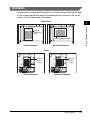
Basic Copying Features
1
Place the
original face
down.
Place the original face down.
Vertical Placement
Horizontal Placement
Feeder
ABC
Place the
original
face up.
Vertical Placement
ABC
Place the
original
face up.
Horizontal Placement
Placing Originals
1-11
NOTE
• If the top edge of the original is not aligned with the back edge of the platen glass (by the
arrow in the top left corner), your original may not be scanned correctly, depending on the
copy mode that you have set.
• STMT and LTR originals can be placed either vertically or horizontally. However, the
scanning speed for horizontally placed originals is somewhat slower than vertically
placed originals. Place originals horizontally when printing with a preset copy ratio, such
as when enlarging an LTR original onto 11" × 17" paper.
• Horizontally placed LTR and STMT originals are referred to as LTRR and STMTR.
• 11" × 17" and LGL originals must be placed horizontally.
• When <AUTO COLLATE> is set to ‘COLLATE’ or ‘STAPLE’, the Collate (Offset Collate
with the optional finisher attached) or Staple mode is automatically set when you place
the originals into the feeder. (See “Auto Collate,” on p. 3-14.)
• To get the same output orientation as when the original is placed on the platen glass,
place the original upside down and face up. However, when using the Staple mode, the
machine rotates the output automatically.
Basic Copying Features
1
Platen Glass
You should use the platen glass when copying bound originals (such as books and
magazines), heavy or lightweight originals, and transparencies.
NOTE
• The imageRUNNER 2020 automatically detects the size of the following originals on the
platen glass: 11" × 17", LGL, LTR, and LTRR.
• If you place your original on the platen glass of the imageRUNNER 2016, the machine
cannot detect the size of the original. You should select the paper size for the copies
manually. (See “Manual Paper Selection,” on p. 1-26.)
1-12
Placing Originals
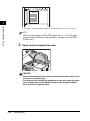
Lift the feeder/platen cover.
1
Sensor
IMPORTANT
The machine is equipped with an open/close sensor on the feeder/platen cover
(see circled area in the above illustration). When placing originals on the platen
glass, lift the feeder/platen cover high enough so that the open/close sensor
underneath is fully released. Otherwise, the machine may not correctly detect the
size of the originals. (Only the imageRUNNER 2020 can detect the size of an
original placed on the platen glass.)
2
Place your originals face down.
The surface of the original that you want to copy must be placed face down.
Align the top edge of your original with the back edge of the platen glass (by the
arrow in the top left corner).
Placing Originals
1-13
Basic Copying Features
1
Basic Copying Features
1
Place books and other bound originals on the platen glass in the same way.
NOTE
When you are enlarging an LTR or STMT original onto 11" × 17" or LGL paper,
place the original horizontally on the platen glass, and align it with the LTRR or
STMTR marks.
3
Gently close the feeder/platen cover.
CAUTION
• Close the feeder/platen cover gently to avoid catching your hands, as this
may result in personal injury.
• Do not press down hard on the feeder/platen cover when using the platen
glass to make copies of thick books. Doing so may damage the platen
glass and result in personal injury.
1-14
Placing Originals
1
Basic Copying Features
NOTE
• If you are placing the original on the platen glass, the size of the original is detected
after the feeder/platen cover is closed. Be sure to close the feeder/platen cover
before copying.
• STMT originals and postcards cannot be detected. After pressing
(Start), follow
the instructions on the LCD display to specify the original size. You can also
manually select the paper size.
• Remove the original from the platen glass when scanning is complete.
Feeder (DADF-P1)
You should use the feeder when you want to copy several originals at the same
time. Place the originals into the feeder and press
(Start). The machine
automatically feeds the originals to the scanning area and scans them. If you are
copying in the Two-Sided mode, two-sided originals can also be automatically
turned over and scanned as two-sided documents.
You can place the following originals into the feeder’s original supply tray:
• Weight:
- 14 lb bond to 28 lb bond [52 g/m2 to 105 g/m2] (One-page scanning for 10 lb
bond to 14 lb bond [37 g/m2 to 52 g/m2] and 28 lb bond to 32 lb bond [105 g/m2 to
128 g/m2])
• Size:
- 11" × 17", LGL, LTR, LTRR, STMT
• Tray
capacity:
- LTR/LTRR: 50 sheets (20 lb bond [80 g/m2])
- LGL/11" × 17": 25 sheets (20 lb bond [80 g/m2])
Placing Originals
1-15
IMPORTANT
• Do not place the following types of originals into the feeder:
- Originals with tears or large binding holes
- Severely curled originals or originals with sharp folds
- Clipped or stapled originals
- Carbon backed paper or other originals which may not feed smoothly
- Transparencies and other highly transparent originals
• If the same original is fed through the feeder repeatedly, the original may fold or become
creased, and make feeding impossible. Limit repeated feeding to a maximum of 30 times
(this number varies, depending on the type and quality of the original).
• If the feeder rollers are dirty from scanning originals written in pencil, clean the feeder.
(See Chapter 7, “Routine Maintenance,” in the Reference Guide.)
• Always smooth out any folds in your originals before placing them into the feeder.
• Set the originals one-by-one if they are very thin (10 lb bond to 14 lb bond [37 g/m2 to
52 g/m2]) or very thick (28 lb bond to 32 lb bond [105 g/m2 to 128 g/m2]).
Basic Copying Features
1
1
1-16
Adjust the slide guides to fit the size of your originals.
Placing Originals
Neatly place your originals with the side to be copied face up
into the original supply tray.
Place your originals as far into the feeder as they will go.
1
IMPORTANT
• Do not add or remove originals while they are being scanned.
• When scanning is complete, remove the originals from the original output area to
avoid paper jams.
Original Output Area
NOTE
• The scanned originals are output to the original output area in the order that they
are fed into the feeder.
• When you are enlarging an LTR original onto 11'' × 17'' or LGL paper, place the
original horizontally.
• You can place different size originals together into the feeder if you set the Different
Size Originals mode. (See “Different Size Originals,” on p. 2-17.)
Placing Originals
1-17
Basic Copying Features
2
Canceling a Copy Job
You can cancel a copy job in two ways: using
Monitor screen.
Basic Copying Features
1
(Stop) key and using the System
Using the Stop Key
Stop
1
Press [Stop].
● If you press
glass:
OK
(Stop) while scanning originals placed on the platen
❑ Press [OK].
Scanning stops, and the copy job is canceled.
● If you press
OK
(Stop) while scanning originals placed in the feeder:
❑ Press [OK].
Scanning stops, and the copy job is canceled.
1-18
Canceling a Copy Job
❑ Press [
(Stop) after printing has started:
] to select ‘YES’.
• If you do not want to cancel the job, press [
] to select ‘NO’.
1
• You cannot select multiple jobs and cancel them all at once. Select and
cancel one job at a time.
The copy job currently being printed is canceled. If there is any reserved copy
job, it will start printing.
NOTE
• If you press
(Stop) while the machine is scanning an original placed in the
optional feeder, this may cause a paper jam. For instructions on clearing paper
jams in the feeder, see Chapter 8, “Troubleshooting,” in the Reference Guide.
• If you press
(Stop) after copying has started, some sheets of blank paper may
be output.
• To cancel all settings and return the machine to the Standby display, press
(Reset).
Using the System Monitor Screen
You can cancel a copy job from the System Monitor screen during printing or while
it is waiting to be processed.
System Monitor
1
Press [System Monitor].
The Copy Status display appears.
Canceling a Copy Job
1-19
Basic Copying Features
● If you press
OK
2
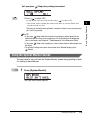
Make sure that <COPY STATUS> is displayed in the first line of
the LCD display ➞ press [OK].
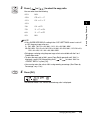
If <COPY STATUS> is not displayed, press [
appears ➞ press [OK].
Basic Copying Features
1
3
Press [
] or [
] or [
] until <COPY STATUS>
] to scroll through the job list.
The current job is displayed first.
NOTE
The messages and symbols displayed on the Copy Status screen are as follows:
- <PRINTING> = Current job
- A dash (-) = Reserved jobs
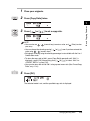
OK
4
Press [OK].
A confirmation message appears.
5
Press [
] to select ‘YES’.
The selected job is canceled.
NOTE
• If you do not want to cancel the job, press [
] to select ‘NO’.
• If you want to cancel another job, repeat steps 3 to 5.
• You cannot select multiple jobs and cancel them all at once. Select and cancel one
job at a time.
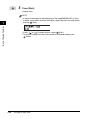
Stop
1-20
6
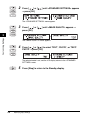
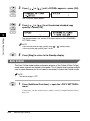
Press [Stop] to return to the Standby display.
Canceling a Copy Job
Reserved Copying
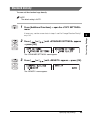
You can set the machine to scan originals even while it is printing or waiting to
process a job.
IMPORTANT
You cannot reserve a copy job when there is a paper jam or paper is not loaded in the
paper drawers or stack bypass.
NOTE
• You can reserve up to five copy jobs, including the current job.
• You can set different copy modes and paper sources, including the stack bypass, for
each reserved job.
Reserving Copy Jobs
Reserved printing can be specified in the following cases:
■ While the Machine Is Waiting
You can specify copy settings or scan originals while the machine is in the waiting state,
such as when the power has just been turned ON, or after a paper jam is cleared. Copying
automatically begins when the machine is ready.
NOTE
You can specify reserved copying while the machine is in the waiting state in the following
cases:
- Between the time that the machine is turned ON and when it is ready to copy
- After a paper jam is cleared
- After a cover on the main unit or an optional unit, such as a finisher, is opened and
closed
■ While the Machine Is Printing
You can specify copy settings for a new job while the machine is printing. Copying of the
new job automatically begins when the current job is complete.
Reserved Copying
1-21
Basic Copying Features
1
1
Basic Copying Features
Start
1
Place your originals.
2
Set the desired copy modes and quantity (1 to 99).
3
Press [Start].
Scanning starts.
NOTE
If you place the original on the platen glass of the imageRUNNER 2016, or if the
machine cannot detect the size of the original, specify the size of the original after
pressing
(Start).
Press [
4
] or [
] to select the size ➞ press
(Start).
Once the original is scanned, remove it from the machine.
NOTE
To cancel a reserved copy, see “Canceling a Copy Job,” on p. 1-18.
1-22
Reserved Copying
Copy Quantity
You can make up to 99 copies for each copy job.
Specifying the Required Number of Copies
ABC
1
GHI
DEF
2
JKL
4
PQRS
3
MNO
5
TUV
7
1
6
Use 0 (1 to 99).
9
(numeric keys) to enter the desired copy quantity
WXYZ
8
9
SYMBOLS
Tone
#
0
The copy quantity appears on the right hand side of the LCD display.
IMPORTANT
You cannot change the copy quantity while the machine is copying.
Changing the Copy Quantity
Clear
1
C
ABC
1
GHI
DEF
2
JKL
4
PQRS
TUV
7
3
MNO
5
6
2
Press [Clear] to clear the entered number.
Use 0 (1 to 99).
9
(numeric keys) to enter the desired copy quantity
WXYZ
8
9
SYMBOLS
Tone
0
#
The copy quantity appears on the right hand side of the LCD display.
IMPORTANT
You cannot change the copy quantity while the machine is copying.
Copy Quantity
1-23
Basic Copying Features
1
Paper Selection
You can manually specify a paper size or set the machine to automatically select
the paper size for you.
Basic Copying Features
1
NOTE
• If you are copying an original with an image that extends all the way to the edges onto the
same size paper at a copy ratio of 100%, the periphery of the original image may be cut
off slightly on the copy. For more information on how much may be cut off, refer to
“Non-image areas” in the Specifications table in Chapter 9, “Appendix,” in the Reference
Guide.
• For instructions on loading paper into the stack bypass, see Chapter 2, “Basic
Operations,” in the Reference Guide.
Auto Paper Selection
The machine automatically selects the copy paper size.
IMPORTANT
• For the imageRUNNER 2016, the Feeder (DADF-P1) should be attached to the machine
to use the Auto Paper Selection mode. The size of the original cannot be detected when
it is placed on the platen glass of the imageRUNNER 2016.
• You cannot use the Auto Paper Selection mode when copying the following types of
originals. Copy these originals using the Manual Paper Selection mode.
- Nonstandard size originals
- Highly transparent originals, such as transparencies
- Originals with an extremely dark background
- STMT or STMTR originals
• You cannot use the Auto Paper Selection mode when copying under either of the
following conditions:
- You are copying in the 2 on 1 Combination mode.
- The Auto Paper Selection is set to ‘ON’ for only one paper drawer in <COPY> in <AUTO
DRAWER SELCT> in the <COMMON SETTINGS> menu. (See Chapter 5,
“Customizing Settings,” in the Reference Guide.)
1-24
Paper Selection
1
Place your originals.
Make sure that <AUTO> is displayed. If not, press
(Reset) or press
(Paper Select) repeatedly until <AUTO> appears on the LCD display.
<AUTO> and the size of the paper loaded in the paper drawer are automatically
selected according to the detected original size, are displayed on the LCD display.
NOTE
If the message <NO APPROPRIATE SIZE> appears, the paper loaded in the paper
drawers or stack bypass is different in size from the original. Load the paper of the
appropriate size indicated on the LCD display into a paper drawer or the stack
bypass. If you press
(Start) without loading the paper, the machine
automatically selects the paper with the narrowest margin, and starts copying.
Start
2
Press [Start].
Copying starts.
NOTE
If the machine cannot detect the size of the original, the paper size does not appear
on the LCD display. In this case, specify the size of the original after pressing
(Start).
Press [
] or [
] to select the size ➞ press
(Start).
Paper Selection
1-25
1
Basic Copying Features
NOTE
• The default setting is the standard paper size set in the <PAPER SELECT> menu. (See
“Paper Drawer Selection,” on p. 3-20.)
• You can activate or deactivate the Auto Paper Selection mode for each paper drawer and
the stack bypass. (See Chapter 5, “Customizing Settings,” in the Reference Guide.)
• You can use the stack bypass for the Auto Paper Selection mode when:
- The paper is loaded in the stack bypass.
- The paper size is specified in <BYPASS STD SET> in the <COMMON SETTINGS>
menu.
- The Auto Paper Selection mode is set to ‘ON’ for the stack bypass in <COPY> in
<AUTO DRAWER SELCT> in the <COMMON SETTINGS> menu.
Manual Paper Selection
You can make copies after manually selecting the paper size loaded in the paper
sources.
IMPORTANT
• If your machine is the imageRUNNER 2016 and the Feeder (DADF-P1) is not attached,
only the manual paper selection is available.
• If you select the paper manually, the Auto Orientation mode cannot be used even if you
set <AUTO ORIENTATION> to ‘ON’ in the <COPY SETTINGS> menu.
Basic Copying Features
1
NOTE
For details about the size and type of paper you can set in the stack bypass, see
Chapter 2, “Basic Operations,” in the Reference Guide.
Paper Select
1-26
1
Place your originals.
2
Press [Paper Select] repeatedly to select the paper size.
Paper Selection
Start
3
Press [Start].
Copying starts.
NOTE
To cancel all settings and return the machine to the Standby display, press
(Reset).
Paper Selection
1-27
1
Basic Copying Features
NOTE
• If there is no paper in the paper source that you have selected, a message
prompting you to load the paper of the appropriate size appears on the LCD
display. You cannot start copying until you load the paper or change the paper
selection.
• The paper sizes are displayed in the order in which they are loaded in the paper
drawers.
• The suffix ‘R’ (such as in LTRR), used in paper size designations, indicates that the
paper is loaded in a paper drawer or the stack bypass horizontally.
• If you have not specified the paper size and type for the stack bypass using the
Additional Functions menu, a message prompting you to specify them appears on
the LCD display when you select the stack bypass as the paper source. (See
Chapter 5, “Customizing Settings,” in the Reference Guide.)
Density and Image Quality Adjustments
You can set the desired density and select the original type before scanning the
original.
Basic Copying Features
1
NOTE
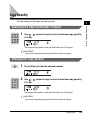
The default setting is ‘AUTO DENSITY’.
Automatic Density Adjustment
This mode enables you to set the machine to automatically adjust the copy density
to the level best suited to the quality of the text original.
1
Place your originals.
● If
Density
OK
is not displayed:
❑ Press [Density] to select the auto mode.
❑ Press [OK].
The machine automatically adjusts the copy density to the level best suited to
the quality of the original.
1-28
Density and Image Quality Adjustments
NOTE
• Image quality mode automatically changes to ‘TEXT’ when <AUTO DENSITY> is
set. You cannot select the original type.
• An automatic density adjustment may not work with transparencies. In this case,
adjust the copy density manually by pressing [
] or [
].
2
Press [Start].
1
Copying starts.
NOTE
• If you place the original on the platen glass of the imageRUNNER 2016, or if the
machine cannot detect the size of the original, specify the size of the original after
pressing
(Start).
(Start).
Press [
] or [
] to select the size ➞ press
• To cancel all settings and return the machine to the Standby display, press
(Reset).
Manual Density Adjustment
You can manually adjust the copy density to the most appropriate level for the
original.
Density
1
Place your originals.
2
Press [Density] twice to select the manual mode.
Density and Image Quality Adjustments
1-29
Basic Copying Features
Start
3
Press [
] or [
] to adjust the copy density.
Press [
] to move the indicator to the left to make the density lighter, or press
[
] to move it to the right to make the density darker.
1
Basic Copying Features
NOTE
You can adjust the density to nine levels.
OK
Start
4
Press [OK].
5
Press [Start].
Copying starts.
NOTE
• If you place the original on the platen glass of the imageRUNNER 2016, or if the
machine cannot detect the size of the original, specify the size of the original after
pressing
(Start).
(Start).
Press [
] or [
] to select the size ➞ press
• To cancel all settings and return the machine to the Standby display, press
(Reset).
1-30
Density and Image Quality Adjustments
Original Type Selection
This machine is capable of processing and producing copies according to the type
of the original. You can manually select the original type so that the machine
reproduces copies as faithful as possible to the original. The following three original
type modes are available:
The world’s coral reefs, where
brilliantly colored fish and a
myriad of other tropical creatures
come together. Aptly nicknamed
“Tropical Forests under the sea”,
these spots of breathtaking
beauty serve as home to
countless varieties of life, and to
us of the land, this alluring,
dream-like world forms a tropical
paradise filled with romance.
Photo Mode
1
Text/Photo Mode
Basic Copying Features
Text Mode
The world’s coral reefs, where
brilliantly colored fish and a
myriad of other tropical creatures
come together.
■ Text Mode
This mode is best suited for making copies of text originals. Blueprints or pencil drawn
originals can also be copied clearly.
■ Photo Mode
This mode is best suited for making copies of photos printed on photographic paper, or
making copies of images printed with halftone dots.
■ Text/Photo Mode
This mode is best suited for making copies of originals containing both text and images/
photos, such as magazines or catalogues.
IMPORTANT
• Combination of these three modes (Text, Photo, or Text/Photo) cannot be selected at the
same time. If you select one of these modes, the previously set mode is canceled.
• If you make copies of an original containing halftones, such as a printed image, using the
Photo mode, the moiré effect (a shimmering, wavy pattern) may occur. In this case, you
can lessen this moiré effect by using the Sharpness mode. (See “Sharpness,” on
p. 3-21.)
Density and Image Quality Adjustments
1-31
NOTE
• The default setting is ‘TEXT’.
• Copy density automatically changes to manual mode when ‘PHOTO’ or ‘TEXT/PHOTO’
is selected.
• If the original is a transparency, select the original type ➞ adjust the density to the most
appropriate level for the original.
1
Basic Copying Features
1
Image Quality
1-32
2
Place your originals.
Press [Image Quality] repeatedly until the desired type of
original (‘TEXT’, ‘PHOTO’, or ‘TEXT/PHOTO’) appears.
Density and Image Quality Adjustments
3
Press [Start].
Copying starts.
NOTE
• If you place the original on the platen glass of the immageRUNNER 2016, or if the
machine cannot detect the size of the original, specify the size of the original after
pressing
(Start).
(Start).
Press [
] or [
] to select the size ➞ press
• To cancel all settings and return the machine to the Standby display, press
(Reset).
Density and Image Quality Adjustments
1
Basic Copying Features
Start
1-33
Changing the Copy Ratio
You can set the machine to adjust the copy ratio automatically, or you can specify
the copy ratio manually.
Basic Copying Features
1
Preset Copy Ratio
The machine offers you a variety of preset copy ratios to reduce or enlarge
standard size originals to another standard paper size.
NOTE
Placing an original horizontally means setting the original with the longer side sideways.
(See “Orientation,” on p. 1-11.)
Copy Ratio
1-34
1
Place your originals.
2
Press [Copy Ratio].
Changing the Copy Ratio
3
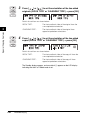
Press [
] or [
] to select the copy ratio.
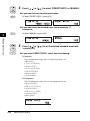
You can select from the following:
MAX.
-129%
LTR ➞ 11 × 17
-121%
LGL ➞ 11 × 17
1
-100%
-78%
LGL ➞ LTR
-73%
11 × 17 ➞ LGL
-64%
11 × 17 ➞ LTR
-50%
MIN.
NOTE
• If the <PAPER SIZE GROUP> setting in the <COPY SETTINGS> menu is set to ‘A’
or ‘AB’, the preset copy ratios are:
A: 50% MIN., 70% A3 ➞ A4, 100%, 141% A4 ➞ A3, 200% MAX.
AB: 50% MIN., 70% A3 ➞ A4, 81% B4 ➞ A4, 86% A3 ➞ B4, 100%, 115% B4 ➞ A3,
122% A4 ➞ B4, 141% A4 ➞ A3, 200% MAX.
• Enlarging or reducing using the preset copy ratio is not available with the 2 on 1
Combination mode.
• To return the copy ratio to 100%, press [Copy Ratio] repeatedly until ‘100%’ is
displayed ➞ press [OK]. Alternatively, press [
] or [
] to select ‘100%’ for
<PRESET RATIO> ➞ press [OK].
• You can also return the ratio to 100% using zoom by percentage. (See “Zoom by
Percentage,” on p. 1-36.)
OK
4
Press [OK].
The selected mode is set, and the selected copy ratio is displayed.
Changing the Copy Ratio
1-35
Basic Copying Features
-200%
Start
5
Press [Start].
Copying starts.
NOTE
• If you place the original on the platen glass of the immageRUNNER 2016, or if the
machine cannot detect the size of the original, specify the size of the original after
pressing
(Start).
Basic Copying Features
1
] or [
] to select the size ➞ press
(Start).
• To cancel all settings and return the machine to the Standby display, press
(Reset).
• Press [
Zoom by Percentage
You can reduce or enlarge originals by any copy ratio in 1% increments. The
available copy ratios are from 50% to 200%.
Original
Copy
CITY
CITY
1-36
Changing the Copy Ratio
CITY
CITY
Copy Ratio
1
Place your originals.
2
Press [Copy Ratio] twice.
3
Press [
] or [
] to set a copy ratio.
NOTE
• You can also use 0 - 9 (numeric keys) to enter a value, and
(Clear) to clear
your entry.
• You can change the value by pressing [
] or [
], even if you have entered the
value using 0 - 9 (numeric keys).
• Enlarging or reducing using the zoom by percentage is not available with the 2 on 1
Combination mode.
• To return the copy ratio to 100%, press [Copy Ratio] repeatedly until ‘100%’ is
displayed ➞ press [OK]. Alternatively, press [
] or [
] to select ‘100%’ for
<PRESET RATIO> ➞ press [OK].
• You can also return the ratio to 100% using a preset zoom ratio. (See “Preset Copy
Ratio”, on p. 1-34.)
OK
4
Press [OK].
The selected mode is set, and the specified copy ratio is displayed.
Changing the Copy Ratio
1-37
Basic Copying Features
1
Start
5
Press [Start].
Copying starts.
NOTE
• If you place the original on the platen glass of the imageRUNNER 2016, or if the
machine cannot detect the size of the original, specify the size of the original after
pressing
(Start).
Basic Copying Features
1
] or [
] to select the size ➞ press
(Start).
• To cancel all settings and return the machine to the Standby display, press
(Reset).
• Press [
1-38
Changing the Copy Ratio
Collating Copies
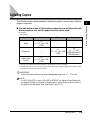
■ The table below shows all the finishing modes that are available with each
different optional unit, and the paper sizes that can be used.
✔ : Available
— : Unavailable
Optional Unit
Collate
Offset
Staple*1
None
✔
11" × 17", LGL, LTR,
LTRR
—
—
Finisher-U1
—
✔
11" × 17", LGL, LTR,
LTRR
✔
11" × 17", LGL,
LTRR (30 sheets)*2,
LTR (50 sheets)*2
Inner 2 Way
Tray-E1
✔
11" × 17", LGL, LTR,
LTRR
—
—
*1 The copies are stapled at the part that represents the upper left corner of the original.
*2 The maximum when you are using 17 lb bond to 20 lb bond (64 g/m2 to 80 g/m2) paper. If the number of sheets
is greater than the limit, they will not be stapled.
IMPORTANT
Pull out the output auxiliary tray when stapling paper larger than 11" × 17" or LGL.
NOTE
If <AUTO COLLATE> is set to ‘COLLATE’ or ‘STAPLE’, the Collate (Offset Collate with
the optional Finisher-U1 attached) or Staple mode is automatically set when you place
the originals into the feeder. (See “Auto Collate,” on p. 3-14.)
Collating Copies
1-39
1
Basic Copying Features
The Finisher modes can be selected to collate the copies in various ways, either by
pages or copy sets.
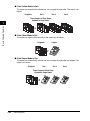
■ If the Collate Mode Is Set:
The copies are automatically collated into sets arranged in page order. The output is as
follows:
Originals
Set 1
Set 2
Set 3
Three Copies of Each Page
Collated in Page Order
Basic Copying Features
1
1
1
1
2
1
2
3
2
3
2
3
4
4
3
4
4
■ If the Offset Mode Is Set:
The copies are slightly offset vertically in the output tray as follows:
Originals
Copies
1
1
2
1
1
3
4
■ If the Staple Mode Is Set:
The copies are automatically collated into sets arranged in page order and stapled. The
output is as follows:
Originals
Set 1
Set 2
Set 3
Three Copies of Each Page
Collated in Page Order
1
1
2
3
4
1-40
Collating Copies
1
1
Page Order Collate
Collate
Staple
2
Place your originals.
Press [Collate/Staple] repeatedly until the indicator for the
Collate function lights.
1
IMPORTANT
• When the optional FInisher-U1 is attached, the Offset Collate mode is set
automatically.
• The Offset Collate mode can be set only with the optional FInisher-U1 attached.
NOTE
When <AUTO COLLATE> is set to ‘COLLATE’ or ‘STAPLE’, the Collate (Offset
Collate with the optional FInisher-U1 attached) or Staple mode is automatically set
when you place the originals into the feeder. (See “Auto Collate,” on p. 3-14.)
ABC
1
GHI
DEF
2
JKL
4
PQRS
5
TUV
7
3
MNO
6
3
Use 0 (1 to 99).
9
(numeric keys) to enter the desired copy quantity
WXYZ
8
9
SYMBOLS
Tone
0
#
NOTE
For more information about entering the copy quantity, see “Specifying the
Required Number of Copies,” on p. 1-23.
Collating Copies
1-41
Basic Copying Features
1
Start
4
Press [Start].
When the original is placed on the platen glass, follow the instructions that
appear on the LCD display.
Copying starts.
NOTE
• If you place the original on the platen glass of the imageRUNNER 2016, or if the
machine cannot detect the size of the original, specify the size of the original after
pressing
(Start).
Basic Copying Features
1
Press [
] or [
] to select the size ➞ press
(Start).
• To cancel this setting, press [Collate/Staple] repeatedly until the collate indicator
turns off.
• To cancel all settings and return the machine to the Standby display, press
(Reset).
1-42
Collating Copies
Page Order Staple
IMPORTANT
Pull out the output auxiliary tray when stapling paper larger than 11" × 17" or LGL.
Collate
Staple
2
1
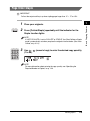
Place your originals.
Press [Collate/Staple] repeatedly until the indicator for the
Staple function lights.
NOTE
If <AUTO COLLATE> is set to ‘COLLATE’ or ‘STAPLE’, the Offset Collate or Staple
mode is automatically set when you place the originals into the feeder. (See “Auto
Collate,” on p. 3-14.)
ABC
1
GHI
DEF
2
JKL
4
PQRS
5
TUV
7
3
MNO
6
3
Use 0 (1 to 99).
9
(numeric keys) to enter the desired copy quantity
WXYZ
8
9
SYMBOLS
Tone
0
#
NOTE
For more information about entering the copy quantity, see “Specifying the
Required Number of Copies,” on p. 1-23.
Collating Copies
1-43
Basic Copying Features
1
Start
4
Press [Start].
When the original is placed on the platen glass, follow the instructions that
appear on the LCD display.
Copying starts.
NOTE
• If you place the original on the platen glass of the imageRUNNER 2016, or if the
machine cannot detect the size of the original, specify the size of the original after
pressing
(Start).
Basic Copying Features
1
Press [
] or [
] to select the size ➞ press
(Start).
• To cancel this setting, press [Collate/Staple] repeatedly until the staple indicator
turns off.
• To cancel all settings and return the machine to the Standby display, press
(Reset).
1-44
Collating Copies
Special Copying Features
2
CHAPTER
This chapter describes the special copying features for document layout and image
adjustment.
Two-Page Separation . . . . . . . . . . . . . . . . . . . . . . . . . . . . . . . . . . . . . . . . . . . . . . . . . . . . 2-2
Frame Erase . . . . . . . . . . . . . . . . . . . . . . . . . . . . . . . . . . . . . . . . . . . . . . . . . . . . . . . . . . . 2-5
Original Frame Erase . . . . . . . . . . . . . . . . . . . . . . . . . . . . . . . . . . . . . . . . . . . . . . . . . . . . . . . . . .2-7
Book Frame Erase . . . . . . . . . . . . . . . . . . . . . . . . . . . . . . . . . . . . . . . . . . . . . . . . . . . . . . . . . . . .2-9
Binding Hole Erase. . . . . . . . . . . . . . . . . . . . . . . . . . . . . . . . . . . . . . . . . . . . . . . . . . . . . . . . . . .2-11
2 on 1 Combination. . . . . . . . . . . . . . . . . . . . . . . . . . . . . . . . . . . . . . . . . . . . . . . . . . . . . 2-14
Different Size Originals . . . . . . . . . . . . . . . . . . . . . . . . . . . . . . . . . . . . . . . . . . . . . . . . . . 2-17
Two-Sided Copying . . . . . . . . . . . . . . . . . . . . . . . . . . . . . . . . . . . . . . . . . . . . . . . . . . . . . 2-20
1 to 2-Sided . . . . . . . . . . . . . . . . . . . . . . . . . . . . . . . . . . . . . . . . . . . . . . . . . . . . . . . . . . . . . . . .2-20
2 to 2-Sided . . . . . . . . . . . . . . . . . . . . . . . . . . . . . . . . . . . . . . . . . . . . . . . . . . . . . . . . . . . . . . . .2-23
2 to 1-Sided . . . . . . . . . . . . . . . . . . . . . . . . . . . . . . . . . . . . . . . . . . . . . . . . . . . . . . . . . . . . . . . .2-26
Book to 2-Sided . . . . . . . . . . . . . . . . . . . . . . . . . . . . . . . . . . . . . . . . . . . . . . . . . . . . . . . . . . . . .2-28
2-1
Two-Page Separation
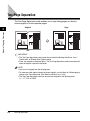
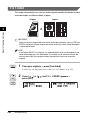
The Two-Page Separation mode enables you to copy facing pages in a book or
bound original to fit onto separate pages.
Original
Special Copying Features
2
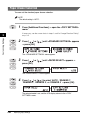
1
Copy
1
IMPORTANT
• The Two-Page Separation mode cannot be used with the Binding Hole Erase, 2 on 1
Combination, or Different Size Originals mode.
• Place your original on the platen glass. The Two-Page Separation mode cannot be used
when the original is placed in the feeder.
NOTE
• You can start copying from the left page only.
• To make two-sided copies of books or bound originals, use the Book to 2-Sided copying
feature of the Two-sided mode. (See “Book to 2-Sided,” on p. 2-28.)
• The Two-Page Separation mode can be used with originals of the following sizes:
11" × 17", LGL, or LTRR.
2-2
Two-Page Separation
1
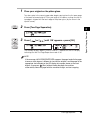
Place your original on the platen glass.
To make copies in the correct page order, begin copying from the first open page
of the book or bound original. Place your original face down, making sure that its
top edge is aligned with the back edge of the platen glass (by the arrow in the
top left corner).
2
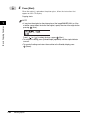
Press [Two-Page Separation].
3
Press [
] or [
2
] until ‘ON’ appears ➞ press [OK].
OK
The Standby display appears, and an asterisk (*) appears on the LCD display
indicating that the Two-Page Separation mode is set.
NOTE
If the message <NO APPROPRIATE SIZE> appears, the paper loaded in the paper
drawers or stack bypass is different in size from the original. Load the paper of the
appropriate size indicated on the LCD display into a paper drawer or the stack
bypass. If you press
(Start) without loading the paper, the machine
automatically selects the paper with the narrowest margin, and starts copying.
Two-Page Separation
2-3
Special Copying Features
Two-Page
Separation
ABC
1
GHI
DEF
2
JKL
4
PQRS
TUV
7
3
MNO
5
4
6
Use 0 (1 to 99).
9
(numeric keys) to enter the desired copy quantity
WXYZ
8
9
SYMBOLS
Tone
0
#
NOTE
For more information about entering the copy quantity, see “Specifying the
Required Number of Copies,” on p. 1-23.
2
Special Copying Features
Start
5
Press [Start].
Copying starts.
To scan the next two facing pages, turn the page of the original ➞ place your
original on the platen glass ➞ press
(Start).
NOTE
• If you place the original on the platen glass of the imageRUNNER 2016, or if the
machine cannot detect the size of the original, specify the size of the original after
pressing
(Start).
Press [
] or [
] to select the size ➞ press
(Start).
• To cancel all settings and return the machine to the Standby display, press
(Reset).
• To cancel copy jobs, see “Canceling a Copy Job,” on p. 1-18.
2-4
Two-Page Separation
Frame Erase
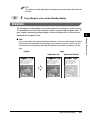
The Frame Erase modes erase shadows and lines that appear when copying
various types of originals. The following three Frame Erase modes are available.
NOTE
• You can select originals of the following sizes: 11×17, LGL, LTRR, LTR, STMTR, or
STMT.
• You cannot select the free size paper loaded in the stack bypass.
■ Original Frame Erase
The Original Frame Erase mode erases the dark borders and frame lines that appear
around the copy if the original is smaller than the selected paper size. You can also use
this mode to create a blank border around the edge of the copy.
Copy (LTR)
Original (STMT)
Original Frame
Erase Selected
Copy (LTR)
Original Frame
Erase Not
Selected
Frame Erase
2-5
2
Special Copying Features
IMPORTANT
• Combination of the three Frame Erase modes cannot be set. If you select one of these
modes, the previously set mode is canceled.
• You can set the Frame Erase modes only for the original sizes shown on the LCD display.
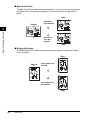
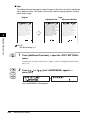
■ Book Frame Erase
The Book Frame Erase mode erases the dark borders, as well as center and contour lines
that appear if you are copying facing pages in a bound original onto a single sheet of
paper.
Copy
Original
Book Frame
Erase Selected
Special Copying Features
2
Book Frame
Erase Not
Selected
Copy
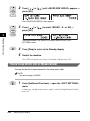
■ Binding Hole Erase
The Binding Hole Erase mode erases the shadows that appear on copies from binding
holes on originals.
Copy
Original
Binding Hole Erase
Selected
Binding Hole Erase
Not Selected
Copy
2-6
Frame Erase
Original Frame Erase
The Original Frame Erase mode erases the dark borders and frame lines that
appear around the copy if the original is smaller than the selected paper size. You
can also use this mode to create a blank border around the edge of the copy.
Before using this mode, set the unit of measurement of the frame erase width in the
Additional Functions menu. (See “Frame Erase Width Unit of Measurement,” on
p. 3-24.)
Frame Erase
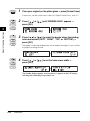
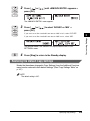
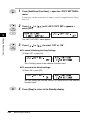
1
Place your originals.
2
Press [Frame Erase].
3
Press [
] or [
press [OK].
] until ‘ORIGINAL FR’ appears ➞
Press [
] or [
press [OK].
] to select the size of the original ➞
OK
4
OK
Frame Erase
2-7
2
Special Copying Features
IMPORTANT
The Original Frame Erase mode cannot be used with the 2 on 1 Combination mode or
Different Size Originals mode.
5
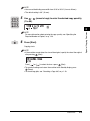
Press [
] or [
] to set the frame erase width for all four
borders ➞ press [OK].
OK
The Standby display appears, and an asterisk (*) appears on the LCD display
indicating that the Frame Erase mode is set.
NOTE
• You can set the original frame erase width from 1/16" to 1 15/16" (1 mm to 50 mm).
• The default setting is 1/8" (4 mm).
Special Copying Features
2
ABC
1
GHI
DEF
2
JKL
4
PQRS
5
TUV
7
3
MNO
6
6
Use 0 (1 to 99).
9
(numeric keys) to enter the desired copy quantity
WXYZ
8
9
SYMBOLS
Tone
0
#
NOTE
• For more information about entering the copy quantity, see “Specifying the
Required Number of Copies,” on p. 1-23.
• The paper size is displayed according to the size of the original you selected in
step 4.
Start
7
Press [Start].
Copying starts.
NOTE
• To cancel all settings and return the machine to the Standby display, press
(Reset).
• To cancel copy jobs, see “Canceling a Copy Job,” on p. 1-18.
2-8
Frame Erase
Book Frame Erase
The Book Frame Erase mode erases dark borders, as well as center and contour
lines that appear if you are copying facing pages in a bound original onto a single
sheet of paper.
Before using this mode, set the unit of measurement of the frame erase width in the
Additional Functions menu. (See “Frame Erase Width Unit of Measurement,” on
p. 3-24.)
Frame Erase
1
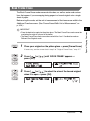
Place your original on the platen glass ➞ press [Frame Erase].
If necessary, see the screen shot in step 2 of “Original Frame Erase,” on p. 2-7.
2
Press [
] or [
press [OK].
] until ‘BOOK FRAME’ appears ➞
OK
3
Press [
] or [
] to select the size of the bound original
when it is open ➞ press [OK].
OK
Frame Erase
2-9
2
Special Copying Features
IMPORTANT
• Place the book to be copied on the platen glass. The Book Frame Erase mode cannot be
used when the original is placed in the feeder.
• The Book Frame Erase mode cannot be used with the 2 on 1 Combination mode or
Different Size Originals mode.
4
Press [
] or [
] to set the frame erase width for all four
borders ➞ press [OK].
OK
NOTE
• You can set the book frame erase width for all four borders in the range from 1/16"
to 1 15/16" (1 mm to 50 mm).
• The default setting is 1/8" (4 mm).
Special Copying Features
2
5
Press [
] or [
] to set the frame erase width for the
center of the bound original ➞ press [OK].
OK
The Standby display appears, and an asterisk (*) appears on the LCD display
indicating that the Book Frame Erase mode is set.
NOTE
• You can set the book frame erase width for the center of the bound original from
1/16" to 1 15/16" (1 mm to 50 mm).
• The default setting is 3/8" (10 mm).
2-10
Frame Erase
ABC
1
GHI
DEF
2
JKL
4
PQRS
TUV
7
3
MNO
5
6
6
Use 0 (1 to 99).
9
(numeric keys) to enter the desired copy quantity
WXYZ
8
9
SYMBOLS
Tone
0
#
Start
7
Press [Start].
Copying starts.
NOTE
• To cancel all settings and return the machine to the Standby display, press
(Reset).
• To cancel copy jobs, see “Canceling a Copy Job,” on p. 1-18.
Binding Hole Erase
The Binding Hole Erase mode erases the shadows that appear on copies from
binding holes on originals.
Before using this mode, set the unit of measurement of the frame erase width in the
Additional Functions menu. (See “Frame Erase Width Unit of Measurement,” on
p. 3-24.)
IMPORTANT
• Do not place originals with binding holes into the feeder, otherwise the originals may be
damaged.
• The Binding Hole Erase mode cannot be used with the Two-Page Separation mode or
Different Size Originals mode.
Frame Erase
2
Special Copying Features
NOTE
• For more information about entering the copy quantity, see “Specifying the
Required Number of Copies,” on p. 1-23.
• The paper size is displayed according to the size of the original you have selected
in step 3.
2-11
Frame Erase
1
Place your original on the platen glass ➞ press [Frame Erase].
If necessary, see the screen shot in step 2 of “Original Frame Erase,” on p. 2-7.
2
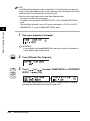
Press [
] or [
press [OK].
] until ‘BINDING HOLE’ appears ➞
OK
Special Copying Features
2
3
OK
Press [
] or [
] to select the border where the binding
holes are located (‘LEFT’, ‘RIGHT’, ‘TOP’, or ‘BOTTOM’) ➞
press [OK].
The border is where the binding holes are located on the original, if you visualize
the original as being face up.
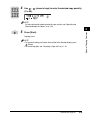
4
Press [
] or [
press [OK].
] to set the frame erase width ➞
OK
The Standby display appears, and an asterisk (*) appears on the LCD display
indicating that the Binding Erase mode is set.
2-12
Frame Erase
NOTE
• You can set the binding erase width from 3/16" to 13/16" (3 mm to 20 mm).
• The default setting is 3/4" (18 mm).
ABC
1
DEF
2
JKL
4
PQRS
5
TUV
7
3
MNO
5
6
Use 0 (1 to 99).
9
(numeric keys) to enter the desired copy quantity
WXYZ
8
9
SYMBOLS
Tone
0
#
2
NOTE
For more information about entering the copy quantity, see “Specifying the
Required Number of Copies,” on p. 1-23.
Start
6
Press [Start].
Copying starts.
NOTE
• If the machine cannot detect the size of the original, specify the size of the original
after pressing
(Start).
Press [
] or [
] to select the size ➞ press
(Start).
• To cancel all settings and return the machine to the Standby display, press
(Reset).
• To cancel copy jobs, see “Canceling a Copy Job,” on p. 1-18.
Frame Erase
2-13
Special Copying Features
GHI
2 on 1 Combination
The 2 on 1 Combination mode enables you to automatically reduce two originals to
fit onto one side or both sides of a selected paper size.
Original
Special Copying Features
2
Copy
1
1
2
2
IMPORTANT
The 2 on 1 Combination mode cannot be used with the Two-Page Separation, Original
Frame Erase, Book Frame Erase, or Different Size Originals mode.
NOTE
• If the optional Duplex Unit-A1 is attached, you can make two-sided copies from
one-sided originals. (See “1 to 2-Sided,” on p. 2-20.)
• You can set originals of the following sizes: 11" × 17", LGL, LTRR, LTR, STMTR, STMT.
• The reduction ratio is automatically set so that the originals fit onto the selected paper
size.
2-14
2 on 1 Combination
Place your originals.
2
Press [2 on 1].
3
Press [
] or [
2
] until ‘ON’ appears ➞ press [OK].
Special Copying Features
2 on 1
1
OK
4
] to select the size of the original ➞
You can select 11" × 17", LGL, LTRR, LTR, STMTR, or STMT.
OK
5
OK
Press [
] or [
press [OK].
Press [
] or [
] to select the paper size ➞ press [OK].
You can select the size of the paper loaded in the paper drawers or stack
bypass.
The Standby display appears, and an asterisk (*) appears on the LCD display
indicating that the 2 on 1 Combination mode is set.
IMPORTANT
You cannot use Auto Paper Selection in the 2 on 1 Combination mode.
NOTE
The machine automatically selects the copy ratio depending on the selected paper
size. However, you can also set the copy ratio using the Preset Copy Ratio or Zoom
by Percentage mode.
2 on 1 Combination
2-15
ABC
1
GHI
DEF
2
JKL
4
PQRS
TUV
7
3
MNO
5
6
6
Use 0 (1 to 99).
9
(numeric keys) to enter the desired copy quantity
WXYZ
8
9
SYMBOLS
Tone
0
#
NOTE
For more information about entering the copy quantity, see “Specifying the
Required Number of Copies,” on p. 1-23.
2
Special Copying Features
Start
7
Press [Start].
If the original is placed on the platen glass, follow the instructions that appear on
the LCD display ➞ press
(Start) once for each original. When scanning is
complete, press [OK].
If you are copying in the Collate, Offset Collate, or Staple mode, copying starts
when the scanning of all pages is complete.
Otherwise, copying starts when enough pages to make a 2 on 1 Combination
copy have been scanned.
NOTE
• To cancel all settings and return the machine to the Standby display, press
(Reset).
• To cancel copy jobs, see “Canceling a Copy Job,” on p. 1-18.
2-16
2 on 1 Combination
Different Size Originals
The Different Size Originals mode enables you to copy different size originals
together.
Different Size Originals
2-17
2
Special Copying Features
IMPORTANT
• If your machine is the imageRUNNER 2016, the Feeder (DADF-P1) should be attached
to use this mode.
• If paper of the same size as the original is not loaded in the paper drawer or stack
bypass, the machine automatically reduces, enlarges, or separates the copied image to
fit the paper loaded in the paper drawer or stack bypass.
• The Different Size Originals mode cannot be used with the Two-Page Separation, 2 on 1
Combination, Original Frame Erase, Book Frame Erase, Binding Hole Erase, or Book to
2-Sided mode.
• Make sure that the different size originals are of the same weight (paper type).
• Set different size originals in the following combinations. Other combinations may
damage the originals.
- 11" × 17" and LGL, LTR and LGL, LTR and LTRR
• Align the top edge of the originals with the back edge of the feeder or the platen glass if
you are placing originals with different widths. (“Width” refers to the vertical measurement
of the paper from the front of the machine to the back of the machine when the paper is
placed in the feeder or the platen glass.)
• If you place originals with different widths into the feeder, the originals may move slightly
when fed to the platen glass. As a result, the images may be scanned and copied as
slanted.
• If the Different Size Originals mode is set, the scanning speed may be slower than
normal.
• If the Different Size Originals mode is set in combination with the Auto Paper Selection
mode, Auto Orientation is not performed.
NOTE
• If the Different Size Originals mode is used with the 1 to 2-Sided mode, the copies are
output as one-sided copies on paper of their respective sizes if the originals for the front
and back sides of a two-sided copy are different in size.
• You can use the stack bypass for the Auto Paper Selection when:
- The paper is loaded in the stack bypass.
- The paper size is specified in <BYPASS STD SET> in the <COMMON SETTINGS>
menu.
- The Auto Paper Selection is set to ‘ON’ for the stack bypass in <COPY> of <AUTO
DRAWER SELCT> in the <COMMON SETTINGS> menu.
Special Copying Features
2
1
Place your originals in the feeder.
IMPORTANT
If your machine is the imageRUNNER 2016, place your originals in the feeder to
use the Different Size Originals mode.
Different Size
Originals
2
3
Press [Different Size Originals].
Press [
] or [
] to select ‘SAME WIDTH’ or ‘DIFFERENT
WIDTH’ ➞ press [OK].
OK
The Standby display appears, and an asterisk (*) appears on the LCD display
indicating that the Different Size Originals mode is set.
2-18
Different Size Originals
ABC
1
JKL
4
PQRS
TUV
7
3
MNO
5
4
6
Use 0 (1 to 99).
9
(numeric keys) to enter the desired copy quantity
WXYZ
8
9
SYMBOLS
Tone
0
#
NOTE
For more information about entering the copy quantity, see “Specifying the
Required Number of Copies,” on p. 1-23.
2
Start
5
Special Copying Features
GHI
DEF
2
Press [Start].
Copying starts.
NOTE
• To cancel all settings and return the machine to the Standby display, press
(Reset).
• To cancel copy jobs, see “Canceling a Copy Job,” on p. 1-18.
Different Size Originals
2-19
Two-Sided Copying
The Two-Sided mode enables you to make two-sided copies from one-sided or
two-sided originals, or make one-sided copies from two-sided originals.
IMPORTANT
You may not be able to make two-sided copies on some types of paper, depending on the
paper.
Special Copying Features
2
NOTE
• If you are copying in the Two-Sided mode, align the top edge of the original with the back
edge of the platen glass (by the arrow in the top left corner), or with the back edge of the
feeder.
• Paper used to make two-sided copies must conform to the following specifications:
- Paper size:
11" × 17", LGL, LTR, LTRR, or STMTR
- Paper weight: 17 lb bond to 24 lb bond (64 g/m2 to 90 g/m2)
1 to 2-Sided
This mode enables you to make two-sided copies from one-sided originals.
Originals
Copy
IMPORTANT
Make sure to place originals with a horizontal (landscape) orientation, such as LTRR and
STMTR, horizontally. If these originals are placed vertically, the back side of the original
is copied upside down.
2-20
Two-Sided Copying
NOTE
• If there is an odd number of originals, the back side of the last copy is left blank. (The
machine’s counter does not count the blank page as a copy.)
• If the 1 to 2-Sided mode is used with the Different Size Originals mode, the copies of
different size originals will be printed as one-sided copies on paper of their respective
sizes. If you want to make two-sided copies with different size originals, you must select
the paper size beforehand. (See “Manual Paper Selection,” on p. 1-26.)
• If the 1 to 2-Sided mode is used when the 2 on 1 Combination mode is set to ‘ON’, two
pages of the originals are printed on one side of the paper, and another two pages on the
other side.
Two-Sided
1
Place your originals.
2
Press [Two-Sided].
3
Press [
] or [
press [OK].
Special Copying Features
2
] until ‘1 > 2-SIDED’ appears ➞
OK
Two-Sided Copying
2-21
4
Press [
] or [
] to set the orientation of the two-sided
copies (‘BOOK TYPE’ or ‘CALENDAR TYPE’) ➞ press [OK].
OK
Details of each item are shown below.
Special Copying Features
2
‘BOOK TYPE’:
The front and back sides of the copy will have the
same top-bottom orientation.
‘CALENDAR TYPE’:
The front and back sides of the copy will have
opposite top-bottom orientations.
The Standby display appears, and an asterisk (*) appears on the LCD display
indicating that the 1 to 2-Sided mode is set.
Start
5
Press [Start].
If the original is placed on the platen glass, follow the instructions that appear on
(Start) once for each original. When scanning is
the LCD display ➞ press
complete, press [OK].
Copying starts.
NOTE
• If you place the original on the platen glass of the imageRUNNER 2016, or if the
machine cannot detect the size of the original, specify the size of the original after
pressing
(Start).
Press [
] or [
] to select the size ➞ press
(Start).
• To cancel all settings and return the machine to the Standby display, press
(Reset).
• To cancel copy jobs, see “Canceling a Copy Job,” on p. 1-18.
2-22
Two-Sided Copying
2 to 2-Sided
This mode enables you to make two-sided copies from two-sided originals.
Original
Copy
NOTE
If the Feeder (DADF-P1) is attached, it is recommended that you set the originals in the
feeder when copying in 2 to 2-Sided mode. This enables you to automatically scan the
front and back sides of the originals without the need to turn over and re-feed the
originals.
Two-Sided
1
Place your originals ➞ press [Two-Sided].
If necessary, see the screen shot in step 2 of “1 to 2-Sided,” on p. 2-20.
2
Press [
] or [
press [OK].
] until ‘2 > 2-SIDED’ appears ➞
OK
Two-Sided Copying
2-23
Special Copying Features
2
3
Press [
] or [
] to set the orientation of the two-sided
originals (‘BOOK TYPE’ or ‘CALENDAR TYPE’) ➞ press [OK].
OK
Details of each item are shown below.
Special Copying Features
2
4
‘BOOK TYPE’:
The front and back sides of the original have the
same top-bottom orientation.
‘CALENDAR TYPE’:
The front and back sides of the original have
opposite top-bottom orientations.
Press [
] or [
] to set the orientation of the two-sided
copies (‘BOOK TYPE’ or ‘CALENDAR TYPE’) ➞ press [OK].
OK
Details of each item are shown below.
‘BOOK TYPE’:
The front and back sides of the copy will have the
same top-bottom orientation.
‘CALENDAR TYPE’:
The front and back sides of the copy will have
opposite top-bottom orientations.
The Standby display appears, and an asterisk (*) appears on the LCD display
indicating that the 2 to 2-Sided mode is set.
2-24
Two-Sided Copying
5
Press [Start].
If the original is placed on the platen glass, follow the instructions that appear on
the LCD display ➞ press
(Start) once for each original. When scanning is
complete, press [OK].
Copying starts.
NOTE
• If you place the original on the platen glass of the immageRUNNER 2016, or if the
machine cannot detect the size of the original, specify the size of the original after
pressing
[Start].
Press [
] or [
] to select the size ➞ press
(Start).
• To cancel all settings and return the machine to the Standby display, press
(Reset).
• To cancel copy jobs, see “Canceling a Copy Job,” on p. 1-18.
Two-Sided Copying
2
Special Copying Features
Start
2-25
2 to 1-Sided
This mode automatically turns over two-sided originals placed in the feeder to make
one-sided copies on different sheets of paper.
Original
Copies
Special Copying Features
2
IMPORTANT
Make sure to place originals with a horizontal (landscape) orientation, such as LTRR and
STMTR, horizontally. If these originals are placed vertically, the back side of the original
is copied upside down.
NOTE
If the Feeder (DADF-P1) is attached, it is recommended that you set the originals in the
feeder when copying in 2 to1-Sided mode. This enables you to automatically scan the
front and back sides of the originals without the need to turn over and re-feed the
originals.
Two-Sided
1
Place your originals ➞ press [Two-Sided].
If necessary, see the screen shot in step 2 of “1 to 2-Sided,” on p. 2-20.
2
Press [
] or [
press [OK].
OK
2-26
Two-Sided Copying
] until ‘2 > 1-SIDED’ appears ➞
3
Press [
] or [
] to set the orientation of the two-sided
originals (‘BOOK TYPE’ or ‘CALENDAR TYPE’) ➞ press [OK].
OK
Details of each item are shown below.
‘BOOK TYPE’:
The front and back sides of the original have the
same top-bottom orientation.
‘CALENDAR TYPE’:
The front and back sides of the original have
opposite top-bottom orientations.
The Standby display appears, and an asterisk (*) appears on the LCD display
indicating that the 2 to 1-Sided mode is set.
Start
4
Press [Start].
If the original is placed on the platen glass, follow the instructions that appear on
(Start) once for each original. When scanning is
the LCD display ➞ press
complete, press [OK].
Copying starts.
NOTE
• If you place the original on the platen glass of the imageRUNNER 2016, or if the
machine cannot detect the size of the original, specify the size of the original after
pressing
(Start).
Press [
] or [
] to select the size ➞ press
(Start).
• To cancel all settings and return the machine to the Standby display, press
(Reset).
• To cancel copy jobs, see “Canceling a Copy Job,” on p. 1-18.
Two-Sided Copying
2-27
Special Copying Features
2
Book to 2-Sided
This mode enables you to make two-sided copies from facing pages, or from the
front and back sides of a page in bound originals, such as books and magazines.
■ Left/Right Two-Sided
This setting makes two-sided copies from facing pages.
Original
Copies
Special Copying Features
2
■ Front/Back Two-Sided
This setting makes two-sided copies from the front and back sides of a page.
Original
2-28
Two-Sided Copying
Copies
IMPORTANT
• The Book to 2-Sided mode cannot be used with the Different Size Originals mode.
• If you select ‘FRT/BACK 2-SIDED’, the front side of the first two-sided page and the back
side of the last two-sided page are left blank. (The machine’s counter does not count the
blank pages as copies.)
• Place your original on the platen glass. The Book to 2-Sided mode cannot be used when
the original is placed in the feeder.
NOTE
You cannot select the free size paper loaded in the stack bypass.
Place your original on the platen glass.
To make copies in the correct page order, begin copying from the first open page
of the book or bound original.
Place your original face down, making sure that its top edge is aligned with the
back edge of the platen glass (by the arrow in the top left corner).
Two-Sided
2
3
Press [Two-Sided].
Press [
] or [
press [OK].
] until ‘BOOK > 2-SIDED’ appears ➞
OK
Two-Sided Copying
2-29
Special Copying Features
1
2
4
Press [
] or [
] to select the desired type of two-sided
layout (‘L/R 2-SIDED’ or ‘FRT/BACK 2-SIDED’) ➞ press [OK].
OK
Details of each item are shown below.
‘L/R 2-SIDED’:
The facing pages of a book or bound original are
copied onto the front and back sides of a single sheet of
paper.
‘FRT/BACK 2-SIDED’:
The front and back sides of the left page, or the front
and back sides of the right page, are copied onto the
front and back sides of a single sheet of paper.
Special Copying Features
2
The Standby display appears, and an asterisk (*) appears on the LCD display
indicating that the Book to 2-Sided mode is set.
Start
5
Press [Start].
To copy the next two facing pages, turn the page of the original, place your
original on the platen glass ➞ press
(Start).
Scanning starts.
NOTE
• If you place the original on the platen glass of the imageRUNNER 2016, or if the
machine cannot detect the size of the original, specify the size of the original after
pressing
(Start).
Press [
OK
6
] or [
] to select the size ➞ press
(Start).
When scanning is complete, press [OK].
Copying starts.
NOTE
• To cancel all settings and return the machine to the Standby display, press
(Reset).
• To cancel copy jobs, see “Canceling a Copy Job,” on p. 1-18.
2-30
Two-Sided Copying
Customizing Settings
3
CHAPTER
This chapter explains how to change the machine’s default settings and customize them.
Copy Settings Table . . . . . . . . . . . . . . . . . . . . . . . . . . . . . . . . . . . . . . . . . . . . . . . . . . . . . 3-2
Specifying Copy Settings . . . . . . . . . . . . . . . . . . . . . . . . . . . . . . . . . . . . . . . . . . . . . . . . . 3-4
Image Direction Priority . . . . . . . . . . . . . . . . . . . . . . . . . . . . . . . . . . . . . . . . . . . . . . . . . . . . . . . .3-5
Auto Orientation . . . . . . . . . . . . . . . . . . . . . . . . . . . . . . . . . . . . . . . . . . . . . . . . . . . . . . . . . . . . . .3-6
Standard Image Quality . . . . . . . . . . . . . . . . . . . . . . . . . . . . . . . . . . . . . . . . . . . . . . . . . . . . . . . .3-7
Standard Density . . . . . . . . . . . . . . . . . . . . . . . . . . . . . . . . . . . . . . . . . . . . . . . . . . . . . . . . . . . . .3-9
Standard Zoom Ratio . . . . . . . . . . . . . . . . . . . . . . . . . . . . . . . . . . . . . . . . . . . . . . . . . . . . . . . . .3-11
Standard Copy Quantity. . . . . . . . . . . . . . . . . . . . . . . . . . . . . . . . . . . . . . . . . . . . . . . . . . . . . . .3-13
Auto Collate . . . . . . . . . . . . . . . . . . . . . . . . . . . . . . . . . . . . . . . . . . . . . . . . . . . . . . . . . . . . . . . .3-14
Standard Two-Sided Copying . . . . . . . . . . . . . . . . . . . . . . . . . . . . . . . . . . . . . . . . . . . . . . . . . .3-16
Standard Frame Erase . . . . . . . . . . . . . . . . . . . . . . . . . . . . . . . . . . . . . . . . . . . . . . . . . . . . . . . .3-17
Standard Two-Page Separation . . . . . . . . . . . . . . . . . . . . . . . . . . . . . . . . . . . . . . . . . . . . . . . . .3-18
Paper Drawer Selection . . . . . . . . . . . . . . . . . . . . . . . . . . . . . . . . . . . . . . . . . . . . . . . . . . . . . . .3-20
Sharpness . . . . . . . . . . . . . . . . . . . . . . . . . . . . . . . . . . . . . . . . . . . . . . . . . . . . . . . . . . . . . . . . .3-21
Paper Size Group . . . . . . . . . . . . . . . . . . . . . . . . . . . . . . . . . . . . . . . . . . . . . . . . . . . . . . . . . . . .3-23
Frame Erase Width Unit of Measurement. . . . . . . . . . . . . . . . . . . . . . . . . . . . . . . . . . . . . . . . . .3-24
Restoring the Default Copy Settings . . . . . . . . . . . . . . . . . . . . . . . . . . . . . . . . . . . . . . . . . . . . .3-25
3-1
Copy Settings Table
The following items can be stored or set in the Copy Settings menu.
Additional Function
Available Settings
Applicable
Page
COPY SETTINGS
Customizing Settings
3
IMAGE DIR PRIORTY
OFF*, ON
p. 3-5
AUTO ORIENTATION
ON*, OFF
p. 3-6
IMAGE QUALITY
TEXT*, PHOTO, TEXT/PHOTO
p. 3-7
DENSITY
AUTO*, MANUAL (9 steps, 5)
p. 3-9
ZOOM RATIO
PRESET RATIO* (100%*, 115% B4 ➞ A3,
121% LGL ➞ 11×17, 122% A4 ➞ B4, 129%
LTR ➞ 11×17, 141% A4 ➞ A3, 200% MAX.,
p. 3-11
50% MIN., 64% 11×17 ➞ LTR, 70% A3 ➞ A4,
73% 11×17 ➞ LGL, 78% LGL ➞ LTR, 81% B4
➞ A4, 86% A3 ➞ B4), MANUAL
COPIES
1*-99
p. 3-13
AUTO COLLATE
OFF*, COLLATE, STAPLE**
p. 3-14
TWO -SIDED**
OFF*, 1 > 2-SIDED, 2 > 2-SIDED,
2 > 1-SIDED, BOOK > 2-SIDED
p. 3-16
FRAME ERASE
OFF*, ORG. FRAME ERASE, BOOK FRAME
p. 3-17
ERASE, BINDING HOLE
2-PAGE SEPARATION
OFF*, ON
p. 3-18
PAPER SELECT
AUTO*, DRAWER 1, DRAWER 2,
DRAWER 3, DRAWER 4
p. 3-20
SHARPNESS
1-9 (5*)
p. 3-21
PAPER SIZE GROUP
INCHES*, A, AB
p. 3-23
MM/INCH ENTRY
INCHES*, MM
p. 3-24
INIT. COPY SET.
OFF*, ON
p. 3-25
STANDARD SETTINGS
An asterisk (*) indicates the default settings.
Two asterisks (**) indicate items that appear only when the appropriate optional equipment is attached.
3-2
Copy Settings Table
NOTE
• For instructions on setting the modes not described in this manual, refer to the other
manuals listed in “Manuals for the Machine.”
• The Copy Settings menu consists of a list of individual settings. Press [
] or [
] to
scroll to the desired setting.
Customizing Settings
3
Copy Settings Table
3-3
Specifying Copy Settings
Standard Copy Settings refer to a combination of copy modes that the machine
automatically applies when you turn ON the main power or when
(Reset) is
pressed. In this section, the procedure for changing the copy modes stored as the
Standard Copy Settings are explained.
NOTE
• The Standard Copy Settings are applied when:
(Reset) is pressed (except while copying).
- the Auto Clear function works.
- the operation in the Additional Functions menu is finished.
• The Standard Copy Settings consist of:
- Image Direction Priority
- Auto Orientation
- Standard Image Quality
- Standard Density
- Standard Zoom Ratio
- Standard Copy Quantity
- Auto Collate
- Standard Two-Sided Copying
- Standard Frame Erase Copying
- Standard Two-Page Separation Copying
- Standard Paper Drawer Selection
- Sharpness
- Paper Size Group
- MM/Inch Entry
- Restoring the Default Copy Settings
• The Auto Clear function can be set to ‘OFF’. (See Chapter 5, “Customizing Settings,” in
the Reference Guide.)
Customizing Settings
3
3-4
Specifying Copy Settings
Image Direction Priority
If <IMAGE DIR PRIORTY> is set to ‘ON’, the machine always copies an image in
the same orientation as the original image. This is because the images on originals
may be copied upside down, depending on the copy mode set.
NOTE
• The default setting is ‘OFF’.
• If <IMAGE DIR PRIORTY> is set to ‘ON’, the copy speed is slower than normal.
1
2
Press [Additional Functions].
Press [
] or [
press [OK].
3
Customizing Settings
Additional
Functions
] until <COPY SETTINGS> appears ➞
OK
The <COPY SETTINGS> menu appears.
3
Press [
] or [
press [OK].
] until <IMAGE DIR PRIORTY> appears ➞
OK
The <IMAGE DIR PRIORTY> menu appears.
Specifying Copy Settings
3-5
4
Press [
] or [
] to select ‘OFF’ or ‘ON’ ➞ press [OK].
OK
The selected mode is set, and the LCD display returns to the <COPY
SETTINGS> menu.
Stop
Press [Stop] to return to the Standby display.
Auto Orientation
If <AUTO ORIENTATION> is set to ‘ON’, the machine uses information, such as the
size of the original and the copy ratio, to determine the most suitable orientation for
the specified paper size and then automatically rotates the image, if necessary.
Customizing Settings
3
5
NOTE
• The default setting is ‘ON’.
• If LTR or STMT originals are enlarged onto 11" × 17" or LGL paper, Auto Orientation is
not performed even if you select ‘ON’.
• Only the images of standard size originals, up to LTR paper, can be rotated when the
copy ratio is set to 100%.
• If Auto Paper Selection is set and the most suitable paper size is not available, the paper
source that is loaded with paper of the same size, even if the orientation is different, is
displayed as the optimal paper to use.
Additional
Functions
1
Press [Additional Functions] ➞ open the <COPY SETTINGS>
menu.
If necessary, see the screen shots in steps 1 and 2 of “Image Direction Priority,”
on p. 3-5.
3-6
Specifying Copy Settings
2
Press [
] or [
press [OK].
] until <AUTO ORIENTATION> appears ➞
OK
The <AUTO ORIENTATION> menu appears.
3
Press [
] or [
] to select ‘ON’ or ‘OFF’ ➞ press [OK].
OK
3
Stop
4
Customizing Settings
The selected mode is set, and the LCD display returns to the <COPY
SETTINGS> menu.
Press [Stop] to return to the Standby display.
Standard Image Quality
You can set the standard image quality for copying.
NOTE
The default setting is ‘TEXT’.
Additional
Functions
1
Press [Additional Functions] ➞ open the <COPY SETTINGS>
menu.
If necessary, see the screen shots in steps 1 and 2 of “Image Direction Priority,”
on p. 3-5.
Specifying Copy Settings
3-7
2
Press [
] or [
➞ press [OK].
] until <STANDARD SETTINGS> appears
OK
The <STANDARD SETTINGS> menu appears.
3
Press [
] or [
press [OK].
] until <IMAGE QUALITY> appears ➞
OK
Customizing Settings
3
The <IMAGE QUALITY> menu appears.
4
Press [
] or [
] to select ‘TEXT’, ‘PHOTO’, or ‘TEXT/
PHOTO’ ➞ press [OK].
OK
The selected mode is set, and the LCD display returns to the <STANDARD
SETTINGS> menu.
Stop
3-8
5
Press [Stop] to return to the Standby display.
Specifying Copy Settings
Standard Density
You can set the standard copy density.
NOTE
The default setting is ‘AUTO’.
1
Press [Additional Functions] ➞ open the <COPY SETTINGS>
menu.
If necessary, see the screen shots in steps 1 and 2 of “Image Direction Priority,”
on p. 3-5.
2
Press [
] or [
➞ press [OK].
] until <STANDARD SETTINGS> appears
OK
The <STANDARD SETTINGS> menu appears.
3
Press [
] or [
] until <DENSITY> appears ➞ press [OK].
OK
The <DENSITY> menu appears.
Specifying Copy Settings
3-9
3
Customizing Settings
Additional
Functions
4
Press [
] or [
] to select ‘AUTO’ or ‘MANUAL’.
● If you want to set the density automatically:
OK
❑ Select ‘AUTO’ ➞ press [OK].
● If you want to set the density manually:
OK
❑ Select ‘MANUAL’ ➞ press [OK].
Customizing Settings
3
❑ Press [
] or [
] to set the desired standard copy density ➞ press [OK].
OK
The selected mode is set, and the LCD display returns to the <STANDARD
SETTINGS> menu.
Stop
3-10
5
Press [Stop] to return to the Standby display.
Specifying Copy Settings
Standard Zoom Ratio
You can set the standard zoom ratio.
NOTE
The default settings are ‘PRESET RATIO’ and ‘100%’.
1
Press [Additional Functions] ➞ open the <COPY SETTINGS>
menu.
If necessary, see the screen shots in steps 1 and 2 of “Image Direction Priority,”
on p. 3-5.
2
Press [
] or [
➞ press [OK].
] until <STANDARD SETTINGS> appears
OK
The <STANDARD SETTINGS> menu appears.
3
Press [
] or [
press [OK].
] until <ZOOM RATIO> appears ➞
OK
The <ZOOM RATIO> menu appears.
Specifying Copy Settings
3-11
3
Customizing Settings
Additional
Functions
4
Press [
] or [
] to select ‘PRESET RATIO’ or ‘MANUAL’.
● If you want to select from the preset ratios:
OK
❑ Select ‘PRESET RATIO’ ➞ press [OK].
● If you want to set the standard zoom ratio manually by 1%
increments:
OK
❑ Select ‘MANUAL’ ➞ press [OK].
Customizing Settings
3
5
Press [
] or [
➞ press [OK].
] to set the desired standard zoom ratio
OK
● If you select ‘PRESET RATIO’, select from the following:
❑ Reduction
The available preset copy ratios for reducing originals are:
• MIN. (50%)
• 11×17 ➞ LTR (64%)
• A3 ➞ A4 (70%)
• 11×17 ➞ LGL (73%)
• LGL ➞ LTR (78%)
• B4 ➞ A4 (81%)
• A3 ➞ B4 (86%)
❑ Enlargement
The available preset copy ratios for enlarging originals are:
• B4 ➞ A3 (115%)
• LGL ➞ 11×17 (121%)
• A4 ➞ B4 (122%)
• LTR ➞ 11×17 (129%)
• A4 ➞ A3 (141%)
• MAX. (200%)
3-12
Specifying Copy Settings
NOTE
If the paper size group is changed, the available preset copy ratios will also
change.
● If you select ‘MANUAL’, enter the standard zoom ratio using
(numeric keys).
0
-
9
NOTE
You can set the zoom ratio from 50% to 200%.
3
Stop
6
Customizing Settings
The selected mode is set, and the LCD display returns to the <STANDARD
SETTINGS> menu.
Press [Stop] to return to the Standby display.
Standard Copy Quantity
You can set the standard copy quantity.
NOTE
The default setting is ‘1’.
Additional
Functions
1
Press [Additional Functions] ➞ open the <COPY SETTINGS>
menu.
If necessary, see the screen shots in steps 1 and 2 of “Image Direction Priority,”
on p. 3-5.
2
Press [
] or [
➞ press [OK].
] until <STANDARD SETTINGS> appears
OK
The <STANDARD SETTINGS> menu appears.
Specifying Copy Settings
3-13
3
Press [
] or [
] until <COPIES> appears ➞ press [OK].
OK
The <COPIES> menu appears.
4
Press [
] or [
] to set the desired standard copy
quantity ➞ press [OK].
OK
3
Customizing Settings
The selected mode is set, and the LCD display returns to the <STANDARD
SETTINGS> menu.
NOTE
• You can also enter the copy quantity using
• You can set the copy quantity from 1 to 99.
Stop
5
0
-
9
(numeric keys).
Press [Stop] to return to the Standby display.
Auto Collate
The Auto Collate mode enables automatic selection of the Collate (Offset Collate)
mode when originals are placed in the feeder. This is helpful when making multiple
sets of copies because you do not need to remember to select the Finisher mode.
NOTE
The default setting is ‘OFF’.
Additional
Functions
1
Press [Additional Functions] ➞ open the <COPY SETTINGS>
menu.
If necessary, see the screen shots in steps 1 and 2 of “Image Direction Priority,”
on p. 3-5.
3-14
Specifying Copy Settings
2
Press [
] or [
➞ press [OK].
] until <STANDARD SETTINGS> appears
OK
The <STANDARD SETTINGS> menu appears.
3
Press [
] or [
press [OK].
] until <AUTO COLLATE> appears ➞
OK
The <AUTO COLLATE> menu appears.
4
OK
Press [
] or [
➞ press [OK].
] to select ‘OFF’, ‘COLLATE’, or ‘STAPLE’
If you do not want the machine to collate automatically, select ‘OFF’.
If you want the machine to collate automatically, select ‘COLLATE’.
If you want the machine to staple automatically, select ‘STAPLE’.
The selected mode is set, the LCD display returns to the <STANDARD
SETTINGS> menu.
NOTE
• When the optional FInisher-U1 is attached, the Collate mode automatically
changes to the Offset Collate mode.
• ‘STAPLE’ is available only when the optional FInisher-U1 is attached.
Stop
5
Press [Stop] to return to the Standby display.
Specifying Copy Settings
3-15
Customizing Settings
3
Standard Two-Sided Copying
You can set the standard Two-Sided mode.
NOTE
The default setting is ‘OFF’.
Additional
Functions
1
Press [Additional Functions] ➞ open the <COPY SETTINGS>
menu.
If necessary, see the screen shots in steps 1 and 2 of “Image Direction Priority,”
on p. 3-5.
Customizing Settings
3
2
Press [
] or [
➞ press [OK].
] until <STANDARD SETTINGS> appears
OK
The <STANDARD SETTINGS> menu appears.
3
Press [
] or [
press [OK].
] until <TWO-SIDED> appears ➞
OK
The <TWO-SIDED> menu appears.
3-16
Specifying Copy Settings
4
OK
Press [
] or [
] to select ‘OFF’, ‘1 > 2-SIDED’,
‘2 > 2-SIDED’, ‘2 > 1-SIDED’, or ‘BOOK > 2-SIDED’ ➞
press [OK].
The selected mode is set, and the LCD display returns to the <STANDARD
SETTINGS> menu.
Stop
5
Press [Stop] to return to the Standby display.
3
Customizing Settings
Standard Frame Erase
You can set the standard Frame Erase mode.
NOTE
The default setting is ‘OFF’.
Additional
Functions
1
Press [Additional Functions] ➞ open the <COPY SETTINGS>
menu.
If necessary, see the screen shots in steps 1 and 2 of “Image Direction Priority,”
on p. 3-5.
2
Press [
] or [
➞ press [OK].
] until <STANDARD SETTINGS> appears
OK
The <STANDARD SETTINGS> menu appears.
Specifying Copy Settings
3-17
3
Press [
] or [
press [OK].
] until <FRAME ERASE> appears ➞
OK
The <FRAME ERASE> menu appears.
4
Press [
] or [
] to select ‘OFF’, ‘ORG. FRAME ERASE’,
‘BOOK FRAME ERASE’, or ‘BINDING HOLE’. ➞ press [OK].
OK
Customizing Settings
3
The selected mode is set, and the LCD display returns to the <STANDARD
SETTINGS> menu.
Stop
5
Press [Stop] to return to the Standby display.
Standard Two-Page Separation
You can set the standard Two-Page Separation mode.
NOTE
The default setting is ‘OFF’.
Additional
Functions
1
Press [Additional Functions] ➞ open the <COPY SETTINGS>
menu.
If necessary, see the screen shots in steps 1 and 2 of “Image Direction Priority,”
on p. 3-5.
3-18
Specifying Copy Settings
2
Press [
] or [
➞ press [OK].
] until <STANDARD SETTINGS> appears
OK
The <STANDARD SETTINGS> menu appears.
3
Press [
] or [
press [OK].
] until <2-PAGE SEPARATION> appears ➞
OK
Customizing Settings
3
The <2-PAGE SEPARATION> menu appears.
4
Press [
] or [
] to select ‘OFF’ or ‘ON’ ➞ press [OK].
OK
The selected mode is set, and the LCD display returns to the <STANDARD
SETTINGS> menu.
Stop
5
Press [Stop] to return to the Standby display.
Specifying Copy Settings
3-19
Paper Drawer Selection
You can set the standard paper drawer selection.
NOTE
The default setting is ‘AUTO’.
Additional
Functions
1
Press [Additional Functions] ➞ open the <COPY SETTINGS>
menu.
If necessary, see the screen shots in steps 1 and 2 of “Image Direction Priority,”
on p. 3-5.
Customizing Settings
3
2
Press [
] or [
➞ press [OK].
] until <STANDARD SETTINGS> appears
OK
The <STANDARD SETTINGS> menu appears.
3
Press [
] or [
press [OK].
] until <PAPER SELECT> appears ➞
OK
The <PAPER SELECT> menu appears.
4
Press [
] or [
] to select ‘AUTO’, ‘DRAWER 1’,
‘DRAWER 2’, ‘DRAWER 3’, or ‘DRAWER 4’ ➞ press [OK].
OK
The selected mode is set, and the LCD display returns to the <COPY
SETTINGS> menu.
3-20
Specifying Copy Settings
NOTE
The display may differ depending on the optional cassette modules attached to the
machine.
Stop
5
Press [Stop] to return to the Standby display.
Sharpness
■ Low
If you make copies of an original containing halftones, such as a printed image, using the
Photo mode, the moiré effect (a shimmering, wavy pattern) may occur. In this case, you
can lessen this moiré effect by adjusting the sharpness level lower to produce a clearer
copy.
Original
Adjustment Set
The world’s coral reefs, where
brilliantly colored fish and a
myriad of other creatures of the
tropics come together.
The world’s coral reefs, where
brilliantly colored fish and a
myriad of other creatures of the
tropics come together.
Copy
Adjustment Not Set
The world’s coral reefs, where
brilliantly colored fish and a
myriad of other creatures of the
tropics come together.
Specifying Copy Settings
3-21
3
Customizing Settings
The Sharpness mode enables you to make copies with a sharper or softer contrast.
To reproduce text or lines with a sharper contrast, increase the sharpness level. To
copy originals containing printed images or other halftones with a softer contrast,
decrease the sharpness level.
■ High
This setting enhances the edges of original images so that faint or fine text is reproduced
with a sharper contrast. This setting is particularly suited for copying blueprints and faint
pencil drawn images.
Original
Adjustment Set
The world’s coral reefs, where
brilliantly colored fish and a myriad
of other tropical creatures come
together. Aptly nicknamed
“Tropical Forests under the sea”,
these spots of breathtaking beauty
serve as home to countless
varieties of life, and to us of the
land, this alluring, dream-like
world forms a tropical paradise
filled with romance.
Customizing Settings
3
Copy
Adjustment Not Set
The world’s coral reefs, where
brilliantly colored fish and a myriad
of other tropical creatures come
together. Aptly nicknamed
“Tropical Forests under the sea”,
these spots of breathtaking beauty
serve as home to countless
varieties of life, and to us of the
land, this alluring, dream-like
world forms a tropical paradise
filled with romance.
The world’s coral reefs, where
brilliantly colored fish and a myriad
of other tropical creatures come
together. Aptly nicknamed
“Tropical Forests under the sea”,
these spots of breathtaking beauty
serve as home to countless
varieties of life, and to us of the
land, this alluring, dream-like
world forms a tropical paradise
filled with romance.
NOTE
The default setting is ‘5’.
Additional
Functions
1
Press [Additional Functions] ➞ open the <COPY SETTINGS>
menu.
If necessary, see the screen shots in steps 1 and 2 of “Image Direction Priority,”
on p. 3-5.
2
Press [
] or [
press [OK].
] until <SHARPNESS> appears ➞
OK
The <SHARPNESS> menu appears.
3-22
Specifying Copy Settings
3
Press [
] or [
press [OK].
] to set the desired sharpness level ➞
OK
The selected mode is set, and the LCD display returns to the <COPY
SETTINGS> menu.
NOTE
• You can also enter the standard sharpness level using
• You can set the sharpness in the range from 1 to 9.
• The highest sharpness level is ‘9’ and the lowest is ‘1.’
0
-
9
(numeric keys).
3
Stop
4
Customizing Settings
To copy text or lines clearly, select a high sharpness level. To copy originals
containing printed images or other halftones, select a low sharpness level.
Press [Stop] to return to the standby display.
Paper Size Group
You can set the paper size group for the machine.
NOTE
• The default setting is ‘INCHES’.
• If the paper size group is changed, the preset copy ratios will also change.
Additional
Functions
1
Press [Additional Functions] ➞ open the <COPY SETTINGS>
menu.
If necessary, see the screen shots in steps 1 and 2 of “Image Direction Priority,”
on p. 3-5.
Specifying Copy Settings
3-23
2
Press [
] or [
press [OK].
] until <PAPER SIZE GROUP> appears ➞
OK
The <PAPER SIZE GROUP> menu appears.
3
Press [
] or [
press [OK].
] to select ‘INCHES’, ‘A’, or ‘AB’ ➞
OK
Customizing Settings
3
The selected mode is set, and the LCD display returns to the <COPY
SETTINGS> menu.
Stop
4
Press [Stop] to return to the Standby display.
5
Restart the machine.
Turn OFF the machine, wait at least 10 seconds, and then turn it ON.
Frame Erase Width Unit of Measurement
You can set the unit of measurement for the frame erase width.
NOTE
The default setting is ‘INCHES’.
Additional
Functions
1
Press [Additional Functions] ➞ open the <COPY SETTINGS>
menu.
If necessary, see the screen shots in steps 1 and 2 of “Image Direction Priority,”
on p. 3-5.
3-24
Specifying Copy Settings
2
Press [
] or [
press [OK].
] until <MM/INCH ENTRY> appears ➞
OK
The <MM/INCH ENTRY> menu appears.
3
OK
Press [
] or [
press [OK].
] to select ‘INCHES’ or ‘MM’ ➞
If you want to set the standard frame erase width in inch, select ‘INCHES’.
3
Customizing Settings
If you want to set the standard frame erase width in mm, select ‘MM’.
The selected mode is set, and the LCD display returns to the <COPY
SETTINGS> menu.
Stop
4
Press [Stop] to return to the Standby display.
Restoring the Default Copy Settings
Modes that have been changed in Copy Settings (from the Additional Functions
menu) can be restored to their default settings. (See “Copy Settings Table,” on
p. 3-2.)
NOTE
The default setting is ‘NO’.
Specifying Copy Settings
3-25
Additional
Functions
1
Press [Additional Functions] ➞ open the <COPY SETTINGS>
menu.
If necessary, see the screen shots in steps 1 and 2 of “Image Direction Priority,”
on p. 3-5.
2
Press [
] or [
press [OK].
] until <INIT. COPY SET.> appears ➞
OK
Customizing Settings
3
The <INIT. COPY SET.> menu appears.
3
Press [
] or [
] to select ‘OFF’ or ‘ON’.
● To cancel initializing the Copy Settings:
❑ Select ‘OFF’ ➞ press [OK].
The LCD display returns to the Additional Functions menu.
● To restore to the default settings:
❑ Select ‘ON’ ➞ press [OK].
The Copy Settings are initialized, and the LCD display returns to the Additional
Functions menu.
Stop
3-26
4
Press [Stop] to return to the Standby display.
Specifying Copy Settings
Appendix
4
CHAPTER
Combination of Copy Modes Chart. . . . . . . . . . . . . . . . . . . . . . . . . . . . . . . . . . . . . . . . . . 4-2
Index . . . . . . . . . . . . . . . . . . . . . . . . . . . . . . . . . . . . . . . . . . . . . . . . . . . . . . . . . . . . . . . . . 4-3
4-1
Combination of Copy Modes Chart
: Combination Unavailable
Copy
M
Appendix
4
odes A
lready
Prese
Set
t zoom
Zoom
by perc
e
Autom
atic De ntage
nsity C
Text
ontrol
Photo
Text/P
ho
Auto P to
aper S
e
Stack
Bypas lection
s
Collate
Offset
C
Staple ollating
Reserv
e
Two-P Copy
age S
eparati
2 on 1
on
C
Origin ombination
al Fram
e
Book F
Erase
ra
Bindin me Erase
g Hole
Erase
1 to 2-S
id
2 to 2-S ed
ided
2 to 1-S
id
Book to ed
Differe 2-Sided
nt Size
Origin
als
The chart shows the available combinations of settings when you want to set more
than one mode at a time.
Modes to Be Set
Preset zoom
Zoom by percentage
Automatic Density Control
Text
Photo
Text/Photo
Auto Paper Selection
Stack Bypass
Collate
Offset Collating
Staple
Reserve Copy
Two-Page Separation
2 on 1 Combination
Original Frame Erase
Book Frame Erase
Binding Hole Erase
1 to 2-Sided
2 to 2-Sided
2 to 1-Sided
Book to 2-Sided
Different Size Originals
4-2
Combination of Copy Modes Chart
Index
F
2 on 1 Combination, 2-14
Feeder, 1-3, 1-10, 1-15
Finishing modes, 1-39
Auto Collate, 3-14
Collate, 1-39, 1-41
Offset, 1-39, 1-41
Staple, 1-39, 1-43
Frame Erase, 2-5
Binding Hole Erase, 2-6, 2-11
Book Frame Erase, 2-6, 2-9
Original Frame Erase, 2-5, 2-7
Standard Frame Erase, 3-17
Unit of Measurement, 3-24
A
Auto Collate, 3-14
Automatic Orientation, 3-6
C
Canceling a Job, 1-18
Combination of Copy Modes Chart, 4-2
Copy Quantity, 1-23, 3-13
Standard Copy Quantity, 3-13
Copy Ratio, 1-34
Preset Ratio, 1-34
Standard Zoom Ratio, 3-11
Zoom by Percentage, 1-36
Copy Settings, 3-4
Copy Settings Table, 3-2
D
Default Copy Settings, 3-25
Density, 1-28, 3-9
Standard Density, 3-9
Different Size Originals, 2-17
4
Appendix
Numeric
I
Image Direction Priority, 3-5
Image Quality, 1-28, 3-7
Photo Mode, 1-31
Standard Image Quality, 3-7
Text Mode, 1-31
Text/Photo Mode, 1-31
O
Orientation of Originals, 1-11
Index
4-3
P
Paper Drawer selection, 3-20
Paper Select, 1-24
Auto Paper Selection, 1-24
Manual Paper Selection, 1-26
Paper Drawer Selection, 3-20
Paper Size Group, 3-23
Platen glass, 1-10, 1-12
Preset Ratio, 1-34
R
Appendix
4
Reserved Copying, 1-21
Restoring the Default Copy Settings, 3-25
S
Sharpness, 3-21
Sleep mode, 1-2
Slide guides (feeder), 1-16
Specifying Copy Settings, 3-4
Standard Copy Settings, 3-4
Standard Zoom Ratio, 3-11
T
Two-Page Separation, 2-2
Standard Two-Page Separation, 3-18
Two-page Separation, 3-18
Two-Sided Copying, 2-20, 3-16
1 to 2-Sided, 2-20
2 to 1-Sided, 2-26
2 to 2-Sided, 2-23
Book to 2-Sided, 2-28
Standard Two-Sided Copying, 3-16
4-4
Index
CANON INC.
30-2, Shimomaruko 3-chome, Ohta-ku, Tokyo 146-8501, Japan
CANON U.S.A., INC.
One Canon Plaza, Lake Success, NY 11042, U.S.A.
CANON CANADA INC.
6390 Dixie Road Mississauga, Ontario L5T 1P7, Canada
CANON EUROPA N.V.
Bovenkerkerweg 59-61 1185 XB Amstelveen, The Netherlands
CANON FRANCE S.A.S.
17,quai du Président Paul Doumer 92414 Courbevoie Cedex, France
CANON (U.K.) LTD.
Woodhatch, Reigate, Surrey, RH2 8BF, United Kingdom
CANON DEUTSCHLAND GmbH
Europark Fichtenhain A10, 47807 Krefeld, Germany
CANON ITALIA S.p.A.
Via Milano, 8 20097 San Donato Milanese (MI) Italy
CANON LATIN AMERICA, INC.
703 Waterford Way Suite400 Miami, Florida 33126 U.S.A.
CANON AUSTRALIA PTY. LTD.
1 Thomas Holt Drive, North Ryde, Sydney, N.S.W. 2113, Australia
CANON CHINA CO., LTD.
15F, North Tower, Beijing Kerry Centre, 1 Guang Hua Road, Chao Yang District, 100020, Beijing, China
CANON SINGAPORE PTE. LTD.
1 HarbourFront Avenue #04-01 Keppel Bay Tower, Singapore 098632
CANON HONGKONG CO., LTD.
19/F., The Metropolis Tower, 10 Metropolis Drive, Hunghom, Kowloon, Hong Kong
FA7-7438 (000)
XXXXXXXX
© CANON INC. 2005
120V
PRINTED IN JAPAN OR CHINA