1
Installation
The PCI slot must support bus master data transfers
(refer to your computer documentation or contact your
vendor).
Installing the Host Adapter
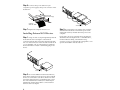
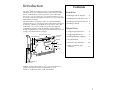
Step 3: Insert the host adapter in the PCI expansion
WARNING: Before beginning the installation,
slot. Press it down firmly so that the contacts are securely
seated in the slot, and secure it with the screw that you
removed in step 2.
turn OFF power to the computer and external
devices and disconnect the power cords.
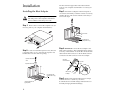
Step 1: Remove the cover from the computer case. (If
necessary, refer to your computer documentation.)
Bus contacts
PCI expansion slot
(typically white or ivory)
Back of
Your Computer
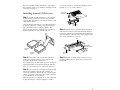
Step 4: OPTIONAL-Connect the host adapter to the
Step 2: Locate an unused PCI expansion slot. (This slot
is typically white or ivory.) Unscrew the expansion slot
bracket that covers the card-slot opening.
Expansion slot bracket
screw
LED on the computer so that it will light whenever there
is activity on the SCSI bus. To do this disconnect the LED
cable from the LED connector on the motherboard and
connect it to the LED connector on the host adapter.
LED cable
from motherboard
2-pin LED
cable
Expansion slot bracket
LED connector
on adapter
1
Pin 1
PCI expansion slots
(typically white or ivory)
Step 5: Make sure that all SCSI devices have unique
16-bit ISA expansion slot
(typically black)
2
SCSI ID’s from 0 to 6. (Refer to your device
documentation for SCSI ID settings and instructions on
manually changing the default settings.)