1
This user guide covers the operation of the CP040
Portable Radios.
Before using this product, read the
operating instructions for safe usage
contained in the Product Safety and
RF Exposure booklet 6864117B25_
C a u t i o n enclosed with your radio.
2.
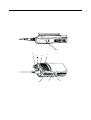
On-Off / Volume Knob
Used to turn the radio on or off, and to adjust
the radio’s volume.
3.
Channel Selector Knob
Switches the radio to different channels.
4.
LED Indicator
Indicates power up, transmit, receive, scan
status, Call Alert, Selective Call and battery
status.
5.
Microphone
Hold the microphone 2.5 to 5 cm from your
mouth, and speak clearly into it.
6.
Side Button 2 (Programmable)
7.
Side Button 1 (Programmable)
Recommended for Monitor/Cancel button.
8.
Accessory Connector
Connects remote microphones, remote
earphones and other accessories. Replace
dust cap when not in use.
!
ATTENTION!
This radio is restricted to occupational use only to
satisfy ICNIRP RF energy exposure requirements.
Before using this product, read the RF energy
awareness information and operating instructions in
the Product Safety and RF Exposure booklet
(Motorola Publication part number 6864117B25_) to
ensure compliance with RF energy exposure limits.
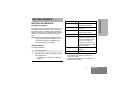
OPERATION AND CONTROL
FUNCTIONS
Radio Controls
The numbers below refer to the illustrations on the
inside front cover.
1.
Push-to-talk (PTT)
Press and hold down this button to talk; release
it to listen.
3
English
RADIO OVERVIEW
RADIO OVERVIEW