1
RADIO OVERVIEW
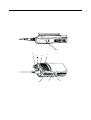
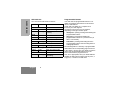
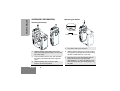
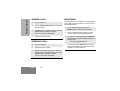
LED Indicator
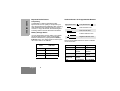
Programmable Buttons
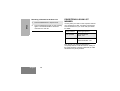
The LED shows radio status as follows:
Your radio has two programmable buttons. Your
dealer can program these buttons as shortcuts to
various radio features.
Check with your dealer for a complete list of
functions your radio supports.
The buttons can access up to two features,
depending on the type of button press:
LED
State
Indication
Radio Call
Red
Solid
Radio transmitting.
Red
Flashing
Channel busy - when
receiving.
Flashing
Radio is scanning.
Flashing
Receiving a Call Alert
•
short press—quickly pressing and releasing the
programmable buttons
•
long press—pressing and holding the
programmable buttons for a period of time (at
least 1 1/2 seconds)
•
hold down—pressing and holding down the
programmable buttons while checking status or
making adjustments
Scan
Green
Call Alert
Yellow
Selective Call
Yellow
Flashing
Receiving a Selective Call
Sticky Monitor/Open Squelch
Yellow
Solid
Radio in monitor mode.
Low Battery Level
Red
English
Flashing
4
Flashing when
transmitting.
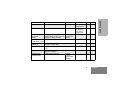
The following table is a summary of programmable
radio features and corresponding page references.
In the “Button” column, have your dealer record the
name of the programmable button next to the
feature that has been programmed to it.
Also, where appropriate, have your dealer indicate
whether the button press requires a short press, a
long press, or needs to be held down.