1
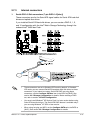
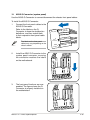
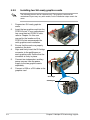
12. ASUS Q-Connector (system panel)
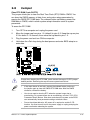
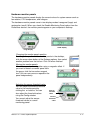
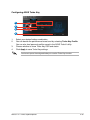
Use the ASUS Q-Connector to connect/disconnect the chassis front panel cables.
To install the ASUS Q-Connector:
1.
Connect the front panel cables to the
ASUS Q-Connector.
Refer to the labels on the QConnector to know the detailed pin
definitions, and then match them
to their respective front panel cable
labels.
The labels on the front panel
cables may vary depending on the
chassis model.
2.
Install the ASUS Q-Connector to the
system panel connector, ensuring
the orientation matches the labels
on the motherboard.
3.
The front panel functions are now
enabled. The figure shows the QConnector is properly installed on
the motherboard.
ASUS P7F7-E WS Supercomputer
IDE_LED+
IDE_LED-
PWR
Ground
Reset
Ground
IDE_LED
POWE
R SW
RESET
SW
2-45