1
CHAPTER 10 ■ SERIAL AND I2C
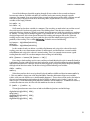
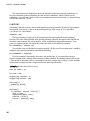
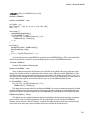
This statement assigns the numerical value of the byte that is read from the serial buffer to the
variable named incomingByte of the byte data type. We used the byte data type because that is the largest
data type that will be returned by the read() function. In this example, if we send the character '0' to the
Arduino it will assign the value 48 to the variable incomingByte. Likewise, if we send the character '9',
then the value 57 is assigned instead. While these are not the numbers we would initially expect, we can
still work with them to do what we need to do. But first, let’s look at what would happen hypothetically if
we changed the data type to the following:
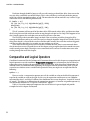
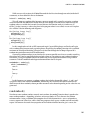
char incomingByte = Serial.read();
While the read() function will still read the incoming byte as an ASCII character code, by storing this
value in a char data type, we will keep the character as a character. So rather than storing the numerical
value 97, we would store the character 'a'; instead of 49 we would have the character '1'. It’s important
to remember that this is not a numerical value—adding two characters may not give you the expected
outcome. For example the character '1' added twice is not equal to 2. Written another way, '1' + '1'
!= 2. Instead, it would result in a value of 98, which, if we sent that value back to the Arduino Serial
Monitor would gives us the character 'b'.
To make things worse, serial communication happens one byte or one character at a time. So we
would not be able to send the numerical value 180 straight from the Serial monitor. What would happen
is the Arduino would receive three bytes that correspond to the characters '1', '8', and '0'. That’s not
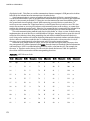
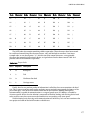
going to work for the servo. If we refer back to the ASCII Character Codes chart in Table 10-1, we will see
that the character '0' has the code 48, '1' is 49, and so on. So if we either subtract the numerical value of
48 from the character code for a number, or subtract the character '0' then we will end up with the
actual numerical value that corresponds to the character. For example, we might write a statement like
the following:
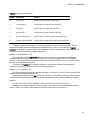
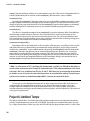
incomingByte
= incomingByte - 48;
Using this statement, we might receive the character '5' that has the ASCII code 53. Subtract 48
from 53 and we end up with 5—a number that can be used with more predictable results. That’s nifty,
right? We might also write the same statement as the following:
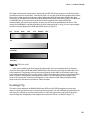
incomingByte
= incomingByte - '0';
Every time the compiler sees the single quotes it knows we are talking about the character '0'and
not the numerical value 0 and so it makes the substitution for us. Now that we have converted a single
digit from a character to a numerical value, we need a way to stitch them together so to speak so that we
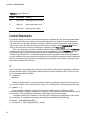
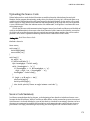
can get a value like 180. In our earlier code we used the following statement:
angle = angle * 10 + (incomingByte - '0');
The last bit of the statement should look familiar from our previous discussion, so let’s look at the
operation angle = angle * 10 and what happens in this statement when we send 180 from the Serial
Monitor. The first time through our loop it is angle == 0, so angle * 10 will also equal 0. We then add
the result of the first incomingByte after it has been subtracted by the character '0' to get its numerical
value, in this case 49 - 48 for a result of 1. That’s the first digit. The second time through the loop it is
angle == 1; we then multiply by 10 to get a result of 10, and then add the result of the character '0'
subtracted from the character '8', or 56 - 48, which is the numerical value 8, when added to 10 is 18.
The third time through the loop, angle == 18, angle * 10 == 180, and then we add the value 0 and now
angle == 180. If we hit the Enter key, with the Newline option selected at the bottom of the window, our
sketch will quickly work all this out and send the byte value 180 to the servo function. It’s not too bad if
you just think it through a few times.
Now our code only has a way of converting the character of numbers to actual numerical values. For
the most part it will ignore any character other than a digit from 0 through 9.
182