1
D4.3 Prototype Software (Documentation)
TELL ME project – GA: 278723
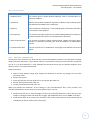
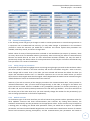
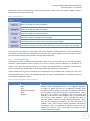
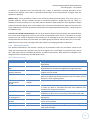
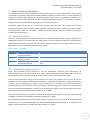
government reports and discussions with communications experts from the United Kingdom. Table 2
details what the scenario buttons do.
Table 2: Scenario buttons
Scenario
Button
Action
Changes the Epidemic Parameters to: R0 = 1.4, latency-period = 2, recovery-period = 5.
Does not change any other parameters.
Changes the Epidemic Parameters to: R0 = 2, latency-period = 1, recovery-period = 5.
Does not change any other parameters.
Changes the Epidemic Parameters to: R0 = 6, latency-period = 7, recovery-period = 21.
Does not change any other parameters.
Changes the communications plan to a ‘low activity’ plan. View the Communications
Plan tab to view the settings for the messages.
Changes the communications plan to a ‘medium activity’ plan. View the
Communications Plan tab to view the settings for the messages.
Changes the communications plan to a ‘high activity’ plan (NB: this plan has no
vaccination). View the Communications Plan tab to view the settings for the messages.
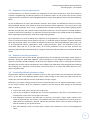
There are also three buttons at the bottom left of the interface. ‘default-behaviour’ resets the behaviour
parameters to those when the simulation is first opened. The ‘clear messages’ and ‘clear-contexts’ buttons
clear the Communications Plan and Policy Context tabs respectively.
2.4.3 Communications plan
Comparing the effect of different communications plans is the main function of the TELL ME simulation.
Therefore, communications plans are likely to be one of the key scenario elements you would like to
change. From using the learning scenarios you should now understand how to change communication
plans, so we shall now explain how communications plans are defined in the simulation.
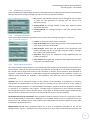
A plan is made up of a group of messages. Each message has six parameters and occupies one row in the
‘Communications Plan’ screen. The messages that make up a plan are described in the simulation using the
six parameters detailed in Table 3.
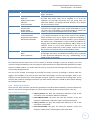
Table 3: Communications plan message parameters
Parameter
Trigger
Values
Before
Start
Day
National prevalence
After
Regular
Description
This parameter, in combination with the Day / Level (below),
identifies when a message will occur, or be triggered. Messages
can begin: (i) before the start of an epidemic (actually when
prevalence reaches half the level at which an epidemic is declared)
and is intended to represent preparatory communications – Day /
Level gives the number of messages that occur before the
epidemic, (ii) at the start of the epidemic, (iii) on a particular day
after the start of the epidemic – Day / Level gives the day, (iv)
when the epidemic reaches a certain national prevalence – Day /
Level sets the proportion prevalence, (v) after the peak of an
epidemic – Day / Level sets the relative prevalence compared to
the epidemic peak (vi) repeated at regular intervals once the
epidemic has started – Day / Level gives the number of days
between repeated messages.
19