1
Amazon Elastic Compute Cloud User Guide for Linux
Instances
T2 Instances
requires more CPU resources than its base performance level allows, it uses credits from the CPU credit
balance to burst up to 100% utilization. The more credits your T2 instance has for CPU resources, the
more time it can burst beyond its base performance level when more performance is needed.
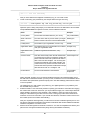
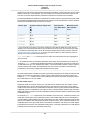
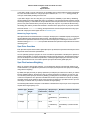
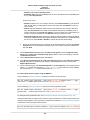
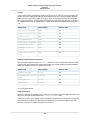
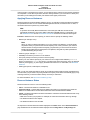
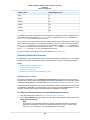
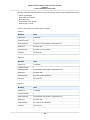
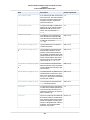
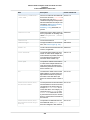
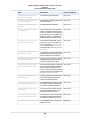
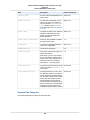
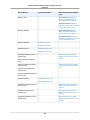
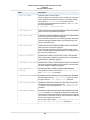
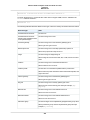
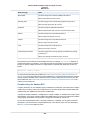
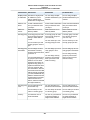
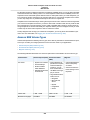
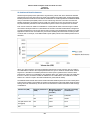
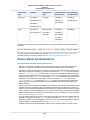
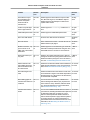
The following table lists the initial CPU credit allocation received at launch, the rate at which CPU credits
are received, the baseline performance level as a percentage of a full core performance, and the maximum
earned CPU credit balance that an instance can accrue.
Instance type
n
I-i CPU credits earned per hour
a
til
U
P
C
e
c
d
rit*
Base performMaximum earned
ance (CPU utiliza- CPU credit baltion)
ance***
t2.micro
03 6
10%
144
t2.small
03 12
20%
288
t2.medium
06 24
40%**
576
t2.large
06 36
60%**
864
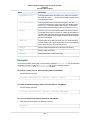
* There are limits to how many T2 instances will launch or start with the initial CPU credit, which by
default is set to 100 launches or starts of any T2 instance per account, per 24-hour period, per region.
If you'd like to increase this limit, you can file a customer support limit increase request by using the
Amazon EC2 Instance Request Form. If your account does not launch or start more than 100 T2 instances in 24 hours, this limit will not affect you.
** t2.medium and t2.large instances have two vCPUs. The base performance is an aggregate of
the two vCPUs.
*** This maximum does not include the initial CPU credits, which are used first and do not expire. For
example, a t2.micro instance that was launched and then remained idle for over 24 hours could reach
a credit balance of up to 174 (30 initial CPU credits + 144 earned credits). However, once the instance
uses the initial 30 CPU credits, the credit balance can never exceed 144 unless a new initial CPU
credit balance is issued by stopping and starting the instance again.
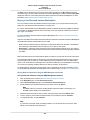
The initial credit balance is designed to provide a good startup experience. The maximum earned credit
balance for an instance is equal to the number of CPU credits received per hour times 24 hours. For
example, a t2.micro instance earns 6 CPU credits per hour and can accumulate a maximum earned
CPU credit balance of 144 CPU credits.
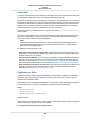
Do CPU credits expire?
Initial CPU credits do not expire, but they are used first when an instance uses CPU credits. Unused
earned credits from a given 5 minute interval expire 24 hours after they are earned, and any expired
credits are removed from the CPU credit balance at that time, before any newly earned credits are added.
Additionally, the CPU credit balance for an instance does not persist between instance stops and starts;
stopping an instance causes it to lose its credit balance entirely, but when it restarts it will receive its initial
credit balance again.
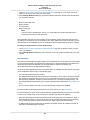
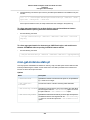
For example, if a t2.small instance had a CPU utilization of 5% for the hour, it would have used 3 CPU
credits (5% of 60 minutes), but it would have earned 12 CPU credits during the hour, so the difference
of 9 CPU credits would be added to the CPU credit balance. Any CPU credits in the balance that reached
their 24 hour expiration date during that time (which could be as many as 12 credits if the instance was
completely idle 24 hours ago) would also be removed from the balance. If the amount of credits expired
is greater than those earned, the credit balance will go down; conversely, if the amount of credits expired
is fewer than those earned, the credit balance will go up.
127