1
Chapter 4
Configuring the PA-T3+
Configuring Half-Duplex and Binary Synchronous Communications in Cisco 7200 Series Routers
For command descriptions, refer to the Configuration Fundamentals Configuration Guide publication.
For more information, see the “Obtaining Documentation” section on page x and the.“Obtaining
Technical Assistance” section on page xi.
Note
If you are configuring a PA-T3+ in a Cisco 7200 router and you want to configure the interface for
half-duplex or Bisync operation, proceed to the next section, “Setting the Bandwidth”; otherwise,
proceed to the “Setting the Bandwidth” section on page 4-15.
Configuring Half-Duplex and Binary Synchronous
Communications in Cisco 7200 Series Routers
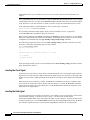
This section explains how to configure EIA/TIA-232 interfaces for half-duplex and Bisync operation in
Cisco 7200 routers.
Note
Cisco IOS Release 11.2(7a)P or a later release of 11.2 P supports half-duplex and Bisync operation on
the PA-T3+ in Cisco 7200 routers.
Cisco IOS Release 11.1(19)CC1 or a later release of 11.1 CC, or Release 11.3(4)AA or a later release of
11.3 AA supports half-duplex and Bisync operation on the PA-T3+ installed in Cisco 7202 routers.
Cisco IOS Release 12.0(3)T or a later release of 12.0 T, or Release 12.0(2)XE or a later release of 12.0
XE supports half-duplex and Bisync operation on the PA-T3+ in Cisco 7204VXR and Cisco 7206VXR
routers.
The Catalyst RSM/VIP2, Cisco 7100 series routers, Cisco uBR7200 series routers, and the VIP do not
support half-duplex and Bisync operation on the PA-T3+.
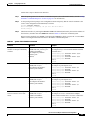
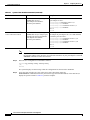
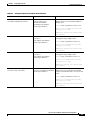
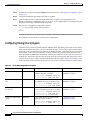
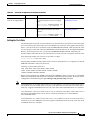
Use the half-duplex command to configure EIA/TIA-232 interfaces for half-duplex mode; full-duplex
mode is the default for low-speed serial interfaces. Serial DCE interfaces in half-duplex mode can be
configured for controlled-carrier mode or constant-carrier mode; constant-carrier mode is the default.
Controlled-carrier mode sets the EIA/TIA-232 interface to deactivate Data Carrier Detect (DCD) until a
transmission is sent to the interface. After a transmission is received, DCD is activated and the interface
waits a user-configured amount of time and then transmits the data. After the transmission, the interface
waits a user-configured amount of time and then deactivates DCD. Constant-carrier mode activates DCD
at all times.
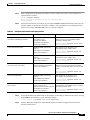
Use the half-duplex controlled-carrier command to configure an EIA/TIA-232 interface for
controlled-carrier mode. Use the no half-duplex controlled-carrier command to return the interface to
constant-carrier mode.
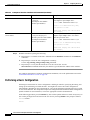
Follow these steps to configure controlled-carrier mode on an EIA/TIA-232 interface:
Step 1
Enter configuration mode and specify that the console terminal is the source of the configuration
subcommands, as follows:
Router# configure terminal
Enter configuration commands, one per line. End with CNTL/Z.
Router(config)#
PA-T3+ Serial Port Adapter Installation and Configuration
OL-3505-03
4-13