1
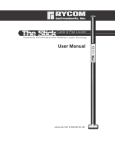
STAFF Receiver Controls and Indicators
SIGNAL STRENGTH
Displays absolute signal
strength from 0 to 99.
DIRECTIONAL ARROW
Indicates direction
of fault.
LOW BATTERY INDICATOR
ON/OFF BUTTON
REFERENCE
Stores and displays
starting signal
strength when
pressed
ON/OFF Button
Turns the unit on and off.
REFERENCE Button
When pressed it stores the signal strength and sets the reference mode. The tone
will beep more rapidly as the STAFF detects a similar signal strength. Pressing the
reference button again (after a reference has been taken) will display the original
reference reading for 2 seconds. Turn the unit off and on to clear the reference.
DIRECTIONAL ARROW
After proper synchronization the arrows will direct the user to the fault. If the signal
strength drops completely off in the area between the ground rod and the fault,
the arrows will not properly display direction until the unit comes within range of
the fault or ground rod.
SIGNAL STRENGTH
The Signal Strength is displayed in a value from 0 to 100. The closer to the ground
rod and/or the fault will result in the highest reading. The signal strength may drop
completely off in the area between the ground rod and the fault.
LOW BATTERY
The STAFF Locator will indicate low battery condition by displaying the Low Battery
icon on the LCD screen.
800.851.7347
www.rycominstruments.com
3