1
Indicators:
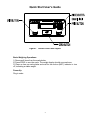
The Doran 7000XL has a main display and eleven indicator lights. These
indicators provide the operator with information about the scale and the current
weighing operation. The main display is used to provide the operator with the
current weight. The units indicators, located on the right of the main display,
show the current measurement units.
? The Motion (MOT) located on the left side of the display, informs the operator
when the scale is in Motion.
? The Center of Zero (ZERO) indicators, located on the left side of the display,
informs the operator when the scale is at Zero.
? The negative (NEG) indicator informs the operator whether the weight display
is showing a negative weight.
ZERO:
The ZERO push button is used to zero the scale prior to making a reading. The
zero button can function over the full range of the scale. To zero the scale, wait
until the scale is stable and press the ZERO button. The scale will zero
immediately. The 7000XL will not zero if the scale is in motion. The 7000XL is
equipped with an optional Zero on Demand feature which holds zero requests
until motion stops. This option may be activated during the scale setup
procedure. Refer to your dealer or Instruction manual for details.
UNITS :
The UNITS button permits the operator to change the scale units by pressing a
button. After pressing UNITS, the units indicator will immediately display the
current weighing unit. The UNITS button has several configuration parameters
which can disable the UNITS button or limit the display units available. Refer to
your dealer or Instruction manual for details.
PRINT:
The PRINT button permits the operator to print the current weight by pressing a
button. Like the ZERO button, the user must wait for motion to stop before
pressing the PRINT button. The current weight will then be transmitted to the
printer. When the data is transmitted, the left most display digit will momentarily
display a "r" to confirm data transmission. The 7000XL has a "Print on Demand"
feature which stores a PRINT request until the scale is stable. Once stable, the
scale transmits the current weight to the printer. The 7000XL also has several
automatic print options which may be used to simplify printer operation. Refer to
your dealer or Instruction manual for details.
5