1
Avira Rescue System Desktop
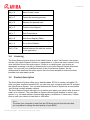
-q
--quiet
-i
-The interactive mode asks the
interactive user what to do with renamed
files.
-b
--batch
Displays in silent mode a
minimum of the command.
Faster than the verbose mode.
The non-interactive batch mode
restores all renamed files without
confirmation of the user.
3.8 Hibernated systems
The Avira Rescue System detects if your system is in hibernation mode. If hibernation
mode is activated, the Avira Rescue System takes precautions, to avoid any damage to
your system and will mount any partition in read-only mode. You may trigger a scan on
partitions, but detected threats will not be removed and the system will not be repaired.
Moreover, you can not use the Avira Registry Editor as long as your system is in
hibernation mode. The Avira Rescue System can exit the hibernation mode first and then
starts the scan.
Warning
Exiting the hibernation mode may lead to loss of data.
Note
The Avira Rescue System detects the hibernation mode only, if it is a NTFS
drive. For FAT drives, the hibernation mode will not be detected.
3.9 Exiting the hibernation mode
The Avira Rescue System detects if your system is in hibernation mode. When your
system is in hibernation mode you receive an appropriate message that the Avira Rescue
System will mount all partitions in read-only mode. You have the following options to exit
the hibernation:
Click Reboot to force Windows to restart your system.
Then exit the hibernation mode manually in Windows.
- OR Avira Rescue System - User Manual (Status: 25 Jun. 2013)
17