1
STING
B
G
A
V
D/O
D/O
STING (ROOM 1)
Door panel 1
Door 1
PWR1
GND
AD1
VD1
KEY1
PWR2
GND
AD2
VD2
KEY2
12V
Door 2
DATA
AD
VD
GND
CCTV1
GND
CCTV2
GND
B) Installation height
Recommended installation height is approximately 140cm for monitor unit and 150cm
for outdoor camera.
Camera
1&2
A) Cable connection
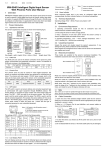
1. Connect the monitor to the camera according to the wiring diagram.
2. Carefully insert the wires to the terminal, taking care that the 2 bare wires do not touch.
Add.
monitor
Installation instructions
B
G
A
V
D/O
D/O
C) Installation of the monitor
1. Fix the wall mounting bracket in the best place by using screws and plugs.
2. Carefully place the indoor monitor against the bracket and gently push down the
monitor so that the pins on the bracket engage in the slots on the rear of the monitor.
DATA
AD
VD
GND
DATA
AD
VD
GND
Add.
monitor
STING
(ROOM 2)
Lock 2
G
V
B
G
V
B
DATA
AD
VD
GND
Attention!
Don't connect powerful devices (such as CCD cameras with infrared backlight) directly
to the power supply of door camera. It can cause damage to the monitor with no
warranty providing. You should use external power supply for such powerful devices.
Maximum current for door panel power is 350mA.
12V
Add.
monitor
ATTENTION!
Depending on monitor position in the system (If more then one monitor is used), right
intercom address should be set for every monitor. Main monitor (all cameras and door
panels are conected to the main monitor) intrcom address should be set ROOM1.
Additional monitors ROOM2, ROOM3 and ROOM4 intercom adresses should be used.
If there is only one monitor in the system, then intrcom address should be set ROOM1.
Door panel 2
Add.
monitor
Cable recommendations:
If cable length between monitor and door panel not more than 30m then you can use
4-wire or 6-wire cable with 0,75 sq.mm. area of one wire. If this length exceeds 30m then
you should use coaxial cable for video (for example RG69), all other connections 4-wire or
6-wire cable can be used.
Lock 1
STING
(ROOM 3)
STING
(ROOM 4)
- +
12V
220V
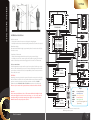
Keys:
- Ground (black wire)
GND
- Audio (blue wire)
AD
VD,CCTV - Video (yellow wire)
- Power (red wire)
PWR
- Data (green wire)
DATA
- Open lock active signal +12V
KEY
(brown wire)
Two door panels, two locks and two CCTV cameras connection to the
GRD Sting monitors system
3
User’s manual
4