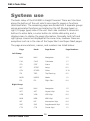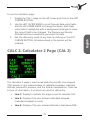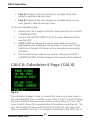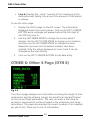
1
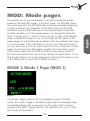
The primary use of the mode pages is to switch navigation modes between LEG and OBS modes. In the LEG mode, the KLN 90B tracks the course laid out in the GPS flight plan, including automatic sequencing of wpts and Direct-To navigation. In the OBS mode, the KLN 90B interfaces with the EFIS and tracks the navigation type chosen with the EFIS. Another use of the mode pages is to change the CDI scale factor. Choices are 5, 1, and 0.2 nm to the left or right of the desired track, the default setting is 5 nm. This includes all CDI scales on the panel gauges. If a CDI scale has 5 markers, then the default scale value is 1 nm per mark. If the scale factor is set to 1 nm, then each mark is 0.2 nm, and if set to 0.2 nm, each mark is 0.04 nm. There are 2 mode pages, the LEG and the OBS pages, and the CDI scale factor can be set on either page. Both the LEG and OBS modes have a Direct-To function which allows the user to track directly to a destination. In the LEG mode tracking is to a wpt (discussed in the Direct-To section), and in the OBS mode it is to a station (MOD 2 section). MODE 1: Mode 1 Page (MOD 1) Fig 6.1 The mode 1 page is used to set the navigation type to the LEG mode. The mode 1 page is the default page, and the navigation type is a utomatically the LEG mode when on this page. Fig6.1 shows a sample of the MOD 1 page with the CDI scale set to +/- 5 nm. There are 3 Lines of information. 103 English MOD: Mode pages