1
Fingerprint Time Attendance Terminal Manual
Chapter One: Handling Instructions
1.1 - Operation Environment
Dear Customers, First of all thank you for purchasing our product, the Fingerprint Time
Attendance Machine! For the optimal use and maintenance of the product, please
read the manual carefully before using it.
1.
Do not please leave the machine under the strong sunshine.
It evidently
effects the collection of fingerprints and lead to failure of fingerprint
recognition.
2.
The temperature span of the fingerprint’s working is 0°C - 45°C.
1.2 - A brief introduction for the System
The fingerprint time attendance system consists of two parts: the fingerprint time
attendance terminal and fingerprint time attendance management software.
The terminal is mainly responsible for the registration of the employees’ fingerprint and
daily check on work attendance. And the software is mainly to read the work
attendance record of the terminal, to process the statistics by following the attendance
rules set by the administrator, and to generate various kinds of statistics report forms.
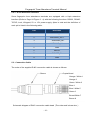
There are four modes for the communication of the terminal and the software: RS232,
RS485, TCP/IP and U disk. RS232 and RS485 are the standard communication
modes of the terminal.
1.3 - Press Method
When installation of the terminal is completed, the fingerprints will be registered first
and then followed by the validating operation. The fingers recommended for
registration are the forefinger and middle finger.
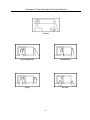
Correct press method: Press with your finger right on the fingerprint gathering window,
with the fingerprint’s centre aligning to the centre of the gathering window as much as
possible. Finger press method is shown as the following:
-3-