1
SELCO A/S
M2000C / HyperTerminal Manual
4.5 Prealam Settings
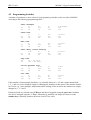
The M2000C can be set-up to “Circuit check” or configured to “Prealarms”
When input terminal 16 is set to minus “Circuit check” is activated. This normally demands a
resistor 3.3 KΩ to be installed directly across the monitoring contacts connected to terminals 4, 5, 6,
7, 13, 14, and 15. A small current will now run in the circuit, and if circuit check is active and this
small current is disconnected, it will be indicated on the appropriate channel with slow flashing
together with an alarm signal.
This circuit check can also be used for prealarms, with the same name as the equivalent label on the
front, by installing a normally closed alarm contact in series with the resistor.
See further description in the data sheet M2095.
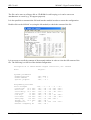
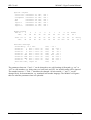
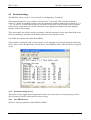
If the number of terminals with “Circuit check” is to be changed it can be done using the following
menu. Also it can be decided if the “Circuit check” also should be active when the motor is stopped
or not.
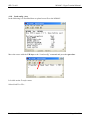
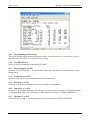
4.5.1 Prealarm settings (Next)
This can be used to toggle between parameter modes: System parameters, Programming switches,
Special outputs, RS 485 request and Prealarm settings.
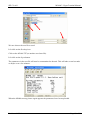
4.5.2 Save PROM (Act)
Will save entered parameters in the PROM of 2000C.
Revision: 060504
Page 19 of 20