1
CHAPTER 1 - SYSTEM OVERVIEW
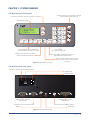
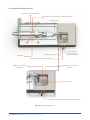
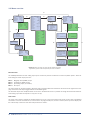
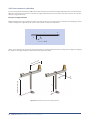
1.1 Myo-Interface front panel
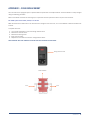
Analog recorder output - Connection to external
data acquisition system (optional)
Up and down arrow keys - Scroll up and down in the menus.
Myo-Interface display
MYO INTERFACE
MYO
INTERFACE
MODEL
310A
MODEL
310A
VERSION 3.25
VERSION
3.30
F1
F2
F3
F4
Info
Esc
Enter
F-keys - Have different but specific functions dependent of the active main menu
1
2
3
Rec. 1
4
5
6
Rec. 2
7
8
9
Rec. 3
-
0
.
Rec. 4
Numeric keys Enter data or setting values
INFO key - Push this key in any menu to
display all specific F-key functions
Enter key - Confirm entered numeric values or
change between available choices
Esc key - Delete incorrectly entered numeric
values. In some submenus used to return to
main menu
Figure 1.1 Myo-Interface front panel
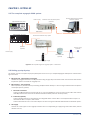
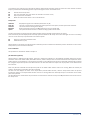
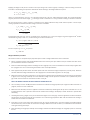
1.2 Myo-Interface rear panel
115-230 V / 50-60 Hz automatic voltage selector
ON/OFF switch
Power connector
O
I
USB
REGULATOR
RS232
ON
1 2
12V DC
pH
MYOGRAPH
Connection port for 310A
Myograph unit
Regulator port for electronic
valve (optional)
RS 232 port for serial connection to PC
Connection port for pH-Meter (optional)
12V DC port
USB port
Figure 1.2 Myo-Interface rear panel
CHAPTER 1 11